


ServerPlayerList
Display currently online player number, list and distance.Server Player List
See who’s online and how far they are from you!
Ever wondered how many players are currently online on your server, or how far your friends are from you?
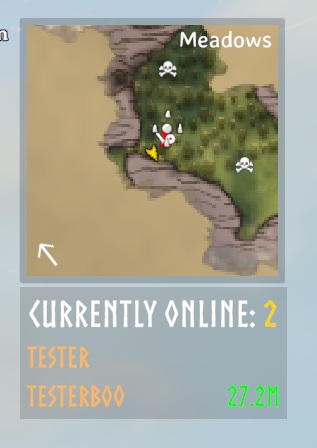
With Server Player List, you get a small, unobtrusive panel showing the total number of online players — and, if they’re sharing their location, their names and distances too.
🧭 Features
- Displays number of online players in a small HUD panel.
- Shows player names and distances (only for players who share their location).
- Toggle between compact and expanded view using Right Control + O.
- Compact view: only shows the online player count.
- Expanded view: shows names and distances.
- The panel is draggable — click and drag to reposition it (easiest with the mouse cursor visible, e.g. in the ESC menu).
- The basic player list is client-side and does not require server installation. Optional RCON filtering requires server installation.
📸 Screenshot
⚙️ Manual Installation Instructions
You must have BepInEx installed.
- Locate your Valheim game folder.
- Extract the contents of the archive into the
BepInEx\pluginsfolder. - Launch the game and look for the Server Player List panel.
- Adjust settings in
BepInEx\config\JoksterCube.ServerPlayerList.cfgif needed.
🧩 Compatibility
- The basic player list works on any server, even if others do not have the mod installed.
- Optional RCON filtering requires ServerPlayerList on the server and matching versions on connecting clients. ValheimRcon is only needed on the server.
RCON Player Filtering
This feature supports ValheimRcon by Tristan-dvr (org.tristan.rcon).
On the server, enable Ignore RCON user = On in the [1 - General] section of ServerPlayerList's configuration. This setting is server-synced and defaults to Off.
When enabled, ServerPlayerList checks for the loaded org.tristan.rcon plugin and reads its active [3. Chat] / Server name configuration entry. Only this name is sent to clients, not the RCON password or other settings. At most one matching entry that would show N/A distance is excluded from both the list and online count. Changes take effect once ValheimRcon reloads its configuration; restart the server if necessary.
Matching is exact and case-sensitive. The first matching entry with a private position is hidden, excluding the local player. Players with visible distances and all other matching entries remain. A real player with the same name and a private position may be hidden instead of the RCON entry. If ValheimRcon is absent, the configured name is empty, or the toggle is off, no entries are excluded.
Ignore List
Set Ignored users in the [1 - General] configuration section to a comma-separated list, for example Ignored users = Server, Server, AnotherPlayer. This option is server-synced when ServerPlayerList is installed on the server; otherwise, your local setting is used. It works without a server installation or RCON plugin and is empty by default. To manage the list centrally, install matching ServerPlayerList versions on the server and connecting clients, then configure the server's list.
Each occurrence of a name hides at most one matching player from both the list and online count. Repeating Server twice hides up to two players named Server; listing it once hides only one. Entries displaying N/A are removed first, then other matches. Your own entry can also be hidden if its name matches and no N/A match remains.
Names are matched exactly and case-sensitively. Spaces around list entries and empty entries are ignored. Manual exclusions apply after RCON filtering, so using both options can hide additional matching players.
💬 Feedback & Support
Report issues or suggest improvements via the mod’s Thunderstore page or GitHub repository.
Author: JoksterCube
Version: 1.0.3
License: MIT