

You are viewing a potentially older version of this package. View Latest Version

ServerPlayerList
Display currently online player number, list and distance.Server Player List
See who’s online and how far they are from you!
Ever wondered how many players are currently online on your server, or how far your friends are from you?
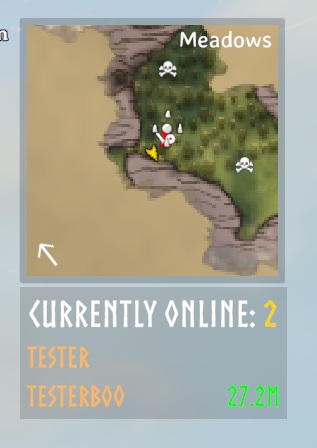
With Server Player List, you get a small, unobtrusive panel showing the total number of online players — and, if they’re sharing their location, their names and distances too.
🧭 Features
- Displays number of online players in a small HUD panel.
- Shows player names and distances (only for players who share their location).
- Toggle between compact and expanded view using Right Control + O.
- Compact view: only shows the online player count.
- Expanded view: shows names and distances.
- The panel is draggable — click and drag to reposition it (easiest with the mouse cursor visible, e.g. in the ESC menu).
- The basic player list is client-side and does not require server installation. Optional RCON filtering requires server installation.
📸 Screenshot
⚙️ Manual Installation Instructions
You must have BepInEx installed.
- Locate your Valheim game folder.
- Extract the contents of the archive into the
BepInEx\pluginsfolder. - Launch the game and look for the Server Player List panel.
- Adjust settings in
BepInEx\config\JoksterCube.ServerPlayerList.cfgif needed.
🧩 Compatibility
- The basic player list works on any server, even if others do not have the mod installed.
- Optional RCON filtering requires ServerPlayerList on the server and matching versions on connecting clients. ValheimRcon is only needed on the server.
RCON Player Filtering
This feature supports ValheimRcon by Tristan-dvr (org.tristan.rcon).
- Setup: On the server, enable
Ignore RCON userunder[1 - General]. Requires ValheimRcon on the server and matching ServerPlayerList versions on clients. - Effect: Hides one exact match for ValheimRcon's
[3. Chat]/Server namewhen that player's position is private (N/A). Only the name is synced; RCON credentials stay on the server. - Note: A same-name player with a private position may be hidden. Reload ValheimRcon after changing its server name.
Ignore List
- Setup: Enter comma-separated names under
[1 - General]→Ignored users(for example,Server, AnotherPlayer). Empty by default; uses the server's setting when the mod is installed there, otherwise your local setting. - Matching: Exact and case-sensitive; surrounding spaces are ignored. Each name occurrence hides one player from the list and count, preferring
N/Aentries. Applied after RCON filtering; can also hide your own entry.
💬 Feedback & Support
Report issues or suggest improvements via the mod’s Thunderstore page or GitHub repository.
Author: JoksterCube
Version: 1.1.1
License: MIT