


SuperVikingKart
SuperVikingKart adds mountable karts, collectible effect blocks, and a full race management system. Gather a friend, build a kart, and see who pulls the fastest lap around your custom-built track. Enable PvP and fire hazards for even more fun :)SuperVikingKart
SuperVikingKart is a Valheim multiplayer mod that adds mountable karts, collectible effect blocks, and a full race management system. Gather a friend, build a kart, and see who pulls the fastest lap around your custom-built track. Enable PvP and fire hazards for even more fun :)
Installation
It is recommended to use a mod manager to install SuperVikingKart and all of its dependencies.
For a manual install, load the following required mods according to their respective instructions:
Then extract the SuperVikingKart archive into <Valheim>\BepInEx\plugins\SuperVikingKart.
Karts
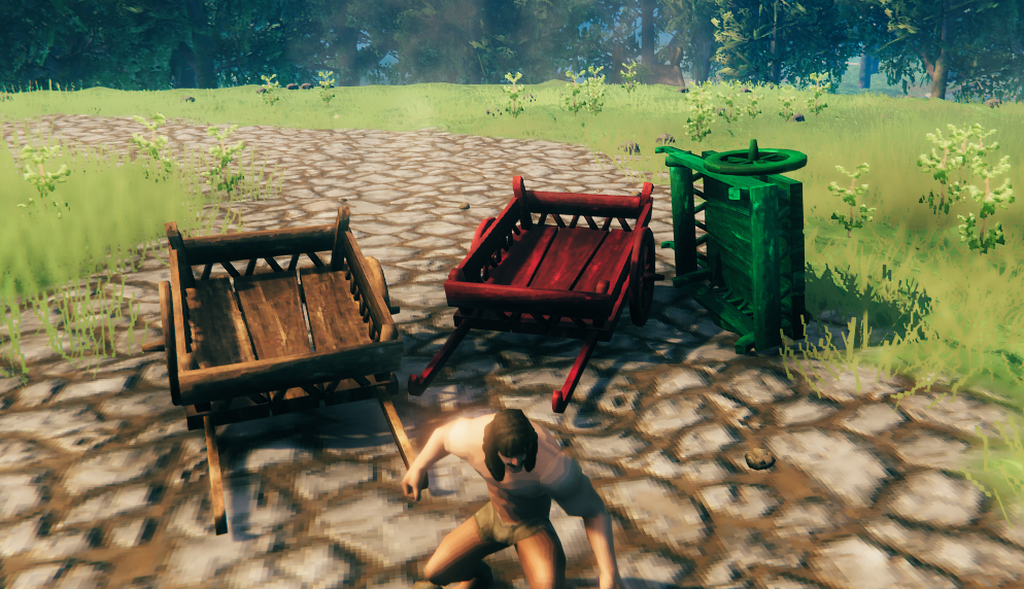
Adds a buildable Super Viking Kart piece to the Hammer under the Misc category.
One player mounts the kart by interacting with it. Another player pulls it by attaching as they would a regular cart. The rider can dismount at any time by interacting again or by jumping.
The rider cannot damage their own kart with melee attacks. The kart's colliders are also temporarily disabled during swings so the rider can still hit targets through it. Hit your fellow contestants and karts while they are near!
To change the color of Super Viking Kart use Alt-interact while aiming at the mount point of the cart to open a color picker. Drag the sliders for a live preview - the chosen color is broadcast to all clients and saved to the world.
Destroyed karts respawn after a configurable delay (default: 10 seconds) with a floating countdown at the destruction site. Karts removed with the Hammer do not respawn.
Buff Blocks
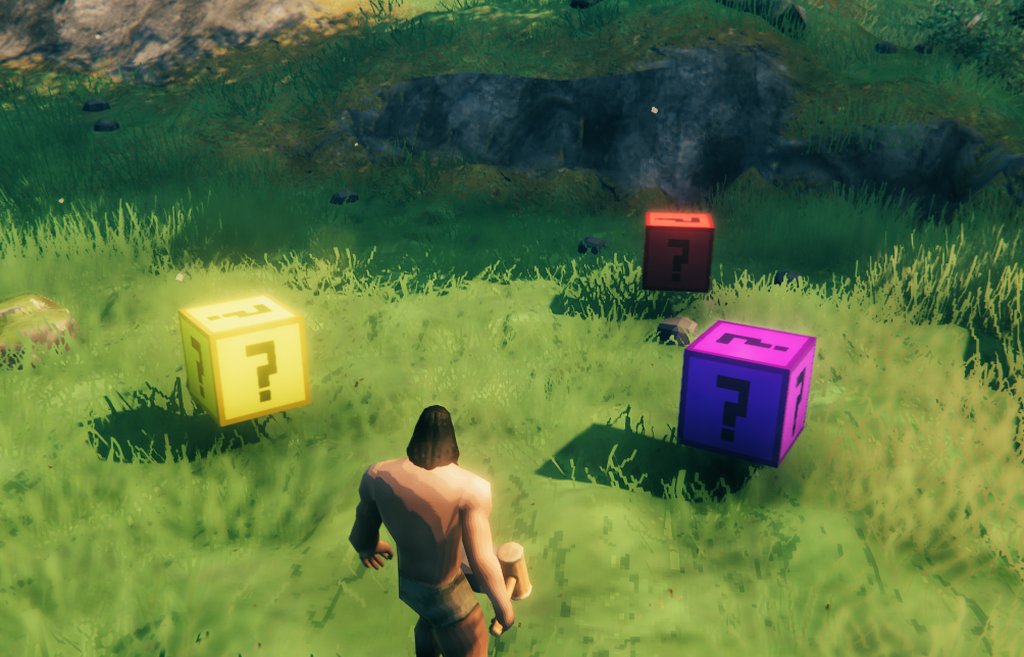
Three types of collectible blocks that apply effects when a kart drives through them. The block hides itself and reappears after a configurable delay (default: 10 seconds).
- Buff Block - Applies a random beneficial effect.
- Debuff Block - Applies a random negative effect.
- Mystery Block - Applies a random effect of either type.
Puller Buffs
| Effect | Description |
|---|---|
| Speed Boost | Significantly increases movement speed for a short duration. |
| Stamina Regen | Regenerates stamina over time for 10 seconds. |
| Stamina Burst | Instantly refills the puller's stamina bar. |
Rider Buffs
| Effect | Description |
|---|---|
| Ooze Bombs | Adds 5 ooze bombs that inflict poison to inventory. |
| Bile Bombs | Adds 2 bile bombs that inflict burning to inventory. |
| Smoke Bombs | Adds 5 smoke bombs that inflict blind to inventory. |
| Fire Arrows | Adds 20 fire arrows to inventory (and a Fine Wood Bow if not already carried). |
| Harpoon | Adds a Harpoon to inventory. Will not add a second if one is already carried. |
| Berserk | Massively increases damage output for 30 seconds. |
Shared Buffs
| Effect | Description |
|---|---|
| Shield | Grants resistance to blunt, slash, and pierce damage for 30 seconds. |
| Health Regen | Regenerates health over time for 10 seconds. |
| Health Burst | Instantly fully heals the rider. |
| Living Dead | Prevents death once for both players. A fatal blow is cancelled and the player is left at 1 HP. Expires after use or after 20 seconds. |
Puller Debuffs
| Effect | Description |
|---|---|
| Frost | Reduces movement speed by 50% for 8 seconds. |
| Tarred | Reduces movement speed by 70% for 8 seconds. |
| Bouncy | Applies an upward force to the kart, launching it into the air. |
Rider Debuffs
| Effect | Description |
|---|---|
| Poison | Deals a small amount of poison damage every second for 10 seconds. |
| Burning | Deals moderate fire damage every second for 3 seconds. |
| Stagger | Immediately staggers the rider. |
| Disarm | Drops the rider's currently equipped weapons on the ground. |
Shared Debuffs
| Effect | Description |
|---|---|
| Weak | Reduces health and stamina regen for 30 seconds |
| Shock | Deals lightning damage every second and reduces movement speed by 30% for 5 seconds. Applies to both players. |
| Blind | Covers the screen with a dark overlay for 5 seconds. Applies to both players. |
Race System
Race Board
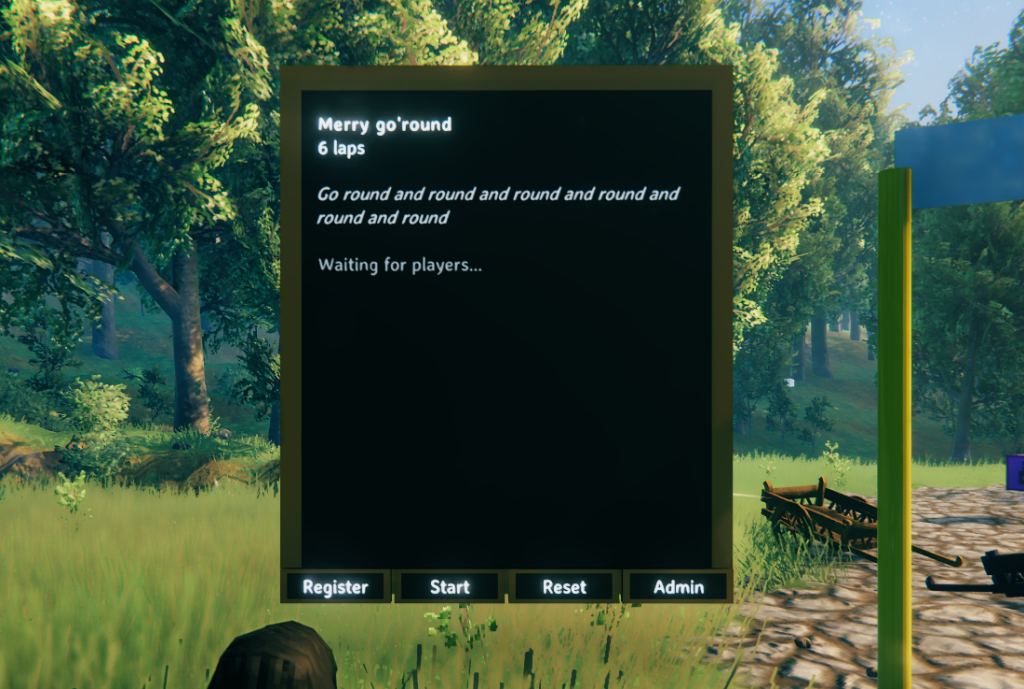
Build a Race Board from the Hammer under the Misc category to configure and manage a race. The board displays live race status including registered players, lap progress, finish times, and final results.
Interact with the Admin button to open the configuration panel and set the Race ID, display name, lap count, and description. You can also toggle Hide Buttons to remove the button row from the board - useful for display-only boards showing live stats at spectator spots. Just remember to configure the board completely before since the admin button will be gone too. The Hide Desc. toggle lets you hide the description from the board - also useful for display-only boards showing only the race name, laps and live statistics. The Hide Status toggle lets you hide the status info on the board - race status, player information, etc. This is useful for boards that should act as description only boards for example. You can have multiple boards with the same Race ID which will connect them all to the same race.
Any player can use the Register button to sign up or leave. Any player can press Start once at least one contestant is registered, or Reset to return the race to idle.
Race Line
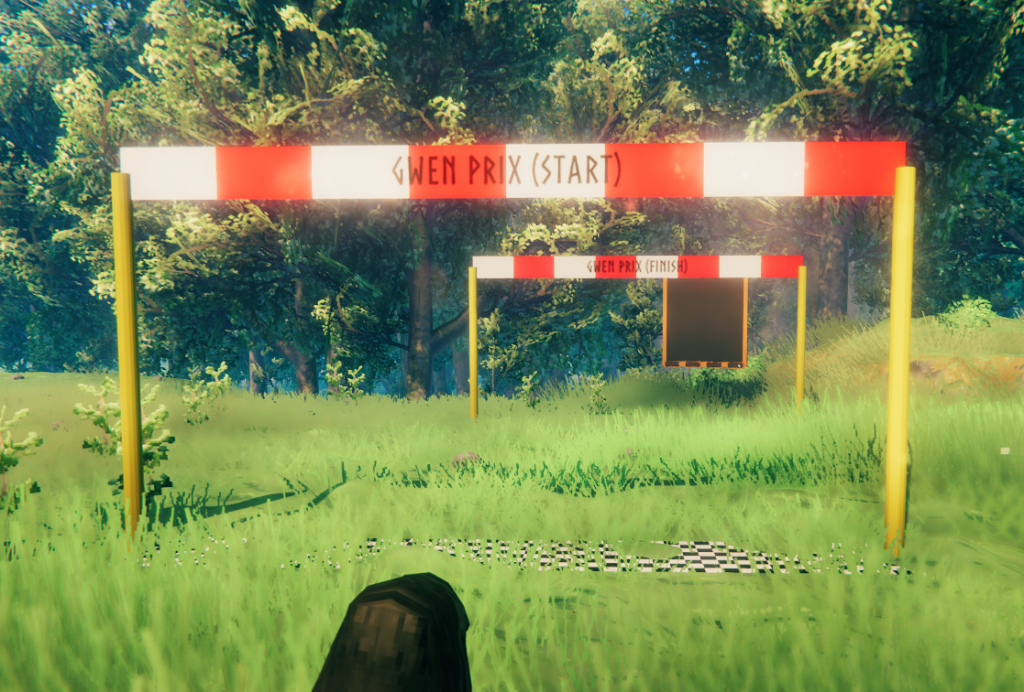
Build a Race Line from the Hammer under the Misc category to place start, finish, combined start/finish, or checkpoint lines. An arrow on the ground indicates the valid crossing direction - the line only registers crossings made in that direction.
Admins can interact with the Race Line to set its Race ID and role: Start, Finish, StartFinish, or Checkpoint.
When a kart crosses a Start or StartFinish line for the first time, the kart is registered as started. Subsequent crossings of the Finish or StartFinish line record a lap. A 3-second cooldown per player prevents the same crossing from counting twice.
Checkpoint lines must be crossed in order each lap. If a contestant crosses a checkpoint out of sequence, they receive a warning and the crossing is not counted. Checkpoint progress resets at the start of each new lap.
Races
When a race starts, a 3-second countdown is broadcast to all registered contestants as a centre-screen message, followed by "GO!". Lap progress and finish times are tracked on the Race Board in real time. Finishing positions use dense ranking - players with the same finish time share a position so a puller/rider group is always recorded together.
Players who disconnect mid-race are automatically assigned a DNF. Players who leave voluntarily during a race are also assigned a DNF. Full results are shown to all remaining contestants once everyone has finished or received a DNF.
Building a Race Track
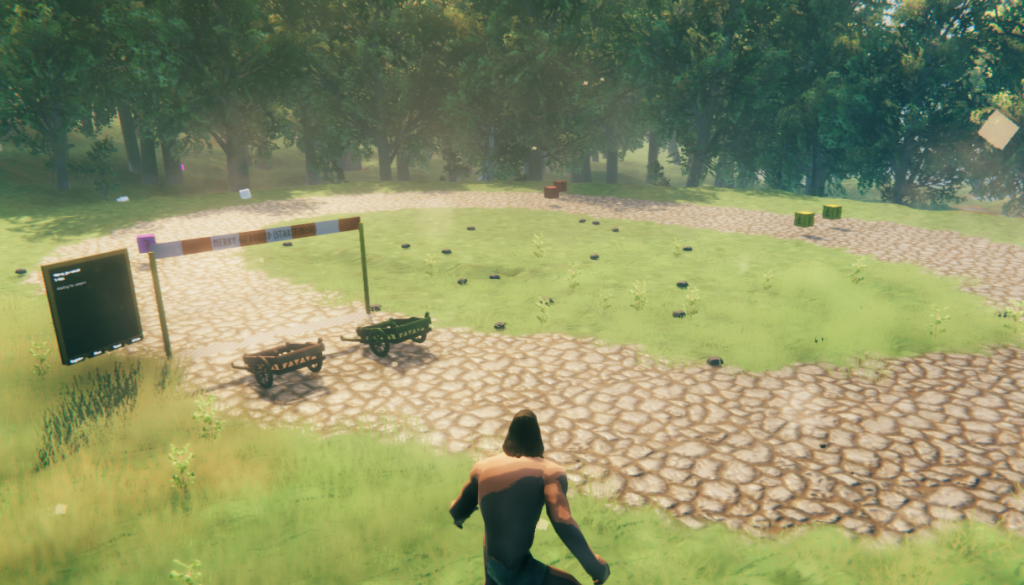
All race pieces are linked by a shared Race ID - a short text string you choose. Every piece with the same Race ID is part of the same race.
1. Choose a Race ID
Pick a short, unique identifier. For this example: meadows_gp.
2. Place and configure the Race Board
Build a Race Board somewhere visible, such as near the start line. Open the Admin panel and set:
- Race ID:
meadows_gp - Name:
Meadows Grand Prix - Laps:
1 - Description:
Optional short description shown on the board
The board will show "Waiting for players..." until someone registers.
You can place multiple boards using the same ID to display the stats and results.
3. Place the Start/Finish line
Build a Race Line and place it across the track. Make sure the arrow points in the direction of travel. Set:
- Race ID:
meadows_gp - Role:
StartFinish
The first crossing records the start. Every subsequent crossing records a completed lap. For a one-lap race the second crossing finishes the race for that contestant.
4. Splitting start and finish (optional)
For tracks with separate start and finish points, place two Race Lines with the same Race ID:
- Beginning of track: Role
Start - End of track: Role
Finish
The kart must cross the Start line before any Finish crossings are counted.
5. Adding checkpoints (optional)
Place one or more Race Lines with Role Checkpoint along the track. Each checkpoint must be assigned a unique Checkpoint # in the admin panel, starting at 1 and incrementing for each subsequent checkpoint.
Checkpoints must be crossed in order - crossing checkpoint 2 without having crossed checkpoint 1 first will show a warning and not count. Checkpoint progress resets at the start of each new lap.
6. Multi-lap races
Set the Laps field on the Race Board to the number of finish line crossings required. The board shows each contestant's current lap and updates in real time.
7. Register and start
Players interact with the Register button to sign up, then any player presses Start when everyone is ready.
8. Verify your setup
If something isn't working, these commands can help:
svk_race list- confirm the race exists and is in the Idle statesvk_race_admin state meadows_gp- show full race state including all contestantssvk_race_admin forcestart meadows_gp- start the race immediately without the countdownsvk_race_admin lap meadows_gp- simulate a lap crossing to verify finish line logicsvk_race_admin forcereset meadows_gp- reset the race back to Idle at any time
PS
All the building pieces can be scaled before being placed and will retain their scaling (ZNetView.m_syncInitialScale = true).
Console Commands
Player Commands
| Command | Description |
|---|---|
svk_race list |
List all active races and their states. |
svk_race register <raceId> |
Register the local player for a race. |
svk_race leave <raceId> |
Leave a race. Counts as a DNF if already underway. |
svk_race start <raceId> |
Start the countdown for a race. |
svk_race reset <raceId> |
Reset a race back to idle. |
svk_race results <raceId> |
Print the current results for a race. |
Admin Commands
All admin commands require devcommands.
| Command | Description |
|---|---|
svk_buff list |
Print all available effects with their targets and types. |
svk_buff <name> |
Force-apply a specific buff or debuff to the local player. |
svk_race_admin create <raceId> [laps] [name] |
Create a new race. |
svk_race_admin remove <raceId> |
Remove a race entirely. |
svk_race_admin addplayer <raceId> <playerName> |
Add a connected player to a race by name. |
svk_race_admin setname <raceId> <name> |
Rename a race. |
svk_race_admin setlaps <raceId> <count> |
Set the lap count for a race. |
svk_race_admin setdescription <raceId> <description> |
Set the description for a race. |
svk_race_admin forcestart <raceId> |
Start a race immediately regardless of state. |
svk_race_admin forcereset <raceId> |
Reset a race regardless of state. |
svk_race_admin lap <raceId> [playerName] |
Simulate a lap completion for a player. |
svk_race_admin finish <raceId> [playerName] |
Simulate finishing all remaining laps for a player. |
svk_race_admin state <raceId> |
Print the detailed state of a race including all contestants. |
Configuration
Configuration is found in <Valheim>\BepInEx\configs\de.sirskunkalot.SuperVikingKart.cfg after starting the game once with the mod installed.
| Key | Description | Range | Default |
|---|---|---|---|
| KartRespawnTime | Time in seconds before a destroyed kart respawns. Server synced. | 2-20 | 10 |
| BuffBlockRespawnTime | Time in seconds before a collected buff block reappears. Server synced. | 2-20 | 10 |
| Debug | Enable verbose debug logging. | - | false |
Changelog
v0.0.5
- Compatible with Valheim 1.0.7
v0.0.4
- Buffs for Rider are only applied when there is an actual rider on the kart
v0.0.3
- Fixed position assignment and race finishing logic on servers
v0.0.2
- Added option to hide the status from a board
- Fixed board text display size
v0.0.1
- Initial release
Credits
Mod created by Jules.
Made with Löve and Jötunn.
Source available on GitHub: https://github.com/sirskunkalot/SuperVikingKart. All contributions welcome!