

RamCraftFilterModLabels
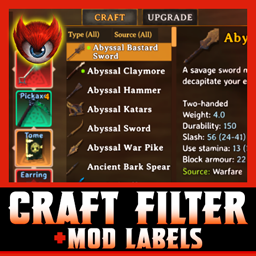
Controller-friendly crafting filters by item type and source mod, item origin labels, and persistent green markers for newly unlocked recipes.Craft Filter + Mod Labels
RamCraftFilterModLabels by JustinRampage adds compact crafting filters and item-source labels to Valheim's existing crafting window. Find what you want without scrolling through hundreds of recipes.
Features
- Filter by item type. Categories include armor pieces, Back, Backpacks, Shields, Archery, Weapons, Tools, Ammo, Baits, Foods, Meads, Potions, Materials, Trinkets, Jewelry, Gems, Keys, Casts, Saddles, and more. Only relevant categories appear for the available recipes at a station.
- Filter by source mod. Use the Source dropdown to see items from Valheim or a specific installed content mod. Combine Type and Source filters.
- Know where items came from. The item description and inventory tooltip show a Source: label (such as Valheim, Warfare, or Wizardry) when the source can be identified.
- Spot genuinely new recipes. A bold neon-green
*marks newly learned recipes, and unread recipes rise to the top of the crafting list. The marker is dismissed after moving off a selected recipe, so controller navigation doesn't abruptly jump. Unread markers are saved separately for each character and persist across logouts. - Controller-friendly. Navigate up from the recipe list to the filters; use left/right to switch, A to choose, and B to go back. Filters work with mouse controls too.
- Minimal interface. Two small dropdowns above the normal recipe list, using Valheim's existing fonts and styling. Filters reset when closing a station.
The mod does not add or unlock recipes, bypass crafting requirements, or modify your character progression. The vanilla Craft, Upgrade, and Reclaim controls remain available. Crafting without a nearby workstation is preserved.
Requirements
- Valheim 1.0.20 (version tested)
- BepInExPack Valheim 5.4.2351 (version tested)
- Jötunn 2.30.2 (version tested)
This mod is client-side only. Install it on each player computer that wants the filters; do not install it on your dedicated server.
Installation
Gale / r2modman / Thunderstore Mod Manager
Install RamCraftFilterModLabels through your mod manager. Its declared dependencies will be installed automatically. Launch Valheim modded.
If you previously installed a local test build of RamCraftFilterModLabels, RamModOrigin, or ModOrigin, disable or remove that copy first. Older versions may share the internal BepInEx plugin ID justinrampage.modorigin, and two copies should not load together.
Manual
- Install BepInExPack Valheim and Jötunn.
- Place
RamCraftFilterModLabels.dllinside your active Valheim profile'sBepInEx/pluginsfolder (or a subfolder). - Launch modded Valheim.
Notes and compatibility
- Categories and source choices reflect recipes currently available at the station. A category will not appear if no matching recipes are available there.
- Direct cooking interactions that do not use the regular crafting menu are not modified.
- Mod-source identification uses Jötunn ModQuery; an item may show
Unknownwhen its origin cannot be resolved. - New-recipe tracking is saved locally in the BepInEx config folder and is specific to your character name.
- Avoid running another mod that rewrites the same crafting filter UI until you've tested compatibility (for example, CraftingCategories).
- Existing
PreviewNewMarkersconfig testing option defaults to off.
Credits
Inspired by CraftingCategories - Laplas.
Created by JustinRampage. Developed with AI assistance and tested in-game with modded Valheim.