

CreatureMarker
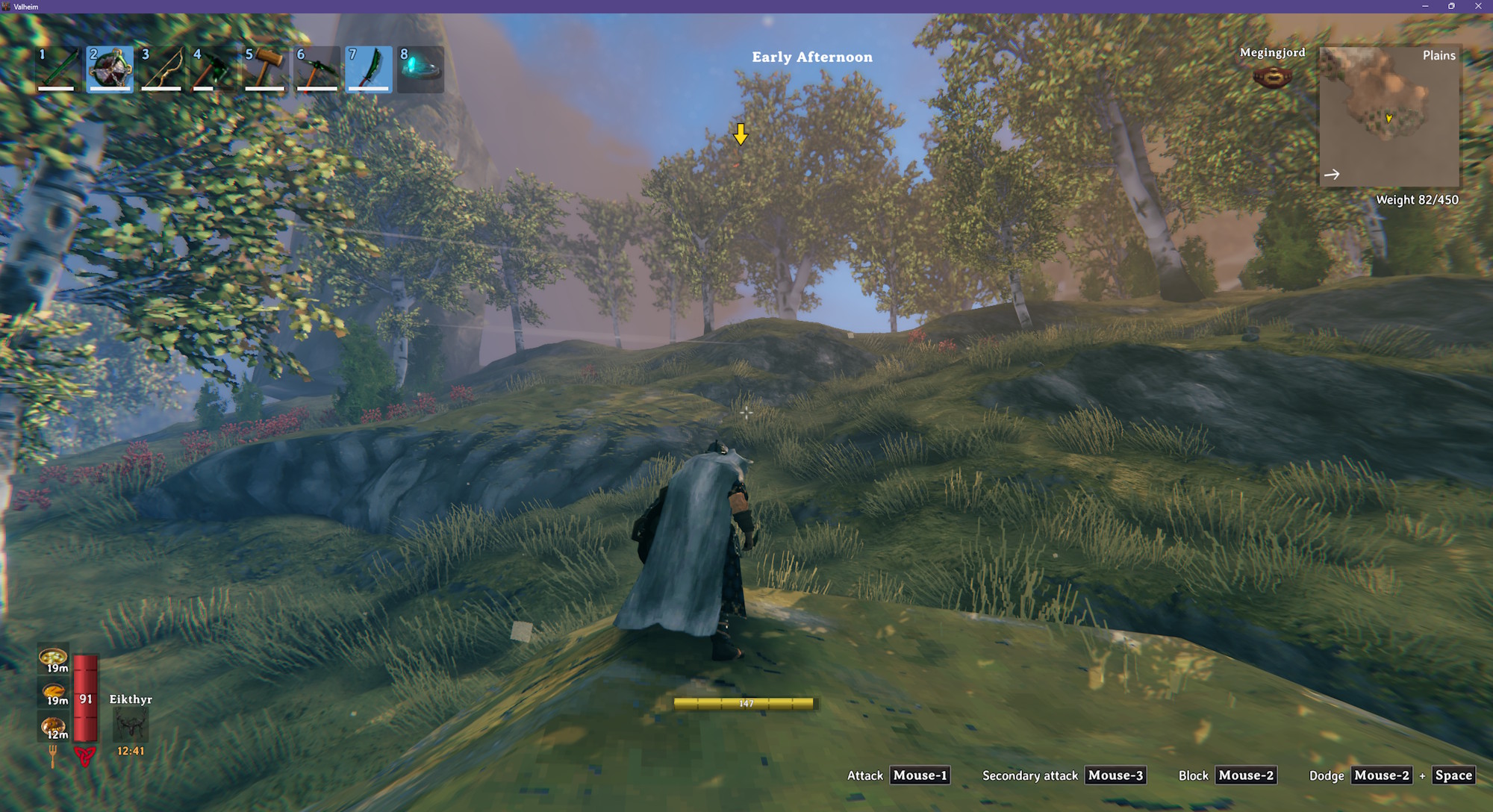
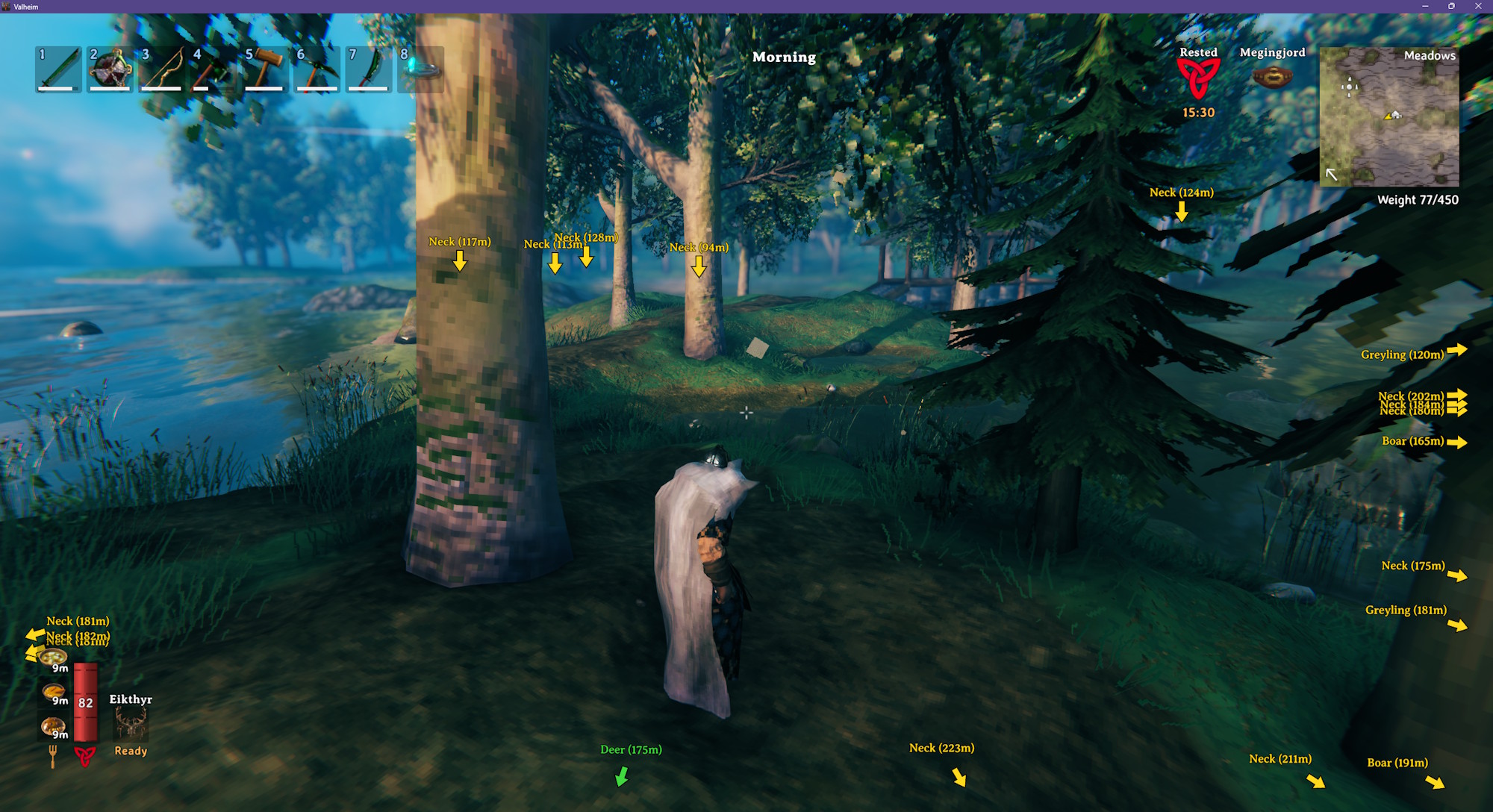
Puts a colored arrow above nearby creatures and fish, or at the edge of the screen when they're off-screen, with optional name, star level and distance, and a matching dot on the map.Puts a colored arrow above nearby creatures and fish. Creatures that are off-screen get an arrow pinned to the edge of the screen, pointing toward them.
- Separate colors for passive creatures, hostile creatures, bosses and fish
- Optional name, level and distance label on each marker
- A matching colored dot on the minimap and the large map for each marked creature
- Choose which creatures are marked - all of them, only hostile ones, or creature by creature
- Includes creatures added by other mods
Configuration
BepInEx\config\kriona.CreatureMarker.cfg is created when you first load a world with the mod, and changes take effect as soon as the file is saved. You do not need to restart Valheim or rejoin the world.
| Setting | Default | Description |
|---|---|---|
| Show On Screen | true | Shows an arrow above each marked creature, pinned to the screen edge when it is off-screen |
| Show On Map | true | Shows a dot on the minimap and the large map for each marked creature, except while you are in a dungeon |
| Max Distance | 50 | How far away, in meters, a creature can be and still get a marker (5 - 500) |
| Far Distance | 50 | How far away, in meters, a creature has to be for its marker to be drawn at Far Scale (5 - 500) |
| Far Scale | 0.66 | Size of the arrow and label of a creature beyond Far Distance (0.2 - 1). 1 keeps every marker full size |
| Bob Height | 6 | How far, in pixels, an on-screen arrow bobs up and down (0 - 30). 0 disables bobbing |
| Show Name | false | Shows the creature's name with its marker |
| Show Distance | false | Shows the creature's distance with its marker |
| Show Level | false | Shows a ⭐ for each of a creature's stars, and a fish's level like Perch[3], after the name. Creatures without stars and level 1 fish show nothing |
| Passive Color | #40D940 | Marker color for creatures that won't attack you |
| Hostile Color | #FFD91A | Marker color for creatures that will |
| Boss Color | #FF3333 | Marker color for bosses |
| Fish Color | #33CCFF | Marker color for fish |
| All Creatures | false | Marks every creature |
| All Hostile Creatures | true | Marks every creature that will attack you |
| All Fish | false | Marks every fish |
Every creature and fish also gets its own line, Prefab = inherit/true/false ## Name. inherit follows the All switches, while true or false always shows or hides that creature's or fish's marker.
Colors can be #RRGGBB or a color name like red, yellow, green, cyan or magenta.
Screenshots
An arrow appearing above a Deathsquito
Showing names and distances
Installation
With a mod manager such as r2modman or the Thunderstore Mod Manager, install Creature Marker - it installs BepInExPack for Valheim too.
By hand:
- Install BepInExPack for Valheim from Thunderstore or Nexus Mods
- Extract the zip into your Valheim folder, or copy
CreatureMarker.dllintoBepInEx\plugins
Client-side only - other players and the server don't need it.
Other Mods By Me
See all my mods on Thunderstore.
Source
The source code is on GitHub.