

TweakStats
Change the stats of any item, recipe, creature, build piece or status effect - weapon damage, attack stamina, armor, block power, food, durability, weight, stack sizes, crafting costs, creature health and drops, building health and more.Change the stats of any item, recipe, creature, build piece or status effect - weapon damage, attack stamina, armor, block power, food, durability, weight, stack sizes, crafting costs, creature health and drops, building health and more.
- Set a stat to a number, add to it or multiply it -
weight = 5,weight = +5orweight = 1.5x - Change one item, several items, every item matching a name like
Sword*or*Bow*, or every item of a skill (e.g.,[Skill:Axes]) or type (e.g.,[Type:Shield]) - Limit tweaks to certain worlds, e.g. single player (
[Worlds: SinglePlayer][/Worlds]) or a specific multiplayer server (e.g.,[Worlds: Midgard][/Worlds]) - Changes take effect as soon as the config file is saved - there's no need to restart Valheim or rejoin the world
- Works with items, recipes, creatures and build pieces added by other mods
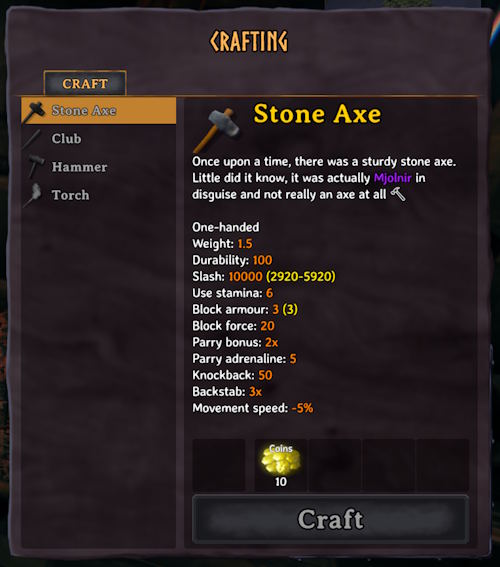
Ex: crafting a stone axe that does 10,000 damage, using coins:
Documentation
NAMES.md
NAMES.md - the name of every item, recipe, creature, build piece and status effect, next to its in-game name.
STATS.md
STATS.md - every stat you can change, from weapon damage to armor to food to crafting costs, plus the damage types, damage modifiers, skills and item types they use.
Console
The tweakstats console command - looks up names in game or lists the items you're carrying and writes out every stat an item has.
Examples
# Every item that uses the Axes skill becomes an insta-kill omni-tool
[Skill:Axes]
damages.slash = 10000
damages.chop = 10000
damages.pickaxe = 10000
# Stone axes are free to craft on your single-player world
[Worlds: SinglePlayer]
[AxeStone]
description = Once upon a time, there was a sturdy stone axe. Little did it know, it was actually <color=purple>Mjolnir</color> in disguise and not really an axe at all 🔨
[Recipe:AxeStone]
resources.Wood = 0
resources.Stone = 0
[/Worlds]
# ZOOOOM (fall damage will probably kill you, but enemies can't)
[ArmorRagsChest]
armor = 1000
movementModifier = 10  # tenfold
# Powerlifter pants
[ArmorRagsLegs]
equipStatusEffect = BeltStrength
[Effect:BeltStrength]
addMaxCarryWeight = 600
# A real menace
[Creature:Greyling]
health = 5000
# Climbing the corporate ladder
[Piece:wood_stepladder]
resources.Wood = 0
resources.Coins = 10
# Clubs do fire damage
[Club]
damages.Blunt = 1
damages.Fire = 10
damagesPerLevel.Blunt = 1
damagesPerLevel.Fire = 20
[Recipe:Club]
resources.BoneFragments.amountPerLevel = 0
# Working remotely
[KnifeWood]
attack.attackRange = 100
Configuration
BepInEx\config\kriona.TweakStats.cfg is created when you first load a world with the mod, and changes take effect as soon as the file is saved. You do not need to restart Valheim or rejoin the world.
All examples are commented out - remove the # from the start of a line to use it.
Each [section] names what to change, and each line under it is stat = value. Lines starting with # are comments and are ignored.
Sections
| Section | Changes |
|---|---|
[SwordIron] |
An item, by its prefab name |
[SwordIron, AxeIron] |
Multiple items |
[Sword*] |
Items whose prefab name matches - * matches any text and ? any one letter |
[Skill:Swords] |
Every item that uses a skill - see Skills |
[Type:Shield] |
Every item of a type - see Item Types |
[Recipe:SwordIron] |
The recipe that makes an item - wildcards work here too |
[Creature:Troll] |
A creature - its health, speed, resistances, AI, drops and attacks |
[Piece:woodwall] |
A build piece - its health, resistances and building cost, and things like a chest's size or a fire's fuel |
[Effect:Rested] |
A status effect, from food and meads to set bonuses and burning |
Creature and Piece sections, and Effect sections for effects that land on creatures like Burning and Poison, only apply in single player, when hosting, or on a server that has Tweak Stats - see Multiplayer Servers.
Names ignore case. Items are named by their prefab name, like SwordIron, rather than the name shown in game, like "Iron sword". NAMES.md lists every item, recipe, creature, build piece and status effect with its name in game, and the tweakstats find command looks them up in game.
Values
| Value | Does |
|---|---|
5 |
Sets the stat to 5 |
+5 |
Adds 5 |
-5 |
Subtracts 5 |
1.5x |
Multiplies by 1.5 |
=-5 |
Sets the stat to -5 - a negative number needs = in front, or it subtracts |
Stats that are whole numbers, like maxStackSize, are rounded after adding or multiplying. Stats that aren't numbers are set:
trueorfalse, e.g.teleportable = true- One of a list of choices, e.g.
skillType = AxesordamageModifiers.Fire = Resistant - The name of an item, status effect or crafting station, e.g.
attackStatusEffect = BurningorcraftingStation = forge, ornoneto remove it
Limits
Extreme values are allowed, but a few are kept inside what the game can handle without freezing, crashing or damaging your save. A value outside a limit is changed to the nearest value inside it (and logged).
| Stat | Limit | Why |
|---|---|---|
| Any number | -1,000,000,000 to 1,000,000,000 | Larger numbers overflow the game's math |
maxStackSize |
1 to 65,535 | The game can't add items to a stack of 0, and saves stack sizes as numbers up to 65,535 |
amount on a recipe |
0 to 1,000 | The game makes each crafted stack separately, all at once |
attack.projectiles |
0 to 100 | The game makes every projectile of a shot at once |
attack.attackAngle |
-360 to 360 | The game checks for hits every 4 degrees of a swing |
width, height on a chest |
1 to 100 | The game makes a slot in the window for each slot in the chest |
maxHoney on a beehive, maxLevel on a sap collector |
0 to 1,000 | The game drops each one separately, all at once |
An item's durability is also saved as no more than 21,000,000, the most the game can save.
Stat Names
A stat's name is the game's name without the m_, so m_attackStamina is attackStamina. Names ignore case.
Example attack and damage stats:
attack.attackStamina- the normal attack's stamina costattack.attackRange- the normal attack's reach, in metersdamages.slash- slash damagedamages.fire- fire damage
A group of damage types can be changed all at once - damages = 1.5x multiplies slash, fire, chop and every other damage type.
Lists are named by their entries:
resources.Iron = 10- the amount of iron a recipe needs, adding iron when the recipe doesn't use itresources.Iron = 0- removes iron from the reciperesources.Iron.amountPerLevel = 5- another stat of the entrydamageModifiers.Frost = Resistant- an armor's frost resistance, adding it when the armor doesn't have one
A misspelled name is reported in the log with suggestions, e.g. there's no stat "damage" - did you mean damages?
Order
Every section that names an item applies to it, from the top of the file down, so a broad section followed by a specific one combines them:
[Skill:Swords]
damages = 1.2x

[SwordIron]
damages.slash = +10   # The Iron sword gets 1.2x, then +10 slash
Worlds
Sections between [Worlds: ...] and [/Worlds] only apply on those worlds:
[Worlds: SinglePlayer, Midgard]
[Skill:Pickaxes]
damages.pickaxe = 2x
[/Worlds]
- A world is named by its name, or by its ID when several share a name - a dedicated server's world is often just
Dedicated - A server can be named by the address you join it with, with or without the port, e.g.
203.0.113.5,203.0.113.5:2456orvalheim.example.com. A server joined from the server list is named by its Steam ID, or its PlayFab ID for crossplay servers SinglePlayeris any world started without letting other players join- The
tweakstats worldcommand shows the world's name and ID and the server's address or ID for wherever you're playing - Sections outside a group apply everywhere
- Groups can't be inside each other
Issues
Lines that can't be used are skipped and logged to BepInEx\LogOutput.log with their line number and what's wrong, and the rest of the file still applies. When the file is saved while playing, a message in the top left says how many problems it has.
Console Commands
Press F5 to open the console.
| Command | Does |
|---|---|
tweakstats find iron sword |
Lists the items whose name or prefab name contains the text, e.g. SwordIron - Iron sword |
tweakstats inventory |
Lists the items you're carrying with their section names and main stats - damage, armor, block power, food, durability and weight - including your tweaks and each item's upgrade level, e.g. [SwordIron] Iron sword - level 2, equipped, damages slash 55, durability 180/250, weight 1.5 |
tweakstats world |
Shows the world's name and ID, whether you're playing alone, hosting or on a server - with the server's address, Steam ID or PlayFab ID - and the [Worlds: ...] groups that apply to it |
tweakstats dump SwordIron |
Writes every stat of a section with its value to a file named after the section, e.g. BepInEx\config\kriona.TweakStats.dump.SwordIron.txt, ready to copy into the config file. Any section works, e.g. tweakstats dump Skill:Swords or tweakstats dump Recipe:SwordIron |
tweakstats list |
Writes every item and recipe name to BepInEx\config\kriona.TweakStats.names.md. Only needed if you are using a mod that adds new items / recipes |
tweakstats reload |
Reads the config file again (this should be automatic) |
dump writes the game's values before any tweaks, so multiplying is easy to work out.
Multiplayer Servers
When the server has Tweak Stats, every player who joins uses the server's config file, and their own kriona.TweakStats.cfg is ignored while they're on it. When the server's config file changes, it's sent to everyone again. Hosting a world from the start menu counts as a server: your config is sent to the players who join you.
When the server doesn't have Tweak Stats, each player uses their own config:
- Item, recipe and most status effect tweaks apply to you only, and other players see the game's own values. Your weapon's damage is worked out by your game, so a stronger weapon also hits harder in PvP
- Creature and Piece sections, and Effect sections for effects that land on creatures like
BurningandPoison, are skipped. A message says how many when you join, and the log lists them
Requiring the Mod
A server can refuse players who don't have Tweak Stats, or who have a different version - the first two numbers have to match, so 1.2.0 and 1.2.3 can play together. It's set in the server's config file:
[Settings]
requireMod = auto
| Value | Does |
|---|---|
auto |
Requires the mod when the config has Creature, Piece or Effect sections - the default |
true |
Always requires the mod |
false |
Lets anyone join |
A refused player sees the game's "incompatible version" message, and a player with a different version of the mod also gets the reason in their log.
With requireMod = false, a player without the mod runs the creatures and build pieces near them with the game's own values, so the same creature can have different stats depending on who's near it.
Stack Sizes
When a chest or inventory loads, each stack is cut down to the item's current maxStackSize, and the rest is deleted. Raising a stack size is safe, but lowering it again - or removing the tweak - deletes whatever is over the new size. On a server, a chest is loaded by every player near it, so a player without your tweak can cut your stacks down the next time the chest changes. Only raise stack sizes on a server when every player uses the same config.
Installation
With a mod manager such as r2modman or the Thunderstore Mod Manager, install Tweak Stats - it installs BepInExPack for Valheim too.
By hand:
- Install BepInExPack for Valheim from Thunderstore or Nexus Mods
- Extract the zip into your Valheim folder, or copy
TweakStats.dllintoBepInEx\plugins
Other Mods By Me
See all my mods on Thunderstore.
Source
The source code is on GitHub.