
MySix DisplayEverything
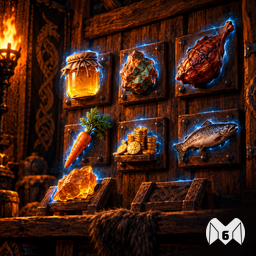
Anything you can carry goes on both item stands - honey, ores, metals, seeds, body armour, arrows and hundreds more the game's stands refuse.MySix Display Everything
The game's item stands take weapons, tools, shields, trophies, helmets and a few other things, and food and potions only on the horizontal stand. Honey, ores, metals, seeds, body armour, capes, arrows and hundreds more can't go on either. With this mod, anything you can pick up and carry goes on both the wall item stand and the horizontal item stand.
- 582 new items: 454 that neither stand would take before - honey, ores, metals, seeds, armour, arrows and hundreds more - and 128, mostly food and potions, that only the horizontal stand took and that now go on the wall stand too.
- Items the game already displays look exactly as they always have, with two exceptions: the turnip hangs upright on the wall stand instead of lying on its side past the plaque's edge, and a fish you catch lies on its side on the horizontal stand instead of standing upright as if swimming (at the game's size for it, so a big catch still looks big).
- The rest are shown with the model you see when they lie on the ground.
- Horizontal stand: they lie as they would on a table, long side along the stand - arrows, bars and fireworks included. Anything with one side much broader than the rest lies on it: a fish on its side, a hide or a plate flat. They rest just on the stand's top; its little bar isn't drawn while one of them lies there. A brim, wing or fin that reaches past the top hangs down beside it, never lower than the stand's own foot, so nothing goes into the table or floor under it: an item that has to sit higher for that gets the stand's top raised to meet it, like a pedestal. Anything bigger than
DisplayEverything.MaxSize(0.6 m by default) is made smaller to fit. - Wall stand: they hang like a plate on a wall, longest side up, showing their broadest side - a fish's side, the queen bee's back and wings, a belt's round face; tankards and cups hang upright, as the game stands them on a table. They hang flat against the plaque: the stand's peg isn't drawn while one of them hangs there, so nothing holds them out from it. They are kept to three quarters of
MaxSize(0.45 m by default) so they sit within the plaque. - Placed by what you see: an item's size, place and which side it shows go by what is actually drawn of it, so a part that shows nothing, or the loose outline of a part set at an angle, can't hold it off the stand, make it smaller or turn it the wrong way.
- Glows and lights: an item's own glow, mist or light stays on the stand; the sparkle a dropped item gives off does not.
- Hold E to take an item back off, as usual.
- Boss altars and other stands that take one particular item keep the game's rules.
- Hair and beard styles never go on a stand.
- Everyone who plays together should have it: a player without it sees an empty stand where someone has displayed honey, ore or anything else the game has no display model for.
Part of the MySix mod suite. Every mod in the suite needs MySix Core, which adds the
in-game mysix command for reading and changing settings. Settings are kept in the world itself,
so a world plays the same on any computer or server: a setting for everyone is changed once, by the
host or a server admin, and each player's own choices are kept in the world for that player.
Installing
Install with a mod manager - the Thunderstore Mod Manager, Gale and r2modman all work - and it
fetches BepInEx and MySix Core for you. To install by hand, install BepInExPack_Valheim first, then
unzip the DLL of MySix Core and of each MySix mod you want into BepInEx/plugins. Everyone
playing together should run the same versions.
Settings
The Settings wiki page lists this mod's 2 settings: what each does, its choices and default, who can change it, and the exact command to type. In short: press F5 in game to open the console (if nothing opens, add -console to Valheim's launch options) and type mysix to list every setting, mysix set <setting> <value> to change one.
Languages
What the MySix mods show you in play - the names and descriptions of their items and portals,
their messages on screen, and the Cartographer's map tab and marks - is in the language you play
Valheim in, in every language the game offers except Abenaki, which shows English for now as we
could not find a translation we trust. The mysix console command, the setting descriptions it
prints, the Settings wiki pages and the warnings before a server restart are in English only. We
mainly test in English; if something reads wrong in your language, please let us know.
Note on achievements
Valheim switches achievements off for anyone with a mod installed. MySix Mods Not Cheating, part of the MySix bundle, keeps them working.
Version 1.0.0. The Changelog tab lists what changed in each release.