

Quads Ledger Chest
A chest you build that shows everything in every chest around it, with a search: find anything in your storehouse and take it from wherever it is.📒 Quad's Ledger Chest
A chest you build that shows everything in every chest around it, with a search: find anything in your storehouse and take it from wherever it is.



Source code · Report a bug · Discord
✨ Features
- Build the Ledger Chest with the hammer at a workbench (10 Wood, 4 Fine Wood, 4 Leather Scraps, 2 Resin). It keeps nothing itself: it is the counter of your storehouse.
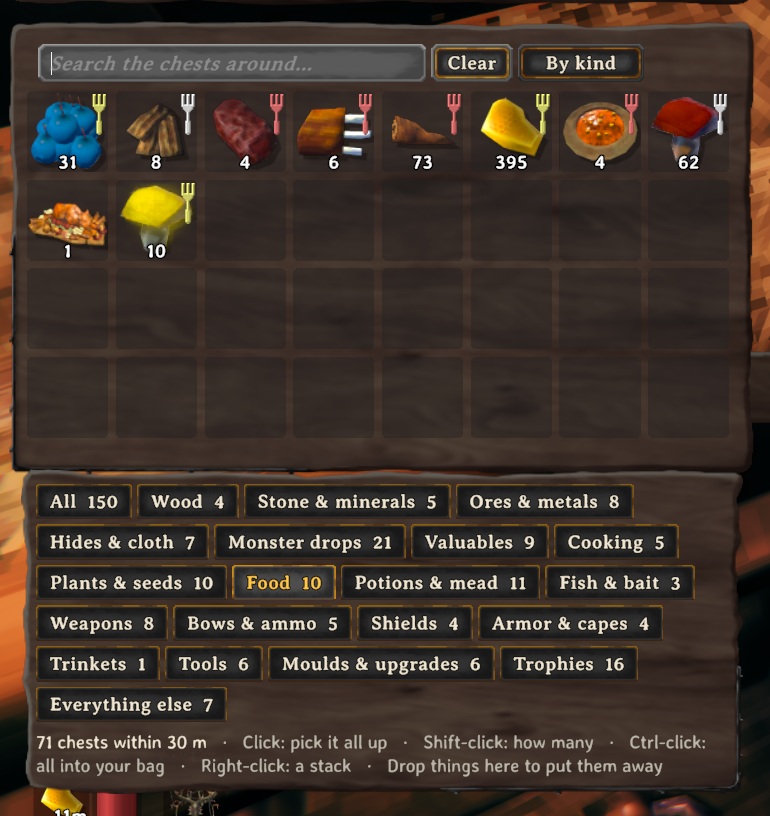
- Open it (E): in place of a chest's slots, the ledger shows every kind of item in the chests within 30 m, one slot each with how many there are in all. It is the game's own chest window, with its tooltips.
- A search in its title bar narrows it down (several words: all must match); list by kind, A to Z or most first.
- Category buttons under it (Wood, Stone & minerals, Ores & metals, Hides & cloth, Cooking, Food, Weapons, Armor, Trophies and more), each with how many things it holds: press one to see only those. Under them: which chests hold what is under your mouse.
- Click an item to pick all of it up, and put it down on a slot of your inventory: as much as fits comes out of the nearest chests that have it, into that slot first and then wherever there's room. Shift-click to choose how many (the game's own split slider). Ctrl-click: all that fits, straight into your inventory. Right-click: a stack, straight in. Put it back on the ledger (or outside the windows, or right-click) and nothing moves.
- Drop things onto it (or Ctrl-click them in your inventory) to put them away: each goes straight on to a chest around it. A chest assigned that item first (QualityOfLife's K), then one assigned its category, then a chest with nothing assigned (one already holding it first). When no chest has room it comes back to you.
- Hover a line to see which chests hold it and how far away they are.
- Items come out exactly as they went in (upgrades, wear). Chests someone else has open are left alone, and so are carts, ships, tombstones and companions' own chests.
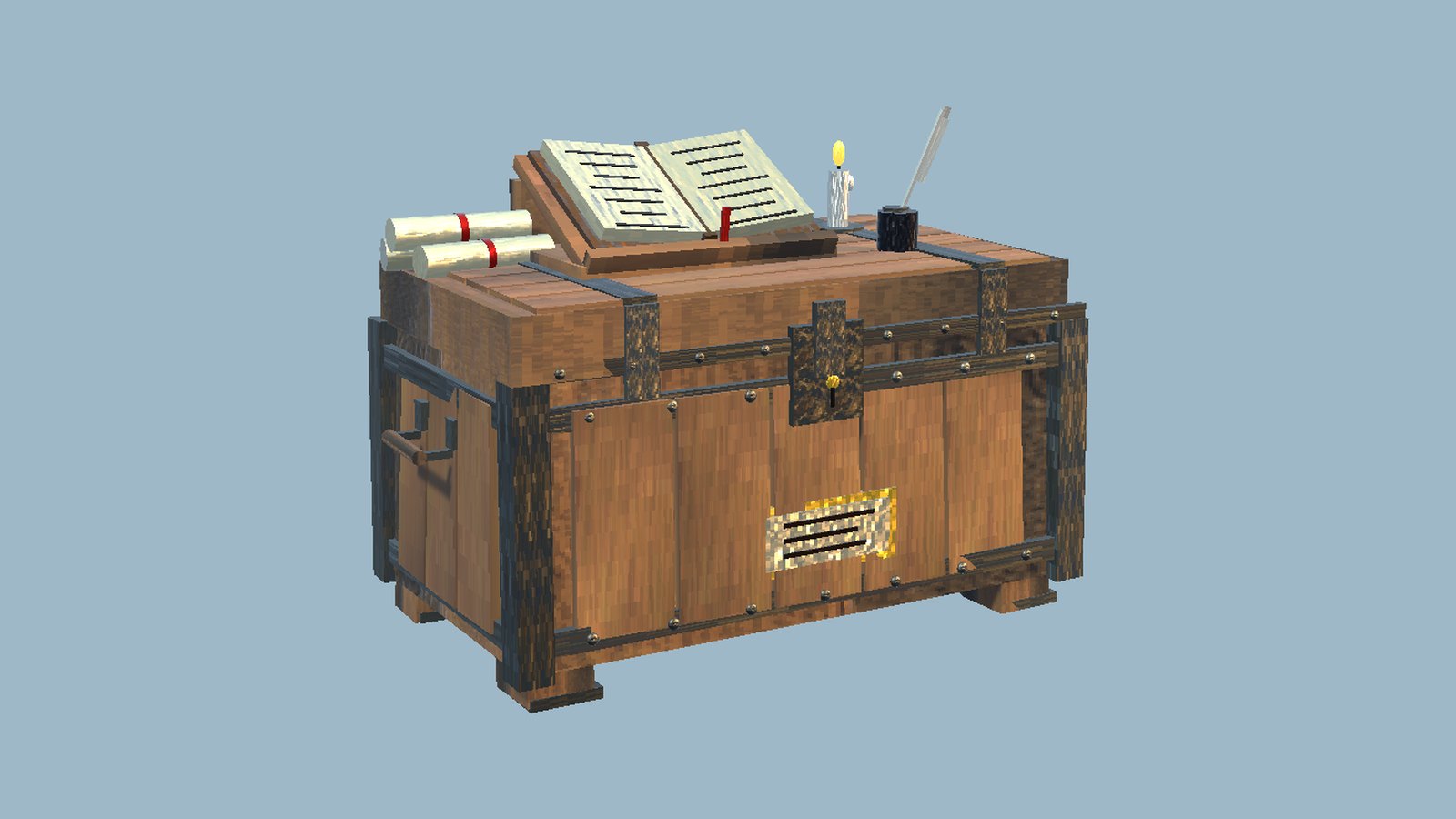
- It has its own hand-made look: an iron-bound strongbox with the ledger open on a reading stand, a quill in its inkpot, scrolls and a candle.
📸 Screenshots
The Ledger Chest
Everything in the chests around it, in one searchable list
🎮 How to use
| Key | What it does |
|---|---|
| E at a Ledger Chest | See and search everything in the chests around it; click to take, Shift-click to choose how many |
🧩 Other mods
Known clashes: none known.
It moves items with the game's own moves, and never lists graves, carts, ships or companions' chests.
Works with our mods
- Quad's Quality of Life: what you put in the Ledger Chest goes on to the chest assigned that item or kind (it works without Quality of Life too).
- Quad's Gear Slots: items you take go into your ordinary rows.
Found a clash with another mod? Tell us which one and what happened.
👥 Multiplayer
Who needs it: Everyone, and the host above all: a game without the mod deletes the pieces when their area loads. Restart after installing or updating them.
The Ledger Chest is a real chest: a game without the mod deletes it with what is in it when its area loads (on a dedicated server above all). It skips chests others have open and chests a ward keeps you out of.
⚙️ Settings
In BepInEx/config/com.quad.ledgerchest.cfg, made the first time the game runs with the mod. r2modman and Thunderstore Mod Manager edit it under Config editor.
Ledger
| Setting | Default | What it does |
|---|---|---|
Radius |
30 |
How far from the Ledger Chest (metres) the chests it lists can be. |
Scale |
1 |
Size of the list beside the chest. |
🤖 Made with AI
Made with the help of Claude (Anthropic), with Claude Code: designed, written and checked together, and tried in the game.
🧪 About Quads Lab
Quads Lab is where Quad H (HardHeadHackerHead) builds software with AI, of every kind: these Valheim mods are one of its projects. Each mod is designed by a player, written with Claude Code and tested in our own world, with bobisme as our tester.
- 🌐 quadslab.io
- 🧰 All Quads Lab mods on Thunderstore
- 💻 Source code on GitHub
- 💬 Discord
- 🐞 Found a bug? Open an issue on GitHub
📜 Recent changes
- 1.0.4 A clearer page: what it does, who needs it in multiplayer, how it gets on with other mods, and where to report a bug. The game itself is unchanged.
- 1.0.3 A new id, com.quad.ledgerchest (it was com.dhack.ledgerchest): your settings move over by themselves the first time it starts, and the old settings file is kept as a backup. Restart the game after this update. If an old copy is still installed beside it, this one stands down and says which file to delete, so the two never both run. The DLL now says it was made with AI, as Thunderstore asks.
- Things that fit in no chest and not in your inventory either stay in the Ledger Chest, and now you're told so. The page now says plainly that the server and every player need the mod (a game without it deletes the Ledger Chests with what is in them), and a problem drawing its look can no longer stop it being registered.
Every change is on the Changelog tab.