

Quads Quality Of Life
Small controls that make the game nicer to play, each with its own switch.🎒 QualityOfLife
Version 1.11.1 · all the mods · install it from Thunderstore (r2modman, Thunderstore Mod Manager) or the in-game mod manager (F7)
Quick gear sets on Q, hammer on B, a Sort button that joins stacks, Stack to chests with undo, chest assignment on K (look at a chest to see what it receives), Sort chests to send everything in the chests around you to the chest assigned it, item locks on L, your ships on the map with their own icon, and tap P next to a boat to push it. It will not let you plant a seed, sapling or crop where it has no room to grow up.
📸 Screenshots
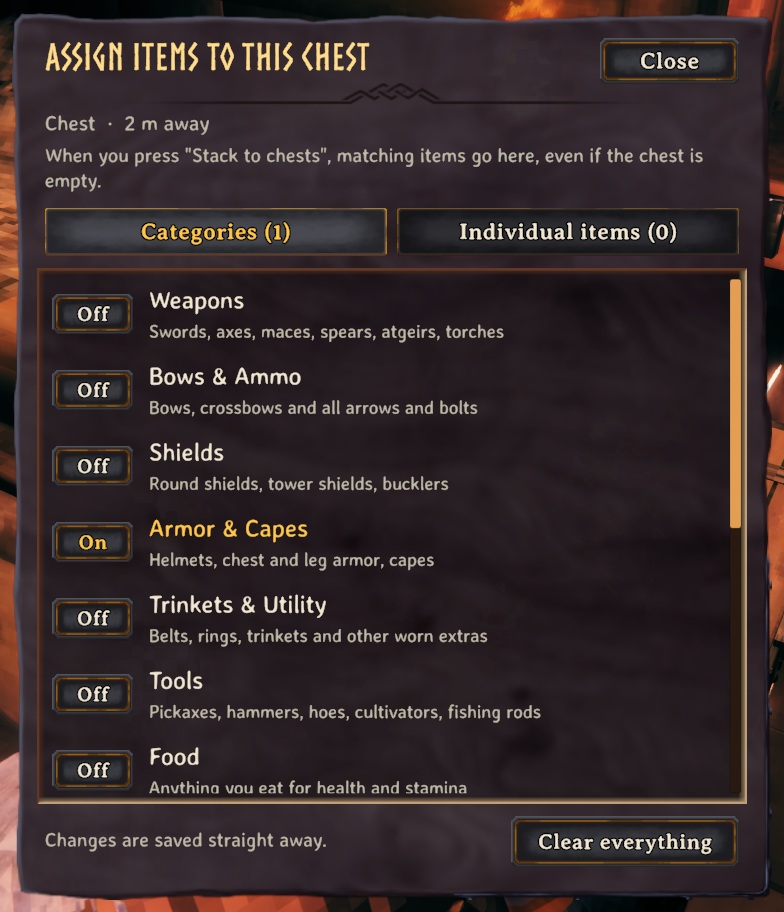
Choosing what a chest receives (K)
Known clashes
- ExtraSlots, Equipment and Quick Slots, AzuExtendedPlayerInventory, Extended Player Inventory, ComfyQuickSlots, BetterArchery (with its quiver on): they keep slots in rows of your inventory below the ordinary ones, which Sort can't tell from your bag, so the Sort button is off while one is installed. Stack to chests never moves what you wear or hold; anything else you keep in their slots, lock (L).
- Removing this mod doesn't give the game back a key it freed (Q, auto-run, by default): bind it again in the game's Settings, Controls. Changing the mod's key does give it back.
🔍 How it works
Small controls that make the game nicer to play, each with its own switch.
What is in it
- Q: build a quick set from items you hover in your inventory; outside the inventory it swaps to the set and back.
- B: jump into construction mode with your hammer, and back to what you had.
- Sort: a button under your inventory joins split stacks and puts everything in order (hotbar and gear slots stay put).
- Stack to chests: a button under your inventory moves matching items into nearby chests, with Undo and sounds.
- K opens the chest assignment menu (choose what each chest receives); L locks items so they are never stacked.
- Boat push: tap or hold P next to a boat to shove it where you look (gentle, with a speed cap).
- Far zoom: scroll the camera out to 20 m on foot and 40 m on a boat (the game stops at 6); the steps grow as you zoom out.
- Planting: you cannot plant a seed, sapling or crop where it has no room to grow up (the ghost turns red and says so), instead of finding out after it never grows.
Keys are configurable. Q and B work while you are running.
⌨️ Keys
| Key | What it does |
|---|---|
| Q | Build a quick set (inventory open) / swap to it and back |
| B | Jump into construction mode with your hammer, and back |
| K / L | Assign what a chest receives / lock an item |
| P | Tap or hold next to a boat (not in it) to push it where you look |
⚙️ Settings
In BepInEx/config/com.quad.qualityoflife.cfg (made the first time the game runs with the mod).
BoatPush
| Setting | Default | What it does |
|---|---|---|
Enabled |
true |
Turn boat pushing on or off. |
Key |
P |
Tap (or hold) this next to a boat, not in it, to push it the way you are looking. |
Strength |
3 |
How hard you push (metres per second, per second). Higher gets a heavy boat moving faster. |
MaxSpeed |
2.5 |
The fastest your pushing can move a boat (metres per second). Walking pace is about 5. |
Seconds |
3 |
One tap of the key keeps pushing for this long (holding it keeps pushing as long as you hold). |
Range |
3 |
How close you have to be to the boat's hull (metres). |
Camera
| Setting | Default | What it does |
|---|---|---|
FarZoom |
true |
Let the scroll wheel zoom the camera out further than the game allows. |
MaxDistance |
20 |
How far out the camera can go on foot (metres). The game's own limit is 6. |
MaxDistanceBoat |
40 |
How far out the camera can go while steering a boat (metres). |
General
| Setting | Default | What it does |
|---|---|---|
ShowMessages |
true |
Show a short message in the top-left when something happens. |
Hammer
| Setting | Default | What it does |
|---|---|---|
Enabled |
true |
Turn the hammer shortcut on or off. |
Key |
B |
Press to equip your hammer and start building. Press again to go back to what you had equipped. |
Map
| Setting | Default | What it does |
|---|---|---|
ShowShips |
true |
Show every ship in the world on the minimap and the map, with a longship icon, wherever it is. |
ShipPinType |
Icon4 |
Which of the map's pin kinds the ship pins count as (their picture is the longship either way). Hiding that kind with the map's pin filters hides them too. |
Planting
| Setting | Default | What it does |
|---|---|---|
NeedRoomToGrow |
true |
A seed, sapling or crop can only be planted where it has the room to grow up: the same check the game makes later (a plant with another plant, a rock, a tree or a building too close never grows), made before you plant, so the ghost turns red and you are told. Takes effect at once. |
QuickSet
| Setting | Default | What it does |
|---|---|---|
Enabled |
true |
Turn the quick-set feature on or off. |
Key |
Q |
Inventory open: hover an item and press to add/remove it from your quick set. Inventory closed: press to swap to the quick set, press again to go back to what you had. |
ShowBadges |
true |
Mark quick-set items in your inventory with a small gold badge. |
QuickStack
| Setting | Default | What it does |
|---|---|---|
Enabled |
true |
Turn the quick-stack buttons and item locking on or off. |
Radius |
20 |
How far (in metres) from you a chest can be and still be used by Stack to chests and Sort chests. Raise it to put things away into your storehouse from across a big base: 60 reaches a long way. Chests only count while their area is loaded around you (about 100 m and more). Takes effect at once. |
LockKey |
L |
Inventory open: hover an item and press this to lock it (it will never be moved by the buttons) or unlock it. |
StackKey |
None |
Optional key that does 'Stack to chests' while your inventory is open (useful with a controller). None = off. |
ProtectHotbar |
true |
Never move items in your top inventory row (the hotbar). |
ShowButtons |
true |
Show the buttons under your inventory when a chest is in range. |
PlaySounds |
true |
Play the chests' own sounds when you stack (a thunk from each chest that takes items) and when you undo. |
ShowChestLabels |
true |
Show what a chest is assigned to receive: under its Assign button when it's open, and in the hover text when you look at it. |
AssignKey |
K |
Look at a chest (or have one open) and press this to choose what it should receive when you stack: whole categories or individual items. |
Sort
| Setting | Default | What it does |
|---|---|---|
Enabled |
true |
Show a Sort button under your inventory: it joins split stacks and puts items in order. (Respects ProtectHotbar in the QuickStack settings.) |
Stations
| Setting | Default | What it does |
|---|---|---|
BuildRange |
0 |
How far (in metres) from a crafting station (workbench, stonecutter, forge, ...) you can build with it, when that is more than the station's own range (20 m, more with upgrades). 0 leaves the game's ranges. 60 reaches across a big base. Takes effect at once. In multiplayer the server's value applies. |
👥 Playing together
See who needs which mod on the front page.
🤖 Made with AI
Made with the help of Claude (Anthropic), with Claude Code: designed, written and checked together, and tried in the game.
📜 Changes
- 1.11.1 A new id, com.quad.qualityoflife (it was com.dhack.qualityoflife): your settings move over by themselves the first time it starts, and the old settings file is kept as a backup. Restart the game after this update. If an old copy is still installed beside it, this one stands down and says which file to delete, so the two never both run. The DLL now says it was made with AI, as Thunderstore asks.
- Fix: Undo after Stack to chests could double an item or swap it for another: it took back the first item of that name in the chest (often an older one) and gave you a copy of the one you had put in, so an enchanted sword, a filled backpack or a worn tool could come back twice or come back as a different one. Undo now takes back the very item you put in; only plain stackable things (wood, stone, arrows) come back by name, and exactly as many as leave the chest. Stack to chests, Sort chests and Undo now also leave alone a chest another player is using or has just changed ("The chests in range are in use"), so your moves and theirs never undo each other. Sort is off (the button is hidden) next to a mod that keeps its own slots in your inventory's rows (ExtraSlots, Equipment and Quick Slots, AzuExtendedPlayerInventory, Extended Player Inventory, ComfyQuickSlots, BetterArchery with its quiver on): it pulled their items out of their slots. Stations/BuildRange is now decided by the server in multiplayer. If you change a key the mod freed from the game (Q: auto-run), the game gets its key back. The buttons under the inventory and the assign window now use the game's own lettering.
- New: Planting/NeedRoomToGrow: you cannot plant a seed, sapling or crop where it has no room to grow up (another plant, a rock, a tree or a building too close). The game only finds this out after planting, and then the plant never grows; now the ghost turns red and says there is not enough space. On by default.
- New: Stations/BuildRange: crafting stations (workbench, stonecutter, forge...) reach farther for building, up to 150 m, so a big build at the edge of the base needs no second workbench or stonecutter. 0 (the default) leaves the game's ranges. Only building changes: a station's base area and crafting at it stay as they were.
- Stack to chests and Sort chests can reach farther: their Radius (QuickStack) is now a 2 to 150 m slider in the configuration manager, taking effect at once.
- New: your ships on the map. Every raft, karve, longship and drakkar in the world shows on the minimap and the big map with a longship icon of its own and its kind as the name, following it as it sails, even far away (on the game hosting the world). Map: ShowShips switches it off.
- The LedgerChest mod's Ledger Chest keeps nothing, so it has no Assign button, no "Receives" line and no K assigning: assign the chests around it.
- Fix: Sort chests (and Stack to chests) treated a companion's bag as a chest: Sort chests took an AICompanion companion's armour, weapons, tools and food out of its gear slots and put them in your chests. Only built chests and carts take part now.
- Looking at a chest now shows what it receives by name ("Receives: Wood, Finewood" and up to three more on the line below, then "+N more") instead of "2 items".
- New: a Sort chests button next to Stack to chests (shown when a chest in range is assigned something). Everything in the chests around you goes to the chest assigned it: a chest assigned that item first, then one assigned its category; items already in a chest that wants them stay, and anything no chest is assigned stays where it is. It tells you what had no room left. Only chests take part (never your inventory, a companion's chest, a cart, a ship, or a chest someone has open), and every item is counted before and after.
- Stack to chests (and companions sorting into your chests) no longer puts anything into a chest a companion has taken as its own: its chest held wood, so all the wood went there.
- Companions (AICompanion) can sort what they bring home into your chests by the same rules as Stack to chests: a chest assigned that item, then its category, then one already holding it.
- New: the camera zooms out much further: up to 20 m on foot (the game stops at 6) and 40 m while steering a boat. Each scroll step grows as you zoom out, so it only takes a few notches. Camera, MaxDistance and MaxDistanceBoat set the limits; FarZoom switches it off.
- Fix: the quick-set key (Q) also triggered the game's auto-run and previous-tab keys. The game's keys are now unbound (once, and you are told in chat); bind them again in Settings, Controls if you want them.
- Fix: in multiplayer, Stack to chests, Undo and chest assignments could lose or duplicate items in a chest another player had open. Chests in use are now left alone.
- New: a Sort button next to Stack to chests (joins split stacks, puts items in order by kind and name; leaves the hotbar and GearSlots slots alone). Boat push (tap or hold P next to a boat) now defaults to P so it does not clash with BuildOrders' G. Stack to chests leaves GearSlots gear, food and quick slots alone.