

RunicStorageNetwork
Connects your base's chests into a network. Craft and upgrade items, build using stored resources, and extend coverage with Runic Relays. Adds four build pieces and two codex items. Created with AI assistance.Runic Storage Network
New in 1.0: Distant storage and the mod API are enabled by default for new configurations. You can turn them off in settings. Existing settings are kept when updating.
Новое в 1.0: Удалённые хранилища и API включены по умолчанию в новых конфигурациях. При желании их можно отключить в настройках. При обновлении сохранённые настройки не меняются.
Settings (EN) · Настройки (RU) · API for mod developers
Report a bug / Сообщить об ошибке · Changelog (EN) · История изменений (RU)
English
Keep your resources in storage — craft and build where you need them.
Runic Storage Network connects your base's chests into a supply network. Craft and upgrade items at connected crafting stations, build with your construction tools, and expand your base without hauling materials from one building to another.
Craft and build through the familiar menus while materials are consumed directly from connected chests. A Storage Codex also lets you search the network and retrieve items into your inventory.
Build pieces
The Storage Codex, equippable Builder's Codex and Runic Gateway are available only when their individual [Content] settings are true (all default to true). Gateways also require ExperimentalUnloadedNetworks = true. See content settings.
Storage Network Core
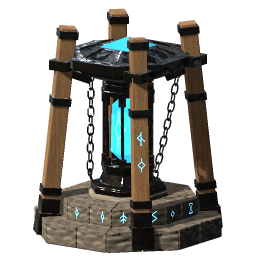
The center of your network. Connects nearby chests and makes their resources available for crafting, upgrading items, and building within its coverage area. One core is enough for a small workshop and storage area.
Runic Relay
Extends the network between buildings. Connects to the core directly or through other relays, links nearby chests, and lets you craft and build nearby using resources from the entire network.
Relays can form chains and branches. They need an uninterrupted connection to the core to function. If the connection breaks, the disconnected section loses access to network resources, but items remain in their chests and can still be retrieved manually.
Storage Codex
A book on a stone pedestal that opens network storage. Place it within the supply range of a core or connected relay. It gives access to that network without extending its coverage. Hover over it to see whether it is connected.
Runic Gateway
Bridges distant sections of the same network. Enable experimental distant storage, build the first gateway near your core or connected relay, and give it a link name. Give a second gateway the same name to extend that network to a distant outpost. Relays, chests, crafting stations and the Storage Codex work around each gateway within normal relay ranges.
Exactly two gateways may share a link name. A third disables that pair until the names are corrected. Gateways keep their network binding and cannot join two independent networks; dismantle and rebuild a gateway to bind it to another core.
Only items allowed through ordinary portals can cross the distant link, including the world's portal setting. Local materials stay usable: iron stored at an outpost can be used there, but iron at the main base cannot cross the gateway under normal portal rules. An ordinary relay path between the two sides also allows those materials. Gateways do not teleport players.
All four structures are built with the regular hammer near a workbench and require no fuel.
Runic Codex
The closed book used to build a Storage Codex. Craft it at a level 1 forge after discovering its ingredients. It can be carried, stored, dropped and picked up like a regular item.
Runic Builder's Codex
A wearable book for building farther from the network. Craft it at a black forge, put it on your hotbar, aim at a Network Core and press the book's hotbar key to bind it. Then equip it in the utility slot, shared with Megingjord.
While equipped, the book draws building materials only from its bound network within 50 m of a core or connected relay, following the configured relay link range. Each copy keeps its own binding; use it on another core to rebind. Network names are optional, and renaming a network does not break the binding. An unbound book supplies no network materials while equipped.
The book does not connect nearby chests or other players, and does not extend crafting-station supply or remove normal workbench requirements for building. Gateway restrictions and storage access rules still apply. Loaded networks work normally; reaching unloaded parts requires experimental distant storage.
Getting started
- Build a core near your storage chests.
- Place crafting stations within its coverage area, or extend the network to other buildings with relays.
- Use crafting stations and your construction tools as usual — the required materials will be drawn from the available supply.
Materials in your inventory are used first, followed by any missing materials from connected chests. Recipe requirements and crafting station level requirements still apply.
Interact with a Storage Codex to open network storage. Search for an item, choose a quantity and press Take to retrieve it into your inventory. Items of different qualities are listed separately; retrieved items keep their original properties. Depositing items through this window is not available. The window scales with the render resolution and with the Scale GUI setting under Settings → Accessibility, like the game's own windows.
Interact with a core (E with default controls) to give its network an optional name. Leave the field empty to remove the name. Connected cores share one network name. Hover over a connected container to see its network; unnamed networks simply show "Connected to network". Unconnected containers receive no additional line.
Ranges and recipes
By default, chests connect within 20 m of a node. Crafting stations and builders are supplied within 20 m, and neighboring network nodes can connect over distances of up to 50 m. See Configuration to change ranges and other settings.
| Material | Core | Relay |
|---|---|---|
| Stone | 30 | 10 |
| Fine wood | 20 | 6 |
| Chains | 2 | — |
| Iron ingots | — | 2 |
| Surtling cores | 4 | 1 |
| Greydwarf eyes | 10 | 5 |
Runic Codex — forge level 1: Silver ×4, Crystal ×2, Greydwarf Eye ×6, Linen Thread ×4, Leather Scraps ×4. Produces one book. The recipe uses normal ingredient discovery.
Runic Builder's Codex — black forge level 1: Runic Codex ×1, Black Core ×1, Refined Eitr ×5, Silver ×2, Crystal ×2. Produces one accessory and unlocks through normal ingredient discovery.
Storage Codex — hammer, near a workbench: Runic Codex ×1, Fine Wood ×10, Stone ×8, Iron ×2, Red Jute ×2. Dismantling returns the materials, including the book.
Runic Gateway — hammer, near a workbench: Stone ×20, Yggdrasil Wood ×10, Silver ×6, Crystal ×10, Refined Eitr ×5. Unlocks through normal ingredient discovery. Requires experimental distant storage to function.
Installation and compatibility
Requires BepInExPack Valheim and Jötunn. For multiplayer, install the same version of the mod and its required dependencies on the server and every player's client.
The network works with stationary containers built by players, including containers added by other mods. The experimental distant-storage option, enabled by default for new configurations, also provides access to eligible unloaded storage. If your existing config has it set to false, change it to true and restart to use distant storage and gateways. Backpacks, tombstones, ship and cart storage, and personal chests are not connected.
Machines that consume or fire their contents stay out of the network by default. The network does not draw crafting materials from the obliterator. Smelters, kilns, cooking stations, fermenters, beehives, sap collectors, ballistae and catapults are excluded on the same rule, including modded equivalents built on the same components.
Automatic eligibility does not guarantee compatibility with every modded container. Containers with custom inventory, saving or access behavior need separate compatibility testing.
Building draws on the network with any build tool, including hammers added by other mods. A tool takes part when the game gives it its own build menu, so nothing needs to be registered with this mod. Ordinary build pieces and planting can use stored resources. Serving trays can also draw food from connected storage. Terrain shaping uses inventory resources by default.
Do not enable multiple crafting-from-chests systems at the same time without checking compatibility. Back up your world and character before installing or updating the mod.
Created with AI assistance
AI tools were used to develop the code, create concept art, and produce the 3D models. Gameplay decisions, selection of results, and in-game testing are handled by the author.
Incompatible mods and integration limits
Runic Storage Network disables its resource supply when it detects NearbyCrafting, AzuCraftyBoxes, DvergerAutomation, CraftFromContainers or CraftFromChests. Use one storage-supply system at a time.
MultiUserChest and Quick Stack Store Sort Trash Restock are optional. The current integrations accept MultiUserChest 0.6.2 and Quick Stack 1.4.15; other versions disable network supply until their integration is updated. See Configuration for the required Quick Stack setting. These version checks do not guarantee compatibility with every mod combination.
Thanks for contributing
Thanks to hoxton314 for contributing to the development of Runic Storage Network, including modded-container support and terminal UI scaling.
Русский
Ресурсы остаются на складе — стройте и создавайте предметы там, где удобно.
Runic Storage Network объединяет сундуки базы в сеть снабжения. Изготавливайте и улучшайте предметы на подключённых станках, стройте строительными инструментами и расширяйте базу, не перенося материалы из одного здания в другое.
Пользуйтесь привычными меню крафта и строительства — необходимые ресурсы расходуются прямо из подключённых сундуков. Кодекс запасов также позволяет искать предметы в сети и забирать их в инвентарь.
Постройки
Кодекс запасов, экипируемый Кодекс строителя и Рунический мост доступны только при значении true их отдельных настроек в разделе [Content] (по умолчанию все включены). Мост также требует ExperimentalUnloadedNetworks = true. См. настройки контента.
Ядро сети хранилищ — Storage Network Core
Центр вашей сети. Подключает соседние сундуки и предоставляет их ресурсы для крафта, улучшения предметов и строительства в своей зоне действия. Одного ядра достаточно для небольшой мастерской со складом.
Рунное реле — Runic Relay
Расширяет сеть между зданиями. Соединяется с ядром напрямую или через другие реле, подключает сундуки вокруг себя и снабжает ближайшие станки и строителя ресурсами всей сети.
Реле можно выстраивать в цепочки и ответвления. Для работы нужен непрерывный путь до ядра. При разрыве связи отключённый участок перестаёт снабжаться, но предметы остаются в сундуках и доступны вручную.
Кодекс запасов
Книга на каменном постаменте, открывающая хранилище сети. Разместите её в зоне снабжения ядра или подключённого реле. Она даёт доступ к этой сети, не расширяя покрытие. При наведении показывается состояние подключения.
Рунический мост — Runic Gateway
Соединяет удалённые участки одной сети. Включите экспериментальную функцию удалённых хранилищ, поставьте первый мост рядом с ядром или подключённым реле и задайте ему имя связи. Такое же имя у второго моста продолжит сеть на удалённой базе. Реле, сундуки, станки и Кодекс запасов работают вокруг моста в обычных радиусах реле.
Одно имя могут использовать ровно два моста. Третий отключает эту пару, пока имена не будут исправлены. Мосты сохраняют привязку к своей сети и не объединяют две независимые сети. Чтобы привязать мост к другому ядру, разберите и постройте его заново.
Через дальнюю связь проходят только предметы, разрешённые для обычных порталов, с учётом настройки мира. Местные материалы остаются доступны: железо на удалённой базе можно использовать там же, но железо основной базы при обычных правилах порталов через мост не пройдёт. Если стороны также соединены обычной цепочкой реле, эти материалы доступны по ней. Мосты не телепортируют игроков.
Все четыре постройки устанавливаются обычным молотом рядом с верстаком и не требуют топлива.
Рунный кодекс
Закрытая книга для постройки Кодекса запасов. Создаётся на кузнице первого уровня после знакомства с ингредиентами. Её можно носить, хранить, выбрасывать и подбирать как обычный предмет.
Рунный кодекс строителя
Экипируемая книга для строительства на большем расстоянии от сети. Создайте её на чёрной кузнице, поместите на панель быстрого доступа, наведитесь на ядро и нажмите клавишу слота книги для привязки. Затем экипируйте её в слот аксессуара, общий с поясом Мегингъёрд.
Экипированная книга использует строительные материалы только своей сети в пределах 50 м от её ядра или подключённого реле. Дальность соответствует настройке связи реле. Каждый экземпляр хранит собственную привязку; использование на другом ядре меняет её. Название сети необязательно, а переименование не разрывает связь. Экипированная непривязанная книга не предоставляет материалы сети.
Книга не подключает соседние сундуки и других игроков, не расширяет снабжение станков для крафта и не отменяет требования к верстаку при строительстве. Ограничения мостов и правила доступа к хранилищам сохраняются. Загруженные сети работают в обычном режиме; доступ к выгруженным участкам требует экспериментальной функции.
Как начать
- Постройте ядро рядом со складскими сундуками.
- Разместите станки в его зоне действия или протяните сеть реле к другим зданиям.
- Пользуйтесь станками и строительными инструментами как обычно — необходимые материалы будут взяты из доступного запаса.
Сначала расходуются материалы при себе, затем — недостающее из сундуков. Требования рецептов и уровни станков сохраняются.
Взаимодействуйте с Кодексом запасов, чтобы открыть хранилище сети. Найдите предмет, выберите количество и нажмите «Забрать», чтобы получить его в инвентарь. Предметы разного качества показаны отдельно и сохраняют свои свойства при получении. Складывание предметов через это окно пока недоступно. Окно масштабируется вместе с разрешением и настройкой «Масштаб интерфейса» в разделе Настройки → Специальные возможности, как и собственные окна игры.
Взаимодействие с ядром (E при стандартном управлении) позволяет задать необязательное название сети. Пустое поле удаляет название. Соединённые ядра используют общее название сети. При наведении на подключённое хранилище показывается его сеть; для безымянной сети — просто «Подключено к сети». У неподключённых хранилищ дополнительной строки нет.
Радиусы и рецепты
По умолчанию сундуки подключаются в радиусе 20 м от узла. Радиус снабжения станков и строителя — также 20 м, а расстояние между соседними узлами связи — до 50 м. Радиусы и другие параметры описаны на странице Настройки.
| Материал | Ядро | Реле |
|---|---|---|
| Камень | 30 | 10 |
| Качественная древесина | 20 | 6 |
| Цепи | 2 | — |
| Железные слитки | — | 2 |
| Ядра суртлинга | 4 | 1 |
| Глаза грейдворфа | 10 | 5 |
Рунный кодекс — кузница первого уровня: серебро ×4, кристалл ×2, глаз грейдворфа ×6, льняная нить ×4, обрывки кожи ×4. Получается одна книга. Рецепт открывается по обычным правилам знакомства с ингредиентами.
Рунный кодекс строителя — чёрная кузница первого уровня: Рунный кодекс ×1, чёрное ядро ×1, очищенный эйтр ×5, серебро ×2, кристалл ×2. Получается один аксессуар; рецепт открывается по обычным правилам знакомства с ингредиентами.
Кодекс запасов — молоток, рядом с верстаком: Рунный кодекс ×1, качественная древесина ×10, камень ×8, железо ×2, красный джут ×2. При разборке материалы возвращаются, включая книгу.
Рунический мост — молоток, рядом с верстаком: камень ×20, древесина Иггдрасиля ×10, серебро ×6, кристалл ×10, очищенный эйтр ×5. Открывается по получению ингредиентов. Для работы нужна экспериментальная функция удалённых хранилищ.
Установка и совместимость
Требуются BepInExPack Valheim и Jötunn. Для совместной игры установите одинаковую версию мода и необходимые зависимости на сервере и у всех игроков.
Сеть работает со стационарными хранилищами, построенными игроками, включая хранилища из других модов. Экспериментальная настройка, включённая по умолчанию в новых конфигурациях, позволяет также использовать подходящие выгруженные хранилища. Если в вашем конфиге стоит false, измените его на true и перезапустите игру для работы удалённых хранилищ и мостов. Рюкзаки, надгробия, корабельные трюмы, повозки и личные сундуки не подключаются.
Устройства, которые расходуют или расстреливают своё содержимое, по умолчанию в сеть не входят. Сеть не забирает материалы для крафта из уничтожителя. По тому же правилу исключаются плавильни, углевыжигательные печи, очаги, бродильни, ульи, сокосборники, баллисты и катапульты, в том числе их аналоги из других модов, собранные на тех же компонентах.
Автоматическое подключение не гарантирует совместимость со всеми модовыми хранилищами. Хранилища с нестандартной работой инвентаря, сохранений или прав доступа требуют отдельной проверки совместимости.
Строительство берёт ресурсы из сети любым строительным инструментом, включая молоты из других модов. Инструмент участвует, если игра даёт ему собственное меню построек, поэтому регистрировать его в этом моде не нужно. Обычные постройки и посадки могут использовать ресурсы хранилищ. Поднос также может брать еду из подключённых хранилищ. Изменение ландшафта по умолчанию использует ресурсы инвентаря.
Не включайте одновременно несколько систем крафта из сундуков без проверки совместимости. Перед установкой и обновлением делайте резервную копию мира и персонажа.
Создано с помощью AI
Мод создан с использованием AI-инструментов при разработке кода, концептов и 3D-моделей. Игровые решения, отбор результатов и проверку в игре выполняет автор.
Несовместимые моды и ограничения интеграций
Runic Storage Network отключает снабжение ресурсами при обнаружении NearbyCrafting, AzuCraftyBoxes, DvergerAutomation, CraftFromContainers или CraftFromChests. Используйте одну систему снабжения из хранилищ.
MultiUserChest и Quick Stack Store Sort Trash Restock необязательны. Текущие интеграции допускают MultiUserChest 0.6.2 и Quick Stack 1.4.15; с другими версиями снабжение отключается до обновления интеграции. Требуемый параметр Quick Stack указан на странице Настройки. Эти проверки версий не гарантируют совместимость с любой комбинацией модов.
Благодарности
Спасибо hoxton314 за вклад в развитие Runic Storage Network, в том числе поддержку модовых хранилищ и исправление масштабирования интерфейса терминала.