
ChangeActivePowerOnTheGo
Switch your active guardian power from the inventory screen, anywhere, instead of walking back to the boss stones. Only powers you have taken at a stone before. Client-side.ChangeActivePowerOnTheGo
Switch your active guardian power (Eikthyr, the Elder, Bonemass, Moder, Yagluth, the Queen, Fader, the Deep North power) from the inventory screen, wherever you are, instead of walking back to the boss stones at the start of the world. The powers themselves are untouched: same effects, same duration, same shared cooldown.
How it works
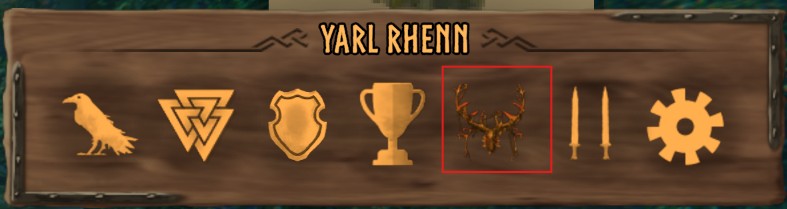
Open the inventory. The row of buttons above your character (Compendium, Skills, Trophies, Achievements, PvP) has a new Powers button, showing the icon of your active power. It opens a window in the style of the Skills window with one row per power: icon, name, and Active on the one you have. Hover a row for the power's description, click it to make it your active power. The message "Activated: <power>" confirms the switch and the power icon in the bottom-left corner of the HUD changes at once. Escape, the close button or a click outside the window closes it.
On a gamepad: the stick or d-pad moves the selection, A activates it, B closes the window.
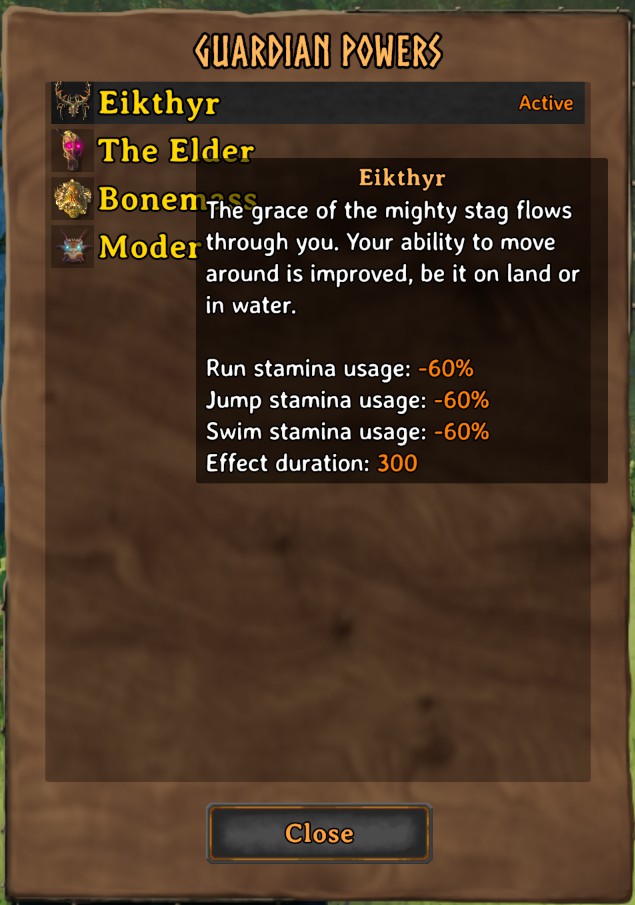
Which powers are listed. Only powers this character has activated at their boss stone at least once. Hanging the trophy is not enough; you have to hook the stone and take the power one time, exactly as in the unmodded game. The game records that on the character, and the mod reads that record. Until a character has done that for at least one boss, the window says so. A new character on an old world still visits each stone once.
Cooldown. The guardian power cooldown is one timer shared by every power. Switching does not reset it, the same as switching at a stone: if Eikthyr is on cooldown and you switch to Bonemass, Bonemass is ready when the timer runs out.
Statistics. A switch counts in your character's statistics the same way a switch at a stone does.
Guardian powers added by other mods are listed too, once the character has activated them at their stone.
Installation
With a mod manager (Thunderstore Mod Manager, r2modman, Gale): install it from the mod list, or click Install with App on this page. BepInExPack is installed alongside it.
By hand: install BepInExPack_Valheim first. Then unzip this package and put ChangeActivePowerOnTheGo.dll in Valheim\BepInEx\plugins\ChangeActivePowerOnTheGo\.
Configuration
None. There is no config file and nothing to set up.
Multiplayer
Client-side only. Your active power is part of your character, not of the world, so only the players who want to switch away from the stones need the mod. The server needs nothing, and players without the mod are not affected in any way.
Compatibility
No known conflicts. The mod adds one button to the inventory's info panel and one window; it does not change how powers work, how they are activated, or what they do. A mod that rebuilds the inventory screen's info panel could hide the button.
With DraggableUI 1.1.0 or later installed, the Powers window can be dragged by its background while open and placed in its edit mode, like the Skills window; without DraggableUI it sits where the Skills window does.
Something not working?
- No Powers button. The mod did not load, or the info panel was changed by another mod. Open
BepInEx\LogOutput.login the same profile and search forChangeActivePowerOnTheGo. If the name is not there, the mod is not installed in that profile. If it says a button or dialog was "not found", another mod or a game update changed the inventory screen. - The window is empty. This character has not taken a power at a boss stone yet. Visit the stone, hook it, take the power once, and it will be listed from then on.
- Switched, but the power is not ready. The cooldown is shared by every power and carries over, as at the stones. Wait for the HUD timer.
Bugs and feedback
Found a bug? Email a screenshot and the steps to reproduce it to [email protected], with the mod version and your BepInEx\LogOutput.log attached. I check that inbox once a week.