

WhySleepAlone
Share double beds with another Viking, keep a persistent shared respawn, wake Satisfied, add custom modded beds, and use your own dreams and wake text.Why Sleep Alone?
Share a bed. Share a home. Wake up Satisfied.
Why Sleep Alone? expands Valheim's double-bed experience for two players.
Share the vanilla Dragon Bed, use it as a shared respawn point, sleep together, wake with the configurable Satisfied buff, enjoy atmospheric shared dreams, and even enable compatible double beds from other mods.
Created by TheLionCid
Version: 1.0.3
Valheim: 1.0.20
Framework: BepInEx 5.4.2351
Discord / Support: https://discord.gg/kN3cqHqWYA
At a Glance
- Two players, one shared bed
- Shared respawn point
- Satisfied buff after a valid shared night
- 80 shared dreams + 20 wake-up lines
- Neutral, Romantic, Bawdy, Mixed and Custom text modes
- Write your own dreams and wake-up messages
- Add compatible double beds from other mods
- Adjustable sleep and respawn positions
- Vanilla boss/progression dreams and cinematics stay protected
- Built for multiplayer
Quick Start
1. Install the mod
Install Why Sleep Alone? on the host and participating players.
2. Build a Dragon Bed
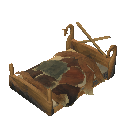
The vanilla Dragon Bed is supported automatically:
piece_bed02
3. Link the second player
Bed owner: Shift + Use to open the shared-bed invitation.
Second player: use/interact with the bed to join.
Once linked, both players can use the bed normally for sleeping and respawn.
Since 1.0.3, shared-bed persistence has been reworked to survive world reloads reliably. Linked partners and open invitations are restored using a persistent identity for each bed, so you do not need to reopen the bed every time you restart the world. An open invitation remains open until the owner closes it or a partner successfully joins.
When linked, the bed can display both names, for example:
Lion & Yume's Bed
4. Sleep together
Complete a valid shared night and both players can receive Satisfied.
That's it. The advanced options below are optional.
Shared Bed Features
A supported shared bed can be linked to two players:
- Player A — the vanilla bed owner
- Player B — the linked partner
Both players can:
- sleep in the same bed;
- use the same bed as their respawn point;
- use separate configurable sleeping positions;
- use separate configurable respawn positions;
- receive Satisfied after a successful shared night.
The persistent bed link and the temporary "currently sleeping" state are handled separately, so leaving the bed, disconnecting or waking up does not permanently occupy a slot.
If a linked bed disappears, the mod uses safe cleanup/fallback behavior instead of trapping the player in a respawn loop.
Satisfied

Sleeping successfully with your linked partner can grant:
Satisfied
Default duration: 60 minutes
Default bonuses:
- +10% Health regeneration
- +10% Stamina regeneration
- +10% Eitr regeneration
Each value can be configured individually.
Satisfied works alongside Valheim's normal Rested effect.
The visual profile also follows the selected tone:
Neutral — Dragon Bed
Uses Valheim's Dragon Bed icon.
Romantic / Bawdy — Love Potion
Uses Valheim's Love Potion icon (potion_pheromones).
♥ Wake-up hearts
Romantic and Bawdy modes can trigger a short burst of Valheim's vanilla pet-heart effect when both players wake.
The heart burst is only a brief visual effect; it does not run for the full Satisfied duration.
Dreams & Mood
Why Sleep Alone? includes 80 shared-sleep dreams and 20 wake-up lines in English and Spanish.
The writing is designed to feel more at home in Valheim: longhouses, voyages, snow, ravens, old battles, runestones, mead, shared fires and the occasional questionable night under the furs.
Neutral
Quiet, mysterious and companion-focused.
Expect dreams about:
- distant homes;
- winter roads;
- Yggdrasil;
- ravens;
- old halls;
- returning from long journeys.
Romantic
Affectionate, but written with a Viking/Norse tone rather than modern romance.
Expect:
- returning from raids;
- waiting by the fire;
- voyages together;
- runestones and remembrance;
- growing old beside someone;
- finding "home" in another person.
Bawdy
Adult Viking tavern humor and suggestive shared-night stories.
Two intensities are available:
- Mild — cheeky, suggestive and playful
- Spicy — more openly adult, while still keeping the tone humorous rather than graphic
Mixed
A varied blend of all built-in styles:
- 45% Neutral
- 30% Romantic
- 20% Bawdy Mild
- 5% Bawdy Spicy
Custom
Use your own dreams and wake-up messages.
More on that below.
Less Repetition
The mod keeps a small local history so the same lines do not constantly repeat.
- up to the last 10 dreams are avoided while alternatives exist;
- recent wake-up lines are also avoided;
- small text pools relax safely instead of blocking sleep.
This history is local and lightweight.
Vanilla Dreams Always Come First
Why Sleep Alone? uses Valheim's own dream presentation.
It does not replace the sleep screen with a custom cinematic system.
Most importantly:
Boss, progression, special and cinematic dreams always have priority over Why Sleep Alone?
The mod only replaces vanilla dream results that it can safely identify as ordinary generic dreams.
If Valheim has something important to show you, Valheim wins.
Because of this, a Why Sleep Alone? dream is not guaranteed to appear every shared night.
Double Beds from Other Mods
Version 1.0.0 added support for compatible modded beds; version 1.0.3 improves persistence across world reloads by restoring shared-bed links and invitations through a persistent bed identity.
The Dragon Bed is always supported automatically.
To add another bed, open:
BepInEx/config/TheLionCid.WhySleepAlone.cfg
Find:
[Compatibility]
AdditionalDoubleBeds =
Add the exact prefab names, separated by commas:
AdditionalDoubleBeds = FancyDoubleBed, OakMarriageBed, MyModdedBed
Use the prefab name
Use the exact prefab name, not the translated or visible item name.
The host validates the real registered prefab before allowing it to work as a shared bed.
Why Sleep Alone? does not automatically enable every object with "bed" in its name.
Positioning custom beds
Custom beds use the same existing position controls as the Dragon Bed:
- Sleep A
- Sleep B
- Spawn A
- Spawn B
If players are floating, clipping or positioned incorrectly, adjust those sliders in the config.
Community-Tested Bed Compatibility
The custom-bed feature was originally added after a community request.
Since release, we have received the first real third-party compatibility confirmation:
Core Wood Extras
Community tested: ✅ Working
A player confirmed that both double-sized beds from Core Wood Extras worked correctly after adding their prefab names to AdditionalDoubleBeds.
This confirms that the custom-bed system can work successfully with third-party beds in real multiplayer use.
Other bed mods
Other bed mods may also work, but compatibility depends on how their prefabs are built.
If you successfully use Why Sleep Alone? with another bed mod, please let us know so it can be added to the confirmed compatibility list.
When reporting compatibility, please include:
- mod name;
- mod version;
- exact bed prefab name;
- whether it worked correctly;
- any positioning adjustments you needed.
Custom Dreams & Wake-Up Messages
Want private jokes, personal memories or your own romantic/bawdy lines?
Why Sleep Alone? can load them from:
BepInEx/config/WhySleepAlone_CustomText.txt
If the file does not exist, the mod creates an example automatically.
It will never overwrite an existing custom text file.
Example
# Lines beginning with # are comments.
# One complete message per line.

[Dreams]
You dream of the first house you built together...
Someone stole all the furs again. Suspicious.
You remember your first voyage together.

[Wake]
You wake beside the reason you keep coming home.
The bed survived another night.
The file uses UTF-8, so accented characters and other Unicode text are supported.
Use only your custom text
[Text]
SharedSleepTone = Custom
Mix your text with the built-in dreams
IncludeCustomInMixed = true
When enabled, valid custom entries receive a small share of the Mixed selection pool.
Important
Custom text is local.
It is not synchronized between players.
That means each player can intentionally have a different custom text file.
After editing the file, restart the game or reload the BepInEx config through a tool that performs ConfigFile.Reload.
If the file is missing, empty or malformed, the mod falls back safely instead of breaking sleep.
Multiplayer
Why Sleep Alone? is designed around multiplayer.
For the best experience:
- install the same Why Sleep Alone? version on host and participating clients;
- do not keep old copies of
WhySleepAlone.dll; - everyone must also have any third-party mod that provides a custom bed.
For additional beds:
- the host controls the allowed bed list;
- that list is distributed to clients through the mod's existing gameplay synchronization;
- clients cannot locally add a bed that the host has not allowed.
Custom dream text remains local and is not synchronized.
Configuration
Main config:
BepInEx/config/TheLionCid.WhySleepAlone.cfg
Useful options include:
- enable / disable Why Sleep Alone?;
Satisfiedduration;- Health regeneration bonus;
- Stamina regeneration bonus;
- Eitr regeneration bonus;
- Neutral / Romantic / Bawdy / Mixed / Custom text mode;
- Mild / Spicy Bawdy intensity;
- include custom text in Mixed;
- additional double-bed prefab list;
- heart effects;
- Sleep A / Sleep B positions;
- Spawn A / Spawn B positions;
- anti-repeat behavior;
- debug logging.
For most users, the defaults are enough.
Installation
Thunderstore / r2modman
Install Why Sleep Alone? normally through your preferred Thunderstore-compatible mod manager.
Required dependency:
- BepInExPack Valheim 5.4.2351
Manual
- Install BepInExPack for Valheim.
- Copy the
WhySleepAlonefolder into:
BepInEx/plugins/
- You should end up with:
BepInEx/plugins/WhySleepAlone/WhySleepAlone.dll
- Start Valheim.
Multiplayer
Install the same version on the host and participating players.
Do not keep multiple copies of WhySleepAlone.dll in different plugin folders.
Troubleshooting
My partner cannot join the bed
Check that:
- both players have the same version of Why Sleep Alone?;
- the owner opened the bed for sharing;
- the correct bed is being used;
- old DLL copies have been removed.
A custom bed does not work
Check that:
- the prefab name is exact;
- it is listed in
AdditionalDoubleBeds; - the host has the bed enabled;
- everyone has the mod that adds the bed.
Players are positioned badly on a custom bed
Adjust:
- Sleep A
- Sleep B
- Spawn A
- Spawn B
My custom dream text does not appear
Check:
WhySleepAlone_CustomText.txtexists;- the text is under
[Dreams]; SharedSleepTone = Custom, orIncludeCustomInMixed = true;- you restarted/reloaded the configuration after editing.
Remember: vanilla special dreams can take priority.
Community & Support
Bug reports, compatibility confirmations, suggestions and feedback are welcome.
Discord:
https://discord.gg/kN3cqHqWYA
When reporting a problem, please include:
- Why Sleep Alone? version;
- Valheim version;
- active mod list;
- host / client / single-player / dedicated server;
- reproduction steps;
- relevant BepInEx logs.
For custom beds, also include:
- bed mod name and version;
- exact prefab name.
Development
Why Sleep Alone? has been developed with assistance from AI tools for areas such as code generation, debugging, visual planning and documentation.
Final design decisions, testing and release management are handled by TheLionCid.
Credits
- TheLionCid — creator and author
- Community members — testing, bug reports and feature suggestions
- Core Wood Extras user/tester — first confirmed third-party double-bed compatibility report
- BepInEx / Valheim modding community — framework and ecosystem
- Valheim — native runtime assets reused where appropriate
Español
Comparte cama. Comparte hogar. Despierta Satisfecho.
Why Sleep Alone? amplía la experiencia de dormir en pareja en Valheim.
Discord / Soporte: https://discord.gg/kN3cqHqWYA
Puedes compartir la Cama de dragón, usarla como punto de aparición para dos jugadores, dormir juntos, conseguir el efecto Satisfecho, disfrutar de sueños compartidos y habilitar camas dobles compatibles de otros mods.
En pocas palabras
- Dos jugadores en una cama
- Punto de aparición compartido
- Efecto Satisfecho
- 80 sueños + 20 frases de despertar
- Neutral, Romántico, Picante, Mixto y Personalizado
- Tus propios sueños y mensajes
- Camas dobles de otros mods
- Posiciones ajustables
- Los sueños importantes de Valheim siempre tienen prioridad
- Diseñado para multijugador
Cómo empezar
- Instala el mod en host y jugadores.
- Construye una Cama de dragón.
- El propietario usa Mayús + Usar para abrir la cama.
- El segundo jugador interactúa con ella para unirse.
- Dormid juntos.
Una noche compartida válida puede conceder Satisfecho a ambos.
Desde la 1.0.3, la persistencia de las camas compartidas se ha rehecho para sobrevivir correctamente a las recargas del mundo. La pareja vinculada y las invitaciones abiertas se restauran mediante una identidad persistente de cada cama, por lo que no hace falta volver a abrirla cada vez que reiniciáis el mundo. Si queda abierta esperando compañero, conserva ese estado hasta que el propietario la cierre o alguien se vincule.
Cuando hay dos jugadores vinculados puede mostrarse, por ejemplo:
Cama de Lion y Yume
Satisfecho
Duración predeterminada: 60 minutos
Bonificaciones predeterminadas:
- +10% regeneración de Vida
- +10% regeneración de Aguante
- +10% regeneración de Eitr
Funciona junto a Descansado y todos los valores son configurables.
El perfil visual depende del tono:
Neutral — Cama de dragón
Utiliza el icono vanilla de la Cama de dragón.
Romántico / Picante — Love Potion
Utiliza el icono vanilla de Love Potion (potion_pheromones).
♥ Corazones al despertar
Los modos Romántico y Picante pueden mostrar una breve ráfaga del efecto vanilla de corazones al despertar juntos.
Camas de otros mods
Añade los nombres exactos de los prefabs en:
BepInEx/config/TheLionCid.WhySleepAlone.cfg
Ejemplo:
[Compatibility]
AdditionalDoubleBeds = FancyDoubleBed, OakMarriageBed
Usa el nombre exacto del prefab, no el nombre visible o traducido.
Las camas adicionales utilizan los mismos controles:
- Sleep A
- Sleep B
- Spawn A
- Spawn B
Así puedes adaptar manualmente la posición de los dos jugadores.
Compatibilidad confirmada por la comunidad
Core Wood Extras — ✅ Compatible
Un jugador ha confirmado que las dos camas dobles de Core Wood Extras funcionan correctamente añadiendo sus nombres de prefab a AdditionalDoubleBeds.
Esta es actualmente la primera compatibilidad con camas externas confirmada en una partida real.
Si utilizas otro mod de camas y funciona correctamente, cuéntanoslo para añadirlo a la lista.
Textos personalizados
Archivo:
BepInEx/config/WhySleepAlone_CustomText.txt
Ejemplo:
[Dreams]
Sueñas con la primera casa que construisteis juntos...
Alguien ha vuelto a robar todas las pieles.

[Wake]
Despiertas junto a la razón por la que siempre vuelves a casa.
La cama ha sobrevivido otra noche.
Para usar solo tus textos:
[Text]
SharedSleepTone = Custom
Para mezclarlos con los textos del mod:
IncludeCustomInMixed = true
Los textos son locales: cada jugador puede tener los suyos.
Tonos de sueño
Neutral
Misterioso, tranquilo y melancólico.
Romántico
Hogar, viajes, juramentos, regreso de incursiones y compañía.
Picante
Humor adulto de taberna vikinga.
- Mild — insinuante
- Spicy — más adulto y atrevido
Mixto
Combina todos los tonos.
Personalizado
Utiliza tus propios textos.
Sueños de Valheim
Why Sleep Alone? solo sustituye sueños genéricos que puede identificar de forma segura.
Los sueños de jefes, progreso, eventos especiales y cinemáticas vanilla siempre tienen prioridad.
Por eso no tiene por qué aparecer un sueño de Why Sleep Alone? todas las noches.
Multijugador
Usa la misma versión del mod en host y jugadores.
Para camas de otros mods:
- todos deben tener instalado el mod que añade la cama;
- el host controla qué prefabs están permitidos;
- la lista se sincroniza con los clientes.
Los textos personalizados no se sincronizan.
Instalación
Thunderstore / r2modman
Instálalo normalmente desde tu gestor de mods.
Dependencia:
- BepInExPack Valheim 5.4.2351
Manual
Coloca:
WhySleepAlone.dll
en:
BepInEx/plugins/WhySleepAlone/
Soporte y comunidad
Discord:
Para reportar un problema incluye, si es posible:
- versión de Why Sleep Alone?;
- versión de Valheim;
- lista de mods;
- si eres host o cliente;
- pasos para reproducirlo;
- logs de BepInEx.
Para camas externas añade también:
- nombre del mod;
- versión;
- prefab exacto de la cama.
Créditos
TheLionCid — creador y autor de Why Sleep Alone?
Gracias a la comunidad por los reportes, las pruebas y las sugerencias que han hecho crecer el mod.
Why Sleep Alone? es un mod independiente de Valheim y no está afiliado ni respaldado por Iron Gate.
Visual references in this README use vanilla Valheim assets. The Dragon Bed and Love Potion images are sourced from Jötunn's documentation, while the Rested icon is shown from a Valheim data mirror. They are documentation-only references and are not bundled as gameplay assets by Why Sleep Alone?.