


ItemUpgrader
Valheim-style item upgrade roulette with a 90% default chance cap, progression and one-stack rewards. Optional NO LIMITS mode with hover help, configurable values and automatic English/Russian UI. Client-side.Item Upgrader
Turn spare resources and equipment into a chance to obtain the reward you want. Choose your stake, choose an item and its quantity, then check the odds before spinning the upgrade wheel.
Valheim 1.0.16 · Client-side · English / Русский · F8 menu
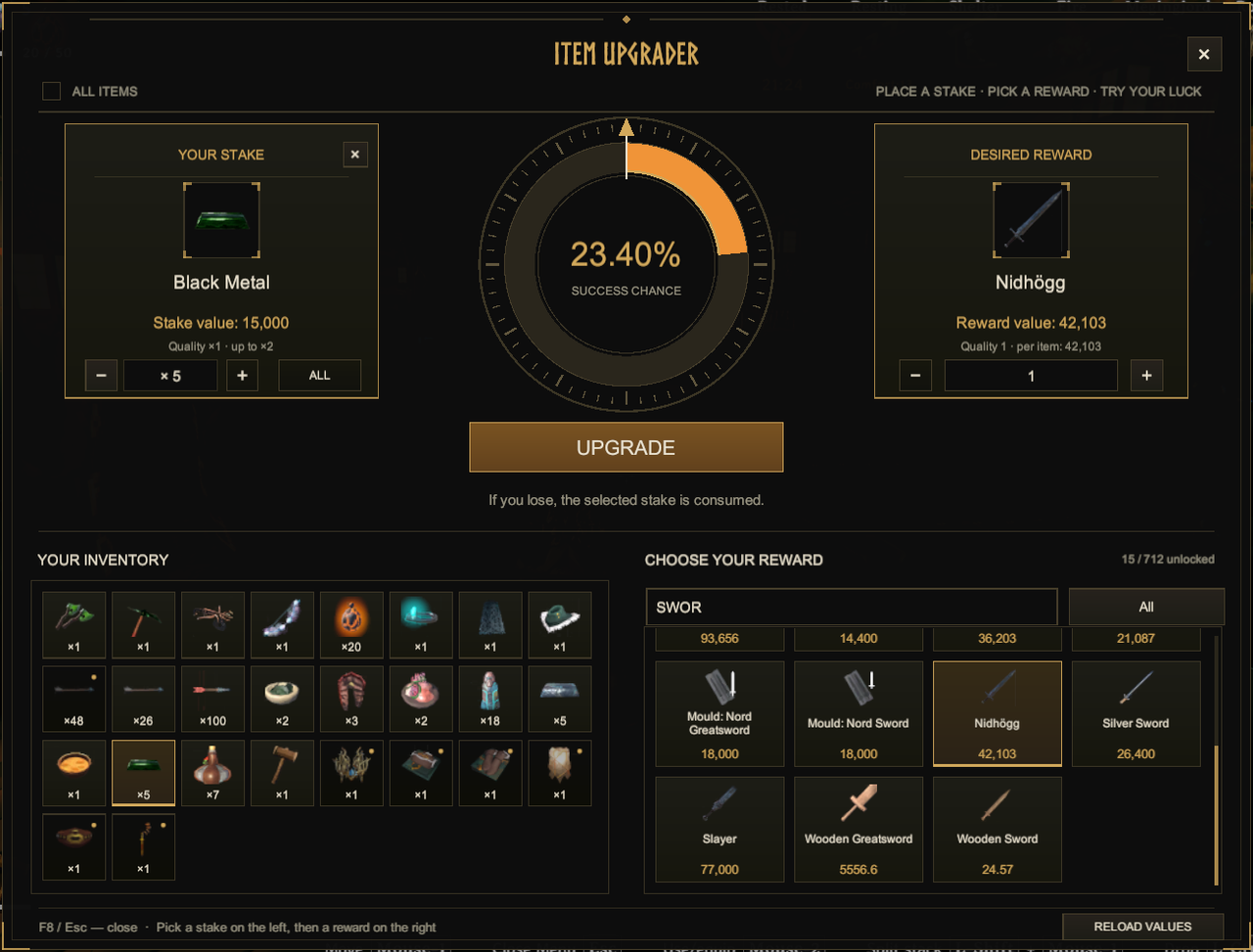
Actual in-game screenshot from an earlier interface version. Version 0.6.2 combines the catalog and stack overrides into NO LIMITS, adds hover help and refines spacing. Items and values shown depend on your game and configuration.
How it works
- Press F8 to open the menu.
- Select an unequipped item from your inventory and the quantity you want to spend.
- Choose a reward from the catalog and set how many you want to receive. By default, the maximum is one actual stack of that item.
- Check the displayed success chance and press UPGRADE.
- Watch the smooth five-second spin. On success, press CLAIM to collect your reward.
The selected stake is spent on every attempt. A successful roll gives you the chosen reward; a failed roll consumes the stake without a reward. Rewards are created at quality 1 with full durability. If your inventory cannot hold everything, you can claim the reward in smaller batches.
F8 or Esc closes the menu. Closing it does not cancel a spin already in progress.
Features
- A menu that fits Valheim. Dark panels, warm bronze details, clear item cards and a central chance wheel.
- Progression that follows your character. Rewards unlock as you discover their materials/items or crafting recipes. Existing character discoveries count too.
- One optional NO LIMITS mode. The top-left NO LIMITS / БЕЗ ОГРАНИЧЕНИЙ switch opens the full obtainable catalog and permits multiple reward stacks together. It starts off on world/character entry. Test, obsolete, NPC-only and exchange-disabled items remain excluded.
- One-stack rewards by default. Each item uses its own actual stack size, read from the game. An item with a stack size of 30 allows up to 30 rewards; equipment with a stack size of 1 allows one. Stack changes from other mods are respected.
- Help beside the switch. Hover the ? icon for a full explanation of both modes, the current quantity ceiling and the configured chance cap. Prices and odds are still applied in NO LIMITS mode. The switch is locked during a spin and while a reward is waiting to be claimed.
- Quantity selection. Choose both how much to stake and how many reward items you want. Buttons and typed input share the same limit, and quantity is checked again before the stake is spent. Higher total reward value lowers your chance for the same stake.
- Configurable item values. Automatic values consider resources, biome progression and crafting costs, including metals and Deep North content. Equipment quality increases value by at most ×2; wear reduces stake value.
- A quick catalog. Search by item name or internal ID, cycle categories, scroll with the mouse wheel or drag the slim scrollbars.
- Automatic English and Russian. The interface follows the game language. Other languages use English UI text, while item names stay in the game's selected language.
Installation
Install with Thunderstore Mod Manager or r2modman. The required BepInEx package is installed as a dependency.
For manual installation, copy the included folder so the DLL is located at:
Valheim/BepInEx/plugins/ItemUpgrader/ItemUpgrader.dll
Start the game with BepInEx, enter a world and press F8.
The mod runs on the client. No server installation is required; the menu, odds and outcomes are calculated locally.
Settings and balance
After the first launch, settings are stored in BepInEx/config/valheim.itemupgrader.cfg. Individual values are in BepInEx/config/ItemUpgrader/ItemValues.json.
| Setting | Default | What it changes |
|---|---|---|
| OpenKey | F8 | Menu hotkey |
| MaximumRewardAmount | 1000 | Absolute reward ceiling; normal mode also applies the selected item's stack size |
| SpinSeconds | 5 | Wheel animation duration |
| ScrollRowsPerNotch | 2 | Mouse-wheel scrolling speed |
| ReturnRate | 0.85 | Base chance multiplier |
| MaximumChance | 0.90 | Default chance cap: 90%; applies in both modes |
| UpgradeChanceExponent | 1.25 | Extra reduction for rewards worth more than the stake |
With NO LIMITS off, rewards must be discovered and their maximum quantity is the lower of the selected item's actual stack size and MaximumRewardAmount. With it on, the full obtainable catalog is visible and only the configured quantity ceiling applies (1 to 10000). Switching it off clamps oversized quantities and clears undiscovered targets. The mode resets to off on world/character entry. Previously won rewards are preserved in full, including rewards larger than one stack.
The new default MaximumChance is 0.90 (90%). On the first update to 0.6.2, the former standard 0.95 is changed to 0.90 once; other custom values are retained. NO LIMITS does not bypass the configured chance cap.
The chance depends on total stake value ÷ total reward value. A small stake aimed at a much more valuable reward has a smaller chance; adding reward items increases their total value. The number shown in the menu is the calculated chance for the current selection, not a fixed chance for every roll.
Edit ItemValues.json and use RELOAD VALUES / ОБНОВИТЬ ЦЕНЫ to apply the new values. Setting an item's value to 0 disables its exchange; removing its entry restores automatic pricing. Custom prices override automatic value limits, while the quality multiplier remains capped at ×2.
When updating, close the game, replace the DLL and keep only one copy in your plugins folder. Preserve your configuration, ItemValues.json and AutomaticValues.json.
Русский
Item Upgrader превращает лишние ресурсы и снаряжение в шанс получить выбранный предмет. Задай ставку и желаемую награду, посмотри вероятность и испытай удачу на колесе улучшения.
Как пользоваться
- Нажми F8 и выбери предмет из своего инвентаря.
- Укажи количество ставки кнопками − / + / ВСЁ.
- Выбери награду в каталоге справа и задай её количество. По умолчанию максимум — один стак этого предмета.
- Посмотри шанс в центре и нажми УЛУЧШИТЬ.
- После пятисекундного вращения при успехе нажми ЗАБРАТЬ.
Ставка списывается при каждой попытке. При успехе ты получаешь выбранную награду; при проигрыше ставка сгорает. Награда выдаётся первого качества и с полной прочностью. При нехватке места её можно забрать частями. F8 / Esc закрывает меню, но не отменяет начатое вращение.
Режим «Без ограничений»
Вверху меню один переключатель БЕЗ ОГРАНИЧЕНИЙ. По умолчанию он выключен: каталог следует открытиям персонажа, максимум награды — один стак выбранного предмета. Размер стака берётся из игры и учитывает изменения других модов. Лимит показан под ячейкой награды.
Включение одновременно открывает весь каталог доступных игровых вещей и разрешает несколько стаков до MaximumRewardAmount (по умолчанию 1000). Цены, вероятность и общий предел количества продолжают действовать. Служебные, устаревшие, NPC-предметы и вещи с отключённым обменом скрыты в обоих режимах.
Наведи курсор на ? рядом с переключателем: подсказка подробно объясняет оба режима и показывает действующие пределы. При выключении завышенное количество сразу уменьшается, шанс и цена пересчитываются, а ещё не открытая цель сбрасывается. Режим выключается при входе в мир или смене персонажа; во время вращения и до получения выигрыша переключатель заблокирован. Ранее выигранные награды сохраняются целиком.
Максимум шанса по умолчанию — 90%. При первом обновлении на 0.6.2 прежние стандартные 95% меняются на 90%; другие установленные значения сохраняются. Режим «Без ограничений» не снимает этот предел.
Прогрессия, ценности и язык
По умолчанию каталог учитывает открытия персонажа: знакомые предметы/материалы и рецепты. Режим БЕЗ ОГРАНИЧЕНИЙ временно снимает это ограничение вместе с лимитом одного стака.
Ценности учитывают ресурсы, биом и стоимость изготовления. Чем выше суммарная ценность награды относительно ставки, тем меньше шанс её получить. Бонус качества ограничен ×2, а износ снижает оценку ставки. Цены можно настроить в ItemValues.json и применить кнопкой ОБНОВИТЬ ЦЕНЫ.
Русский и английский интерфейсы переключаются автоматически по языку Valheim. Для остальных языков интерфейс мода английский, а названия предметов остаются на языке игры.
Установи через менеджер модов или скопируй BepInEx/plugins/ItemUpgrader в папку игры. На сервер устанавливать мод не требуется: меню и обмен работают локально. При обновлении закрой игру, замени DLL и сохрани cfg и оба файла цен.
Credits and license
Created with assistance from OpenAI Codex. Released under the MIT License.
MIT License
Copyright (c) 2026 Item Upgrader contributors
Permission is hereby granted, free of charge, to any person obtaining a copy of this software and associated documentation files (the "Software"), to deal in the Software without restriction, including without limitation the rights to use, copy, modify, merge, publish, distribute, sublicense, and/or sell copies of the Software, and to permit persons to whom the Software is furnished to do so, subject to the following conditions:
The above copyright notice and this permission notice shall be included in all copies or substantial portions of the Software.
THE SOFTWARE IS PROVIDED "AS IS", WITHOUT WARRANTY OF ANY KIND, EXPRESS OR IMPLIED, INCLUDING BUT NOT LIMITED TO THE WARRANTIES OF MERCHANTABILITY, FITNESS FOR A PARTICULAR PURPOSE AND NONINFRINGEMENT. IN NO EVENT SHALL THE AUTHORS OR COPYRIGHT HOLDERS BE LIABLE FOR ANY CLAIM, DAMAGES OR OTHER LIABILITY, WHETHER IN AN ACTION OF CONTRACT, TORT OR OTHERWISE, ARISING FROM, OUT OF OR IN CONNECTION WITH THE SOFTWARE OR THE USE OR OTHER DEALINGS IN THE SOFTWARE.


