


Build Hotbar
A standalone building hotbar with an F6 toggle, saved building pieces, multiple rows, custom hotkeys, draggable positioning and in-game settings. No Build Camera required.Build Hotbar
Keep your favourite building pieces one key press away. A standalone client-side mod for Valheim, with built-in settings and no Build Camera requirement.
Tested on Valheim 1.0.7 (network 39).
Getting started
Equip a hammer or another building tool, then press F6 to enable the hotbar. Press F6 again to restore your normal inventory shortcuts. Auto activation on equip is optional and off by default.
Open the building menu and hover over a piece, then press Shift + a slot key to save it. With no menu item hovered, this saves your currently selected piece instead.
| Default control | Action |
|---|---|
| F6 | Enable or disable the building hotbar |
| 1 to 8 | Select a saved piece in the current row |
| Shift + slot key | Save the hovered or selected piece |
| Alt + slot key | Clear that slot |
| Alt + mouse wheel | Switch hotbar rows |
Putting away or changing your building tool resets activation. Normal material requirements and building restrictions still apply.
Make it yours
- 8 slots and 3 rows by default. Choose 1 to 8 slots and 1 to 12 rows, with one row visible at a time.
- Move it: open the building menu and drag the title. The default position is top centre.
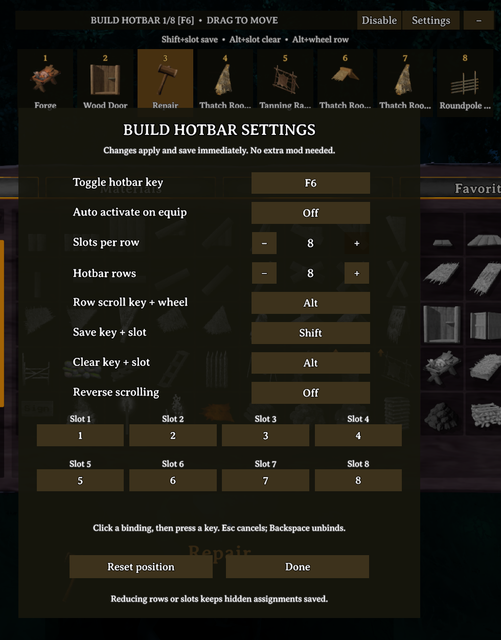
- Change keys: open the building menu, click Settings, click a binding, then press your preferred keyboard key. Escape cancels; Backspace unbinds.
- Hide the slots: click the minus button to collapse the bar. Collapse keeps shortcuts active; use F6 or Disable to turn them off.
- Settings save immediately. No ConfigurationManager needed. Adjust row scrolling, slot count, row count, activation and bindings in game.
- Saved pieces are kept separately for each building piece table and shared across characters/worlds within your mod profile. Reducing rows or slots preserves hidden assignments.
Custom bindings support keyboard keys. Save/clear use a held key plus a slot key; row switching uses a held key plus the wheel.
Screenshots
The screenshots show a user configuration with eight rows. The default is three.

Installation and existing users
Install with Thunderstore Mod Manager or r2modman and launch modded. Each player who wants the hotbar installs it locally; the server does not need it.
Build Camera is optional. Keep only one copy of BuildCameraHotbar.dll in your profile. Versions 1.1.0 and 1.1.1 of Build Camera Unofficial Valheim 1.0 Fix already bundle an older hotbar. Close the game and remove that older hotbar DLL before using this standalone package, while keeping the camera DLL if you want its camera features. Updating or reinstalling those older camera packages can restore their bundled DLL.
The DLL name and configuration identity are retained so existing assignments, bindings and position carry over. Configuration: BepInEx/config/ValheimEnthusiestKakimaki.BuildCameraHotbar.cfg.
For manual installation, install BepInEx and copy the package's plugins folder into BepInEx.
Credits and source
Build Hotbar is maintained by ValheimEnthusiestKakimaki / KakimakiDev. It began as a companion to the original Build Camera mod by Azumatt, CookieMilk and the original Build Camera contributors. This standalone hotbar does not include their camera plugin.
- Azumatt's Build Camera Custom Hammers Edition
- Build Camera Custom Hammers Edition source
- Original Build Camera source
Licensed under GNU GPL v3. The package includes LICENSE.txt and Source.zip with source code and build instructions.