

CatosChestViewer
See chest contents and use optional Stash Sense highlights while looking at a chest.Catos Chest Viewer
By Catosaur.
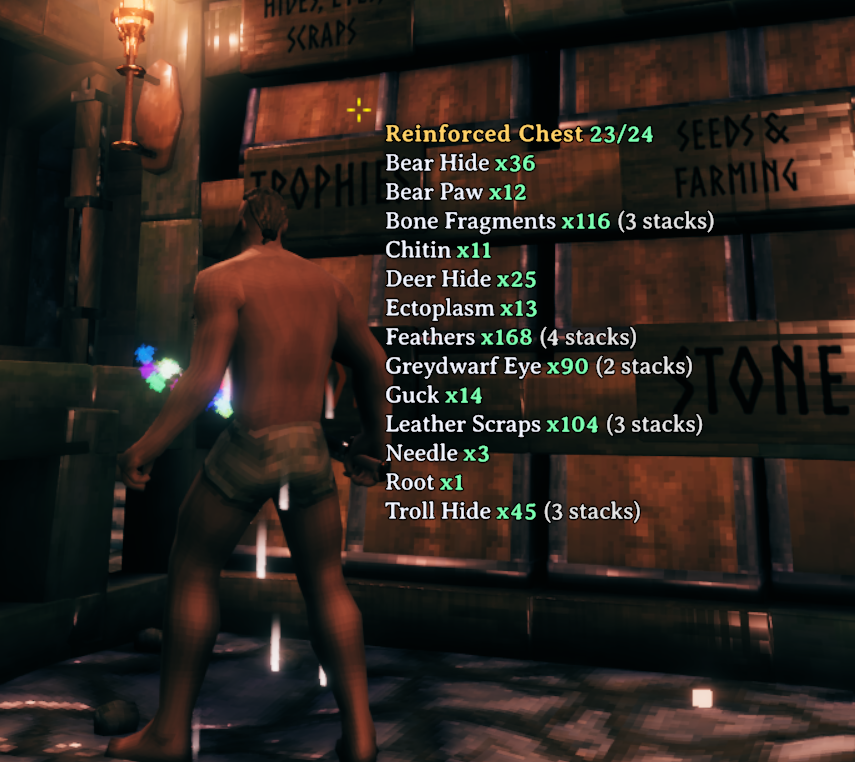
Client-side mod to see what is inside a chest while looking at it, without opening the container. Items are localized, alphabetized, and duplicate stacks are combined into one row. The header shows used slots out of the container's total slots. Optional fullness colors make the capacity easier to scan, while the numeric fraction remains visible. Rows can also show how many source stacks contributed to the total.
Client-side only
CatosChestViewer is a client-side mod. It does not need to be installed on a dedicated server, and other players do not need to install it. Each client independently renders its own local hover display.
Supported containers
The viewer supports vanilla chests and compatible modded storage that exposes
Valheim's native Container component, inventory, and access behavior. This
includes native-compatible storage such as modded iron chests when they follow
that API. Unsupported custom storage systems are ignored safely.
RuneStorage terminals are skipped, so the viewer does not show their unused chest inventory. RuneStorage Cores still show their contents.
Example output:
Reinforced Chest 23/24
Bone Fragments x116 (3 stacks)
Feathers x168 (4 stacks)
Wood x240
The source-stack detail can be disabled with ShowStackCount in the generated
configuration file. Stack counts are shown only when an item occupies multiple
source stacks.
Fullness colors
The capacity value uses these default thresholds:
- Green below 70% full
- Orange from 70% to below 100% full
- Red at 100% full
Disable the colors or change the thresholds and colors in the generated config:
[Display]
FullnessColoringEnabled = true
FullnessGreenBelowPercent = 70
FullnessRedFromPercent = 100
Fullness is based on occupied inventory slots, not the number of items inside a stack.
Stash Sense (optional)
Stash Sense helps with quick organization. When you hover a chest, it highlights each chest item that is also present in your own inventory, making suitable storage easy to spot at a glance. It is enabled by default; use the matching-row highlight to find the right chest, or turn it off in the generated config:
[Stash Sense]
Enabled = false
Stash Sense only changes the local hover text; it never moves, sorts, opens, or otherwise changes items. It is client-side and does not require other players or the server to install the mod.
Installation
Install the Thunderstore package with a Valheim mod manager, or place
CatosChestViewer.dll in the client profile's BepInEx/plugins directory.
BepInExPack Valheim 5.4.2350 is required.
The mod creates its configuration at
BepInEx/config/com.catosaur.catoschestviewer.cfg.