

You are viewing a potentially older version of this package. View Latest Version
SeneaLHudLayout
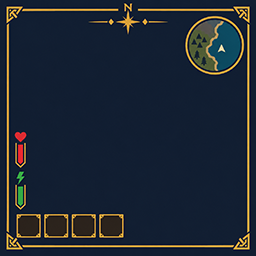
Moves SeneaL UI's hotbar to the bottom left and keeps compass, health, boss bars, and Passive Powers readable.SeneaL HUD Layout
Client layout companion for SeneaL UI. Moves the hotbar cluster to the bottom left, lifts health/food above it, keeps the compass at the top, and places Passive Powers next to the food column.
Requires SeneaL UI. Clients only.
1.1.30
- Selected and equipped items get a soft gold glow.
[Slots] Highlightdefaults on. Color is[Slots] HighlightColor, size is[Slots] HighlightSize. - A green check marks the selected hotbar item and equipped gear.
[Slots] CornerPipdefaults on. Size is[Slots] CornerPipSize. - Inventory equip countdown:
[Slots] ShowEquipCue. Hotbar countdown for worn gear only:[Slots] ShowGearBarCue. - Health numbers sit just below the bar. The login server-rules window stays hidden.
1.1.15
- Equipped items get a brighter blue frame.
[Slots] SelectionGlowis 0 to 3, default 1.4. - Equipping or unequipping shows a white seconds countdown on the item.
[Slots] ShowEquipCuedefaults on.
1.1.8
[Powers] Scalesizes the Passive Powers icons (0.5 to 1.5, default 1).- Creature and player bars show
current/maxjust above the bar.[WorldHud] ShowHealthNumbersdefaults on. [Vitals] AlwaysShowStamina,AlwaysShowEitr, andAlwaysShowAdrenalinedefault off, so SeneaL UI still fades those bars.- Item Drawer hover shows one slot and the total count.
Config: BepInEx/config/cjayride.SeneaLHudLayout.cfg
[General] Enabled = false restores SeneaL's own placement.
SeneaL UI by seneaL. Layout overlay by cjayride.


