

You are viewing a potentially older version of this package. View Latest Version
SeneaLHudLayout
Moves SeneaL UI's hotbar to the bottom left and keeps compass, health, boss bars, and Passive Powers readable.SeneaL HUD Layout
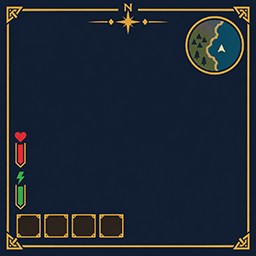
Client layout companion for SeneaL UI. Moves the hotbar cluster to the bottom left, lifts health/food above it, keeps the compass at the top, and places Passive Powers next to the food column.
Requires SeneaL UI. Clients only.
1.1.93
- Character window: Quests button (EpicLoot adventure mode) and Talents button (TalentTree), left of the settings gear. Same dark fill, 1 pixel brass edge.
- Quests opens Bounties and Treasure tabs: target, zone, stars, loot, and a Map button. Closing the map returns to that list.
Bounties: 2/8uses EpicLoot's Max Bounties Per Player. Treasure shows how many maps you have. - Accepting a bounty or treasure map from Haldor does not open the map (
Quests/KeepMapClosedOnAccept, on by default). - Passive Powers shared cooldown is shown beside the icons.
1.1.85
- With SkillsReworked installed, the Skills button opens the vanilla window.
UseVanillaSkillsWindow. - The Passive Powers "Passive" label is hidden. Shared activation cooldown sits to the right of the icons; grey F / Shift+F keys while it runs. Green above an icon = passive buff time left; red under a key = that power's depletion.
1.1.84
- Creature level stars can be hidden.
ShowCreatureStars(on by default).
1.1.83
- Gold diamonds and lines beside creature names are hidden by default.
ShowNameplateDiamondsto bring them back.
1.1.82
- Talents button beside the character-window level (opens TalentTree).
ShowTalentsButton. - 100 px SkillsReworked XP bar under that level.
ShowLevelXpBar. - Fix: skills like Tenacity can take points again after a death leaves them at a partial level. Needs Tenacity and SkillsReworked.
FixSkillRespendAfterDeath.
1.1.81
- Threat icons: size/lift/opacity (
ThreatIconSize5,ThreatIconLift10,ThreatIconOpacity0.71).ShowThreatIconsto hide them. - Shudnal ConfigurationManager works with SeneaL
ModSettingsWindow = ConfigurationManager. - Nameplate: ValuesBesideLabels restores when off; single CLLC-colored star row;
HideNameplateExtras;ShowEnemyLevel.
1.1.73
- With SeneaL
ModSettingsWindow = ConfigurationManager, F1 opens shudnal ConfigurationManager (SeneaL alone only detects the official BepInEx manager GUID).
1.1.31
- Highlight and check color or size changes apply to items that are already selected.
- Turning Highlight or CornerPip on or off updates marks already on screen.
1.1.30
- Selected and equipped items get a soft gold glow.
[Slots] Highlightdefaults on. Color is[Slots] HighlightColor, size is[Slots] HighlightSize. - A green check marks the selected hotbar item and equipped gear.
[Slots] CornerPipdefaults on. Size is[Slots] CornerPipSize. - Inventory equip countdown:
[Slots] ShowEquipCue. Hotbar countdown for worn gear only:[Slots] ShowGearBarCue. - Health numbers sit just below the bar. The login server-rules window stays hidden.
1.1.15
- Equipped items get a brighter blue frame.
[Slots] SelectionGlowis 0 to 3, default 1.4. - Equipping or unequipping shows a white seconds countdown on the item.
[Slots] ShowEquipCuedefaults on.
1.1.8
[Powers] Scalesizes the Passive Powers icons (0.5 to 1.5, default 1).- Creature and player bars show
current/maxjust above the bar.[WorldHud] ShowHealthNumbersdefaults on. [Vitals] AlwaysShowStamina,AlwaysShowEitr, andAlwaysShowAdrenalinedefault off, so SeneaL UI still fades those bars.- Item Drawer hover shows one slot and the total count.
Config: BepInEx/config/cjayride.SeneaLHudLayout.cfg
[General] Enabled = false restores SeneaL's own placement.
SeneaL UI by seneaL. Layout overlay by cjayride.