

ValheimClock
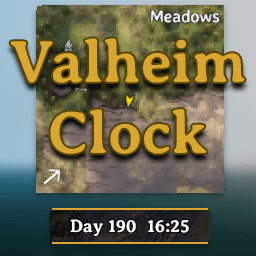
A highly customizable, server-synchronized HUD clock that fits perfectly into Valheim's native UI.Valheim Clock
A lightweight, server-synchronized, highly customizable HUD clock for Valheim.
Valheim Clock adds a permanent, vanilla-friendly time display directly beneath your minimap. Unlike client-based clocks, this mod hooks directly into the server's authoritative ZNet time, ensuring that every player sees the exact same time, synchronized down to the minute.
✨ Features
- Vanilla-Friendly UI: Designed to seamlessly blend into Valheim's aesthetic with a dark semi-transparent background, crisp gold trims, and metallic corner rivets.
- Highly Configurable: Move it, resize it, or change the font size to fit your exact screen resolution and personal taste.
- Dynamic Layouts: Choose between a standard "Single Line" display or a compact "Stacked" layout.
- Instant Hot-Reloading: Adjust your configuration file while playing! The UI will instantly snap to your new settings without needing to restart the game or log out of your server.
- Client-Side: Only players who want to see the clock need to install it.
🎨 Themes

⚙️ Configuration Options
Upon launching the game for the first time, a configuration file will be generated at BepInEx/config/com.orfox.valheimclock.cfg.
General
- 12 Hour Format displays the clock in a 12-hour format with AM/PM instead of 24-hour format time.
- Weather displays the current weather/environment alongside the time.
- Progress bar displays a progress bar at the bottom tracking the day/night cycle.
Position
- Offset X: Move the clock horizontally (Default: 0)
- Offset Y: Move the clock vertically (Default: -10)
Visuals
- Panel Width: Width of the clock background (Default: 160)
- Panel Height: Height of the clock background (Default: 34)
- Font Size: Adjust the text size (Default: 18)
- Text Layout: Choose between
SingleLine(Day 32 14:45) orStacked(Day on top, Time on bottom). - Weather Font Size: Adjust the Weather text size (Default: 14)
- Themes: Choose between
Valheim, Blood, Ocean, Nature, Monochrome
Note: Because this mod supports hot-reloading, you can edit these values in a text editor while standing in-game and hit Save to watch the UI update instantly!
📥 Installation
Recommended (Mod Manager):
- Download and install r2modman or Thunderstore Mod Manager.
- Click "Install with Mod Manager" on this page.
Manual Installation:
- Ensure you have BepInEx installed.
- Download the
.zipfile from this page and extract it. - Move
ValheimClock.dllinto yourBepInEx/pluginsfolder. - Launch the game.