

FineDining
Make food matter with real spoilage, freshness-based stats, Iceboxes, up to 9 food slots, Chef's Choice bonuses, Full Course rewards, Cooking skill perks, bonus outputs, auto-eject cooking, faster fermentation, and clear station hover hints.FineDining
FineDining is a server-synchronized Valheim food overhaul focused on food storage, diet variety, and the Cooking skill.
Showcase
Click a screenshot to open the full-resolution original.
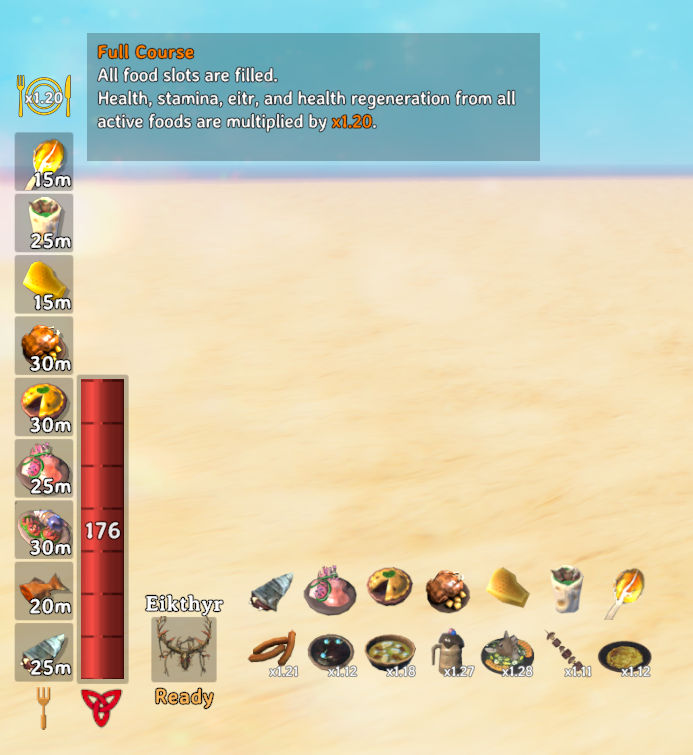
Diet, Chef's Choice, and Full Course
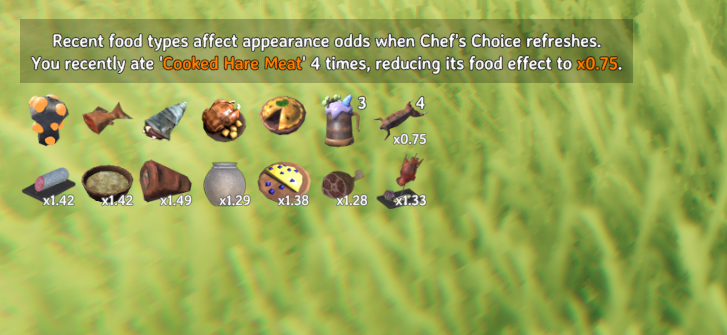
Recent meals influence Chef's Choice. Natural food expiry or a food removed by Puke advances the list.
| Recent meals | Chef's Choice |
|---|---|
 |
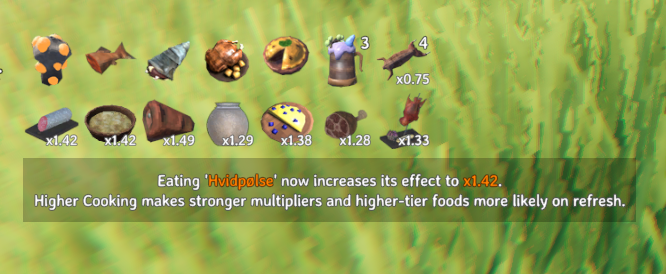 |

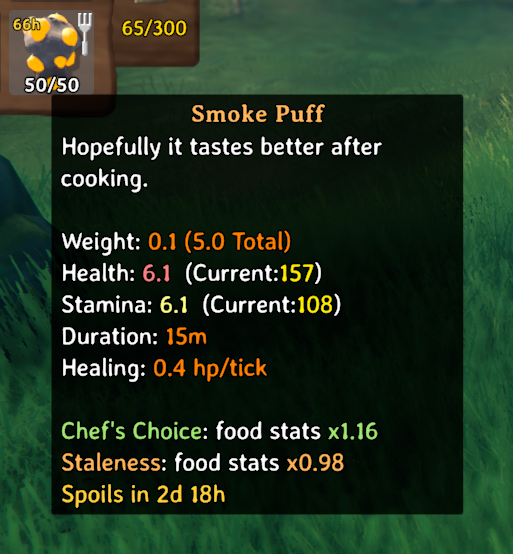
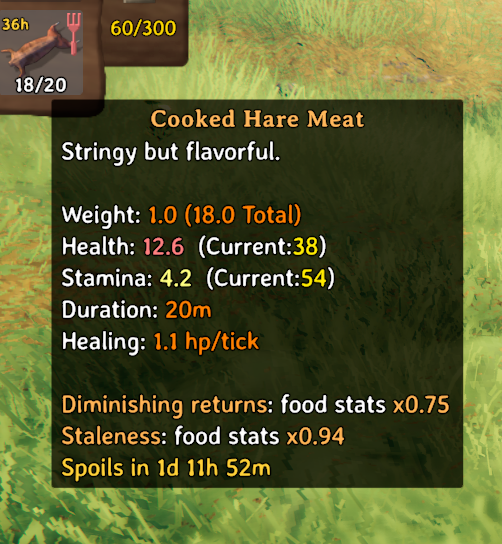
Tooltips show Chef, diminishing, and stale multipliers. Filling every unlocked food slot activates Full Course.
| Chef bonus and freshness penalty | Repetition and freshness penalties |
|---|---|
 |
 |
Cooking and station hints
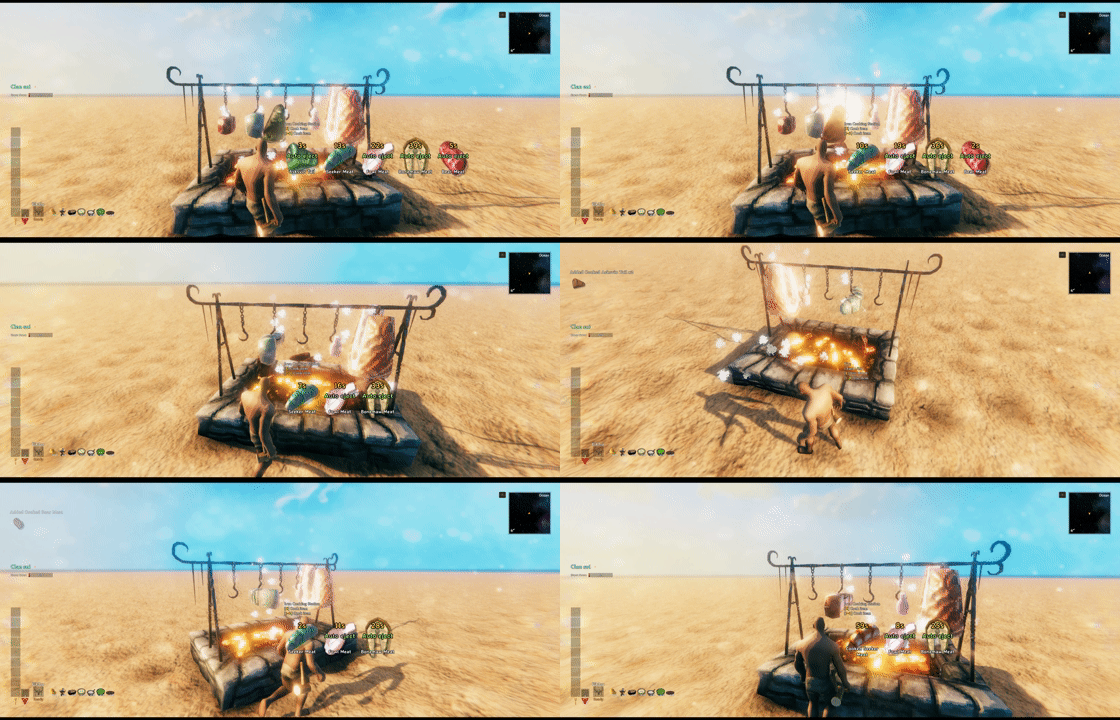
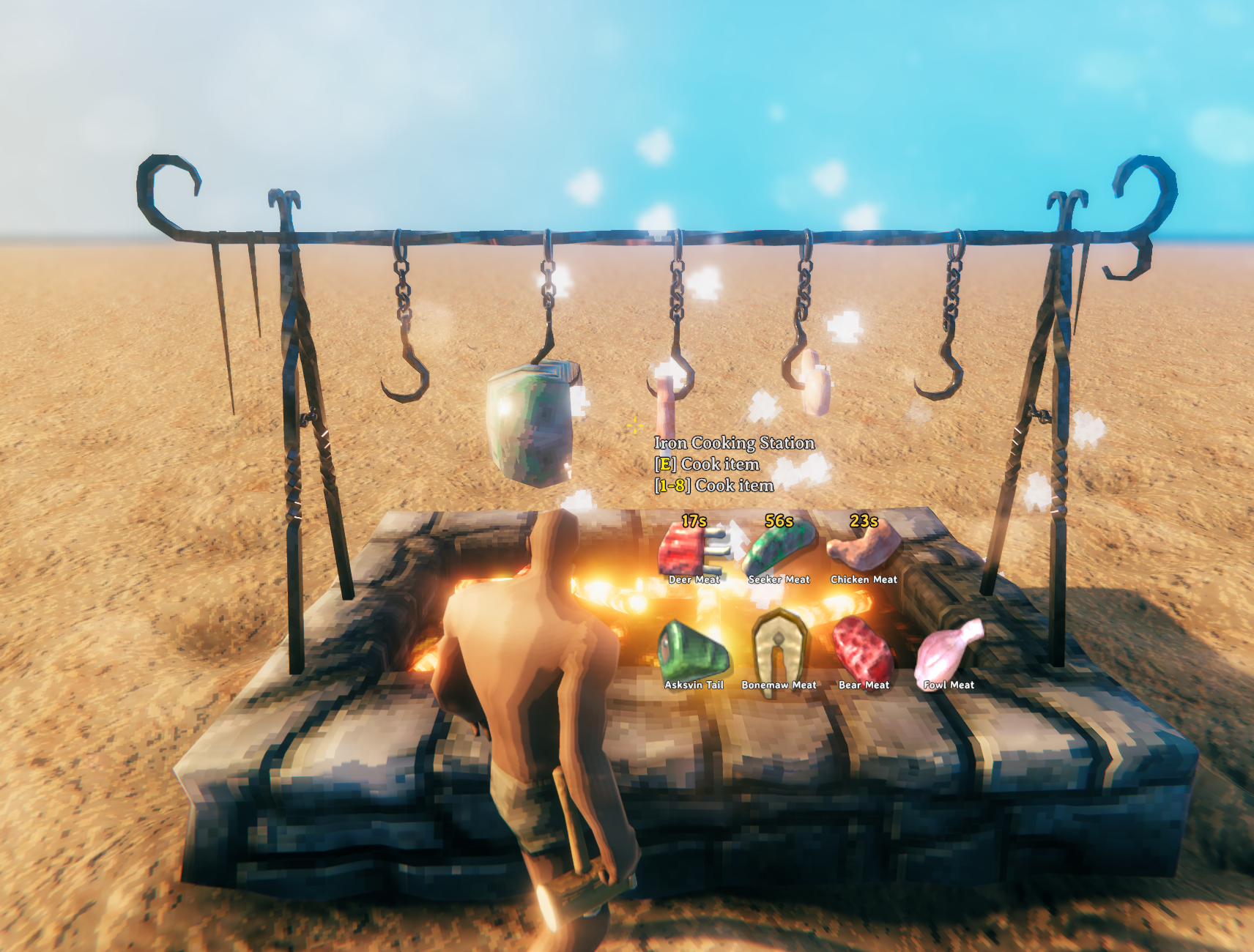
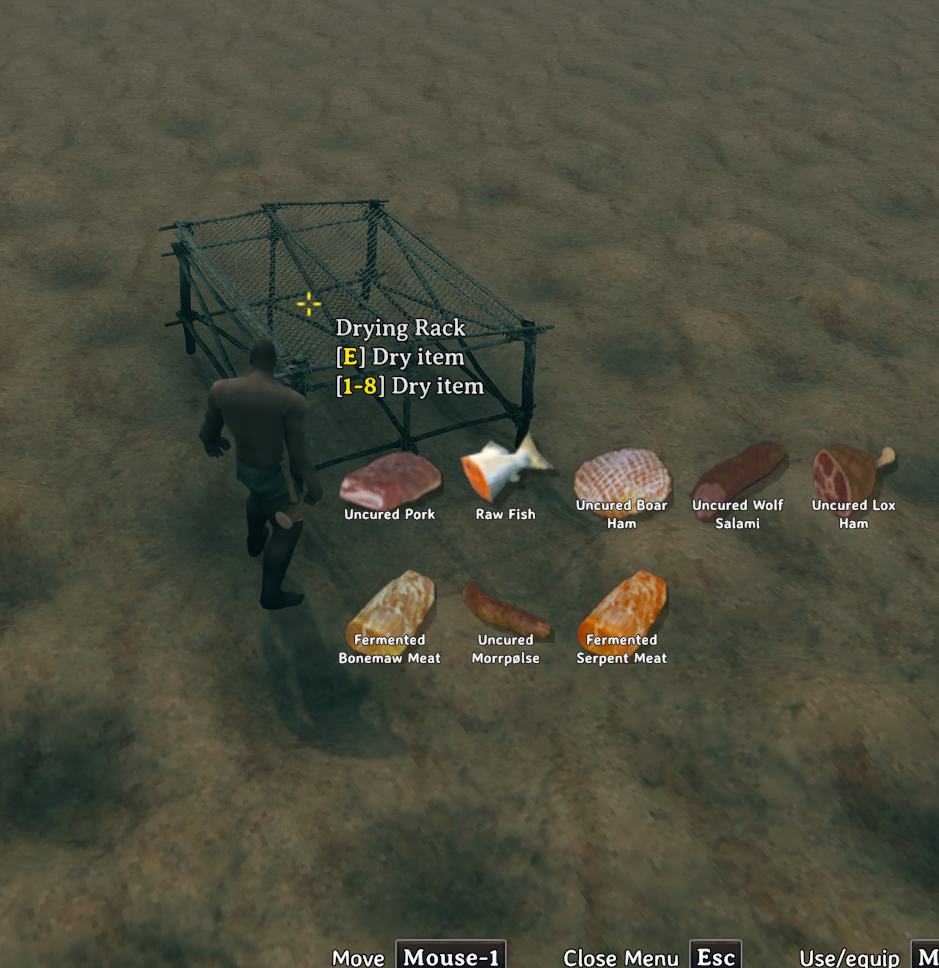
Cooking skill can auto-eject finished food, while hover hints expose valid inputs and processing state for vanilla and modded stations.
| Vanilla cooking station | Modded cooking station |
|---|---|
 |
 |
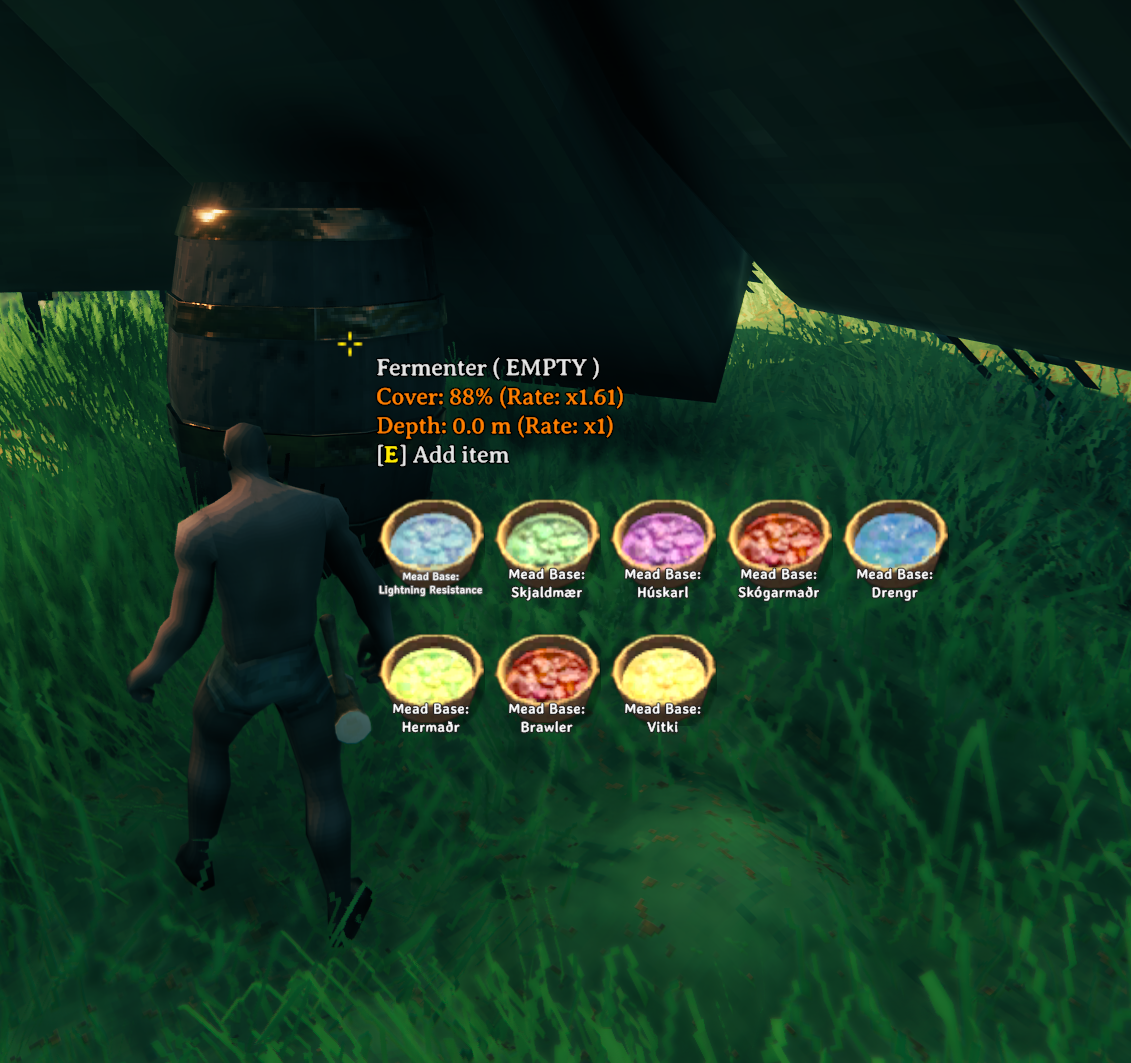
Cover and depth speed fermentation. Compatible custom Fermenters receive the same clear hover information.
| Vanilla Fermenter | Modded Fermenter |
|---|---|
 |
 |

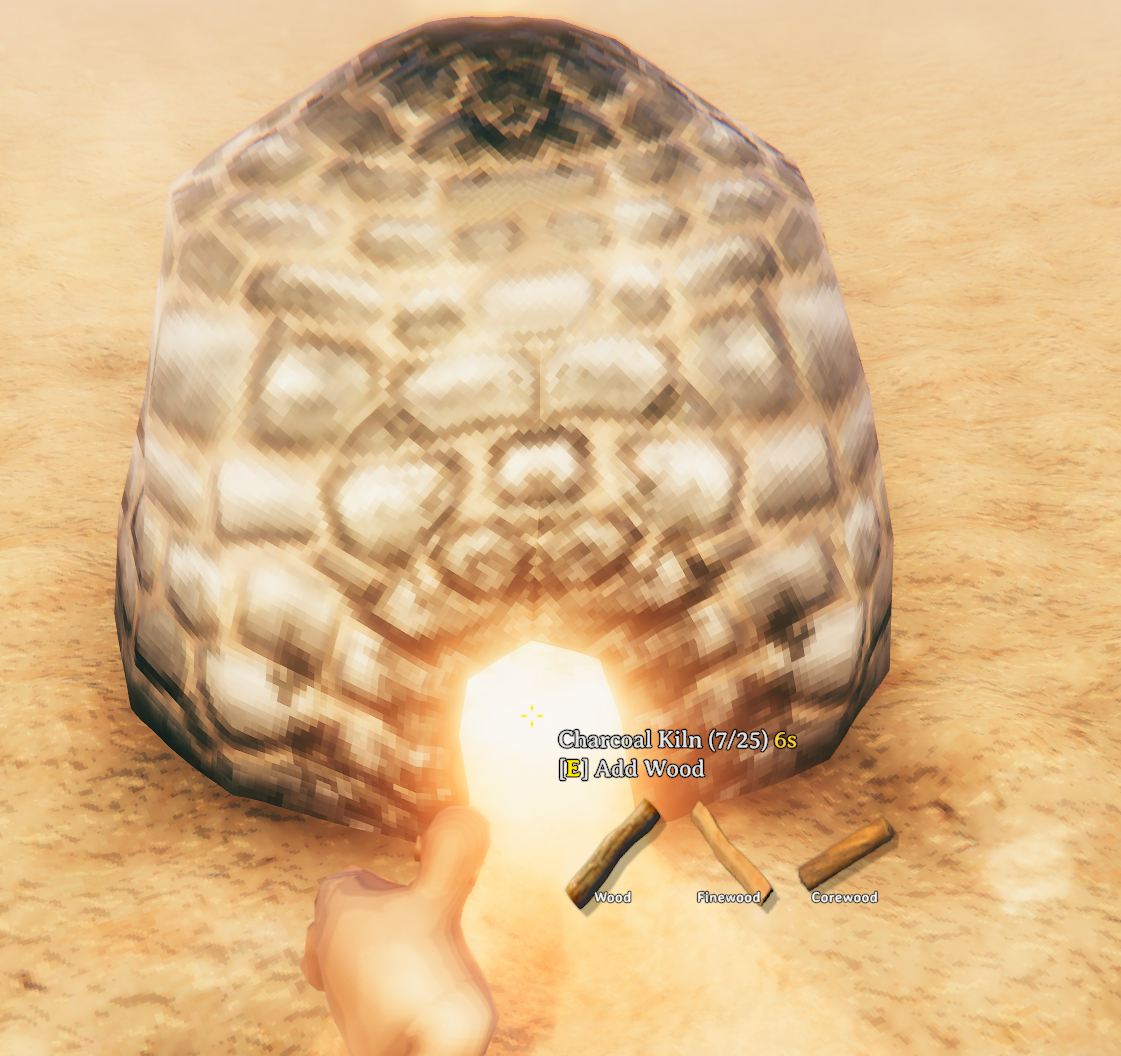
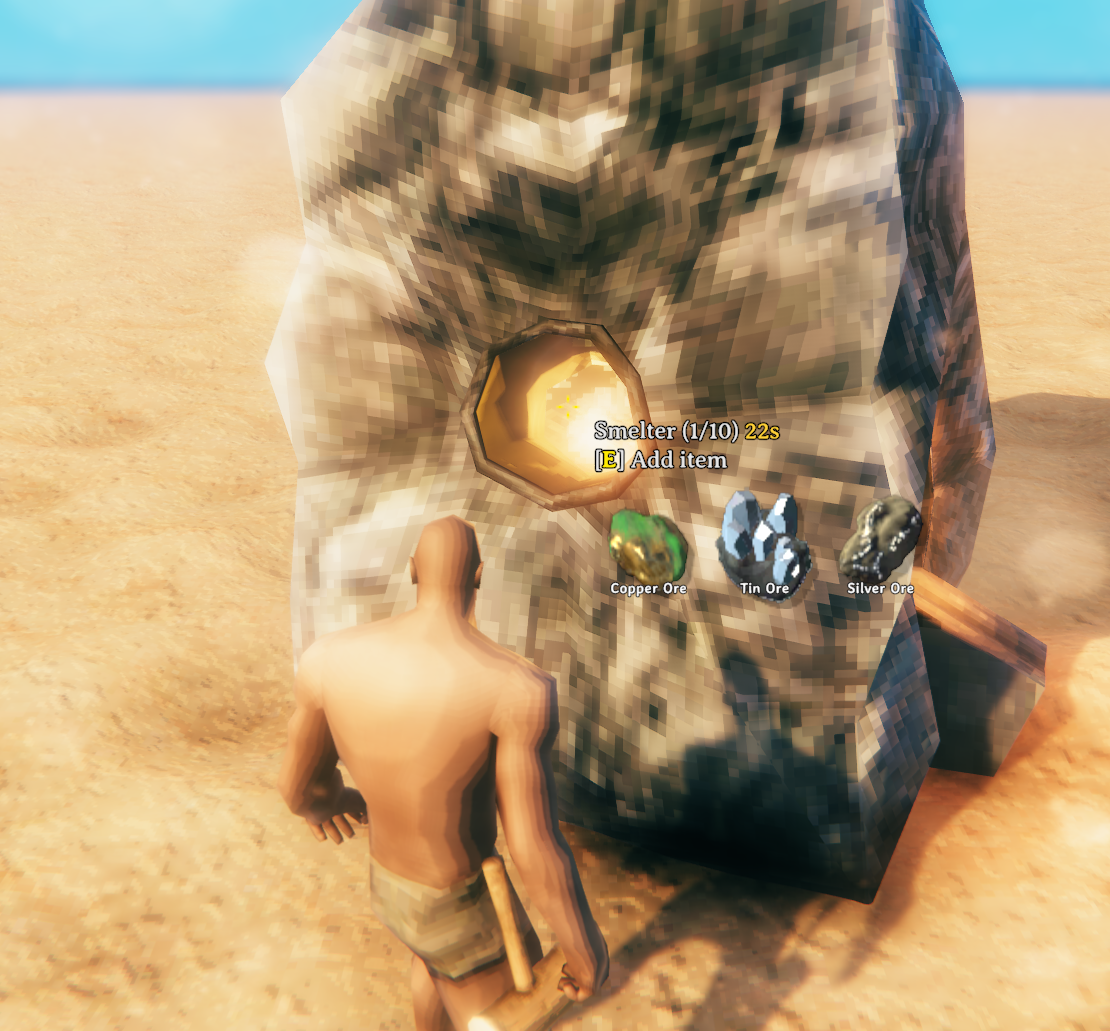
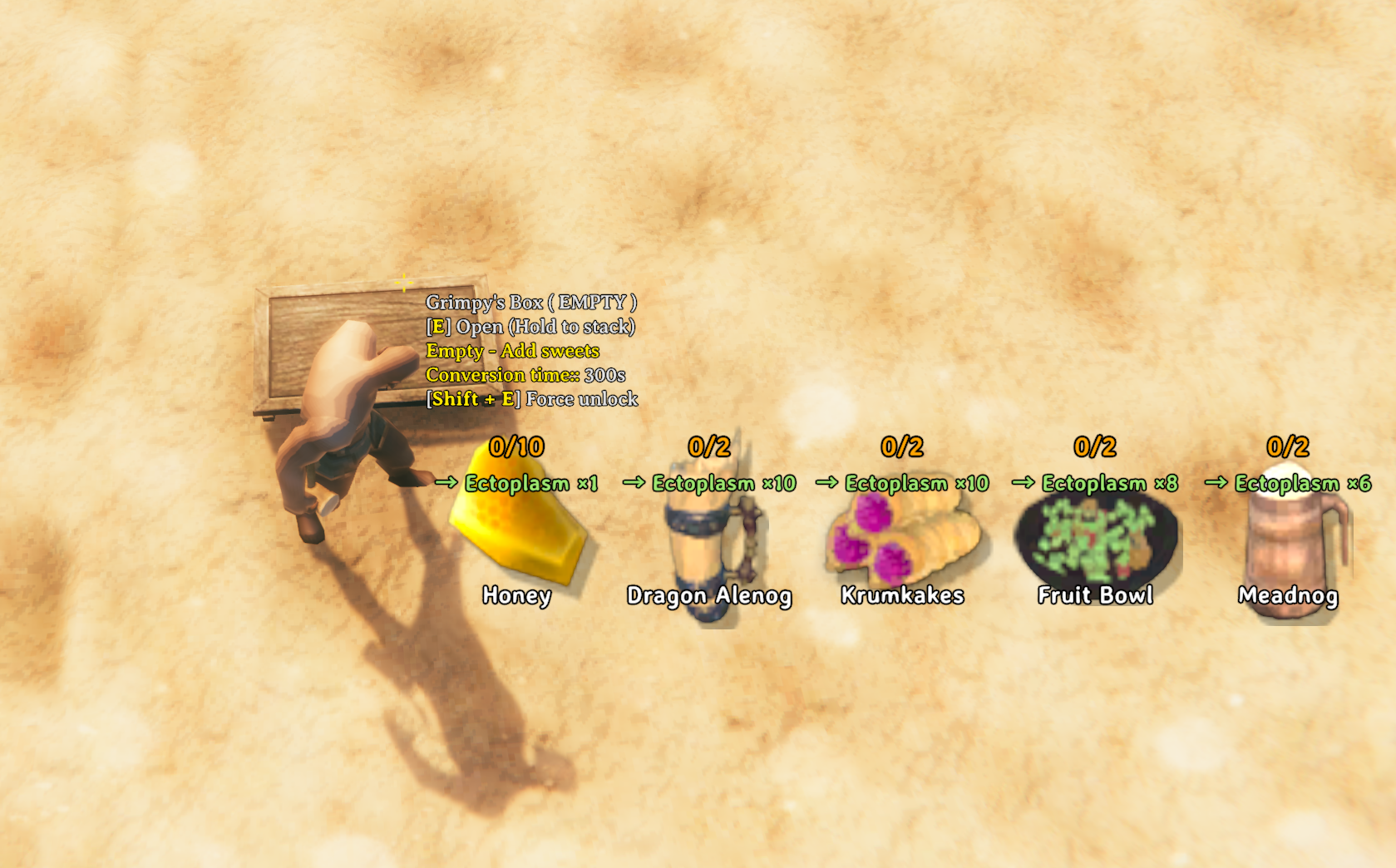
Production buildings and supported ValheimCuisine stations expose compact hover information.

| Charcoal Kiln input hints | Smelter processing hints |
|---|---|
 |
 |
| Freydi Collector | Grimpy Box |
|---|---|
 |
 |
Spoilage and preservation
Food can spoil in containers, as loose drops, and when placed for display. Remaining time stays visible where the item is used.
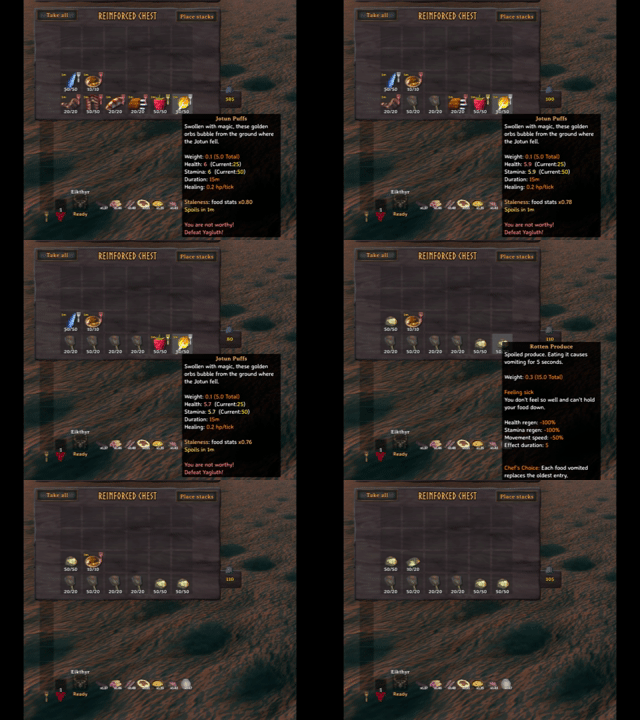


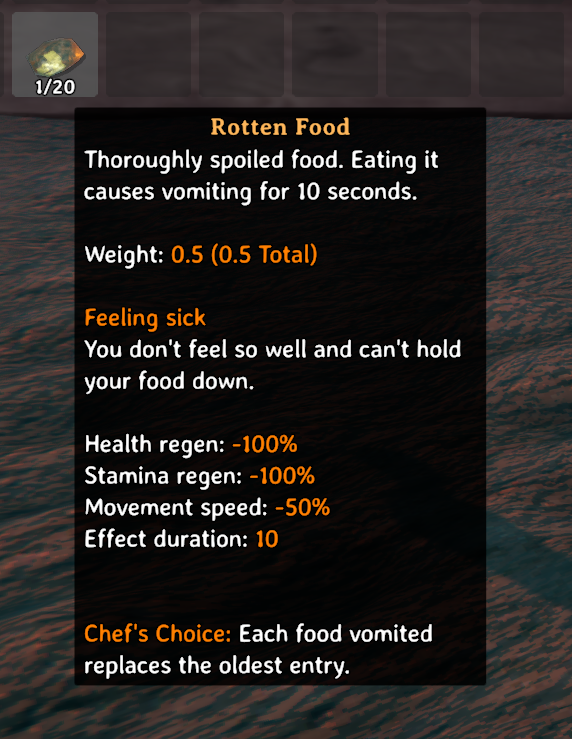
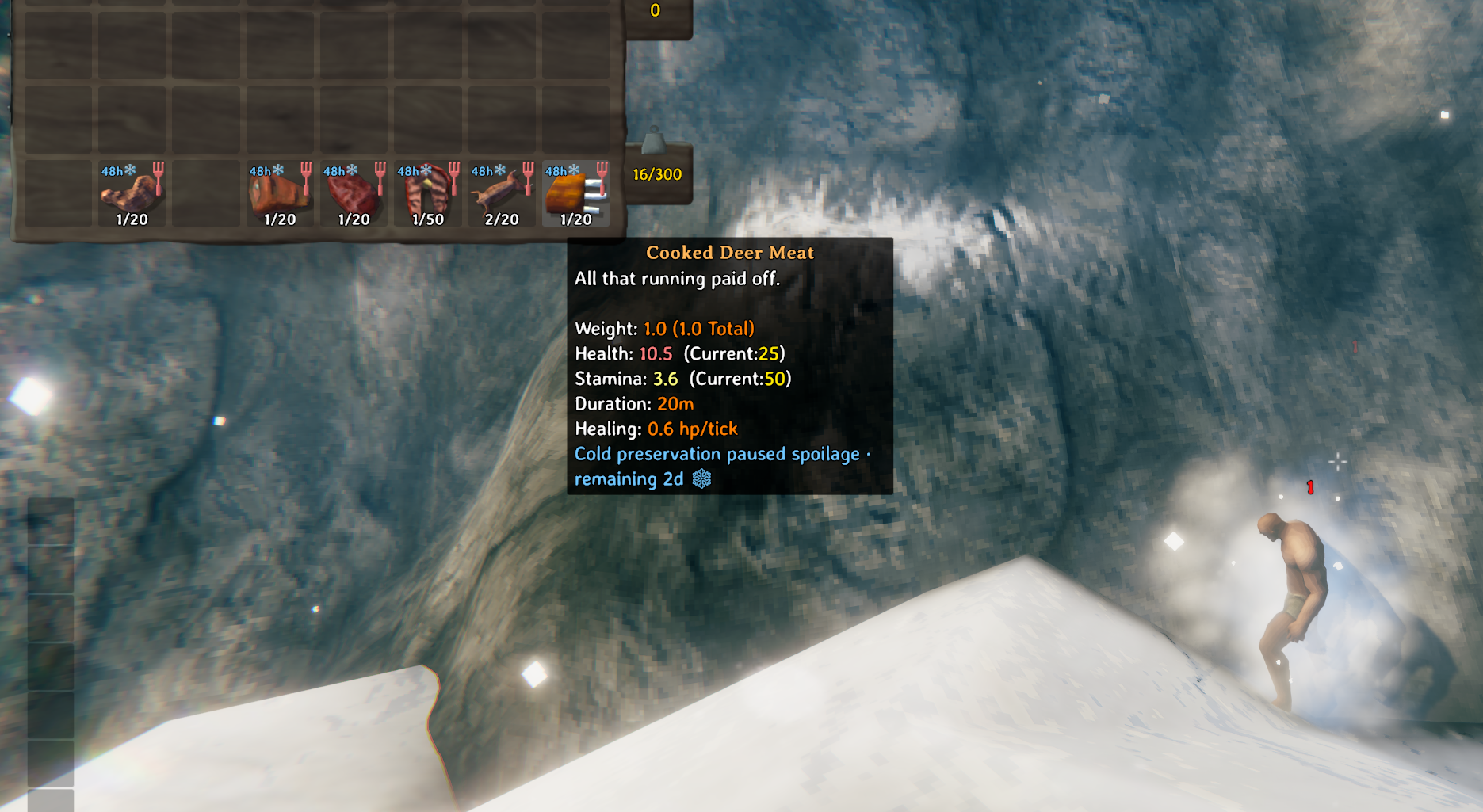
Expired food normally becomes its configured rotten result. A group rule or exact override can instead keep the original prefab at minimum freshness. Cold biomes and the Icebox pause active spoilage timers.
| Placed food with an active timer | Placed food preserved in the Mountain |
|---|---|
 |
 |
| Cold-biome preservation | Icebox preservation |
|---|---|
 |
 |
Features
- Configurable spoilage, freshness-scaled food stats, and an Icebox.
- Three- to nine-slot diets with diminishing returns, Chef's Choice, and Full Course.
- Cooking experience, production bonuses, auto-eject, faster fermentation, and station hints.
Spoilage
[5 - Spoilage] Spoilage Mode is synchronized by the server and can be changed live:
| Mode | Behavior |
|---|---|
FollowYaml (default) |
Uses Spoilage.yml lifetimes, exclusions, and expiry results. Preserves the existing behavior. |
Off |
Stops new timers and expiry processing, hides spoilage UI, and removes the freshness penalty from food eaten while Off. Existing item metadata is retained. |
StatDecreaseOnly |
Uses the same YAML targets and lifetimes, including zero-hour exclusions, but keeps expired items at minimum freshness instead of replacing them. |
Off does not freeze world time: saved running deadlines can pass and expire when spoilage is re-enabled. Saved paused clocks retain their existing preservation/save behavior. Merging, placing, and recovering tracked items still transfer spoilage state. Items created while Off receive no new timer or placement anchor; normal activation rules apply after re-enabling.
Mode changes do not rewrite already-eaten food effects, reverse rotten replacements, or clear permanent minimum-freshness markers. Switching from StatDecreaseOnly back to FollowYaml therefore leaves already-expired kept items at minimum freshness. While Off, their marker is retained but causes no new consumption penalty. In StatDecreaseOnly, health, stamina, eitr, and regeneration use the stale-food minimum (default 0.75); food duration is unchanged. Non-edible ingredients are retained without a food-stat effect. Spoilage.yml and the generated reference continue to describe the underlying YAML policy.
Ordinary food starts its spoilage clock when it first enters a player inventory. Untouched food in location loot and ordinary containers remains fresh until that first pickup. Placed food starts from its placement time.
An active clock follows Valheim's network world time through a persistent, server-controlled spoilage clock. It continues in ordinary containers and unloaded zones while that clock is running, and it survives restarts without resetting. Time does not advance while the server is offline, while an empty dedicated server pauses world time, or while the item is preserved.
Spoilage pauses in:
- An Icebox.
- Biomes listed in
No-Spoil Biomes; the default isMountain, DeepNorth. - Water, for world items classified as Fish.
[5 - Spoilage] Pause Spoilage In Winter defaults to false and is server-synchronized.
When enabled with Seasonality or Seasons, the world spoilage clock stops during that
mod's accepted winter. Food already using the world-aware clock receives the same winter
protection in offline character saves, unloaded containers, and placed/ground items.
Spring resumes the clock without scanning those inventories. This is a world-wide season
rule, independent of indoor temperature or snow; No-Spoil Biomes is not overwritten.
Seasons declares Seasonality incompatible, so use one season provider, not both.
Existing numeric timers are upgraded when their owner first processes them, retaining their remaining lifetime at that moment. Winters before that upgrade are not refunded. Turning winter protection off retains previously earned protection and resumes normal time progression. Icebox/biome/fish preservation remains separate; logging out still resumes those local pauses in the character snapshot, on the winter-aware world clock. Already spoiled food is never restored. Seasons' normal time rewinds remain effective outside winter; skipped calendar seasons are not reconstructed after a large time jump.
Install the same updated FineDining DLL on the server and all clients, including when winter protection is off. The world-aware item record is not readable by older FineDining builds; do not mix builds or downgrade saved characters/worlds without restoring matching backups. A character entering a different world uses its last saved remaining-life checkpoint because the destination cannot query the original server's offline history. Restore worlds and characters together where possible. If an item's same-world clock history is missing, FineDining retains its record and defers unsafe spoilage/merges with a warning rather than granting a new lifetime or destroying it.
The clock is saved inside the world. Opening and saving that world without FineDining can remove its custom clock object, so keep the mod installed while using these saves. During initial clock synchronization, conflicting timed stacks wait to merge; loading items into separate empty slots remains available. Tooltips show winter as preservation.
The default Spoilage.yml policy is:
version: 1
lifetimes:
  farmingHarvest: 96
  cookingStationInput: 48
  cookingStationOutput: 72
  unfermentedFood: 72
  fermentedFood: 96
  feastMaterial: 96, keep
  feastResult: 72, keep
  fish: 48
  otherEdible: 48
chefChoiceBlacklist: []
overrides:
  - Raspberry, 96, keep
  - Mushroom, 96, keep
  - DeerMeat, 48, keep
  - NeckTail, 48, keep
  - Honey, 0
The default prefab overrides preserve Raspberry and Mushroom at minimum freshness after 96 hours, preserve DeerMeat and NeckTail after 48 hours, and disable spoilage for Honey. These rules apply to the exact prefab names; Blueberries and other mushroom prefabs follow their automatic group rules unless overridden.
Group lifetime values use <hours>[, keep]. Valid hours are 0..720; a number alone uses the group's fixed rotten replacement, while keep preserves the original prefab and stack and permanently moves it to minimum freshness. Both 0 and 0, keep disable spoilage; the latter retains the action for when you enable it again. Positive fractions are supported, with one second as the minimum internal lifetime. By default, feastMaterial and feastResult use keep. unfermentedFood covers Fermenter inputs whose conversion path eventually reaches directly edible food, including paths that continue through a CookingStation.
Automatic CookingStation groups include inputs and outputs only when the conversion's output can reach directly edible food through CookingStation/Fermenter steps. Raw food, dough, and intermediate food-processing steps remain included; Frost Foundry equipment and unfinished casts are excluded. Exact prefab overrides remain authoritative.
Existing Spoilage.yml files are not overwritten. Changed lifetimes apply to newly assigned timers; existing timers keep their saved lifetime and expiry.
Exact prefab rules use this compact format:
overrides:
  - ModdedFood, 100
  - ModdedProduce, 72, FineDining_RottenProduce
  - PreservedIdentityFood, 72, keep
  - DecorativeFood, 0
  - DisabledPreservedFood, 0, keep
The optional third value is either a replacement prefab or the reserved, case-insensitive keyword keep. With a positive lifetime and keep, the timer runs normally, but expiry preserves the original prefab and stack and records a permanent minimum-freshness state instead of creating a replacement. The item stays at the configured minimum freshness effect, displays Minimum freshness reached (Min in slots), and does not receive another timer after moves or restarts. Because its prefab identity is unchanged, other systems still recognize it as the original item. A 0 lifetime, with or without keep, disables spoilage without applying this state. Disabling spoilage does not restore items that already reached permanent minimum freshness. A zero-hour override cannot specify a replacement prefab.
When the third override value is omitted, a classified item inherits its group's action while an unclassified force-include uses RottenMeat. Unless overridden, farming harvests become FineDining_RottenProduce; CookingStation inputs, CookingStation outputs, and Fish become RottenMeat; unfermented food, fermented food, and other edible food become FineDining_RottenFood; feast materials and feast results keep their original prefab.
FineDining_RottenProduce and FineDining_RottenFood cannot spoil again. Eating them applies Puke for five and ten seconds respectively.
Timers appear in inventory and container slots, item tooltips, loose ItemDrop hover text, and placed-food hover text. Merging timed stacks keeps the lower remaining lifetime; merging with a minimum-freshness keep stack applies that state to the resulting stack. Vanilla loose-item cleanup remains active.
Freshness
An edible item's own freshness scales its health, stamina, eitr, and health regeneration from x1.00 to the configured minimum, x0.75 by default. The scale is captured when the food is eaten.
Ingredient freshness is not inherited by recipes, CookingStation output, Fermenter output, or feast output. Food duration and consume status effects are unchanged.
Diet and Chef's Choice
Maximum Food Slots accepts any integer from 3 through 9 and defaults to 4. Slots unlock as the player learns directly edible Health/Stamina/Eitr foods, stopping at the configured maximum:
Known foods  0-6  7-9  10-12  13-15  16-18  19-21  22+
Food slots     3    4      5      6      7      8      9
Newly earned slots take effect when an active food is removed or replaced, or while no food is active.
Food Stat Scale defaults to 0.9 and controls the total base strength of a full unlocked diet relative to three equivalent vanilla foods. Each food's Health, Stamina, Eitr, and health regeneration uses 3 * Food Stat Scale / currently unlocked slots before other effects. The default per-food multipliers are 0.9, 0.675, 0.54, 0.45, about 0.385714, 0.3375, and 0.3 for three through nine unlocked slots. Empty slots do not increase the remaining foods' multipliers. Player base stats and external player-stat bonuses are unchanged.
- The recent-food history tracks seven unique foods by default.
- The fourth and later consumption receives the default
x0.75diminishing multiplier. - Chef's Choice contains seven foods with multipliers between
x1.10andx1.50by default. - Higher Cooking skill favors higher food tiers and stronger Chef multipliers.
- Recent Health/Stamina/Eitr proportions influence new Chef choices by
70%at the default setting. - A naturally expired food or a food actually removed by Puke advances Chef's Choice once from the oldest entry.
- Full Course works at every stage from three through nine unlocked slots and defaults to
x1.20while every unlocked slot is filled with directly edible food. With the default Food Stat Scale, this gives0.9 * 1.2 = 1.08of three equivalent vanilla foods before other effects. Even with a nine-slot maximum, filling the first three unlocked slots activates Full Course.
These features can be switched independently with server-synchronized settings, all enabled by default:
| Section | Setting | When false |
|---|---|---|
3 - Diet |
Full Course Enabled |
Disables the bonus, indicator, and messages, including for currently active foods on the next food-stat update. |
3 - Diet |
Diminishing Returns Enabled |
Newly eaten foods receive no repetition penalty. Recent history continues to update for Chef's Choice and later re-enabling. |
4 - Chef Choice |
Chef Choice Enabled |
Newly eaten foods receive no Chef bonus or repetition-penalty exemption. Hides Chef UI and pauses selection, consumption, expiry/Puke rotation, and admin rerolls of the saved list. |
Chef and diminishing settings apply to the next consumption; already eaten foods retain their saved effects and matching hover details until replaced or removed. Toggling these features does not clear saved history or reroll an existing valid Chef list. Re-enabling resumes from that state, including consumption history recorded while disabled. The recent-food row is available while either Chef's Choice or diminishing returns is enabled; both rows are hidden when both are disabled. Food-slot progression, base stat scaling, freshness, and Cooking experience/production bonuses keep their own settings.
To hide only the HUD rows, use the client-only settings below. Both default to true and can be changed independently, including on a server with locked gameplay settings.
[2 - Client]
Show Recent Food Row = true
Show Chef Choice Row = true
Setting either to false hides that icon row and its hover descriptions. History, Chef list updates, food bonuses/penalties, item tooltips, eaten-food hover details, and the Full Course indicator continue to work. Showing a row does not re-enable a disabled gameplay feature. When only the Chef row is visible, it moves into the first row's space.
Hover an eaten food to see its name and Net effect ×N above the recent-food row, connected by a white arrow. This replaces the cursor-following name tooltip. The total excludes the base slot scale and vanilla time-based stat decay. The second line lists non-neutral Full Course, Chef, freshness, and diminishing multipliers; when none apply, only Net effect ×1.00 is shown beside the food name. Chef, freshness, and diminishing values are saved when eating, while Full Course reflects the current diet. Foods already active without a saved breakdown show only the combined multiplier until eaten again.
Chef's Choice only uses consumables with positive health, stamina, or eitr. Exact exclusions belong in chefChoiceBlacklist in Spoilage.yml.
ResourceMap.yml defines Chef food tiers from lowest to highest. The server or single-player host creates, hot-reloads, and synchronizes it. Connected clients ignore their local copy, and invalid edits keep the last valid map.
The default map includes DeepNorth food ingredients after AshLands. Existing
ResourceMap files are preserved on update; merge the new DeepNorth section from
Resources/Defaults/ResourceMap.yml into your server or single-player map to
use it. Adding a tier also changes the relative selection weights of earlier
tiers. It does not change the Chef multiplier formula or reroll existing valid
Chef entries. FoodTier.reference.yml is regenerated for diagnosis, not edited
as configuration.
Cooking and stations
Successfully eating a directly edible Health/Stamina/Eitr food grants 0.15 Cooking experience by default. Setting Cooking Experience per Food Eaten to 0 disables it.
At Cooking level 100:
- Normal recipes and CookingStation outputs have a default
25%bonus-item chance, configurable from0%to25%. - Fermenter outputs use a separate default of
20%, also configurable from0%to25%. - Lower Cooking levels scale both chances linearly.
Production Bonus Excluded Output Prefabs disables the bonus for matching output items across recipes, CookingStations, and Fermenters.
CookingStation auto-eject is available only when the conversion has a separate burnt or coal stage. The server-synchronized Auto Eject Guaranteed Cooking Level setting in 1 - General accepts integers from 0 to 100 and defaults to 100. For a positive setting, chance rises linearly with the inserting player's Cooking level, reaching 100% at the configured level and staying there above it. For example, 25 gives 50% chance at level 12.5 and guarantees auto-eject at level 25; 50 gives 50% at level 25 and guarantees it at level 50. 0 disables auto-eject for newly inserted food.
The result is decided at insertion. Setting changes affect new insertions; already stored plans keep their auto-eject decisions, production bonuses, and prepaid collection experience. Production-bonus and other Cooking-experience settings remain independent.
Updating to 1.1.4: before updating, finish and collect all food from existing CookingStations, including modded stations and stations in unloaded areas. Update the server and every client together to the same version. Existing per-slot plans are not read, converted, or deleted: food left inside loses its previous auto-eject decision, fixed bonus, and prepaid collection-experience record. Old stored keys and their save warnings can remain even after a station is emptied. New plans use one compact block per station; an explicit empty block prevents completed plans from remaining active on other peers. Before reverting to the old version, also empty the stations under the new version; do not treat a DLL rollback as a conversion of saved plans.
Fermenters can run faster with cover and depth. Full cover and eight meters of depth each provide up to x2 speed by default, and the two multipliers combine. Prefabs listed in Fermenter Bonus Excluded Prefabs keep native timing and output; FineDining acceleration, output bonuses, and insertion/collection Cooking experience are disabled for them.
Hover hints show available inputs and processing time for CookingStations, Smelters, Windmills, and Fermenters. Icon scale and rows are client-side settings. Optional AzuCraftyBoxes integration includes nearby container contents, and optional ValheimCuisine integration adds Grimpy Box and Freydis information.
Icebox
FineDining_Icebox is found in the Hammer's Misc tab and always pauses spoilage inside it.
- Size: eight columns and four rows by default; rows are configurable from
4to20. - Recipe:
TrophySGolem:1,Obsidian:8,Crystal:16,Silver:32. - Map and minimap pins: enabled by default for Iceboxes owned by the local account.
- Placement limit: two per Steam account by default, configured through the server-synchronized
Icebox Default Placement Limitsetting.
Use -1 for unlimited placement, 0 to deny placement, or a positive number for a maximum count. Exact Steam64 overrides are configured in the server-only Icebox.yml and take priority over the synchronized default.
Configuration
The main configuration file is BepInEx/config/sighsorry.FineDining.cfg.
Server configuration locking is enabled by default. Config descriptions identify every entry as server-synchronized or client-only.
| Section | Scope | Contents |
|---|---|---|
1 - General |
Server-synchronized | Configuration lock, Cooking bonuses, and fermentation |
2 - Client |
Client-only | Diet HUD visibility, station icon scale, and row counts |
3 - Diet |
Server-synchronized | Food slots, stat scales, history, and diminishing returns |
4 - Chef Choice |
Server-synchronized | Choice count, multipliers, tier weighting, and food-type preference |
5 - Spoilage |
Mixed | Global mode, preservation, stale-food minimum, Icebox default limit, recipe, size, and local pins |
Additional files are created under BepInEx/config/FineDining/:
| File | Purpose |
|---|---|
Spoilage.yml |
Server-authoritative lifetimes, expiry results, overrides, and Chef blacklist |
ResourceMap.yml |
Server-authoritative Chef food tiers |
Icebox.yml |
Server-only per-Steam64 Icebox limit overrides |
Spoilage.reference.yml |
Generated spoilage classification reference; not configuration |
FoodTier.reference.yml |
Generated Chef tier and food-type reference; not configuration |
Invalid YAML keeps the last valid policy. Files from older names are not read or migrated; the former Icebox.yml defaultLimit field is unsupported.
Admin commands
| Command | Action |
|---|---|
fd:rerollchef |
Reroll the local player's Chef's Choice list |
fd:clearrecent |
Clear the local player's recent-food history |
fd:printstate |
Print the local player's FineDining diet state |
Compatibility
- InventorySlots
1.3.7or newer: spoilage-aware stack merging. - AzuExtendedPlayerInventory: hidden-slot merge compatibility.
- AzuCraftyBoxes: nearby-container station hints using its configured range.
- ValheimCuisine: Grimpy Box and Freydis hover information.
- Expand World Data: custom biome names in
No-Spoil Biomes. - Feaster-style placed food: spoilage metadata and hover information.
- Path of Valheiman: optional integration checked against
5.0.4and5.0.10in isolated tests. FineDining's food-slot scale, Chef's Choice, diminishing returns, Full Course and freshness compose with PoV food values and food-derived masteries. PoV raw food remains edible after character reload; its snacks keep their separate slots and apply freshness without consuming Chef choices or recent-food history. Food regeneration follows PoV's tick cadence without increasing total recovery from tick frequency alone.
PoV 5.0.10's custom item cards retain PoV's artwork and interactions while showing FineDining's adjusted food values and spoilage status. The card uses the same food preview and freshness wording as ordinary/pinned tooltips, including decimal values and snack handling. Visible food cards are checked at most once per second and rebuilt only when their displayed values or text change; refresh is deferred while a PoV Alt-held card is being used. This optional display adapter does not require InventorySlots. If a future PoV version changes its internal card layout, a warning is logged without disabling the existing food/gameplay integration.
With PoV, batch cooking also submits FineDining's normal cooking plan for each extra ingredient. Fermenter bonuses preserve PoV's temporary extra bottle and output stamps. PoV's vanilla-skill freeze, Hearty Meal rolls, global food multiplier, nourishment, and existing extra-production stacking remain unchanged. PoV's No Decay applies to eaten-food stat decay; FineDining's Spoilage Mode controls inventory spoilage independently. No new required mod, setting, or save migration is introduced. Install the same FineDining version on the server and clients; actual combined game and multiplayer validation is still needed.
PoV's metadata-based stacking is also supported, checked against 5.3.6 in isolated tests. Foods with different spoilage timers can merge during inventory transfers, full-inventory pickup checks, drag previews, and PoV's own sorting. The resulting stack keeps the shorter remaining lifetime; minimum-freshness state is preserved. Other item metadata and PoV's slot restrictions remain in force. This permission is limited to supported transfer/sort paths, including when spoilage is Off; it does not globally ignore FineDining metadata. If the required PoV contract changes, this adapter leaves the original stacking restrictions active and logs a warning independently of food/card compatibility.
EpicLoot ground auto-stacking preserves FineDining's expiry and freshness merge even without FeedLikeGrandma. EpicLoot keeps its magic-item stacking rules; FineDining applies its existing expiry policy once before quantities change. With the corresponding FeedLikeGrandma compatibility patch, FLG only keeps Feed Barrel food separate from ordinary drops, so expiry is not applied twice. Update both mods together when using both, on the server and every client, then restart. Compatibility checks relevant code and active patches rather than an exact mod version or whole-DLL hash. An unsupported EpicLoot replacement or an older FLG bridge pauses ground auto-stacking before item changes; normal pickup, storage and spoilage remain available.
EpicLoot's fixed AddHealthRegen gear effect is included before the normal health-regeneration multiplier, using EpicLoot's own effect API. It retains the existing food requirement and PoV recovery cadence. PoVPlus.Compat is not required for this integration; its older food-heal adapter may report a changed-pattern warning because FineDining now handles the addition itself.
Supported active ItemDataManager copies also participate in EpicLoot ground stacking. Each copy can veto a merge and supplies only the data keys it owns; FineDining then composes its spoilage data once. Existing ItemDataManager patches are retained. With the matching FeedLikeGrandma update, FineDining owns this data merge while FLG keeps its separate Feed Barrel protection. Unknown or conflicting metadata is kept on separate stacks, including unrecognized # namespaces whose policy cannot be checked. This integration covers EpicLoot's ground auto-stack replacement; it does not replace every mod's inventory or sorting rules. No new setting or save-format change is required.
FineDining performs spoilage work only for authoritative loaded inventories, containers, and world items. Unloaded progress is timestamp-based rather than continuously simulated, and dedicated servers do not require a local HUD.