
Interstellar BanSystem
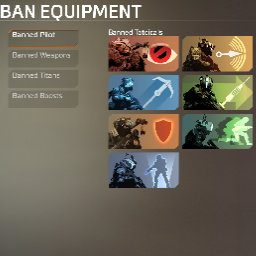
Allows the disabling of Titans, Boosts, Pilot abilities and Grenades with Auto Replacements through UI or predefined configs.Interstellar.BanSystem
This is the repository for the Interstellar.BanSystem Mod for the R2Northstart client of Titanfall 2.
General Information
Required by: Server (To use the UI you also need it on the client)
UI features:
- You can ban Tacticals, Ordinances, Weapons, Titans and Boosts
- You can force Weapon attachments and visor
- You can force Titan kit 1, 2 and 3
- You can import / export predefined banned loadouts
Additional features:
- When something is banned the first non banned Weapon, Tacticals ect. is given.
- If all of a category are banned, the option to use it will be disabled.
- Titan meter goes back to 0 if all are banned after you reached 100%
Config
Permissions
By default, everybody can change the banned loadout.
To stop players from changing the configuration, you can set the inbuilt Northstar config ns_private_match_only_host_can_change_settings to 1 at Northstar.CustomServers\mod.json
If you use a dedicated server, you can add yourself as an admin in the mods config at Interstellar.BanSystem\mod.json.
Change the Default Values of "grant_admin" to your name or UID. You can add multiple by adding a , between them with NO SPACES.
"ConVars": [
  {
    "Name": "grant_admin",
    "DefaultValue": ""
  }
]
You can see your own UID by going into the Northstar lobby and typing
sv_cheats 1; script print(GetPlayerArray()[0].GetUID())into the console
Ban Config
You can predefine an initial ban config that will be loaded on startup at 'Interstellar.BanSystem\mod.json'. Change the Default Values of "ban_config" to a exported config, which you can get by clicking on export button in the UI and copying the string.
"ConVars": [
  {
    "Name": "ban_config",
    "DefaultValue": ""
  }
]
You can also set it on the fly by typing this into the console script_ui ImportBanConfig("THE_BAN_CONFIG")