
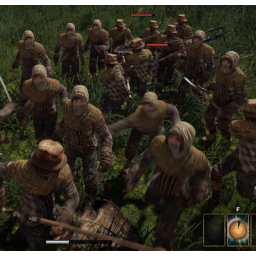
MoreEnemies
Multiplies the number of enemies in every encounter (up to 100x), with separate sliders for standard enemies, unique enemies and bosses. Works in co-op, including Raid Mode parties, when everyone has the mod.Edited · Oct 30, 2026
More Enemies
More enemies in every encounter. Every bandit camp, hyena pack, dungeon, unique enemy and boss gets 2x the enemies by default, up to 10x. Standard enemies, unique enemies and bosses each have their own slider.
Features
- There are three separate sliders to change spawns of regular enemies, uniques, and boss enemies. The latter two are defined by wiki.gg: Uniques, Bosses
- Want more than 10x enemies? I chose it semiarbitrarily - it felt like a fun "balanced" maximum for hard fights. If you wish the slider could move further to the right (up to 100x), you can customize the slider maximum in the BepInEx settings file. Look for the keyword MaxMultiplier in the [Advanced] section of BepInEx/config/catalysten.increasedenemycount.cfg . (You need to run the game once to generate the .cfg file).
- This mod also fixes audio issues for crowds. In vanilla Outward, there is a hard limit of 32 sounds playing at once. The music starts to cut in and out, for example. With this mod, that limit is raised. (And music is prioritized).
Current limitations
- Co-op is still in beta. I have added support for it, but haven't yet tested it. Raid Mode (3+ players) should be supported.
- Only Outward Definitive Edition is supported.
- Arena wave spawns and summoned creatures aren't multiplied.
- High multipliers in crowded areas mean a lot of enemies: Chersonese at 10x has 760 (76 originals plus 684 copies).
- Unique/boss detection uses English enemy names. In other game languages, every enemy uses the Standard slider.
Recommended Mods (not required)
- Raid Mode. Even for single players who just want to mess with damage dealt/received. It allows for several QOL settings, too.
- Outward Config Manager lets you change all of this mod’s settings in-game with F5, instead of editing the .cfg file.
Requirements
- BepInExPack Outward. Automatically installed when you use a mod manager.
- Follow the instructions on the wiki for setting up your game for mods: https://outward.wiki.gg/wiki/Installing_Mods
- To install this mod, use a mod manager such as r2modman (recommended).* To install by hand, put
IncreasedEnemyCount.dllinBepInEx/plugins/.
*I've heard that Thunderstore Mod Manager can have issues with modding Outward DE, so I recommend sticking with r2modman.
Co-op notes
- Everyone in the session needs the mod, at the same version. Players without it can't see the extra enemies, but can still be hit by them. By default the host's game adds no extra enemies while someone is missing the mod, and the host gets an on-screen notice.
- Only the host's settings are used. Other players' own settings don't matter in co-op.
- If anything doesn't match between a player and the host (for example because of different mods), that player gets an on-screen notice. Leaving and re-entering the area will hopefully fix it.
Co-op support is new. If you run into problems, please report them with your BepInEx/LogOutput.log attached. Either by making an issue on Github, or by posting a comment in my Workshop on the Outward Modding Community Discord.
Settings
| Setting | Default | |
|---|---|---|
| General.Enabled | true | master switch |
| General.SpawnSpacing | 2.0 | metres between original and copy (0.5–10) |
| General.ExcludedNames | "" | comma list of keywords, never copied (wins over IncludedNames) |
| General.IncludedNames | "" | comma list of keywords, always use the standard multiplier |
| Multipliers.StandardEnemies | 2 | total count of each standard enemy (1–10) |
| Multipliers.UniqueEnemies | 2 | total count of each unique enemy (1–10) |
| Multipliers.Bosses | 2 | total count of each boss (1–10) |
| Multiplayer.RequireModOnAllPlayers | true | host only: skip copies while anyone lacks the mod |
| Audio.PrioritizeMusic | true | stop music cutting out when many enemies make noise |
| Audio.MaxAudibleSounds | 128 | sounds audible at once (vanilla 32, max 255); restart to apply |
| Debug.LogEachEnemy | true | per-enemy log lines |
| Advanced.MaxMultiplier | 10 | slider maximum, up to 100; .cfg only, restart to apply |
Use of AI
Claude Code was used in the making of this mod.