

PEAK Quick Resume
One key to browse and load any saved campfire from anywherePEAK Quick Resume
Full release (v1.0.0): If you are updating from a beta release (v0.3.0 or older) be sure to check the CHANGELOG.
Press one key to browse your campfires and jump straight back to any of them.
Tired of the long ritual to load a PEAK Checkpoint Save: die, restart, walk to and open the Gate Kiosk, pick the difficulty, load in, then press the load key twice? This mod collapses all of that into a single key and adds an in-game menu so you can pick which checkpoint to load.
Press F7 anywhere and a save picker opens listing all your checkpoints for the current mode. Choose one with the arrow keys and press F7 (or Enter) and it will:
- Start a fresh run of that save's difficulty, then
- Automatically load that checkpoint. So you're back at that campfire with your items and progress.
The newest save is preselected, so pressing F7 twice still loads your latest checkpoint just like before.
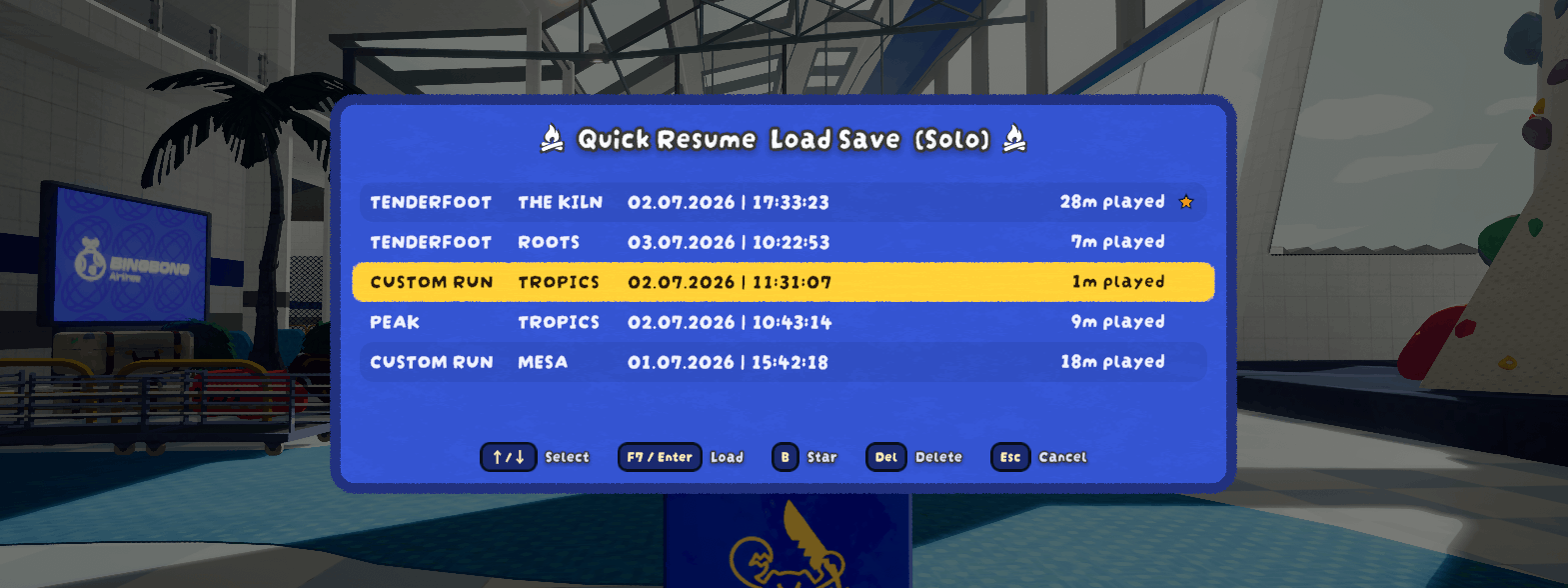
Works after you die, from the Airport, or mid-run (so no need to die first). Full co-op support: the host presses F7 and everyone is brought along and restored.
Because it always spins up a fresh run instance before loading, you can resume as many times as you like without having the problem of loading twice (through F6) and breaking the game.
The mod also adds a few optional Quality of Life pause menu buttons (more details at the bottom of this README).
⚠️ Requires PEAK Checkpoint Save
This mod does not save or load anything by itself, it automates PEAK Checkpoint Save by dominik0207, which does all the real work. Huge thanks to them; that mod is a hard dependency and will be installed automatically.
The campfire saving is still handled entirely by PEAK Checkpoint Save (light a campfire to save). Quick Resume archives each of those saves (now you can have multiple saves per difficulty), makes loading effortless from anywhere in-game, and lets you pick which one to load.
Note: As this mod does all the restoring, it's the one that causes issues regarding client teleport. The Quick Resume mod tries to mitigate these issues by applying a custom config and trying to steer it in the right direction.
How to use
- Play as normal. Light a campfire to save (that's PEAK Checkpoint Save doing its thing). Each save is added to your history (and is never overwritten/deleted automatically).
- Press F7 to open the save picker.
- Use ↑/↓ to highlight a checkpoint, then press F7 again (or Enter) to load it. Just want the latest? Press F7 twice.
- Press Del to delete the highlighted save (press it twice to confirm), or Esc to close the menu.
In co-op, only the host can use F7 and everyone is restored together.
Configuration
Config file: BepInEx/config/OnlyCook.PEAKQuickResume.cfg. If you have PEAKLib.ModConfig installed, every setting below (including a proper click-to-rebind widget for the resume key) is also editable in the game's settings under Mod Settings → PEAK Quick Resume, no need to touch the config file by hand.
- resume-key: the key to open the picker / load the highlighted save (default F7). Rebindable directly in ModConfig's menu.
- resume-key-also-confirms-load: if disabled, pressing the resume key while the picker is open does nothing, only Enter confirms a load (useful if you keep accidentally reloading while trying to close the picker).
- allow-mid-game: allow resuming while still alive (default on).
- panel-opacity: how see-through the picker's background panel is (0 = fully see-through; 1 = fully opaque, default).
- Pause-Menu: disable/re-enable any of the 3 added QoL pause menu buttons, and optionally enable
move-rebind-controls-to-settingsto move the 'Rebind Controls' button away from the pause menu. - Timing: advanced settle/timeout values; raise
coop-airport-settleif a client occasionally gets left behind on a slow connection. - Teleport-Override:
enable-optimized-coop-loading(on by default) makes a plain co-op load use PEAK Checkpoint Save'steleportJumpLogic 1instead of your own base setting, since extensive testing found this avoids nearly all of the teleport glitching described below. Hold Shift while loading to use your own base setting instead for just that one load, or Alt forteleportJumpLogic 2. Solo play is never affected. Press F1 in-game for a live explanation using your actual current settings. - Teleport-Mitigation: detects and helps recover from the teleport glitching described below (see Notes). Everything here is on by default and rarely needs touching; thresholds and delays are all individually configurable if you want to tune them.
Your archived checkpoints live in BepInEx/plugins/QuickResume/Archive/ (split into Offline/ and Coop/). PEAK Checkpoint Save's own files are never modified.
Notes
- Host-only in co-op. Although everyone should have PEAK Quick Resume installed for compatibility reasons.
- Loading a checkpoint can grant Steam achievements (a property of the underlying mod). Don't use it if you want to earn everything unassisted.
- Custom runs are resumed with your current custom settings (the checkpoint file doesn't store the run's original settings).
- Client teleport glitches (co-op): occasionally, PEAK Checkpoint Save's own teleport logic may keep trying to re-correct a client's position right after loading, causing brief up/down glitching (and sometimes fall damage from being repeatedly snapped back into the air). Quick Resume now detects this, cancels the excess corrections, refunds any fall damage they caused, and forces you back to the right spot if you're still stuck.
- Translations were done by AI, so if something is off in your language, then you are free to open a GitHub Issue (see below).
Feedback & bug reports
Found a bug or have a suggestion? Please open an issue on GitHub or send me an email at [email protected]. It helps a lot to include:
- what you did and what happened (solo or co-op; if co-op, whether you were the host),
- your
LogOutput.log(Quick Resume logs every step of a resume, this file is what makes bugs fixable).
Where is LogOutput.log?
BepInEx rewrites this file every time you launch the game, so reproduce the bug, then quit and grab the file before playing again.
r2modman / Thunderstore Manager:
- Open the manager, pick PEAK, choose your profile, then go to Settings and search for the following setting:
Copy log file contents to clipboard, click on that setting and paste it in your GitHub Issue.
Manual install?
- Find out where your
LogOutput.logfile is on your OS. You can for example use Everything on Windows or use this commandfind ~ -name "LogOutput.log"on Linux/Mac.
Miscellaneous Pause Menu Buttons
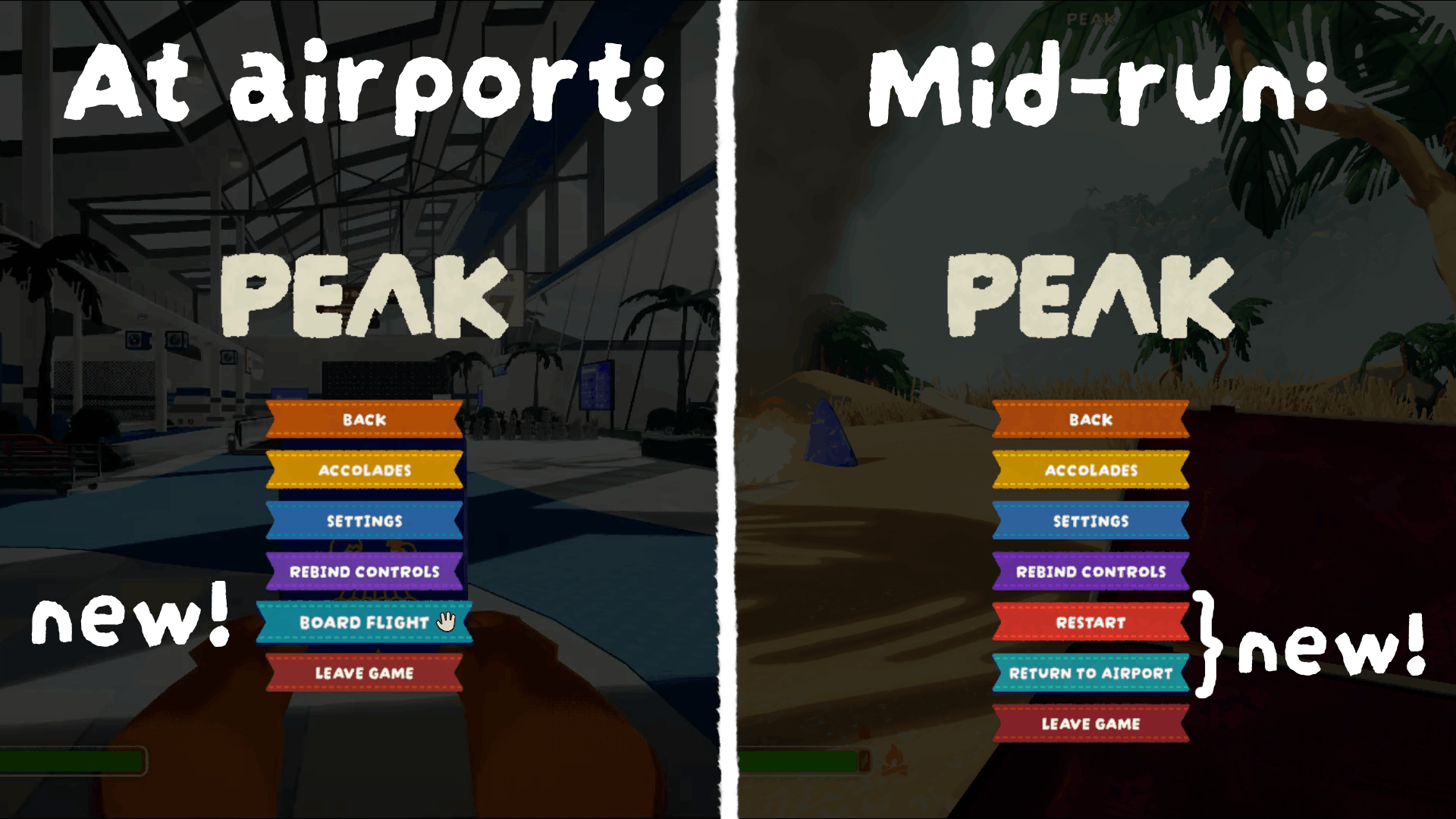
- Board Flight (at the Airport): Opens the gate kiosk directly without having to walk over.
- Restart and Return to Airport (mid-run, host-only): Both buttons do the advertised action and apply it to all clients.
You can disable/hide any of these buttons through 'Mod Settings' (on the PEAK Quick Resume tab, under Pause Menu)
If you have too many pause menu buttons because of this, you can enable the
move-rebind-controls-to-settingssetting (also underPause-Menu). This will move the 'Rebind Controls' button from the pause menu to the 'Settings' page, below the 'Back' (or if applicable 'Mod Settings') button.