

VisualBacktrack3D
Find your way back without opening the map!VisualBacktrack3D for R.E.P.O
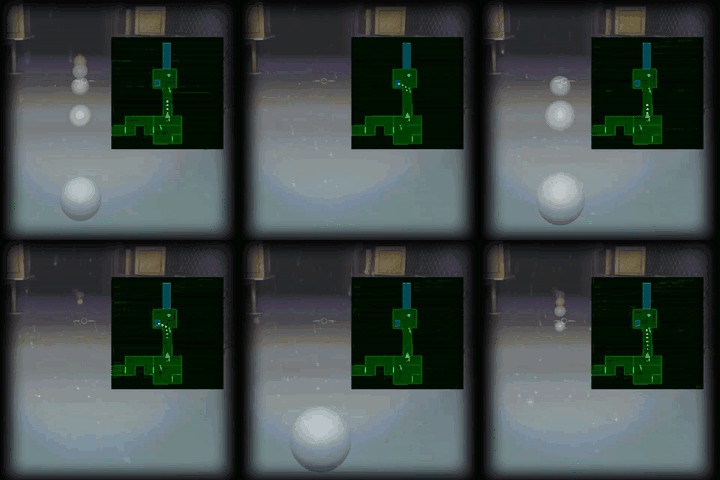
A purely client-sided BepInEx mod for R.E.P.O that adds 3D visual representations (spheres) in the game world corresponding to the 2D backtrack points shown on the in-game map.
This helps players visualize their tracked path and navigate previously visited areas more easily by providing landmarks directly within the game environment.
Showcase
Features
- 3D Backtrack Points: Renders visible spheres in the 3D game world at the locations corresponding to the 2D map backtrack points.
- Visual Navigation Aid: Helps orient yourself and follow your tracked path directly within the game environment.
- Synced Animation: Sphere animations (scaling effect) can mirror the 2D map points' appearance animation.
- Customizable: Configure appearance (color, opacity, shadows) and animation behavior via a configuration file.
Requirements
- R.E.P.O (The game itself)
- BepInEx pack for Unity games (ensure it's correctly installed for R.E.P.O)
Installation
- Ensure you have BepInEx installed correctly for R.E.P.O. You typically need to run the game once with BepInEx installed to generate its folders.
- Download the latest zip containing the
Backtrack3D.dllfile. - Place the
.dllfile inside yourR.E.P.O/BepInEx/plugins/folder. If thepluginsfolder doesn't exist insideBepInEx, create it. - Launch the game. The mod should now be active.
Configuration
After running the game once with the mod installed, a configuration file will be created at:
R.E.P.O/BepInEx/config/com.nilaier.visualbacktrack.cfg
You can edit this file with a text editor to change the mod's settings:
[3D Visuals]Section:CastShadows(Type:Boolean, Default:true)- Determines if the 3D spheres should cast shadows. Set to
trueto cast shadows,falseto disable.
- Determines if the 3D spheres should cast shadows. Set to
BacktrackPointColor(Type:Color, Default:White)- Sets the color of the 3D spheres. You can use standard Unity color names (like
White,Red,Blue) or RGBA values as comma-separated strings (e.g.,1,0,0,1for opaque red,0,1,0,0.5for semi-transparent green). The alpha component here is mostly superseded by theOpacitysetting below for rendering purposes, but it's part of the Color structure.
- Sets the color of the 3D spheres. You can use standard Unity color names (like
SyncAnimation(Type:Boolean, Default:true)- If
true, the 3D sphere's appearance animation (scaling up) will use the same timing (speed and curve) as the 2D map point's animation. - If
false, the animation will use a default ease-in-out curve and theAnimationSpeedsetting below.
- If
AnimationSpeed(Type:Single, Default:1.0)- Controls the speed of the sphere's appearance animation only if
SyncAnimationis set tofalse. Higher values result in a faster animation.
- Controls the speed of the sphere's appearance animation only if
Opacity(Type:Single, Default:0.75)- Sets the transparency of the 3D spheres.
1.0is fully opaque,0.0is fully transparent. Values below1.0automatically configure the sphere's material for transparency.
- Sets the transparency of the 3D spheres.
License
This mod is distributed under the terms of the GNU General Public License v3.0.
You can find a copy of the license in the LICENSE file included with the source code, or read it online here: https://www.gnu.org/licenses/gpl-3.0.html