

MoreUI
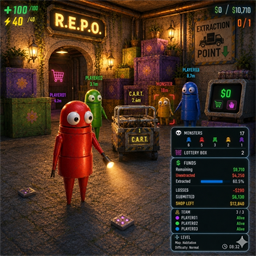
Always-on HUD for teammates, carts, and vehicles — plus monster stats, loot value, and level info in the bottom-right corner. Supports Chinese and English.更多的UI显示 / MoreUI
REPO 游戏交流 QQ 群:824639225
支持 R.E.P.O. v0.4。
Scroll down for English ↓
功能说明
- 好友局内常显名字与死亡状态,存活/死亡好友可分别开启左右边缘离屏提示
- 推车局内常显,可按大/小推车分别开关
- 载具(赛车/载货车)局内常显,有人乘坐时标签变绿色
- 好友、推车、载具的米数显示均可独立开关,默认关闭
- 右下角默认使用文字显示,可调字体大小、文字透明度和位置偏移,也可切换为原生UI显示
- 右下角显示怪物统计、装饰箱、收集进度、未收集、地图库存、损坏宝物、提交资金、商店库存、关卡和好友信息
- 好友名称颜色跟随玩家头顶主色实时更新
- 配置面板支持中英文,切换语言后实时刷新;首次安装/版本更新时若检测到中文相关 mod 则默认中文,否则默认英文
本模组建议和 SuperScanner 一起搭配使用效果更佳
关于配置重置:为了避免由于版本升级、功能增删或配置项更名所导致的配置文件冲突或无效残留,本模组不进行跨版本配置兼容。模组在检测到版本更新时,会直接将所有本地配置重置为默认值。
默认行为
- 好友局内显示默认开启,死亡好友离屏边缘提示默认开启,存活好友离屏边缘提示默认关闭
- 好友局内米数默认关闭
- 推车局内常显默认开启,推车米数默认关闭
- 载具局内常显默认开启,载具米数默认关闭
- 右下角默认显示方式为文字显示,默认字体大小 22,默认文字透明度 70%
版权声明
本模组为独家原创作品,禁止未经授权复制、移植或转载任何相关代码,违者将进行投诉处理。
配置说明
| 分组 | 配置项 | 默认值 | 说明 |
|---|---|---|---|
| A.模组信息 | 语言 / 模组名称 / 模组版本号 | 自动检测 / - / 当前版本 | 语言可下拉切换中英文;名称为只读条目 |
| B.全局设置 | 模组启用 | 开 | 关闭后整个模组所有显示和补丁立即失效 |
| B.全局设置 | 敌人名字优化 | 开 | 仅中文模式生效,使用更顺口的中文昵称;英文模式始终用英文 |
| C.好友局内显示 | 启用 / 死亡好友显示 / 死亡好友离屏边缘提示 / 存活好友显示 / 存活好友离屏边缘提示 / 显示米数 / 字体大小 | 开 / 开 / 开 / 开 / 关 / 关 / 22 | 控制队友局内信息 |
| D1.推车局内显示 | 启用 / 显示小推车 / 显示推车 / 显示米数 / 字体大小 | 开 / 开 / 开 / 关 / 20 | 控制推车局内信息 |
| D2.载具局内显示 | 启用 / 显示赛车 / 显示载货车 / 显示米数 / 字体大小 | 开 / 开 / 开 / 关 / 20 | 控制载具局内信息;有人乘坐时标签变绿色 |
| E.卡车位置局内显示 | 启用 / 仅通关前显示 / 整局显示 | 开 / 开 / 关 | 控制卡车位置在局内何时显示;卡车位置在出生点安全区 |
| F1.右下角基础设置 | 启用 / 不同分区空行 / 显示模式 / 字体大小 / 文字透明度/% / 刷新间隔/秒 / X 偏移 / Y 偏移 | 开 / 开 / 文字显示 / 22 / 70 / 3 / 0 / 0 | 控制右下角面板布局 |
| F2.右下角怪物统计 | 启用 / 显示怪物明细 / 显示怪物总数 | 开 / 开 / 开 | 控制怪物统计 |
| F3.右下角价值统计 | 启用 / 显示装饰箱 / 显示赛车数量 / 显示载货车数量 / 显示小推车数量 / 显示推车数量 / 显示收集进度 / 显示损坏宝物 / 显示地图库存 / 显示提交资金 / 显示商店库存 / 显示关卡 | 开 / 开 / 关 / 关 / 关 / 关 / 开 / 开 / 开 / 开 / 开 / 开 | 控制资金相关信息 |
| F4.右下角好友信息 | 启用 / 显示死亡好友信息 / 显示存活好友信息 / 显示玩家 | 开 / 开 / 开 / 开 | 控制右下角好友信息 |
English
Supports R.E.P.O. v0.4.
MoreUI is a client-side HUD and overlay enhancement mod for R.E.P.O.
Features
- Always-on teammate names and death status, with separate left/right off-screen edge prompts for alive and dead teammates
- Cart labels are shown persistently by default, with separate large/small cart toggles
- Vehicle labels (Kart / Cargo) shown persistently; label turns green when a player is riding
- Distance display for teammates, carts, and vehicles can be toggled independently and is off by default
- Bottom-right panel uses text mode by default with 70% opacity, supports font size, text opacity, refresh timing, and position offsets, and can switch to native UI mode
- Bottom-right panel shows monster stats, lottery boxes, extraction progress, unextracted funds, map remaining, run lost funds, submitted funds, shop stock, level info, and teammate info
- Teammate name colors follow each player's head color and update in real time
- Config panel supports Chinese / English with live refresh on language switch. On first install or version reset, defaults to Chinese when a Chinese mod pack is detected, otherwise English
This mod is recommended to be used alongside SuperScanner for the best experience.
Regarding Config Resets: To avoid configuration conflicts or obsolete settings caused by version upgrades, feature changes, or renamed settings, this mod does not support cross-version config compatibility. The mod will directly reset all local configurations to their default values upon detecting a version update.
Default Behavior
- Teammate display on by default; dead-teammate edge hint on, alive-teammate edge hint off
- Teammate distance meters off by default
- Cart display always-on by default; cart distance meters off by default
- Vehicle display always-on by default; vehicle distance meters off by default
- Bottom-right panel uses text mode by default at font size 22 and 70% opacity
Copyright Notice
This mod is an exclusive original work. Copying, porting, or redistributing any part of the source code without permission is strictly prohibited. Violations will be reported.
Settings
| Group | Setting | Default | Description |
|---|---|---|---|
| A.Mod Info | Language / Mod Name / Mod Version | auto-detect / - / current | Language can be switched between Chinese and English; other items are read-only |
| B.Global | Mod Enabled | On | Disables every feature and patch when off |
| B.Global | Enemy Nicknames | On | Chinese mode only — replaces literal translations with friendlier nicknames |
| C.Teammate Display | Enabled / Show Dead / Dead Edge Hint / Show Alive / Alive Edge Hint / Show Distance / Font Size | On / On / On / On / Off / Off / 22 | Controls teammate world labels |
| D1.Cart Display | Enabled / Show Cart Small / Show Cart Standard / Show Distance / Font Size | On / On / On / Off / 20 | Controls cart world labels |
| D2.Vehicle Display | Enabled / Show Kart / Show Cargo / Show Distance / Font Size | On / On / On / Off / 20 | Controls vehicle world labels; label turns green when a player is riding |
| E.Truck Display | Enabled / Only Before Clear / Show Always | On / On / Off | Controls truck location world labels; always shows in level only |
| F1.Panel Basics | Enabled / Section Spacing / Display Mode / Font Size / Text Opacity % / Refresh Interval / Offset X / Offset Y | On / On / Text / 22 / 70 / 3 / 0 / 0 | Controls bottom-right panel layout |
| F2.Monster Stats | Enabled / Show Breakdown / Show Total | On / On / On | Controls monster stats |
| F3.Value Stats | Enabled / Show Lottery Boxes / Show Kart Count / Show Cargo Count / Show Cart Small Count / Show Cart Standard Count / Show Extraction Progress / Show Run Lost Funds / Show Map Remaining / Show Submitted Funds / Show Shop Stock / Show Level | On / On / Off / Off / Off / Off / On / On / On / On / On / On | Controls value info |
| F4.Teammate Info | Enabled / Show Dead Teammates Info / Show Alive Teammates Info / Show Player Counts | On / On / On / On | Controls teammate info in the bottom-right panel |