
You are viewing a potentially older version of this package. View Latest Version
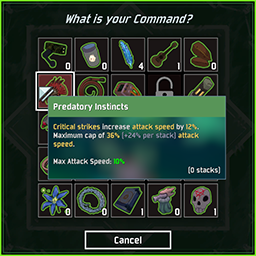
Various quality of life improvements to the command and scrapper menus
Shows item names and statistics on hover
Displays a counter to show how many of each item you have
Allows you to close menus with the escape key
Protection settings to keep you safe while deciding at the command menu (off by default / configurable / server can force settings)
Many optional tweaks to UI appearance
Copy BetterCommandMenu.dll to your BepInEx/plugins folder. It requires BepInEx and R2API to be installed. If you have any trouble installing, use the mod manager r2modman.
Creates a config file in BepInEx/config on first load. Configurable options include...
Font size, color, border, and alignment options for item counters. Here are some examples of what you can do.

Various options to configure protection. By default, each clients settings are honored in multiplayer. This can be changed so clients are forced to use server settings.
Various UI settings allowing you to customize many aspects. Here is an example with the command menu moved to be over the health bar, with the blur/label/cancel button, and other decorations removed.

Enable/Disable flags for every feature
ItemStatsMod - Will display the statistics from ItemStatsMod in tooltips if enabled
| Normal | ItemStatsMod |
|---|---|
 |
 |
The protection functionality has been moved to another mod. This was so people could get the UI improvements, while still maintaining the vanilla aspect of the game. It is located here. SafeMenus
Added support for servers to force client protection settings
Fixed shield protection amount
Added option to hide counters when you have none of that item
Added offset values to item counters so you can correct slight errors in your setup
Added options to tweak command menu appearance
Fixed bug where protection was being applied multiple times
