


NewtCraftHub
Craft & build from chests up to 100 m; smelters and ovens feed from them; Shift-fill; shared chests; cooking timers; world clock; farm grid; Shift harvest; chest contents on hover. All switchable (F1). Valheim 1.0.NewtCraftHub
Your base, working for you. Craft, build, smelt, cook, farm and share storage without running back and forth to your chests.
Valheim is at its best when you are out exploring, fighting and building, not sorting boxes. NewtCraftHub turns the storage around you into one big inventory: the workbench, the forge and the hammer see everything in your chests up to 100 m away, smelters and ovens refill themselves from them, friends can use the same chest at the same time, and small everyday helpers (a world clock, cooking timers, a farm grid, one-press harvesting) keep the game flowing.
Every feature has its own on/off switch, everything can be changed in game with F1 (also online), and the mod is built to stay light: nothing runs when you are not using it, and the whole mod costs a fraction of a millisecond per frame even in large bases. Built for Valheim 1.0, safe in multiplayer.
Formerly NewtCraftBoxes: your settings carry over (see Updating).
New features
0.8: world clock, farm grid and one-press harvest
- World clock: the day of your world and the in-game time at the top of the screen, in 24 h, 12 h or as the time of day ("Late morning"). Press Home to show or hide it.
- Farm grid: crops you plant with the cultivator snap into a neat grid lined up with the crops next to them, spaced exactly as much as they need to grow, with faint grid lines on the ground. The grid stays put while you plant. Hold Shift to plant anywhere.
- Shift harvest: Shift + use on a ripe crop harvests the whole field around it, nearest first. Each crop costs a little stamina, and you harvest as much as your stamina allows.
0.5–0.7: stations, cooking and sharing
- Shift-fill stations: one press fills a smelter, furnace, kiln or oven to its limit, and never beyond it, even while another player's game controls the station.
- Cooking timers: every item on a cooking station or oven shows the time until it is cooked, then until it burns.
- Shared chests: several players can use the same chest at the same time. No more "in use", and no duplicated items.
- In-game settings: press F1 to change anything while playing.
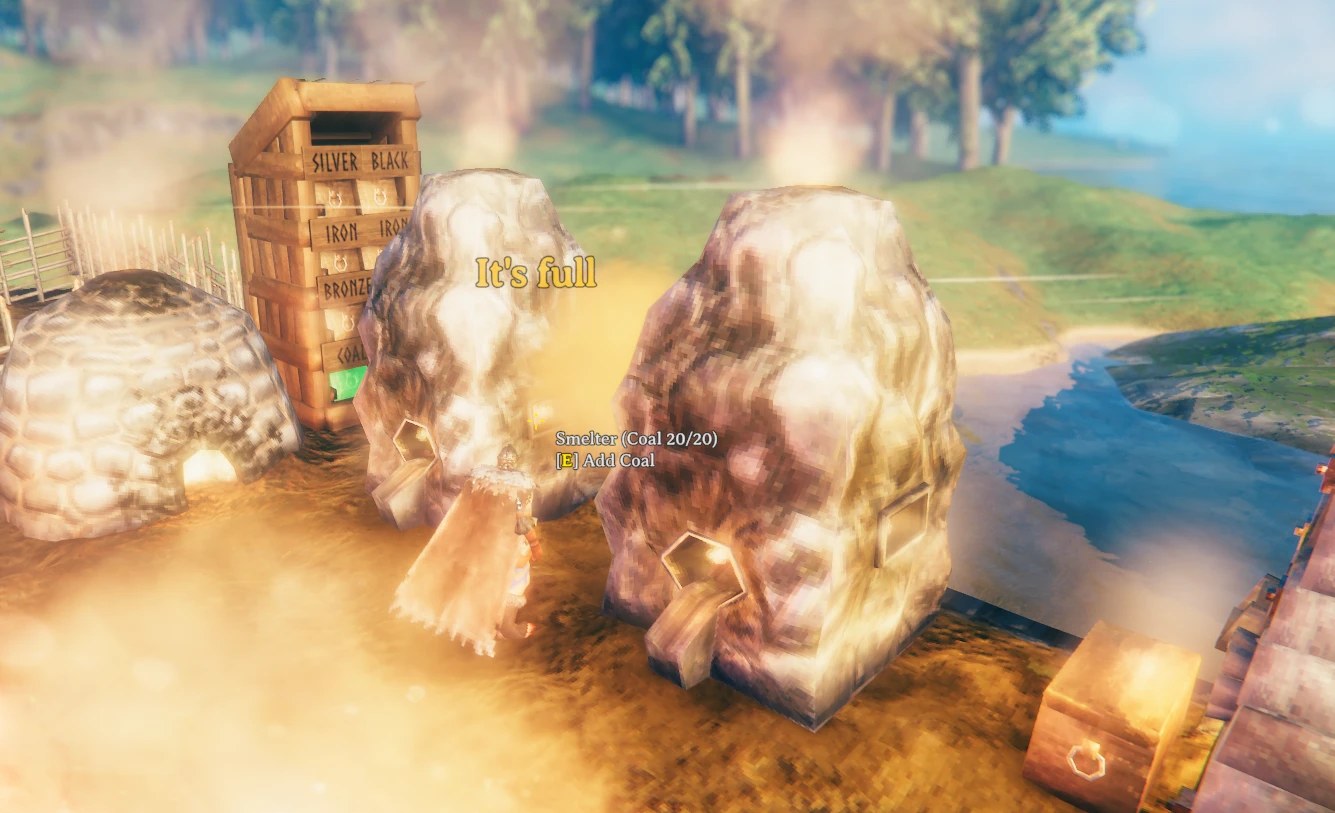
One Shift-press filled the smelter with coal up to 20/20; the next press only says "It's full".
Features
Craft and build from your chests
- Building (hammer, hoe, cultivator), crafting at any station and upgrading items use the materials stored in the containers around you: chests, barrels, and the storage of carts and ships.
- Your inventory is always used first; only what is missing is taken, nearest container first.
- Requirement slots show
available/required, and item tooltips show how many your chests hold. - The game itself decides what every recipe needs (craft ×N, upgrades, item quality, world level), so recipes behave exactly like vanilla.
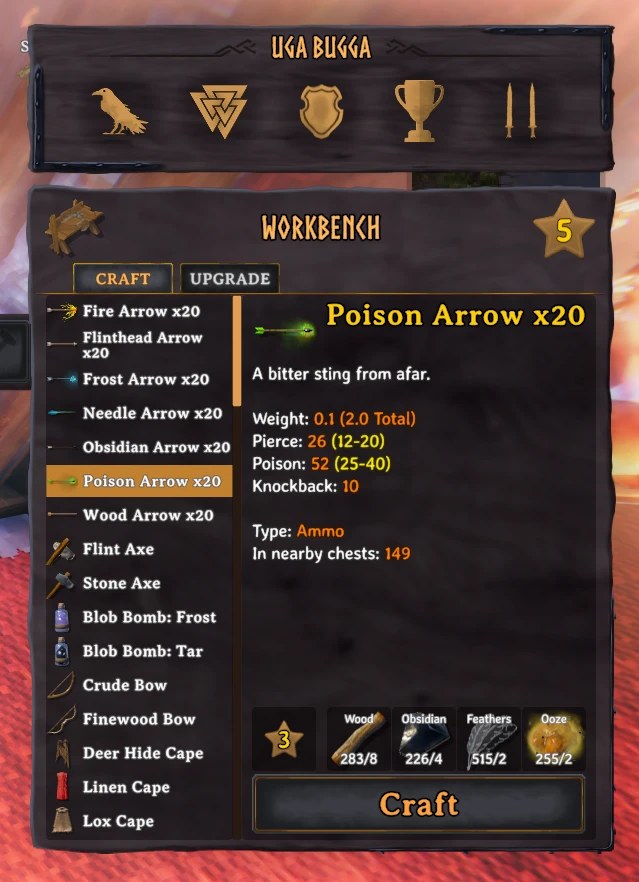
At the workbench the poison arrows need 8 wood, 4 obsidian, 2 feathers and 2 ooze: all of it comes from the chests, and the tooltip shows 149 more arrows stored nearby.
Up to 100 m away
- Every container within 100 m counts (the
Rangesetting), so the whole base is one storage. Private chests of other players, chests inside wards you can't open, dungeon chests and tombstones are ignored.
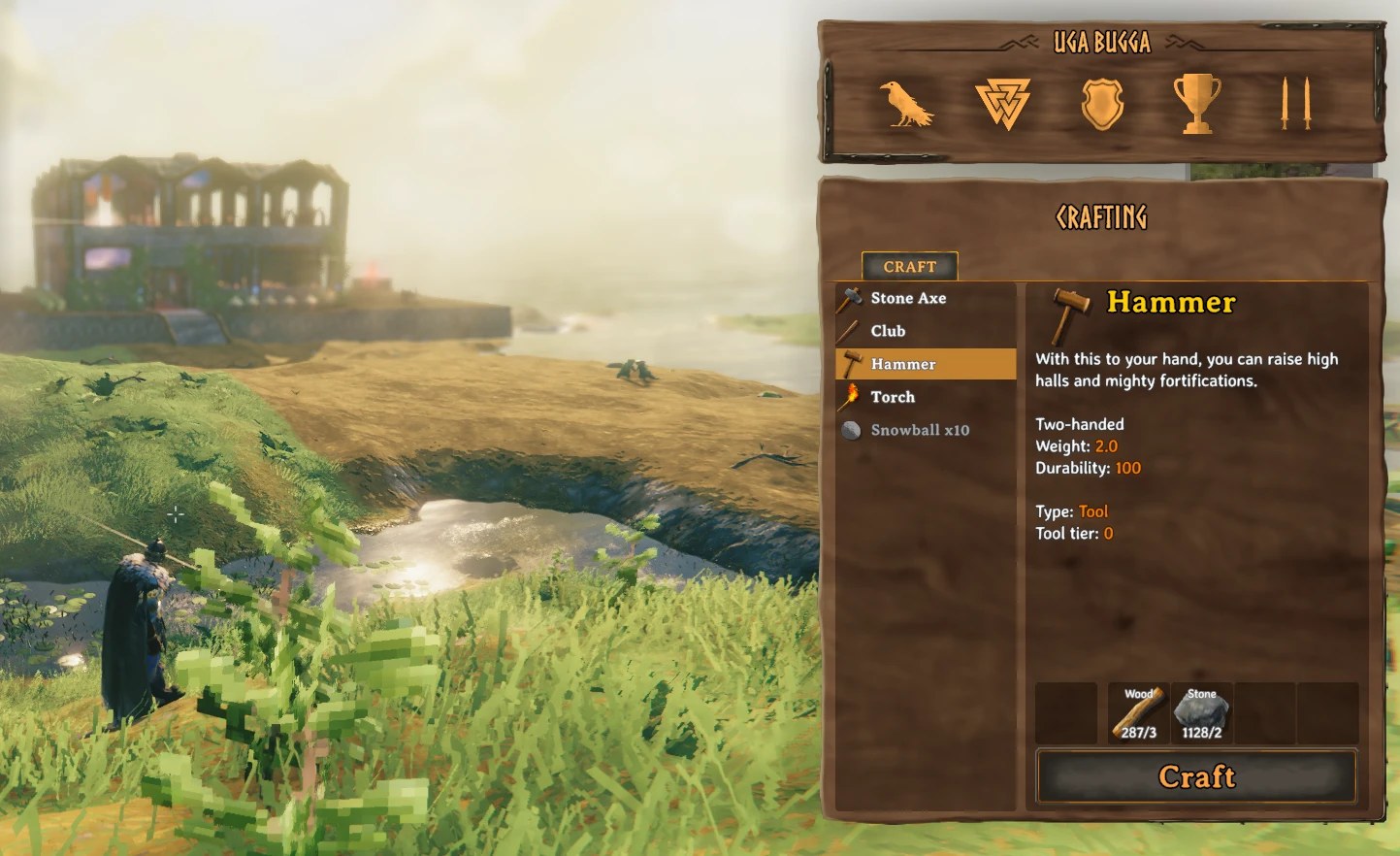
The base is in the distance, yet the hammer's 3 wood and 2 stone are covered: 287 wood and 1128 stone are counted from chests up to 100 m away, with nothing in your pockets.
Stations that feed themselves
- Smelter, blast furnace, charcoal kiln, windmill, spinning wheel, eitr refinery take ore and fuel, the fermenter mead bases, ovens and cooking stations raw food and fuel, straight from your chests when you don't carry any. Press use as usual (hold to keep adding); a unit the station can't take goes back to its chest.
- Shift + use fills the station to its limit in one press. Limits are respected for every press and every station, even when another player's game controls it: nothing is overfilled or destroyed.
- Cauldron recipes use the crafting feature above.
Cooking timers
- Look at a cooking station, iron cooking station or stone oven: each item shows
ready in 0:12, thenready, burns in 0:20. A timer that stopped (fire out, no fuel) is marked (no heat). Every player near the station sees the same numbers.
Farming
- Farm grid: plant the first crop anywhere; the next ones snap to an even grid lined up with the crops around them, spaced by the room each crop needs to grow, so none of them is ever blocked. Grid lines show where the next crops go. The grid is set by your first snap and stays steady while you plant (even next to a field planted by hand); it starts over when you switch crop, walk away, pause for 30 s, or hold Shift to place freely.
- Shift harvest: Shift + use on a ripe crop picks the crops around it, nearest first, until your stamina runs out. Only planted crops are harvested (the ones the scythe cuts); berry bushes and other wild plants are left alone. Drops, skill gains and bonus yields are the game's own.
World clock
- Not just the time: the clock also shows the date of your world, the day you have reached since it began, so you always know how long your saga has run and how long until night falls.
- The day sits on top in a smaller font, the time right below it, readable over snow, sky and night. Choose 24 h (
14:05), 12 h (02:05 PM) or the time of day ("Late morning"), the text, position, size and colour. Home shows or hides it.
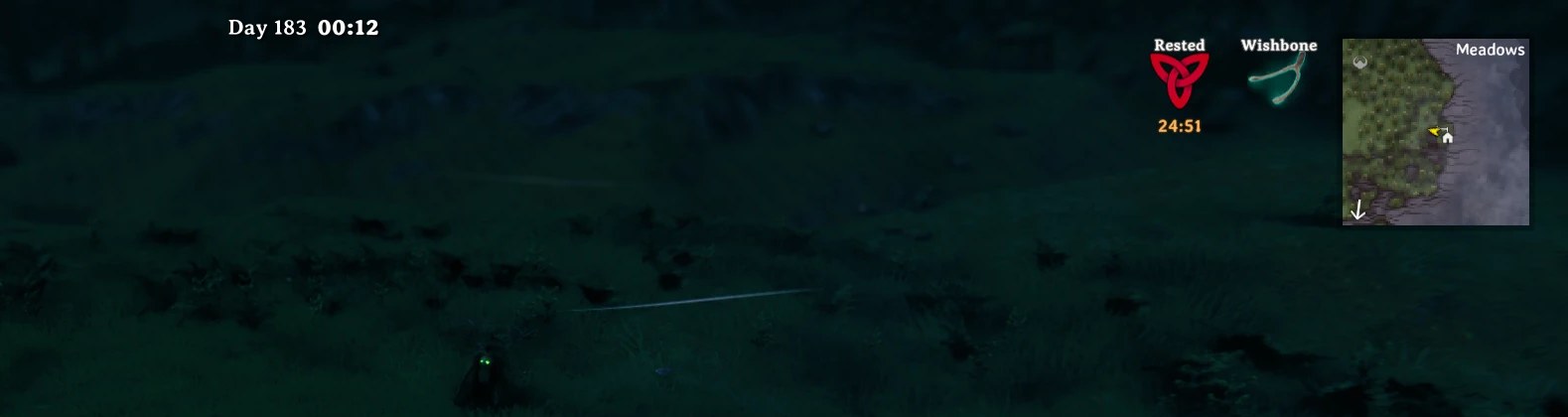
Day 183 of this world, twelve minutes past midnight: date and time at a glance, next to the usual HUD.
Shared chests
- A friend can open a chest you already have open; you both see its contents change live and can take and store items at the same time. Only one game changes the chest at any moment: a click that changes it waits a fraction of a second until the chest is handed over with its latest contents, so nothing is duplicated or lost. Everyone at the chest needs the mod; carts and ships are not shared.
See what's inside
- Look at a chest, cart or ship to see what it holds, summed and sorted, plus the slots in use.
- Item tooltips gain the item type, tool tier, stack size and how many your nearby chests hold.
Multiplayer safe and light
- Every chest in range counts at once, including chests near other players, from the contents the game keeps in sync. Looking at recipes never sends anything over the network, and when a chest another player's game controls is needed, it is asked for exactly like the game does when you open it: no duplicated or reappearing items, and two players with the mod never fight over chests.
- Client-side: only the players who want it install it; no server install needed.
- Each feature is installed independently: if a game update breaks one, only that one is switched off and the log says why.
More to come
NewtCraftHub keeps growing into an all-in-one base mod. New features arrive with their own switch, so you keep only what you use. Suggestions are welcome: send them to Anatta Labs.
Quick start
- Install with r2modman or the Thunderstore Mod Manager; BepInExPack Valheim and the in-game settings window come with it.
- Start the game, stand near your chests, open the workbench or the hammer menu: requirements now show
available/required(e.g.34/10). Craft and build as usual. - At a smelter, kiln or oven press use as usual, or Shift + use to fill it completely.
- Look at a cooking station to see how long until the food is ready.
- Plant with the cultivator next to an existing crop: it snaps into the grid. Shift + use on a ripe crop harvests the field.
- Open a chest a friend already has open: you both use it at the same time.
- Press Home to show or hide the clock, F1 to change any setting or switch features on and off.
No setup is needed: every feature works out of the box.
Installation
Requirements
- Valheim 1.0 or newer, on PC. Console players can't use mods; PC players with the mod can still join crossplay worlds.
- BepInExPack Valheim and Official BepInEx ConfigurationManager, installed automatically by mod managers.
Mod manager (recommended)
- Install r2modman or the Thunderstore Mod Manager.
- Select Valheim and a profile, go to Online, search for NewtCraftHub (by Anatta Labs) and click Download.
- Click Start modded. Always start the game from the mod manager, not from Steam.
From a .zip file (a friend sent you the mod): Settings → Profile → Import local mod, select
NewtCraftHub-X.Y.Z.zip, then Start modded.
Manual installation
- Install BepInEx: copy everything inside the
BepInExPack_Valheimfolder of BepInExPack Valheim into your Valheim folder (Steam → right-click Valheim → Manage → Browse local files), start the game once and close it. Linux / Steam Deck: set the launch options to./start_game_bepinex.sh %command%. - Copy
plugins/NewtCraftHub.dllfrom the zip toValheim/BepInEx/plugins/NewtCraftHub/. - Start the game.
BepInEx/LogOutput.logshould containNewtCraftHub X.Y.Z loaded (23/23 patch groups active).
Updating and uninstalling
- Mod manager: Update or Uninstall on the mod. Manual: replace or delete
BepInEx/plugins/NewtCraftHub/. - Your settings stay in
BepInEx/config/(deletenewton.newtcraftboxes.cfgandnewton.NewtCraftHub.ymlto reset them). - Coming from NewtCraftBoxes: install NewtCraftHub, then uninstall NewtCraftBoxes. Settings are kept, and
newton.NewtCraftBoxes.ymlis imported once asnewton.NewtCraftHub.yml.
Configuration
- In game, also online: press F1 and open NewtCraftHub; changes apply at once and are yours only.
- Config file:
BepInEx/config/newton.newtcraftboxes.cfg(in a mod manager: Config editor). Changes saved while playing are applied a moment later.
Turning features on and off
Each feature is one line in section 0 - Features (true = on, false = off); 1 - General → Enabled = false switches the whole mod off.
[0 - Features]
CraftFromContainers = true    # craft, build and upgrade with materials from nearby containers
FeedStations = true           # smelters, kilns, fermenters, ovens take ore / fuel / food from containers
ShiftFillsStations = true     # Shift + use fills a station to its limit
SharedContainers = true       # several players at the same chest
CookingTimers = true          # time until cooked / burnt on cooking stations and ovens
WorldClock = true             # in-game time and day on screen
FarmGrid = true               # crops snap to an even grid
ShiftHarvest = true           # Shift + use on a crop harvests the field
ChestContentsOnHover = true   # what a chest holds, when you look at it
ItemTooltipInfo = true        # extra item tooltip lines
AvailableAmountText = true    # "available/required" on requirements
Container rules (optional)
BepInEx/config/newton.NewtCraftHub.yml (created on first start with examples, reloaded live) chooses which
items may never be taken from a kind of container. By default every item can be taken from every container.
groups:
  Valuables: [Coins, Ruby, Amber, AmberPearl]

piece_chest_private:        # personal chests: never take anything
  exclude: [All]

piece_chest_wood:           # wood chests: no valuables or food... except coins
  exclude: [Valuables, Food]
  includeOverride: [Coins]
- The key is the container prefab name:
piece_chest_wood,piece_chest,piece_chest_private,piece_chest_blackmetal,piece_chest_barrel; carts and ships use the vehicle's name (Cart,Karve,VikingShip).DebugLoggingwrites the name of every container items are taken from. excludelists items or groups never taken;includeOverridelists items always allowed and wins overexclude. Items are prefab names (Wood,Bronze,TrophyDeer; see the item list).- Built-in groups:
All,Food,Potion,Fish,Swords,Axes,Clubs,Knives,Pickaxes,Polearms,Spears,Bows,Crossbows,Equipment,Trophy,Boss Trophy,Ores,Metals,Woods,Seeds,Crops(calculated from the game's items, modded items included). - Indent with 2 spaces. If the file has an error, the log shows the line and the previous rules stay active.
All settings available
| Section | Setting | Default | What it does |
|---|---|---|---|
| 0 - Features | CraftFromContainers | true |
Craft, build and upgrade using materials from nearby containers. |
| 0 - Features | FeedStations | true |
Stations take ore, fuel, mead bases and raw food from nearby containers when you carry none. |
| 0 - Features | ShiftFillsStations | true |
Shift + use fills a smelter, furnace, kiln, windmill, spinning wheel, eitr refinery or oven to its limit. |
| 0 - Features | SharedContainers | true |
Several players can use the same chest at once (everyone at it needs the mod). |
| 0 - Features | CookingTimers | true |
Time until cooked / burnt on cooking stations and ovens. |
| 0 - Features | WorldClock | true |
In-game time and day on screen. |
| 0 - Features | FarmGrid | true |
Crops planted with the cultivator snap to an even grid. |
| 0 - Features | ShiftHarvest | true |
Shift + use on a ripe crop harvests the crops around it, as many as your stamina allows. |
| 0 - Features | ChestContentsOnHover | true |
What a chest, cart or ship holds, in its hover text. |
| 0 - Features | ItemTooltipInfo | true |
Extra item tooltip lines. |
| 0 - Features | AvailableAmountText | true |
available/required on requirement slots when containers contribute. |
| 1 - General | Enabled | true |
Master switch for the whole mod. |
| 1 - General | Range | 100 |
Metres (1–100) between you and a container for it to be used. |
| 1 - General | ToggleKey | (none) | Hotkey switching crafting from containers on/off while playing (e.g. F8). |
| 2 - Containers | OnlyPlayerBuilt | true |
Ignore dungeon and treasure chests. |
| 2 - Containers | IncludeShipsAndCarts | true |
Also use cart and ship storage. |
| 2 - Containers | RespectWards | true |
Skip containers inside wards you can't open. |
| 2 - Containers | SkipContainersInUse | true |
Skip chests another player has open. |
| 2 - Containers | TakeNetworkOwnership | true |
Ask the player whose game controls a chest to hand it over before using it (needed for chests near other players). |
| 3 - Performance | RefreshInterval | 0.5 |
Seconds between rescans of nearby containers while standing still (0.1–5). |
| 5 - Debug | DebugLogging | false |
Detailed log in BepInEx/LogOutput.log, plus a Perf: line every minute. |
| 6 - Chest Contents | MaxEntries | 8 |
Lines listed; -1 = all. |
| 6 - Chest Contents | SortBy / SortAscending | Amount / false |
Amount, Name, Weight or Value; reverse order. |
| 6 - Chest Contents | EntryFormat / OverflowFormat / CapacityFormat | {0} amount, {1} name / +{0} more / {0}/{1} slots. Colours allowed; empty = no line. |
|
| 7 - Item Tooltip | ShowItemType / ShowToolTier / ShowStackSize / ShowNearbyCount | true |
Each extra tooltip line. |
| 7 - Item Tooltip | ShowPrefabName | false |
The internal name to use in the rules file. |
| 8 - Cooking Timers | ShowBurnTime | true |
Once cooked, also show the time until it burns. |
| 8 - Cooking Timers | ReadyInFormat / DoneFormat / BurnsFormat / BurntFormat | {0} item, {1} time (m:ss). Colours allowed. |
|
| 8 - Cooking Timers | PausedText | (no heat) |
Added when a timer stopped. Empty = nothing. |
| A - World Clock | ToggleKey | Home |
Shows / hides the clock. |
| A - World Clock | TimeFormat | HH:mm |
HH:mm (24 h), hh:mm tt (12 h) or fuzzy (time of day). |
| A - World Clock | Text | day (small) above the time | {0} time, {1} time of day, {2} day, {3} a smaller size (¾ of FontSize); ` |
| ` = new line. Rich text allowed. | |||
| A - World Clock | Position / FontSize / Color / Shadow | 50%,2% / 24 / white / true |
Where and how it is drawn (pixels or % of the screen). |
| A - World Clock | PeriodNames | Midnight, Night, Dawn… | Time-of-day names, comma-separated, spread evenly from midnight. |
| B - Farm Grid | GridLines | 2 |
Grid cells drawn around the crop you place (0 = snap without lines). |
| B - Farm Grid | ExtraSpacing | 0.01 |
Metres added between crops. |
| B - Farm Grid | LineColor | FFFFFF40 |
Line colour, RRGGBBAA. |
| C - Shift Harvest | Radius | 15 |
Metres around the crop you press on. |
| C - Shift Harvest | StaminaPerCrop | 4 |
Stamina per crop; the harvest stops when you run out (0 = free). |
| C - Shift Harvest | MaxCrops | 100 |
Most crops one press harvests. |
Compatibility
- Client-side: servers don't need it; players without the mod play normally next to you.
- Other clock and farm grid mods (Clock, AzuClock, Venture Farm Grid, Farm Grid Remake): while one of them is active, NewtCraftHub's clock or grid stays off, so nothing appears twice. The log says so.
- AzuHoverStats: while its chest list or tooltip lines are on, NewtCraftHub leaves them to it.
- Other "craft from containers" mods (e.g. AzuCraftyBoxes): use only one; two would both take items.
- Modded containers and crops built on the game's own systems are supported automatically.
Troubleshooting
| Problem | What to check |
|---|---|
| Nothing happens | Started with Start modded? Does the log contain NewtCraftHub … loaded? Is Enabled on, and wasn't the mod toggled off with ToggleKey? |
| A chest is not used | Distance (Range), open by someone else, inside a ward, another player's private chest, excluded in the rules file? |
| No clock / no grid | Another clock or farm grid mod is active (see above), or the switch is off. Home toggles the clock. |
| A friend still gets "in use" | Both of you need NewtCraftHub with SharedContainers = true. Carts and ships are never shared. |
Log shows fewer than 23/23 patch groups active |
A game update changed something: that feature is off, the rest keeps working. Please report it with your log. |
The log: in the mod manager, Settings → Debugging → Browse profile folder → BepInEx/LogOutput.log.
To report a problem, set DebugLogging = true, reproduce it and send that file to Anatta Labs.
Credits
- Newt / Anatta Labs: author.
- Ideas that inspired features, each rewritten from scratch for NewtCraftHub: Clock by aedenthorn (published on Thunderstore by Pineapple), Venture Farm Grid by VentureValheim (after Sarcen's Farm Grid), AzuHoverStats and AzuCraftyBoxes by Azumatt.
- Built on BepInEx and HarmonyX; in-game settings by Official BepInEx ConfigurationManager.
- The icon was generated with AI.
For developers
- Plugin GUID
newton.newtcraftboxes(kept from NewtCraftBoxes). Each feature is a separate Harmony patch group, applied independently and found by name, so a game update only disables the part it touches; the log lineloaded (N/23 patch groups active)shows how many are working. - Crafting from containers never re-implements game logic: while the game checks or consumes requirements, counts include nearby containers and the missing amount is taken from them, so vanilla rules always apply.
- Multiplayer: containers are only written by the game that owns them; other players' chests are requested with the vanilla ownership request, shared chests hand ownership over per click, and station inputs count units still in flight to their owner.
- Performance: no allocations on the game's inventory calls, hover texts and timers cached until their data
changes, the clock text rebuilt once per game minute. With
DebugLogging, aPerf:line reports the mod's cost every minute. - Source and issue reports: contact Anatta Labs.
License
MIT. You may use, modify and share it; keep the copyright notice.
Complete the experience: pair NewtCraftHub with SargamAutoStore, also by Anatta Labs. It stores what you pick up in the right chests automatically (by chest contents, matching signs or new-item chests), so your base stays organised while NewtCraftHub puts it to work. Together they put you fully in control of your game.


