
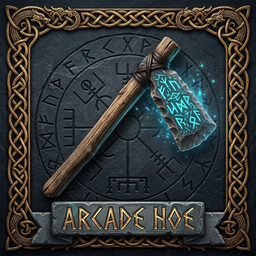
ArcadeHoe
Ancient runic terraformer with zero stamina cost, indestructible durability, true flat leveling, and adjustable radius.⚡ ArcadeHoe - Runic Leveler & True Flat Terraformer
An ancient, enchanted terraforming tool crafted for Viking architects who want true flat ground without the frustration of bumpy terrain, jagged voxel cliffs, and stamina exhaustion!
🌟 Key Features:
- 📏 True Flat Leveling: Sets all terrain height vertices inside the radius to a precise, smooth elevation plane without bumpy polygon steps.
- ⚡ Zero Stamina Drain: Level, raise, and pave terrain endlessly without ever running out of stamina!
- 💎 Indestructible Durability: 9999 max durability and zero wear & tear. Never breaks or needs repair!
- 🎯 Adjustable Radius: Scale your leveling circle on the fly between 2.5m, 4.0m, 6.0m, 8.0m, 12.0m, 16.0m, 20.0m, and 25.0m!
- 🔒 Height Lock (
HKey): Freeze your leveling elevation to your foundation or current height so you can level an entire building plot to the exact same flat height! - 🎯 Aim Elevation Lock (
JKey): Instantly lock the leveling height to wherever your placement crosshair is pointing. - 🌿 Smooth Edge Blending: Natural feathering on outer borders prevents unnatural sheer cliff cuts and blends seamlessly with the natural landscape.
- 🌌 Enchanted Azure Runic Stone: The stone head is transformed into glowing cyan rune stone with realistic light emission and dynamic night lighting.
- 🎨 Valheim Norse HUD: Sleek dark slate and antique gold in-game panel displaying radius, lock status, and hotkeys.
- 🔨 Easy Crafting: Crafted at any basic Workbench (Level 1) for 5 Wood and 2 Stone.
🎮 Controls & Hotkeys:
| Control | Action | Details |
|---|---|---|
Left Click |
True Flat Level | Flattens all ground inside the circle to a smooth plane |
Right Click |
Hoe Menu | Opens vanilla tool options (Raise Ground, Pave Stone, Dirt Path) |
+ / - (or [ / ]) |
Adjust Radius | Cycle between 2.5m, 4.0m, 6.0m, 8.0m, 12.0m, 16.0m, 20.0m, and 25.0m |
Shift or Alt + Mouse Wheel |
Quick Radius | Scroll up to increase, scroll down to decrease radius |
H |
Toggle Height Lock | Freezes leveling elevation (walk anywhere without changing height) |
J |
Aim Height Lock | Sets the locked elevation to the exact height of your crosshair |
All hotkeys and radii can be customized in BepInEx/config/arcade.valheim.arcadehoe.cfg or via Gale Mod Manager.
📦 Installation:
With Mod Manager (Gale / Thunderstore / r2modman):
- Click Install with Mod Manager.
- Launch the game and craft your Arcade Runic Leveler at any Workbench!
Manual Installation:
- Extract
ArcadeHoe.zip. - Copy
ArcadeHoe.dllinto yourValheim/BepInEx/plugins/directory. - Launch Valheim!
💬 Community & Support:
Part of the ArcadeRoom Valheim quality-of-life mod series.
Join our official Discord: ArcadeRoom Discord