

ComfortMe
Valheim 1.0 hammer helper: see which furniture would raise the comfort of the room you are standing in.ComfortMe
Stand in a room. Open the hammer. See which furniture would raise this room’s comfort.
ComfortMe does not change comfort values, recipes, or rested time. It only marks the build menu.
Current version: 1.3.1
Requires: Valheim 1.0 and BepInEx Pack for Valheim
Install: Client-side only. No server install. Other players do not need the mod.
Links
- Team Extreme Discord — setup help, bug reports, and updates
- GitHub — ComfortMe — source and issues
How to use it
- Stand in the room you care about (comfort is a 10 m bubble around you).
- Equip the hammer and right-click to open the piece grid.
- Look at This room: N to the right of the hammer. That is vanilla comfort covering you right now (base + shelter + furniture that currently count). The list stays up while the hammer is equipped, including while you are placing a piece, and hides when you put the hammer away.
- Scan the
+Nchips on the icons. The number is that piece’s comfort. The color is compared to this room, not to the best piece in the whole game. Chips follow the piece across Categories, usage tags, Materials, Recent, and Favorites. - Open Categories and click Comfort for every unlocked comfort piece in one grid. Upgrades for this room are first, then unlit, then already counting, then lower pieces. Hover a piece to lighten the cell plates of every other unlocked piece in that vanilla group (all rugs, all chairs, all fires). The icon and chip do not change. Unique pieces with no group stay unhighlighted.
- With the hammer out and a piece ready to place (grid closed), hold Left Alt to free the mouse from the camera. Hover the Rested icon at the top right, or This room, to draw sparkle lines to every piece that currently counts. While you are placing a comfort piece, a line already runs from that ghost to you.
Unknown recipes stay hidden, same as vanilla. A greyed-out icon (you cannot afford it yet) can still wear a green chip: that is the shopping hint.
The +N chip
Every comfort piece on every hammer tab gets a small chip in the bottom-right of its icon.
| Chip | Example | Meaning |
|---|---|---|
+3 green |
Throne while this room only has a chair | Placing this would raise this room’s comfort |
+2 grey |
Hearth while a hearth (or equal fire) is already counting | Same as what already covers you — no gain from placing another |
+1 red |
Campfire while a hearth +2 is already counting |
Worse than the current group max — placing it does not raise the total |
+2 amber (hot tub / fire in range but cold) |
Hot tub with no wood | The piece is already here. Lighting it adds comfort; building a second one does not |
The chip is not the word “Comfort”. It is only +N. Vanilla already greys unaffordable icons and paints the selection cell blue — ComfortMe does not tint the artwork and never uses blue.
Color codes (same on the chip and in the room list)
| Color | On the grid | In the room list |
|---|---|---|
| Green | Would raise this room | — |
| Grey | Equal to what’s already covering you | Current group max / already counting |
| Red | Lower than this room’s group max | — |
| Amber | Unlit — in range, but not contributing until you add fuel / light it | — |
Vanilla only counts the best piece in a group (Fire, Bed, Chair, Table, Banner, Carpet, plus 1.0 groups such as Decor, Display, Garland, Lantern, and Leisure). Unique pieces (hot tub, armour stand, …) stack once each. Unlit fires and a cold hot tub contribute 0 until they are lit.
Screenshots
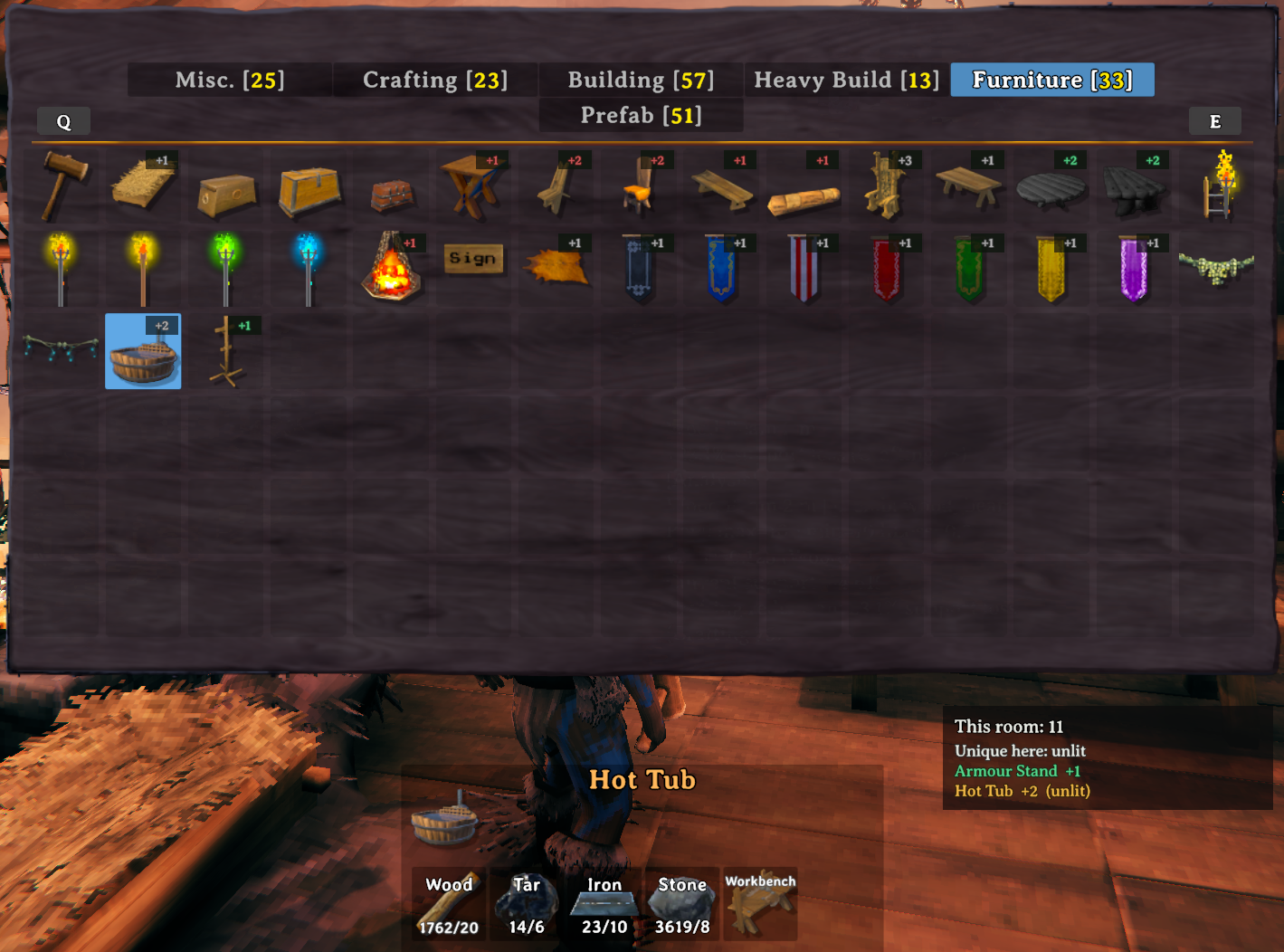
Furniture tab — chips on every comfort piece. Green armour stand = not in this room yet. Amber hot tub = already here, unlit until you add wood. This room: 11 is the live total.
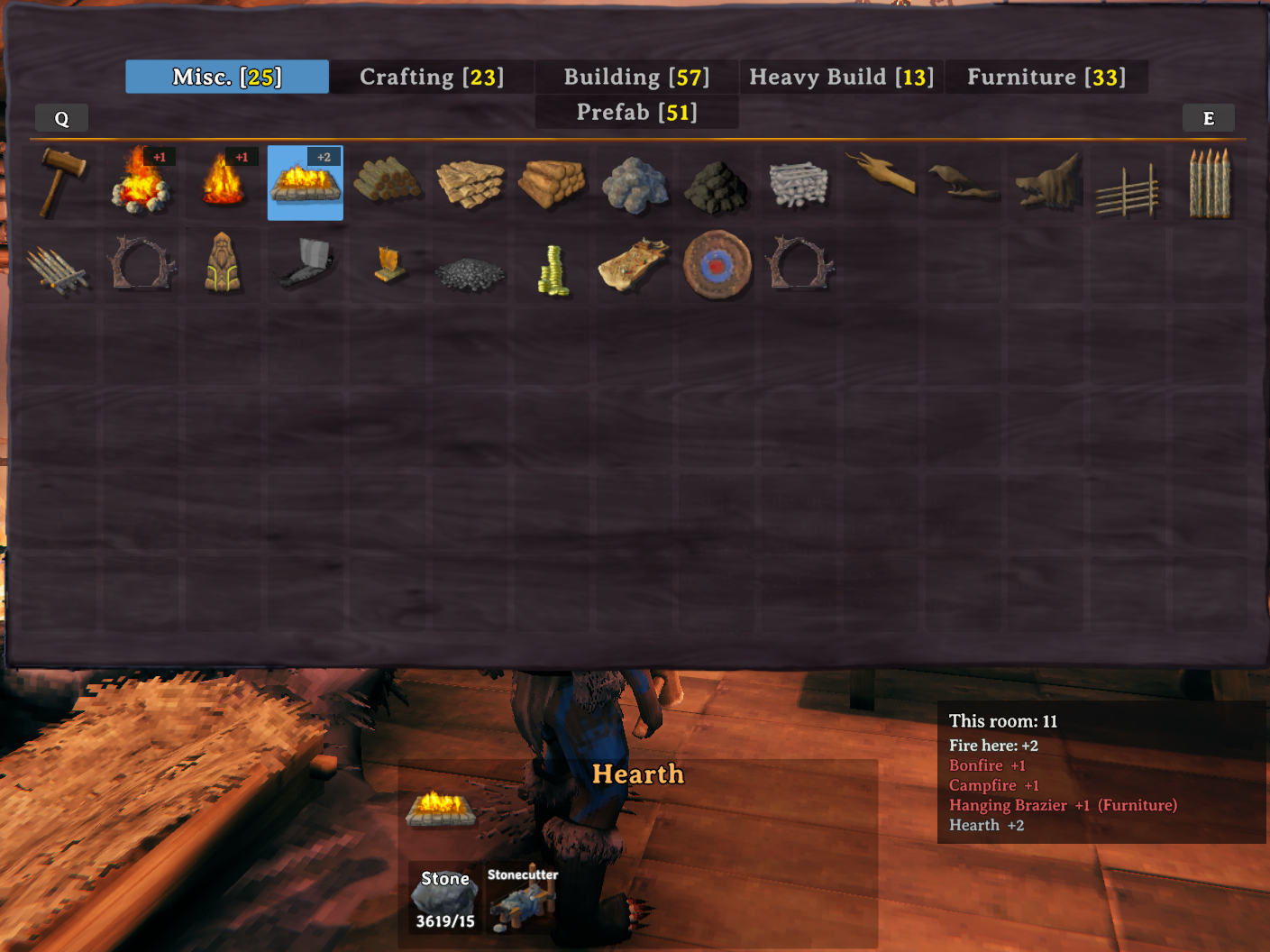
Fire group — only the best fire counts. Hearth is grey +2 because fire here is already +2. Campfire and bonfire are red +1. The Comfort category lists all of these in one place, upgrades first.
What this is not
| Mod | Job |
|---|---|
| Hygge | Stats for the selected piece (group, value, nearest same-group). Green there means “best in the whole game,” not “helps here.” |
| GetComfortable | F4 list of pieces already contributing where you stand. |
| ComfortMe | Which hammer icons would raise this room, plus a Comfort category, group hover on that row, a slim room total, and sparkle lines to the pieces that currently count. |
You can run all three. ComfortMe does not clone Hygge’s inspector or GetComfortable’s F4 list.
Config (BepInEx/config/hardwire99.comfortme.cfg)
| Setting | Default | Effect |
|---|---|---|
Enabled |
true | Kill switch |
ShowValueBadge |
true | +N chips on the grid |
BadgeUpgradesOnly |
false | true = only green chips. Default = green / amber / grey / red on every comfort piece |
ShowGroupCatalog |
true | Slim This room panel beside the hammer |
ShowComfortCategory |
true | Comfort row on the 1.0 Categories list |
ShowGroupHoverHighlight |
true | On the Comfort row, hovering a piece lightens sibling cell plates in the same vanilla group |
ShowComfortLinks |
true | Sparkle lines on hover of This room / Rested, and from a comfort ghost while placing |
HudCursorKey |
LeftAlt | Hold while the hammer is ready to place (grid closed) to free the mouse from the camera |
HighlightPolicy |
AnyIncrease | AnyIncrease / BestAvailable / UpgradeOnly (green chips only) |
RequireMaterials |
false | true = hide chips you cannot afford. Default leaves the chip on greyed icons |
DownloadTranslations |
true | Download the selected language JSON from GitHub (English always ships in the zip) |
TranslationsUrl |
GitHub translations repo | Folder URL for one JSON per language shared by Hardwire99 mods |
DebugLogging |
false | Extra BepInEx log spam |
Localization
HUD chrome (Comfort tab, This room, group labels) follows the language selected in Valheim. English.json is in the zip. French, German, Spanish, Russian, Ukrainian, Chinese, and Japanese are fetched from github.com/cdjensen99-sudo/translations and cached next to the DLL. Piece names and config text stay as they are.
Requirements
- Valheim 1.0
- BepInEx Pack for Valheim (5.4.2350)