

Milestones
Real progress for Valheim's achievements: bars and numbers instead of ??? / ???, a pinned HUD tracker that updates as you play, and progress toasts. Client-side.Milestones
Real progress for Valheim's achievements. The vanilla details panel hides everything behind
??? / ??? until an objective is done; Milestones shows the bar, the numbers and the percentage
the whole time, pins the achievements you care about to the HUD, and tells you in the game's
own message feed when you get closer.
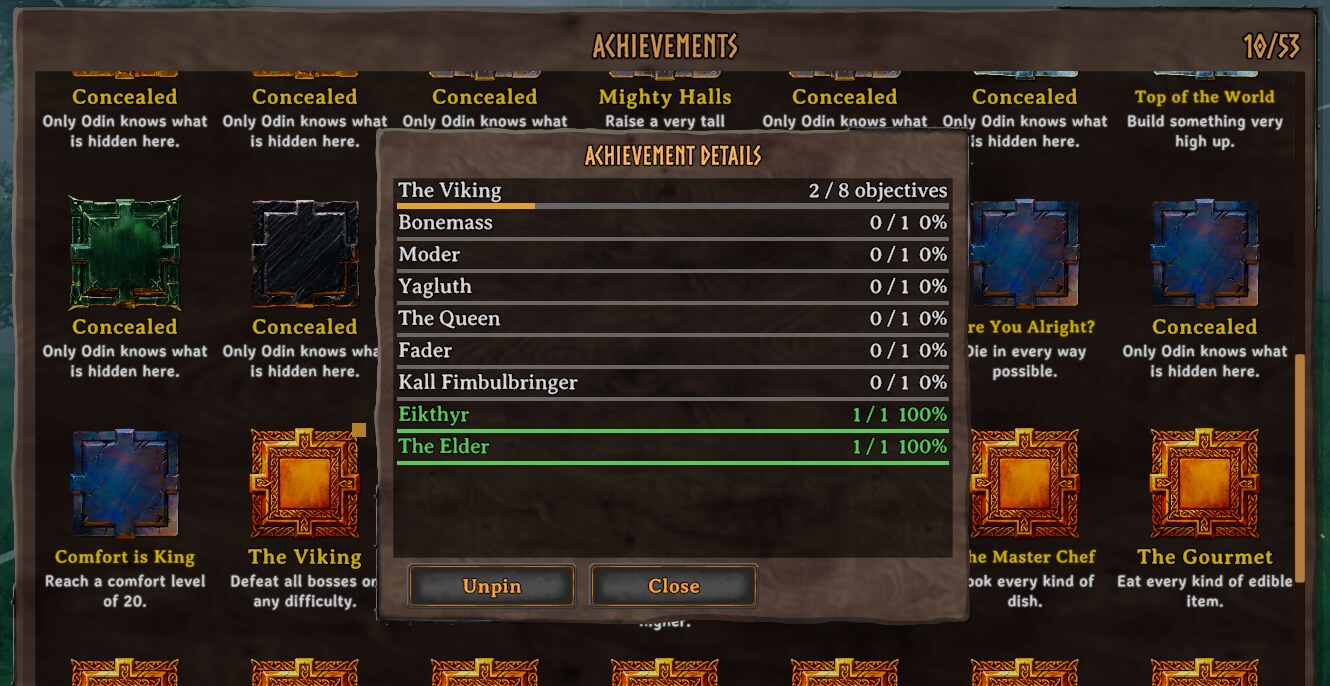
The details panel: every objective with its bar and numbers, unfinished ones first. The amber mark on the tile shows the achievement is pinned.
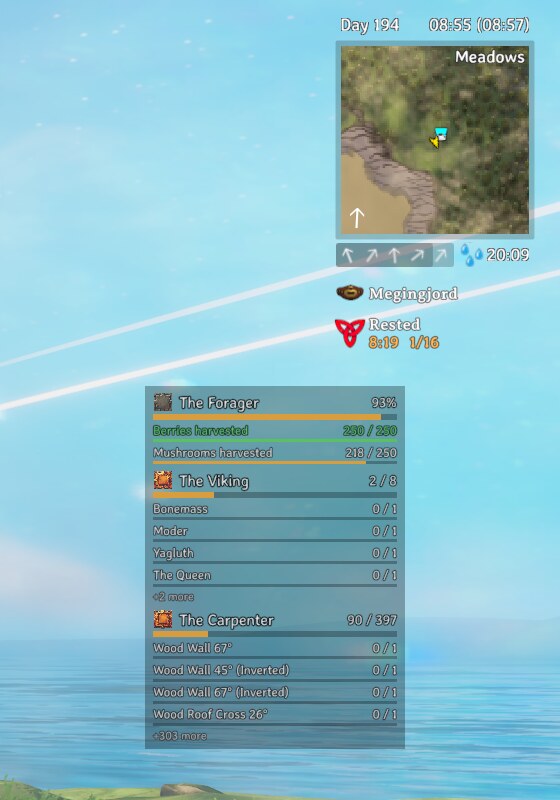
The tracker under the status effects: three pinned achievements, updating as you play. Large ones show the objectives closest to done, then how many are left.
Features
- Real numbers in the details panel. Every objective gets a bar,
current / totaland a percentage. Each achievement also gets an overall bar: objectives met for "do everything once" achievements (eat every food, kill every creature), average fill otherwise, and the game's own 1.15x rule for the lenient build achievements. Unfinished objectives sort to the top, and achievements that require other achievements list them. - A HUD tracker for what you pin. Pin up to three achievements per character from the details panel. A tracker under the status-effect icons, beside the minimap, shows them and moves as you play. Large achievements show the four unfinished objectives closest to done. Unlocked pins clear themselves ten seconds later.
- Toasts, not silence. Pinned achievements toast on every completed objective and at 25 / 50 / 75% overall; every other achievement toasts at 25 / 50 / 75% only. Nothing toasts on unlock — the achievement popup already covers that.
- Tells you when it can't count. If the game has stopped recording achievement stats
(cheats, a cheated item, world modifiers, or another mod setting
Game.isModded), the tracker says so instead of showing stale numbers.
Configuration
| Section | Setting | Default | Meaning |
|---|---|---|---|
| General | Enabled | true |
Master switch. Off restores the vanilla details panel and hides the tracker and toasts. |
| General | OverallMode | Auto |
How the overall bar is measured. Count: objectives met out of all. Average: mean fill of every objective. Auto: Count when every objective is "do this once", Average otherwise. |
| General | SortObjectives | true |
Unfinished objectives first, closest to done at the top. Off keeps the game's order. |
| General | HideUnmetNames | false |
Spoiler guard: unmet objectives keep the game's ??? name but still show their bar and numbers. |
| Tracker | ShowTracker | true |
Show pinned achievements on the HUD. |
| Tracker | Anchor | UnderStatusEffects |
Where the tracker sits. UnderStatusEffects follows the status-effect icons beside the minimap and moves down when they wrap into a second row. |
| Tracker | OffsetX | 0 |
Horizontal nudge in HUD pixels (positive is right). |
| Tracker | OffsetY | 0 |
Vertical nudge in HUD pixels (positive is up). |
| Tracker | Scale | 1 |
Size of the tracker. |
| Tracker | Opacity | 0.9 |
Opacity of the whole tracker. |
| Tracker | Width | 260 |
Width in HUD pixels before scaling. |
| Tracker | MaxRowsPerAchievement | 4 |
Objective rows per pinned achievement. Larger ones show the unfinished objectives closest to done, then +N more. |
| Tracker | HideWhenInventoryOpen | true |
Hide the tracker while the inventory or achievements screen is open. |
| Tracker | AutoUnpinCompleted | true |
Unpin an achievement 10 seconds after it unlocks. Off keeps it pinned, showing Done. |
| Toasts | PinnedToasts | ObjectivesAndThresholds |
Toasts for pinned achievements. |
| Toasts | UnpinnedToasts | ThresholdsOnly |
Toasts for every other achievement. |
| Toasts | Thresholds | 25,50,75 |
Overall percentages that trigger a toast, comma-separated, 1-99. |
| Toasts | ToastPosition | TopLeft |
TopLeft uses the game's pickup-message feed; Center the big centre message. |
| Colors | NotStarted | #7a7a7a |
Bar colour for an objective with no progress. |
| Colors | InProgress | #e0a030 |
Bar colour for an objective under way. |
| Colors | Done | #5ac85a |
Bar colour for a met objective. |
| Logging | Verbose | false |
Log recomputes, pin changes and toasts to the BepInEx log. Advanced. |
Console
milestones— lists every achievement with its overall progress and how many objectives are met.milestones <id|name>— every objective of one achievement, with its bar andcurrent / total.milestones pin|unpin <id|name>— pin or unpin an achievement, same three-slot limit as the UI button.milestones ui— dumps the achievements panel's UI tree, for troubleshooting.
Compatibility
Client-side, safe to add or remove at any time. Pins are stored in the character file and ignored by the game if the mod is removed. Needs no server install.
Achievements paused?
Valheim stops counting achievement stats when it detects cheats, a cheated item, world
modifiers, or another mod setting Game.isModded — Milestones only reads that state, it never
sets it. When this happens the tracker tells you why instead of showing numbers that have
stopped moving. The tracker only shows that line while at least one achievement is pinned;
milestones in the console always reports it.