
RearViewCamera
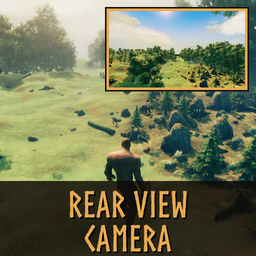
Client-only rear-view camera: a small live window on the HUD (hold or toggle key) and a full-screen rear view while a second key is held. Your character keeps facing forward.Rear View Camera
See what is coming from behind - and dodge it. A small live rear-view window sits under your minimap, and holding one key shows the view behind you on the whole screen. Your character keeps facing forward the whole time.
Client-only: install it on your own game; servers and other players do not need it.
Features
- Small rear view under the minimap (16:9, 640x360 to 960x540 screen pixels, default 800x450), shown with a toggle or while a key is held.
- Full-screen rear view while a second key is held (rendered at up to 1080p and scaled to your screen).
- Status effects: the small window moves below the status-effect icons, sits behind them, or covers them - your choice. It follows where the icons really are, also when another mod moves them.
- Out of the way when needed: hidden while the inventory, the menu, a loading screen or the hidden HUD (Ctrl+F3) is up, and back afterwards. On the large map it can only be closed, not opened. While chat, the console or a text field is open, the keys do nothing.
- Looks like your game: the rear camera uses the game camera's settings and colour grading.
- Animals right behind you: the camera rises over a creature standing between you and the rear camera.
- Key check: if another mod or the game already uses one of the rear-view keys, Home (small window) or End (full screen) is used for that session and a message tells you which mod. If those are taken too, a note on the left says so when you press the key.
- Light on performance: nothing is rendered while the rear view is hidden; while the game is paused the last picture stays.
- Every setting applies at once while you play (config file or Configuration Manager).
Keys
| Key | Default | What it does |
|---|---|---|
| SmallCameraKey | N | Small rear view (Toggle: press on / press off; Hold: while held) |
| FullScreenKey | J | Full-screen rear view while held |
Configuration
BepInEx/config/com.kydldev.RearViewCamera.cfg (or Configuration Manager in game):
| Section | Setting | Default | What it does |
|---|---|---|---|
| General | EnableAll | true | Switches the whole mod on / off |
| Controls | SmallCameraKey | N | Key for the small rear view |
| Controls | SmallCameraKeyMode | Toggle | Toggle or Hold |
| Controls | FullScreenKey | J | Hold for the full-screen rear view |
| SmallCamera | Height | 450 | Height in screen pixels, 360 - 540 (width follows at 16:9) |
| SmallCamera | OffsetX / OffsetY | 0 / 0 | Moves the small window from its place under the minimap, screen pixels |
| SmallCamera | StatusEffects | Under | Under / Behind / OnTop the status-effect icons |
| Camera | DistanceBehind | 0.65 | How far behind your eyes the rear camera sits, metres (0.05 - 3) |
| Camera | HeightOffset | 0 | Raises / lowers the rear camera, metres (-1 - 1) |
| Camera | FieldOfView | 75 | Rear camera field of view, degrees (40 - 110) |
| Camera | UpdateFPS | 15 | Rear view redraws per second (5 - 60); higher is smoother and costs more |
| Camera | MirrorImage | false | Flips the picture left-right like a car mirror |
| DebugLog | Enable | false | Detailed lines in the BepInEx log for bug reports |
Multiplayer
Client-only: nothing is synced, and the server and other players do not need the mod.
Notes
- If the rear view runs into repeated errors it first drops the colour grading, then uses a plain camera, and finally switches itself off until the game is restarted. A note on the left tells you when you press the key.
- Text from other mods drawn under the minimap may overlap the small window; move it with OffsetX / OffsetY.
Bug reports
Turn on [DebugLog] Enable, reproduce the problem, and attach BepInEx/LogOutput.log.