
RearViewCamera
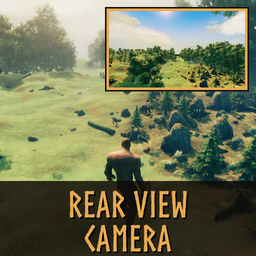
Client-only rear-view camera: a small live window on the HUD (hold or toggle key) and a full-screen rear view while a second key is held. Your character keeps facing forward.Changelog
Newest version first. The top ## x.y.z heading = Plugin.ModVersion = manifest.json version_number (integration tests check it).
1.0.0
- First release.
- Small rear-view window under the minimap (16:9, 640x360 to 960x540, default 800x450): key N, toggle or hold.
- Full-screen rear view while J is held, rendered at up to 1080p; your character keeps facing forward.
- Status-effect icons: the window goes under them, behind them or on top of them, following where they really are.
- Hidden while the inventory, the menu, a loading screen or the hidden HUD is up, back afterwards; on the large map it can only be closed.
- Keys do nothing while chat, the console or a text field is open.
- The rear camera uses the game camera's settings and colour grading.
- The camera rises over a creature standing right behind you.
- Key check against the game and other mods, with Home / End as backup keys and messages about the conflict.
- Settings apply at once while playing; nothing is rendered while the rear view is hidden.
- Safety net: after errors the rear view steps down to simpler rendering and finally switches off until restart, with a note.