
You are viewing a potentially older version of this package. View Latest Version
BetterCraftMenu
A better crafting menu.⚒️ Better Craft Menu
A better crafting menu.
💶 Donations:
If you enjoy using this Valheim mod, please consider making a small donation to help support its development and future updates.
Even £1 or $1 would be greatly appreciated and would help more than you might think!
Thank you for your support, and happy gaming! ⚔️ ...... (A Paypal account is NOT required!)

🔥 Features:
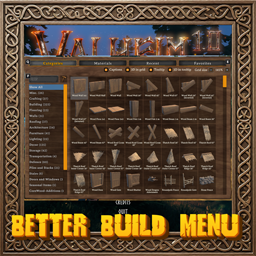
- The crafting window rebuilt: Craft / Upgrade / Dismantle tabs, item categories, search, a scrolling grid of recipe cards, favourites, a card for the chosen item with a turning 3D model, the set bonus, the resources needed, and crafting several at once.
- Three tabs: Craft and Upgrade are the game's own (the same recipes, stations, costs and upgrades); Dismantle breaks an item from your inventory back into part of its materials.
- Categories, each with its own icon: All, Weapons (melee, ranged, magic, arrows and bolts), Shields, Armor, Tools, Food, Meads and Other (materials, trophies and the rest).
- Toolbar: search (each word you type is looked for in the item's name and its materials, in any order, so
bronzeoriron swordfind what you expect), grid or list view, Only available, sorting (default, name, station level, biome, weight) and favourites only. While you type in the search box, your keys don't move the character, use the hotbar or close the inventory. - Recipe cards: the item's icon and name, a small biome badge (the boss trophy of the biome its materials come from), a star for favourites and the quality on Upgrade and Dismantle. The grid scrolls, and the number of recipes shown is at the top right.
- The item's card: a live turning 3D model (or the game's icon), the style button for items with variants, the name, description and stats, the full set bonus with its effect's icon, and Required with the amount of each item needed (red while you do not have enough) and the station with its level.
- − N + and Craft: makes N at once, through the game's own crafting, so skill, bonus items and effects work as usual. The progress bar runs over the button; click it to cancel. Hold Shift for the game's batch of 5.
- Dismantle: returns the materials of every quality level the item has (50% by default, rounded down). It needs the recipe's station at the item's quality level, like making it. Equipped items are left alone, a stack can be dismantled N at a time, and what does not fit in your inventory is dropped at your feet.
- The station's icon, name and level in the header. The game's own repair button stays outside the window's left edge, as in the game.
- Favourites are kept with the character.
- English and Russian, following the game's language.
⚙️ Configuration:
- Change settings in game (Configuration Manager or the mod settings menu, F7) or in the config file
MagicMike.BetterCraftMenu.cfg. Most of them are also switches in the window itself. - General Settings: Enable Plugin (on; local, needs a restart).
- Grid: Columns (4), the cards in a row (also the − + under the grid).
- Card: Show Preview (on: the item's picture in the grid view), 3D Portrait (on: the turning model).
- Filter: Only Available, List View, Favourites Only, Sort.
- Dismantle: Return Percent (50).
- Advanced: Debug Log (off).
🙏 Credits:
- Based on CraftMenu by Chistix, ported with permission; the window's layout is Chistix's.
🌐 Multiplayer:
- Client side only. You can join any server with it, and other players do not need it.
📦 Requirements:
⚠️ Incompatibilities:
- Not for use with any plugin that takes over the crafting menu.
💻 Installation:
Automatic Install
- Plugin is created to be installed with r2modman or Gale. For Nexus downloads you will need to install manually.
Manual Install
- Un-zip and drag the
pluginsfolder into yourBepInExfolder.