
BetterCraftMenu
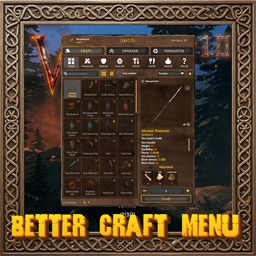
Craft, upgrade and dismantle from one roomy window: recipe cards or a list, category filters, search by item or material, favourites, a spinning 3D model of your pick, and batch crafting.⚒️ Better Craft Menu
Craft, upgrade and dismantle from one roomy window. Browse recipes as cards or a list, narrow them down by category, find anything by typing an item or one of its materials, and star the ones you make often. Spin a 3D model of what you have picked before you make it, then craft one or a whole batch, or break old gear back down into materials.
💶 Donations:
If you enjoy using this Valheim mod, please consider making a small donation to help support its development and future updates.
Even £1 or $1 would be greatly appreciated and would help more than you might think!
Thank you for your support, and happy gaming! ⚔️ ...... (A Paypal account is NOT required!)

⚠️ Incompatibilities:
- Not for use with any plugin that takes over the crafting menu (including AzuExtendedPlayerInventory).
🔥 Features:
- One window for everything: crafting, upgrading and dismantling all live in a single, larger window that takes the place of the game's crafting panel.
- Craft and Upgrade work exactly like the game's: same recipes, stations, costs and upgrades, so mods that change recipes or stations keep working.
- Find things fast: type part of a name or a material in any order (
bronze,iron sword) and the list narrows as you type. Your movement, hotbar and inventory keys are ignored while the search box has focus. - Categories with their own icons: All, Weapons, Ammo, Shields, Armor, Tools, Food, Meads and Other, each showing how many recipes it holds.
- Your view, your way: cards in a grid (choose 3 to 6 per row with the − + buttons, or hold Ctrl and scroll) or a compact list; sort by default order, name, station level, biome or weight; hide what you can't make yet; or show only your favourites.
- Recipe cards at a glance: each card shows the item, a small boss-trophy badge for the biome its materials come from, a star if it's a favourite, and its quality on the Upgrade and Dismantle tabs.
- A closer look before you commit: the selected item spins as a 3D model (or shows its icon if you prefer), with its description, stats, any set bonus, the style picker for items that have one, and the materials you need, which turn red when you're short.
- Make a whole batch: pick an amount with − and + and craft them in one go, using the game's own crafting so skills and bonuses apply as normal. Click the progress bar to stop part-way, or hold Shift for the game's usual stack of 5.
- Dismantle tab: break items you no longer need back into a share of everything that went into them, upgrades included (half by default, set with Return Percent). You need the same station and level that making it would take. Equipped gear is never touched, stacks can be broken down several at a time, and anything that won't fit in your bags lands at your feet.
- Put it where you like: drag the window by its title and it stays there, kept on screen and remembered between sessions. Double-click the title to put it back.
- Works with VNEI: with VNEI installed (and its Attach To Crafting setting on), a VNEI tab sits next to Craft, Upgrade and Dismantle and opens its item browser inside the window.
- Little touches: the station you're using and its level sit in the header, the repair button stays where the game puts it, favourites are saved per character, and the window follows the game's language (English or Russian).
⚙️ Configuration:
- Change settings in game (Configuration Manager or the mod settings menu, F7) or in the config file
MagicMike.BetterCraftMenu.cfg. Most of them are also switches in the window itself. - General Settings: Enable Plugin (on; local, needs a restart).
- Grid: Columns (4), the cards in a row (also the − + under the grid).
- Card: Show Preview (on: the item's picture in the grid view), 3D Portrait (on: the turning model), Show Mod Name (on: the mod that added the item, at the top right of its card).
- Filter: Only Available, List View, Favourites Only, Sort.
- Dismantle: Return Percent (50).
- Window: Offset (0, 0), how far the window has been dragged (double-click its title to reset).
- Advanced: Debug Log (off).
🌐 Multiplayer:
- Client side only. You can join any server with it, and other players do not need it.
📦 Requirements:
💻 Installation:
Automatic Install
- Plugin is created to be installed with r2modman or Gale. For Nexus downloads you will need to install manually.
Manual Install
- Un-zip and drag the
pluginsfolder into yourBepInExfolder.
💥 Plugins Created by Magic Mike:
- Corewood Extras
- Corewood Fortified
- Corewood Additions
- My Dirty Hoe
- Chest Preview
- YabbaDabbaDoo
- BetterBuildMenu
- BetterCraftMenu