

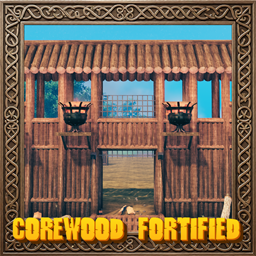
CorewoodFortified
HD Core Wood fortifications: palisade walls, roofed walls, gates, lift gates, drawbridges, fences, spikes, braziers and more!🎯 HD Corewood Fortified
HD Core Wood fortifications: palisade walls, roofed walls, gates, lift gates, drawbridges, fences, spikes, braziers, ziplines and more!
💶 Donations:
If you enjoy using this Valheim mod, please consider making a small donation to help support its development and future updates.
Even £1 or $1 would be greatly appreciated and would help more than you might think!
Thank you for your support, and happy gaming! ⚔️ ...... (A Paypal account is NOT required!)

✅ Recommended Plugins:
- MyBuildCamera by EndoCo.
Workbench
Walls
- Fortified Entrance: 30 Core Wood, 8 Wood
- Fortified Wall: 40 Core Wood, 8 Wood
- Fortified Wall Stairs: 30 Core Wood, 8 Wood
- Fortified Wall Stairs (Alt): 30 Core Wood, 8 Wood
- Fortified Corner: 30 Core Wood, 8 Wood
- Fortified Inner Corner: 30 Core Wood, 8 Wood
- Fortified Curved Corner: 30 Core Wood, 8 Wood
- Elevator Wall: 35 Core Wood, 12 Wood
- Fortified Watchtower: 60 Core Wood, 20 Wood
Roofed Walls
- Roofed Entrance: 40 Core Wood, 10 Wood
- Roofed Wall: 40 Core Wood, 8 Wood
- Roofed Stairs: 45 Core Wood, 12 Wood
- Roofed Stairs (Alt): 45 Core Wood, 12 Wood
- Roofed Corner: 40 Core Wood, 10 Wood
- Roofed Inner Corner: 30 Core Wood, 8 Wood
- Roofed Curved Corner: 40 Core Wood, 12 Wood
Fences
- Fortified Fence: 4 Core Wood
- Large Fortified Fence: 8 Core Wood
- Windowed Fortified Fence: 6 Core Wood
- Fortified Fence Gate: 4 Core Wood, 1 Bronze
Spikes
- Fortified Spikes: 2 Core Wood, 2 Wood
Forge
- Fortified Gates: 10 Core Wood, 6 Wood, 1 Bronze
- Fortified Drawbridge: 8 Core Wood, 20 Wood, 6 Chain, 4 Bronze
- Fortified Lift Gate: 10 Core Wood, 20 Wood, 8 Bronze
- Fortified Brazier Small: 2 Wood, 2 Iron, 5 Coal
- Fortified Brazier Large: 4 Wood, 2 Iron, 5 Coal
- Bronze Spikes: 2 Core Wood, 2 Wood, 2 Bronze
- Iron Spikes: 2 Core Wood, 2 Wood, 2 Iron
Drawbridges
- Large Fortified Drawbridge: 30 Core Wood, 8 Wood, 8 Chain
- Roofed Drawbridge: 40 Core Wood, 12 Wood, 8 Chain, 2 Iron
Chain Towers
- Small Chain Tower 8m: 12 Core Wood, 10 Wood, 1 Chain, 2 Iron
- Medium Chain Tower 15m: 20 Core Wood, 16 Wood, 2 Chain, 4 Iron
- Large Chain Tower 21m: 30 Core Wood, 24 Wood, 3 Chain, 6 Iron
Note: A build camera is recommended to place the towers!
Ziplines
- Zipline Post: 8 Core Wood, 2 Iron, 10 LinenThread
Artisan Table
- Black Metal Spikes: 2 Core Wood, 2 Wood, 2 Black Metal
Black Forge
- Flametal Spikes: 2 Core Wood, 2 Wood, 2 Flametal
Frost Foundry
- Fortified Spikes Bloodgold: 2 Core Wood, 2 Wood, 2 Bloodgold
⛓️ Chain Towers:
Build two chain towers facing each other across the water and they link up on their own. Use the winch on either tower to raise a net of chains from the seabed, and use it again to lower it.
- While placing a tower, a preview line shows which tower it will link to, or why it can't (too far, too close, or not facing each other).
- Each size has its own reach: 15 m, 30 m or 60 m. Two towers of different sizes can link, up to the shorter of their two reaches. The towers must be at least 6 m apart.
- Hitting the net passes half the damage on to the two towers. If either tower is destroyed, the net goes with it.
- Each size's reach can be changed in the config, and chain towers can be turned off entirely.
Note: A build camera is recommended to place the towers!
🛗 Elevators:
Elevator Wall: a fortified wall with a built-in lift platform that carries players up to the top of the wall and back down.
Fortified Watchtower: a corner tower with a lift inside that stops at the ground, the first floor and the top.
- Use the platform itself to send it to the next stop, or simply step onto the platform and it moves on its own.
- Use a switch to call the platform to that switch's floor, or to send it on if it is already there.
- Anything standing on the platform rides with it, and the platform stays in step for every player on a server.
- Speed, automatic movement and sound volume can all be changed in the config, and elevators can be turned off entirely.
🪢 Ziplines:
Tie a rope between two zipline posts and ride it, hanging from a trolley.
- Hold the Alt Place key and press Use on a post to take a rope from it. Walk to another post and do the same to tie the rope there.
- Press Use at either post to ride. Downhill ropes speed you up; hold Forward to pull yourself along (this uses stamina), and Backward or Block to brake. Jump or Use lets go.
- A post holds up to four ropes by default. Look along the rope you want before pressing Use.
- Jump or fall into a rope away from the posts to catch it in mid-air.
- A rope is refused if it is too long, too steep, or a rider would hit the ground, water, trees or buildings on the way.
- Destroying a post takes its ropes down. If you log out while riding, you come back on the ground by a post.
- Rope length, speed, braking, stamina and more can be changed in the config, and ziplines can be turned off entirely.
⚙️ Configuration:
Settings are in BepInEx/config/MagicMike.CorewoodFortified.cfg (or press F7, in game or on the main menu, to open a panel with the settings of all your installed Magic Mike mods).
- Enable Plugin (default
true): turns the mod on or off. Restart required. - Gate Sound Volume (default
1): volume of the lift gate and drawbridge sounds, from 0 (silent) to 1 (full). - Large Drawbridge Sound Volume (default
1): volume of the large and roofed drawbridge sounds, from 0 (silent) to 1 (full). Used instead of Gate Sound Volume for these pieces. - Chain Tower Sound Volume (default
0.5): volume of the chain tower winch sounds, from 0 (silent) to 1 (full).
Elevators (synced from the server)
- Enable Elevators (default
true): if off, the Elevator Wall and Fortified Watchtower are hidden from the build menu and placed elevators do not move. - Automatic Elevators (default
true): if on, an elevator moves on its own when a player steps onto the platform. - Elevator Speed (default
2): how fast the platform moves, in metres per second, from 0.5 to 10. - Elevator Sound Volume (default
0.5): volume of the elevator sound, from 0 (silent) to 1 (full).
Chain Towers (synced from the server)
- Enable Chain Towers (default
true): if off, chain towers are hidden from the build menu, and placed towers stay but their winches cannot be used. A net keeps the height it had. - Max Span Small (default
15): the longest net a small chain tower can hold, in metres, from 15 to 64. - Max Span Medium (default
30): the longest net a medium chain tower can hold, in metres, from 15 to 64. - Max Span Large (default
60): the longest net a large chain tower can hold, in metres, from 15 to 60.
Ziplines (synced from the server)
- Enable Ziplines (default
true): if off, the Zipline Post is hidden from the build menu, placed posts and their ropes stay but cannot be used, and ropes cannot be caught in mid-air. - Max Rope Length (default
150): the longest rope between two posts, in metres, from 10 to 400. - Max Slope (default
60): the steepest rope allowed, in degrees, from 10 to 80. - Max Ropes Per Post (default
4): how many ropes one post can hold, from 1 to 8. - Require Clearance (default
true): refuse ropes where a rider would hit the ground, water, trees, rocks or buildings. - Rope Sag (default
0.02): how much a new rope sags in the middle, as a share of its length. - Max Speed (default
20): top speed on a rope, in metres per second. - Gravity (default
1): how strongly a downhill rope speeds you up. - Crawl Speed (default
0): minimum speed towards the far post, so riders arrive without pulling. 0 is off. - Pull Speed (default
4): speed when holding Forward to pull yourself along, in metres per second. - Pull Stamina (default
6): stamina used per second while pulling. - Brake Strength (default
10): how fast braking slows you down. - Auto Brake (default
true): slow riders down automatically before the far post. - Arrival Speed (default
3): the speed Auto Brake slows riders to, in metres per second.
Ziplines (each player's own)
- Ride Animation (default
hang): body pose while riding:hang,repell,grappling,attach_chairornone. - Hang Height (default
2.3): distance from the rope down to your feet while riding, in metres. - Rope Thickness (default
0.05): how thick the ropes look, in metres across. - Grab Rope In Mid-Air (default
true): catch a rope by jumping or falling into it. - Log Back In On The Ground (default
true): logging out mid-ride brings you back on the ground by a post. - Messages (default
Short):Shortshows a few words in the corner,Allthe full help,Offnothing. - Zipline Sound Volume (default
1): volume of the rope sound while riding, from 0 (silent) to 1 (full).
💻 Installation:
Automatic Install
- Plugin is created to be installed with r2modman or Gale. For Nexus downloads you will need to install manually.
Manual Install
- Un-zip and drag the
pluginsandconfigfolders into yourBepInExfolder.
💥 Plugins Created by Magic Mike:
💬 Comments/Suggestions/Help: Nexus, Discord.
💶 Donations:
Please support this project if you can!