
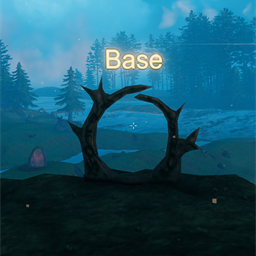
Teleporter Overhead Text
Shows floating 3D text above portals with their tag name.Teleporter Overhead Text
See portal tags from a distance — floating 3D text above each teleporter shows the name you set.
When you walk near a portal, Teleporter Overhead Text draws the tag in world space above the frame so you can tell where it goes without hovering. Labels update when you rename a portal, and they hide when walls block your view.
- Floating 3D text above wood and stone portals
- Color presets, custom RGB, and RGB cycle modes
- Line-of-sight and distance checks (no wall-hack names)
- Press Page Up to show or hide labels (changeable in config)
- Client-side only — no server install required
Questions or bugs? Discord
Install with r2modman (recommended)
- Install r2modman.
- Select Valheim and open the Default profile.
- Make sure BepInExPack Valheim is installed.
- Download this mod and click Install with Mod Manager,
or go to Settings → Import local mod and select the downloaded zip. - Click Start modded.
Manual install (BepInEx)
-
Install BepInExPack Valheim if you do not already have it.
-
Extract the zip.
-
Copy files into:
Valheim\BepInEx\plugins\ModdedWolf-Teleporter_Overhead_Text\The folder should contain
Teleporter_Overhead_Text.dll,manifest.json,icon.png, andREADME.md.Prefer the Thunderstore / r2modman package folder name (
ModdedWolf-Teleporter_Overhead_Text) so enable/disable in the mod manager controls the install. A bareplugins\Teleporter_Overhead_Text\folder is invisible to r2modman and will always load. -
Launch Valheim.
Configuration
After first launch, settings are saved here:
BepInEx\config\ModdedWolf.Teleporter_Overhead_Text.cfg
| Section | Key | Default | Description |
|---|---|---|---|
| General | Enabled | true | Master toggle for portal overhead labels |
| General | ToggleKey | PageUp | Hotkey to show/hide labels (None disables) |
| Appearance | HeightOffset | 2.5 | Minimum height above the portal origin (tall portals also clear the mesh top) |
| Appearance | Font | Arial | Builtin or installed OS font name |
| Appearance | Size | 0.12 | World-space character size |
| Appearance | FontSize | 64 | TextMesh glyph resolution |
| Appearance | ColorPreset | SoftGold | Custom, White, SoftGold, Red, Green, Blue, Yellow, Cyan, Magenta, Orange, RGBCycleSlow, RGBCycleMedium, RGBCycleFast |
| Appearance | ColorR / ColorG / ColorB / ColorA | 255 / 184 / 56 / 255 | RGB channels (0–255) when ColorPreset is Custom; alpha also used by RGB cycle presets |
| Visibility | MaxDistance | 40 | Hide labels farther than this many meters (0 = always show in range) |
| Visibility | RequireLineOfSight | true | Hide labels when a wall blocks view of the teleporter |
| Visibility | ShowWhenEmpty | false | Show (unnamed) on portals with no tag |
| Advanced | UpdateInterval | 0.5 | Seconds between tag text refreshes |
Notes
Labels sit above the portal mesh (including Portal Stone). With RequireLineOfSight on, names stay hidden through walls and closed gates. The ToggleKey only flips visibility while you play — it does not rewrite the Enabled config entry. Toggle is ignored while console, chat, or text input is focused.