

ModSettings
One gear button in the inventory screen that edits the settings of every installed mod in game, in the game's own style. Changes are saved and applied at once. Client-side.ModSettings
One gear button in the inventory screen, beside Skills and Compendium, that edits the settings of every installed mod in game, in the game's own style. No more editing .cfg files by hand, and no more one button per mod.
How it works
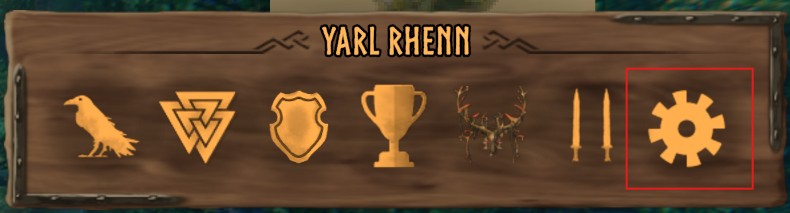
Open the inventory and click the gear in the row above your character. A window in the style of the Skills window lists every mod that has settings, with its version, how many settings it has and the name of its config file. Open one, and its settings appear section by section, each with its whole description and, under it, a control that fits it: On/Off for a switch; minus, a typed value and plus for a number (the buttons step by the smallest value the setting allows, or by 1 when that is 0 or the setting is a font size, and the allowed range is shown; type anything finer); "press keys" for a shortcut; a button that cycles through the choices for a list of values; a text box for text. "< All mods" at the top goes back to the list.
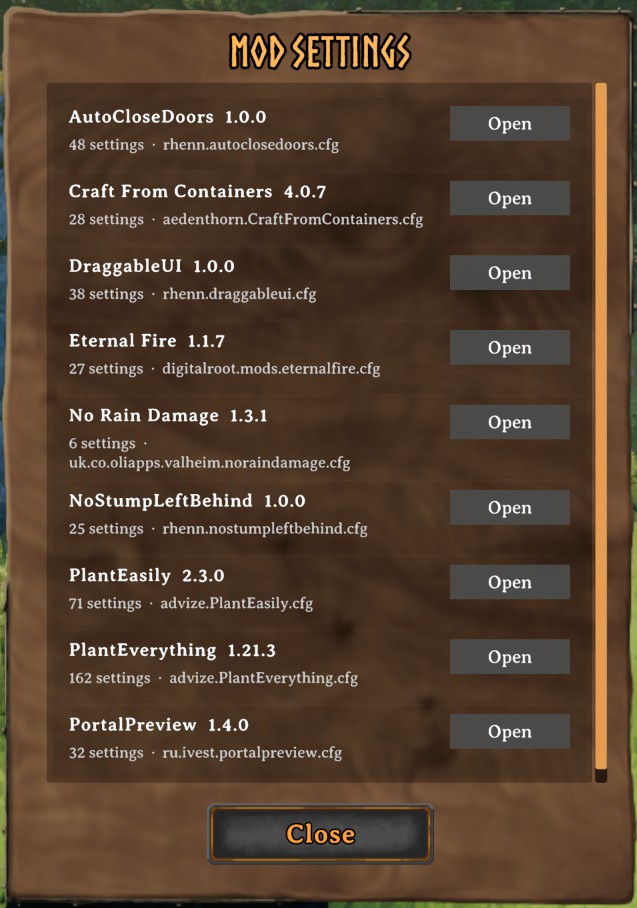
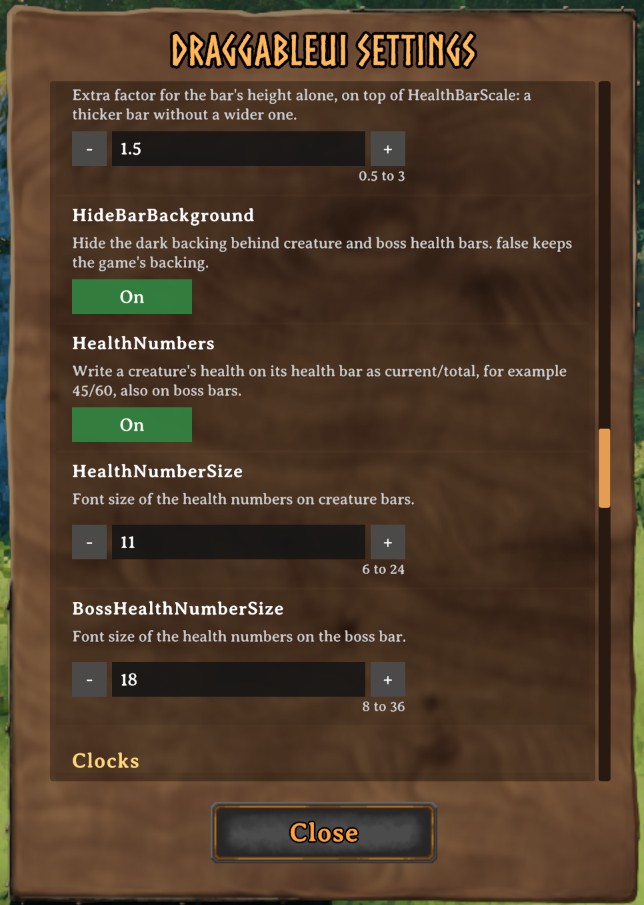
Left: the list of mods. Right: one mod's settings, section by section.
Every change is written to that mod's config file at once and handed to the mod, so settings the mod reads while playing take effect immediately. A setting a mod reads only at startup still needs a restart; its description says so if the author wrote it.
Any mod that uses BepInEx's config system is listed, whoever wrote it. A mod that creates its settings late (after a world loads, say) appears once it has. ModSettings has no settings of its own, so it is not in the list.
Escape, the X or a click outside closes the window. While you type in a box, the keys do not reach the game: no map, inventory or chat opens.
Installation
With a mod manager (Thunderstore Mod Manager, r2modman, Gale): install it from the mod list, or click Install with App on this page. BepInExPack is installed alongside it.
By hand: install BepInExPack_Valheim first. Then unzip this package and put ModSettings.dll in Valheim\BepInEx\plugins\ModSettings\.
Configuration
None. There is no config file.
Multiplayer
Client-side only. Only the player who wants to edit settings in game needs the mod. It touches nothing in the world, and the settings it changes are the mods' own, on that player's computer.
Compatibility
Works with any mod that keeps its settings in a BepInEx config file, which is nearly all of them. A mod with its own settings window keeps it; this one lists the mod as well. With another mod that adds a button to the same row (ChangeActivePowerOnTheGo's Powers button, for one), the row is spread evenly a moment after the inventory screen is built, so the buttons do not land on each other. A mod that rebuilds the inventory's info panel could hide the gear.
Known limits:
- Mouse only. The window has no gamepad navigation.
- A setting of a type the window does not know is shown read-only, with its value, and has to be edited in the file. A mod's
NexusIDentry is shown but never editable: it is the Nexus Mods update checker's bookkeeping, not a setting. - The window does not pause the game. Open it somewhere safe.
Something not working?
- No gear button. The mod did not load, or the info panel was changed by another mod. Open
BepInEx\LogOutput.login the same profile and search forModSettings. If the name is not there, the mod is not installed in that profile. If it says a button or dialog was "not found", another mod or a game update changed the inventory screen. - A mod is missing from the list. It has no settings in a config file, or it creates them later (after a world loads); close and reopen the window then.
- A typed number was not taken. The box accepts both
0.5and0,5; anything else is discarded and the old value shown again. The allowed range is written under the box. - A change did nothing in game. The mod reads that setting only at startup; restart the game.
Bugs and feedback
Found a bug? Email a screenshot and the steps to reproduce it to [email protected], with the mod version and your BepInEx\LogOutput.log attached. I check that inbox once a week.