

RiversAndLakes
Draw rivers, lakes and waterfalls in your world: flowing currents, shaped banks, fish, lava. Multiplayer.Rivers and Lakes
Discord: Voxheim Discord | Patreon: patreon.com/Voxheim | Ko-Fi: ko-fi.com/voxheim
If you feel like supporting this project, thank you kindly in advance! The mod is free and always will be.
| Trailer | Tutorial |
|---|---|
 |
 |
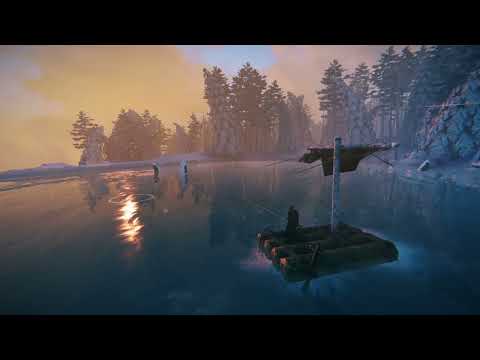
Draw rivers, lakes and waterfalls anywhere in your world. Lay out a river's course or a lake's shore from a bird's-eye planning view, apply it, and the water is there for everyone on the server. Your water flows, carries boats and items downstream, falls over cliffs, and holds fish.
Features
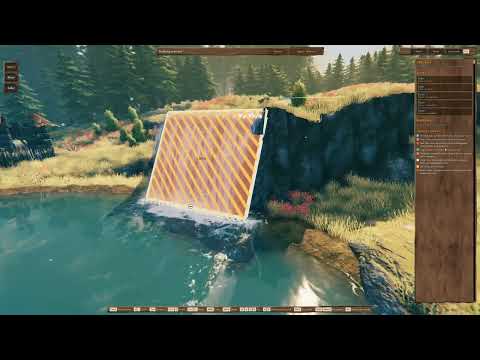
- Plan mode: a free-flying camera with a toolbar and an inspector. Draw a river knot by knot, or click a lake's shore point by point; drag, insert or delete knots; undo and redo; nothing changes in the world until you press Apply.
- Rivers that flow: the current follows your course: it carries boats, floating items and swimmers downstream, and rivers join other rivers and lakes. Build boats right on your water with the hammer.
- Waterfalls: a river that drops off a cliff becomes a waterfall on its own, with spray, mist and a plunge pool.
- Shaped banks: "Shoreline carve" digs the riverbed or lake basin into the ground and forms natural banks; "Paint ground" lays a band of dirt along them. Both are per body and can be turned off.
- Looks: presets (auto by biome, clear stream, glacial, forest pond, bog, mountain tarn, Mistlands, custom colours), foam, ripples, murk and spray per body; rapids and calm stretches per river segment.
- Lava: any body can be lava instead of water: it burns, glows, crusts over, and steams where it meets water.
- Living water: waves driven by the current, ripples around players, boats and rain, caustics on the bed, a view from under the water, reflections, and the sound of streams, rapids and waterfalls.
- Fish: lakes spawn the biome's fish (rivers too, if you turn it on).
- Tidy-up buttons: remove the stones, trees and ore that end up standing in the new water.
Getting started
- Equip the Hoe, open its build menu and pick Rivers & Lakes. (Or open the console and run
riversandlakes, or set a key in the config:[RiversAndLakes] PlanModeKey.) - Pick River (2) or Lake shore (3) and click on the ground to place knots; Enter finishes.
- Select water to change it in the inspector on the right; the keys you can use are shown on screen.
- Press Apply to make it real. Esc steps back (drawing, tool, selection); with nothing left to step back from, it leaves plan mode.
Camera: WASD to fly, Q / E to glide along the ground, middle mouse to orbit, Shift to go faster, Shift + mouse wheel to change the speed.
Multiplayer
All players and the server need the mod, in exactly the same version (checked when you connect). The server
decides: it accepts or refuses every change, and stores the water in the world save. Admins can set in the [Server]
section of the config (synced to everyone):
Access: who may change rivers and lakes: Everyone, AdminsOnly or Whitelist (AllowedPlayers).AllowLava,AllowGroundChanges(shoreline carve and ground paint),Fish.ProtectTerrain: players without access may not dig away the banks near water.
Settings
Water quality has its own rows in the game's Settings > Graphics (Auto / Low / Medium / High / Ultra). Everything
else is in BepInEx/config/com.bogey.riversandlakes.cfg, or in game with a config manager; developer tuning values
are marked advanced.
Compatibility
- Requires BepInEx and Jötunn.
- Works with Voxheim: rivers can run through caves you dig. Works perfectly fine without Voxheim too, of course.
- This mod changes the ground around the water you make (unless you turn "Shoreline carve" and "Paint ground" off). Back up your world before trying it on a save you care about.
Installation
Ideally, use a mod manager. To install by hand, install the dependencies above, then extract the plugins folder of
the zip into <Valheim>\BepInEx\plugins\RiversAndLakes, so that it holds RiversAndLakes.dll and
RiversAndLakes.Core.dll.
FAQ
I see Voxheim in some links - do I need Voxheim to run Rivers and Lakes?
No, yours truly was foolish to believe Voxheim would be the only mod I'd ever make, hence many things are named after it. And yet, here we are ... Rivers and Lakes is entirely independent. It works with and without Voxheim.
Credits
A special thank you to ATomWolf, Adrian and Kneesock for their intense alpha testing of the mod.
Many thanks to Adam and Marius, the first official supporters on the Voxheim Patreon, which backs this mod too. Your support is very much appreciated!
The water and lava sounds are cut from the following Freesound recordings:
| Sound | Recording | Author |
|---|---|---|
| Lapping shores | Water_Lapping_River.wav | ceich93 |
| Streams | Stream, Close Perspective 02 | HECKFRICKER |
| Fast rivers | Loud River 001 | TheWoodlandNomad |
| Rapids | Rapid Mountain River Close.wav | DanGasior |
| Small waterfalls | Ambiance_Waterfall_Small_Close_Loop_Stereo.wav | Nox_Sound |
| Big waterfalls | Ambiance_Waterfall_Big_Skogafoss_Loop_Stereo.wav | Nox_Sound |
| Lava bubbling | Lava Loop 1 | Fission9 |
| Lava rumble | Lava Loop 4 | Fission9 |
| Lava falls | Bubbling lava flowing1.wav | Jim-Bretherick |
Bugs and ideas are welcome on the Discord. Join the server and come have a chat with everyone, we're friendly!