
ServerConnect
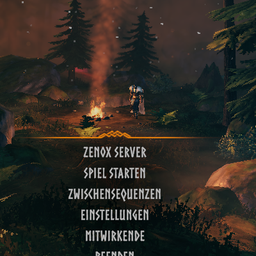
Adds a one-click main menu button that connects straight to a configured server address and password, skipping the server browser.ServerConnect
Adds a one-click button to the main menu that connects straight to a configured server, skipping the server browser and manual IP/password entry entirely.
Bugs / suggestions: Discord

Behaviour
- Adds a button above "Start Game" on the main menu, labelled with your configured server name.
- Clicking it connects directly to the configured
ip:port, submitting the configured password automatically, then proceeds straight to character select like a normal server join. - The button shows whether the server is reachable: green text and dot when it answers a status query, red when it doesn't (checked every 10 seconds while offline, about every minute once online). The button always stays clickable either way.
Configuration
Settings live in BepInEx/config/zenox.serverconnect.cfg, generated on first run. The defaults
are placeholders - set your own server's details before use:
| Setting | Default | Description |
|---|---|---|
Enabled |
true |
Enable/disable the menu button. |
Label |
My Server |
Text shown on the button. |
Address |
127.0.0.1:2456 |
Server address (ip:port) the button connects to. |
Password |
changeme |
Password submitted automatically when connecting. |
StatusCheckEnabled |
true |
Color the button text green/red depending on whether the server answers a status query. false turns the check off completely (no network traffic). |
StatusDot |
true |
Small colored dot next to the button text (green online, red offline, grey = no answer yet). |
QueryPort |
0 |
UDP port for the status query. 0 = automatic (game port from Address + 1, the standard Steam query port). |
StatusCheckInterval |
10 |
Seconds between status checks while the server is offline / unknown (1-60; at least 10 while PlayFabFallback is on). |
StatusCheckIntervalOnline |
60 |
Seconds between status checks once the server is online (1-60). |
StatusColorText |
true |
Tint the button text green/red. false keeps the normal menu text color (the dot still shows the status). |
PlayFabFallback |
true |
If the Steam query gets no answer (servers started with -crossplay don't answer it), ask PlayFab whether the server is registered and online. |
Why the dot can stay red
The status check asks the server's Steam query port (game port + 1, so UDP 2457 for the default 2456), which must be reachable from the internet. Servers with -crossplay don't answer it, which the PlayFab fallback covers; for them the server has to reach PlayFab (outbound HTTPS and UDP). If your server is online but the dot stays red, check that UDP game port + 1 is forwarded, or set StatusCheckEnabled = false - the button works either way.