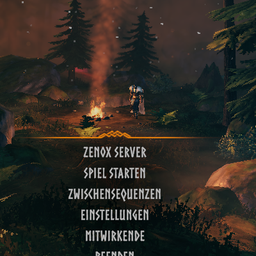
Fixed the button text sitting a little left of the other main menu entries: the status dot is now ignored by the menu layout, so it no longer pushes the text off-center.
New options StatusCheckInterval (seconds between checks while offline, default 10) and StatusCheckIntervalOnline (while online, default 60), each 1-60. While PlayFabFallback is on, values below 10 act as 10 for the offline interval because PlayFab lookups are rate limited.
New option StatusColorText (default on): set it to false to keep the normal menu text color and use only the status dot (StatusDot) as the indicator.
1.0.13
The status check now also works for servers started with -crossplay. Such servers host through PlayFab instead of Steam and don't answer the Steam query, so the button stayed red even though the server was online. When the Steam query gets no answer, ServerConnect now asks PlayFab - the same lookup the game does when you join by IP - and shows the server as online if it is registered there. The log says which way worked ("online (Steam query)" or "online (PlayFab crossplay lookup)").
New option PlayFabFallback (default on) to turn that second check off.
The log now contains one line with every setting that differs from its default (password settings are left out), which makes bug reports easier to check.
1.0.12
Server status check made more tolerant after a report of a running server showing as offline:
it now retries once with a longer timeout, accepts any valid server-query reply (not only the
info reply), and accepts replies coming from a different source address/port (as happens
behind some NAT / hosting setups). When the server is shown as offline, the log now also says
why (no answer / unexpected reply / network error).
1.0.11
Fixed the server status text staying white: the main menu button has an Animator that rewrites
its text color every frame, which overwrote the grayed-out color. The text is now colored after
the Animator (green = server online, red = offline, dimmed until the first answer), and the
button keeps its normal hover highlight.
New small colored status dot next to the button text (green/red/grey), so the status is visible
even if another UI mod restyles the text. Can be turned off with the new StatusDot config
option; StatusCheckEnabled = false still turns the whole check off.
1.0.10
Added a server status check to the main menu button: the button text stays grayed out until
the server answers a status query (every 10 seconds while offline, about every minute once
online). The button itself always stays clickable, since some hosts don't answer queries even
while the server is up. New config options StatusCheckEnabled (turn the whole check off, no
network traffic) and QueryPort (0 = automatic: game port + 1, the standard Steam query port).
1.0.9
Fixed a packaging bug: upload_to_thunderstore.py zipped the DLL from bin/Debug/ instead of
bin/Release/, so 1.0.8 actually shipped the OLD 1.0.7 code (including the gamepad navigation
fix below) despite the correct manifest/changelog - reported by a user comparing the DLL inside
the downloaded zip. No functional code changes beyond what 1.0.8 already described - this is
those changes, finally packaged correctly, republished as 1.0.9.
1.0.8
Fixed the server button being unreachable with a gamepad/controller (reported via Discord) -
mouse/click always worked, but the button was silently skipped when navigating the menu with a
controller. Vanilla's menu buttons use a fixed, prefab-baked up/down navigation chain rather than
deriving neighbors from list order at runtime, so our cloned button never got wired into that
chain. Now rebuilds the vertical navigation links for the whole button list after inserting it.
1.0.7
Added a screenshot to the README.
1.0.6
Fixed 1.0.5's category submission (wrong API field, only "AI Generated" actually applied) -
Utility and Client-side are now correctly set. No functional changes.
1.0.2
Fixed the README's screenshot not actually being included in the uploaded package.
1.0.1
Added an in-game screenshot to the README.
1.0.0
Initial release: one-click main menu button that connects straight to a configured server,
split out of Zenox as a standalone mod. Defaults are placeholders (127.0.0.1:2456,
changeme) - set your own server's details before use.
Thunderstore development is made possible with ads. Please consider making an exception to your adblock.