
PrecisionBuild
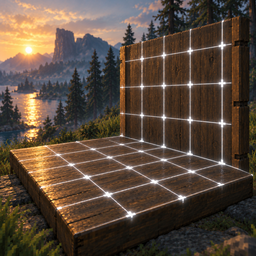
Visual building grid with surface snap, flat rug layering (pass-through), Smart Guide Rail, slope support, and HUD hints.PrecisionBuild
A lightweight client-side building helper for Valheim. It projects an aligned visual grid directly onto surfaces (floors, walls, ground), lets any piece snap cleanly to grid corners or cell centers, and adds quick rotation angle switching.
Supports both English and Russian (automatically adapts to your game language).
Features
- Surface-Projected Grid: A warm, semi-transparent grid that conforms to terrain, wood, stone, roofs, and vertical walls. Major lines every 1 m match Valheim's building modules; finer lines stay quiet in the background.
- Universal Snapping: Snaps all building pieces, chests, crafting stations, and furniture to grid nodes.
- Guide Rail (Smart Axis Lock): Press
Lto lock placement along a straight line. Automatically detects dominant axis (X or Z) and keeps objects sliding strictly along a glowing guide line that fades out towards its ends. Perfect for placing flawless rows of chests, fences, or pillars. - Snap Target Toggle (Corners / Cell Centers): Press
Jto switch between snapping to grid intersections (corners) or directly into the geometric center of each grid cell. The snap marker shows the mode: a cross for corners, a ring for centers. - Rug Pass-Through (Flat Carpet Layering): Press
Pto toggle rug collision ignore mode. Lets you overlap multiple rugs seamlessly without stacking them on top of each other — the grid and placement target the floor directly beneath. - Smart Rotation Steps: Cycle through
90°,45°,22.5°, and5°rotation increments with a single key. Align chests flush with walls or make fine-tuned angular adjustments. - Surface Elevation Protection: Pieces won't sink into floors or clip into walls.
- Compact HUD Hints: Unobtrusive one-line hotkey reminder above the building HUD. Enabled modes are bright, disabled ones are dimmed.
- Full Color Customization: Warm hearth-light palette by default (ivory grid, amber marker, ember rail). Every grid, marker, rail, and HUD color can be changed with HEX values in the config.
Controls
| Key | Action |
|---|---|
| B | Toggle building grid and snapping on / off |
| N | Cycle grid cell size (0.125m → 0.25m → 0.5m → 1.0m) |
| K | Cycle rotation step (90° → 45° → 22.5° → 5°) |
| J | Toggle snap target mode: Intersections (corners) ↔ Cell Centers |
| L | Toggle Guide Rail (Smart Axis Lock) on / off |
| P | Toggle Rug Pass-Through Mode (flat carpet placement on floor) |
| Mouse Wheel | Rotate piece by selected angle step |
| Q / E | Default game snap point switching |
Configuration
Settings are saved in BepInEx/config/com.awuushy.precisionbuild.cfg after the first launch:
| Section | Key | Default | Description |
|---|---|---|---|
| 1. General | Enabled |
true |
Enable or disable the mod |
| 2. Hotkeys | ToggleGridKey |
B |
Key to toggle grid on/off |
| 2. Hotkeys | CycleGridSizeKey |
N |
Key to cycle cell size |
| 2. Hotkeys | CycleRotationKey |
K |
Key to cycle rotation steps |
| 2. Hotkeys | ToggleSnapTargetKey |
J |
Key to toggle corners vs cell centers |
| 3. Grid | DefaultGridSize |
0.25 |
Default grid size in meters |
| 3. Grid | SnapToCellCenters |
false |
Default snap mode (false = corners, true = centers) |
| 3. Grid | ShowVisualGrid |
true |
Show surface grid lines |
| 3. Grid | ShowFootprint |
false |
Show the footprint outline of the piece being placed |
| 3. Grid | ShowKeyHints |
true |
Show compact HUD hint bar |
| 3. Grid | SnapAllPieces |
true |
Apply grid snap to all pieces |
| 3. Grid | GridRadiusCells |
8 |
Grid draw radius in cells |
| 4. Visuals | GridColor |
#F5E6CC70 |
Grid color (HEX with alpha); minor lines are drawn dimmer |
| 4. Visuals | ActiveNodeColor |
#FFC857FF |
Snap marker color (HEX with alpha) |
| 4. Visuals | FootprintColor |
#F5E6CCA0 |
Footprint outline color (HEX with alpha) |
| 4. Visuals | GridLineWidth |
0.012 |
Major line thickness in meters (minor lines are 60% of it) |
| 4. Visuals | HudKeyColor |
#FFC857 |
HUD key labels and highlighted values |
| 4. Visuals | HudTextColor |
#F5E6CC |
HUD enabled modes and current values |
| 4. Visuals | HudDimColor |
#8C8273 |
HUD disabled modes and separators |
| 5. Guide Rail | EnableGuideRail |
true |
Enable Guide Rail module |
| 5. Guide Rail | ToggleGuideRailKey |
L |
Key to toggle Guide Rail axis lock |
| 5. Guide Rail | GuideRailColor |
#FF8A4CFF |
Guide rail line and anchor color (HEX with alpha) |
| 6. Slope Alignment | EnableSlopeSnapping |
true |
Align grid and snapping to roofs, ramps, and rafters |
| 7. Rugs & Carpets | EnableRugMode |
true |
Enable Rug Pass-Through module |
| 7. Rugs & Carpets | ToggleRugModeKey |
P |
Key to toggle Rug Pass-Through mode |
| 7. Rugs & Carpets | AutoRugMode |
true |
Auto-activate pass-through when placing rugs |
If your config still holds the old 1.4.0 default colors, they are switched to the new palette on first launch. Colors you changed yourself are kept.
Compatibility
- Client-side only: Other players and dedicated servers do not need the mod installed.
- Safe to use on vanilla and modded servers.