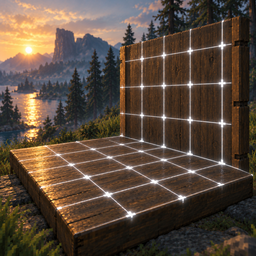
New warm palette inspired by Valheim's hearth light: ivory grid, amber-gold snap marker, ember-orange guide rail, matching HUD. Every color is configurable in 4. Visuals. Configs that still hold the old white/cyan defaults are moved to the new palette automatically; custom colors are kept.
Major / minor grid lines: lines every 1 m (every 2 m for the 1 m step) are brighter, with dots on their intersections. Finer lines are drawn thinner and dimmer, so the grid reads at a glance even at 0.125m.
Constant line thickness: line width is now set in meters and no longer depends on the cell size. GridLineWidth now actually works.
Snap marker shows the snap mode: a cross for grid corners, a ring with a dot for cell centers, with a soft dark outline for bright surfaces like snow.
Guide rail fades out smoothly towards its ends instead of cutting off abruptly.
Compact HUD hint bar: no more repeated ON/OFF words — enabled modes are bright, disabled ones are dimmed. Hints for modules disabled in the config are hidden, and rebound keys show readable names (1, M4, LShift instead of Alpha1, Mouse3, LeftShift).
Unified notifications in a consistent "Label: value" format in both English and Russian.
Removed
Match Piece Rotation (G) and its MatchRotationKey config option. A leftover MatchRotationKey entry in an existing config file is simply ignored.
Fixed
An opaque square was drawn next to every grid intersection (the texture area reserved for solid elements overlapped the grid pattern). Markers, guide rail and footprint now render in their own solid layer.
The footprint fill was nearly invisible because it sampled the grid texture.
0.125m grid step was shown as 0.13m.
Config descriptions for Guide Rail, Slope Alignment and Rugs are now in English like the rest of the config.
package.ps1 no longer depends on the old project location.
[1.4.0] - 2026-10-16
Added
Match Piece Rotation (G):
Press G while aiming at any placed building piece to copy and snap the placement ghost's rotation angle directly to it.
Accompanied by in-game HUD notification and full English/Russian localization.
Optimized & Fixed
Hot-Path Engine Overhaul (Zero FPS Drops on Big Bases):
Rug Pass-Through Spatial Query: Replaced the global $O(N)$ piece iteration with a high-performance local spatial query (Physics.OverlapSphereNonAlloc) around the crosshair, completely eliminating frame-drops on massive player settlements.
JIT DynamicMethod Fast Accessors (FastReflection): Replaced slow FieldInfo.GetValue/SetValue and reflection MethodInfo.Invoke inside per-frame update loops with JIT-compiled dynamic accessors that run at native IL speed.
HUD Dirty-Flag State Caching: KeyHintsPatch now only updates text when building states actually change, eliminating per-frame string allocations and continuous TextMeshPro canvas rebuilds.
Non-Allocating Physics Raycasts: Replaced Physics.RaycastAll in RugPlacementModule with Physics.RaycastNonAlloc using preallocated buffers, eliminating GC pressure.
Surface Alignment Memoization: Ghost collider queries and surface alignment offsets are now cached across frames when holding the same piece and rotation.
Guide Rail Orientation: Guide rail axes now adapt to rotated building walls and camera view direction on terrain instead of hardcoded world X/Z axes.
[1.3.0] - 2026-10-11
Added
Rug Pass-Through / Carpet Stacking Fix: Eliminates the notorious Valheim issue where overlapping rugs stack on top of each other in ugly steps.
When enabled, the raycast and the visual building grid completely ignore existing rugs and project directly onto the floor (or ground) beneath them.
New rugs are placed completely flat on the floor at the exact same elevation, allowing seamless overlapping of carpets across intricate room layouts.
Automatically activates when selecting any rug or carpet (customizable in config: AutoRugMode).
Toggle manually on/off with P key (customizable in config: ToggleRugModeKey).
HUD hint bar updated with Rug Mode status indicator ([P] Rugs: ON/OFF).
Full English and Russian localization for Rug Mode HUD and notifications.
[1.2.0] - 2026-09-27
Added
Guide Rail (Smart Axis Lock): Press L to lock placement along a straight line starting from the targeted point.
Automatically detects whether you are moving along the X or Z axis (smart hysteresis).
Keeps pieces strictly on track for placing flawless rows of chests, fences, pillars, or torches.
Renders a vivid neon guide rail across the building plane and an anchor point marker.
Full terrain support: guide rail conforms smoothly to terrain elevation.
Toggle on/off with L (customizable in config: ToggleGuideRailKey).
Color customization for Guide Rail line in config (GuideRailColor, default: #00E5FFFF).
Slope & Roof Alignment: Full support for sloped surfaces (26° and 45° roofs, sloped beams, stairs, ramps). The visual grid now conforms smoothly to the slope angle and snaps objects directly along the roof pitch.
HUD hint bar updated with Guide Rail status indicator.
Full English and Russian localization for Guide Rail HUD and notifications.
[1.1.1] - 2026-09-23
Fixed
Fixed an issue where mod hotkeys (B, N, K, J) triggered while typing in the hammer build menu search bar or while the piece selection table was open. Hotkeys are now properly suppressed whenever any UI text input or the build menu is active.
[1.1.0] - 2026-09-20
Added
Snap Target Toggle: Press J to switch between snapping to grid intersections (corners) and cell centers. Center snapping makes it effortless to place furniture, tables, and hearths right in the middle of floor tiles.
HUD hint bar updated to show the currently active snap target mode (Corners / Centers).
Fixed & Removed
Removed the multi-piece row placement feature to resolve placement stability and collision issues.
Streamlined placement logic and cleaned up input handling.
[1.0.0] - 2026-09-16
Initial Release
Surface-projected building grid with slope and wall support.
Snapping to grid intersections for all building pieces, chests, and furniture.
Smart rotation step cycling (90°, 45°, 22.5°, 5°) via K key.
Compact in-game HUD hotkey hint bar with automatic English and Russian localization.
Elevation alignment offset to prevent pieces from clipping into floors and walls.
Full HEX color customization support in configuration (clean translucent white #FFFFFF by default).
Thunderstore development is made possible with ads. Please consider making an exception to your adblock.