
DataForge
Easy way to configure recipes, items, pieces and effects by organized reference system. Item cloning with visual tweaks and localization. Weight, stack, amount multiplier for items. Shows comfort group and value in hammer tab.DataForge
Use YAML to change recipes, items, build pieces, and status effects in Valheim. DataForge generates references from the vanilla and modded content in your world, so you can look up a prefab by name and edit just the fields you need.
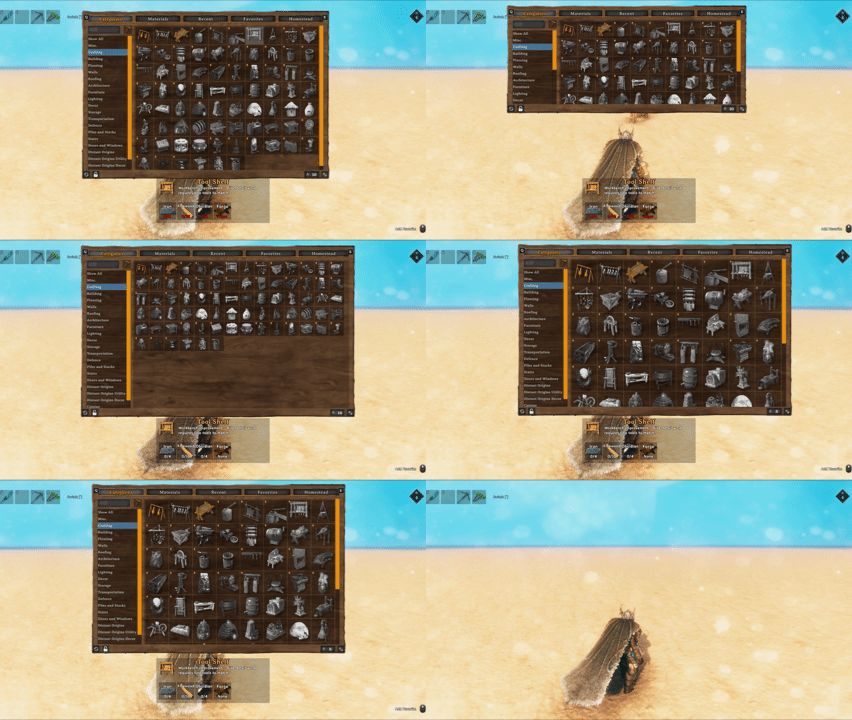
Drag empty space to move the build panel. Drag the bottom-right arrow to resize it, or click the curved arrow at the bottom left to restore its default size and position.

Hover over a comfort piece in the Hammer menu to see which pieces share its comfort group.
Make your first edit
- Install DataForge and BepInExPack Valheim 5.4.2360. In multiplayer, install the same DataForge version on the server and every client.
- Start a world and open
BepInEx/config/DataForge/in the active profile. In multiplayer, edit this folder on the host or dedicated server. - Find
Woodinitems.reference.yml. Add the entry below toitems.ymland save. Wood will stack to 100, and connected players will receive the change.
- item: Wood
  override: true
  maxStackSize: 100
Choose an edit file
| To change | Look up the internal name in | Save your changes in |
|---|---|---|
| Stack size, weight, damage, food, or item visuals | items.reference.yml |
items.yml |
| Ingredients, output, or station level | recipes.reference.yml |
recipes.yml |
| Build costs, health, comfort, or station conversions | pieces.reference.yml |
pieces.yml |
| Buffs, debuffs, duration, or effect visuals | effects.reference.yml |
effects.yml |
Use override: true on each entry you want to apply. Omitted fields keep their current values. Lists such as resources and conversions replace the whole list, so include every entry you want to keep. You can split edits across files such as items_balance.yml or recipes_food.yml in the same folder.
Recipes. This example requires a level‑2 forge. The sword costs 20 Iron and 5 Wood to craft, with a base upgrade cost of 10 Iron.
- recipe: SwordIron
  override: true
  craftingStation: forge, 2
  resources:
    - Iron: 20, 10
    - Wood: 5, 0
If an item has several recipes, copy the exact recipe key from the reference, including any suffix such as ;2. Set remove: true to disable that recipe. In a piece entry, a resource such as Wood: 4, true costs four Wood and returns it when the piece is dismantled.
Item amounts and clones. Use item: Wood, 2 to double newly produced Wood from supported sources. To create a new item, give it a unique prefab name and set cloneFrom: SwordIron, then add its recipe separately. Keep the clone's name stable once players own it.
Visuals and effects. Items and pieces accept icon: auto and material inside the visual block. Find material names in z_materials.reference.txt. For a custom icon, put MyIcon.png in DataForge/icon/ on the server and use MyIcon as the icon name. In effects.yml, a clone such as cloneFrom: Rested can reuse an item icon with top-level icon: item:MeadHealthMinor.
Finding fields. Once the world has loaded, run dataforge:full item in the game console to generate items.full.yml with baseline values and fields omitted from the compact reference. Use recipe, piece, effect, or all for the other files. Run dataforge:refer all to refresh the references. A dedicated-server admin can run either command from a connected client. The files are written on the server.
Hammer menu
The host's Auto Merge Mod Hammers setting is On by default. Edit hammerLayout.on.yml to arrange eligible mod hammers' pieces on the vanilla Hammer. Set it to Off to keep the tools separate and edit hammerLayout.off.yml.
- Move a tab block to reorder it. Move a prefab name between
pieceslists to change its tab, or copy it to show it in both. Save to update connected players. Show All still follows each player's unlocks. - To move a whole tool into the Hammer, add
import: [GB_Parchment_Tool]underHammer. UsepieceTableinpieces.ymlfor a single piece. - Keep
hammerLayout.reference.ymlas the original catalog. To restore one mode's defaults, replace its editable file with{}.
Drag empty space to move the build window. At the bottom left, click the curved arrow to reset its position and size, or click the padlock to lock or unlock both. At the bottom right, scroll over the column count to fit 5–20 columns (default 12). Scroll up for more columns and smaller icons. Drag the diagonal arrow to resize. You can still change columns while locked, and resetting the window keeps your column count.
In 3 - Build Panel, Panel Buttons controls all four buttons. On always shows them (default). Auto reveals the pair nearest the pointer. Off hides both pairs and keeps your saved layout and lock state. Switch back to On or Auto to use the buttons again.
Scroll over the piece list to move one row by default. Comfort badges and station-extension highlights are also client settings.
Gameplay settings
Open BepInEx/config/sighsorry.DataForge.cfg for global settings.
| Setting | Default | In game |
|---|---|---|
| Stackable Stack Multiplier / Item Weight Multiplier | 1 / 1 | Scale stack sizes and weights. Explicit item YAML values take priority. |
| Upgrade Material Scaling | Vanilla | Choose Vanilla, Flat, or Reduced costs for ordinary upgrades. |
| Ignore Station Extension Spacing | On | Place station extensions closer together. |
| Fireplace Fuel Multiplier | 10 | A wood torch holds 40 fuel and a hearth holds 200. Set to 1 for their original capacities. Stored fuel survives a reduction. |
Compatibility
DataForge can edit content that other mods register on the host or server. If a prefab is missing from a reference, check that its mod loads that prefab there. With ValheimCuisine, DataForge reapplies explicit cooking and fermentation conversions after a settings reload. With VNEI, it refreshes affected recipe views.
If an edit fails to load, check BepInEx/LogOutput.log for the file and field. A YAML parse error keeps the last valid configuration active.