


HarnessPrefabs
Unlock and harness existing vanilla and modded prefabs with server-synced YAML policies, public Hammer access, admin-only debug groups, and safer prefab filtering. Use the Dvergr barrel as a fermenter and swap equipment with armor stands.HarnessPrefabs
Scans vanilla Valheim and loaded prefab-adding mods for existing prefabs that are not normally available in the Hammer build table, then lets the server decide which ones become public build pieces and which ones stay admin-only.
It does not add new prefabs. It helps you harness the prefabs that are already there.
Targets Valheim 1.0.7 with BepInExPack Valheim 5.4.2350. Jotunn is no longer required by HarnessPrefabs; keep it installed if other mods require it.
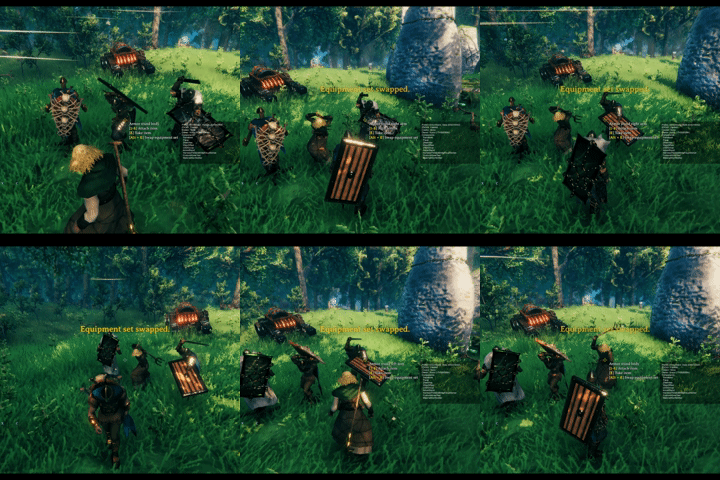
Swap equipment with the vanilla armor stand and the additional armor stands unlocked by HarnessPrefabs.

Dvergr barrel(enhanced lod) can be used as a fermenter. Fermenting time is configurable.
Why Use It
- Open useful vanilla and modded prefabs without shipping another hard-coded prefab dump.
- Keep normal players on curated public build tabs while giving admins debug-only review tabs.
- Replace MoreVanillaBuildPrefabs-style public unlocks with YAML policy files you can review, copy, and override.
- Use MVBP-informed defaults for categories, requirements, placement flags, snap fixes, and icon behavior where those defaults are known.
- Keep the server as the source of truth through ServerSync, so clients receive the active prefab policy and localization text.
- Avoid Hammer clutter from runtime-only objects such as effects, projectiles, ragdolls, creatures, humanoids, and item drops.
What It Does
HarnessPrefabs builds a safe review workflow around hidden prefabs:
- Discover buildable-looking prefabs from Valheim and loaded mods.
- Ignore prefabs that are unsafe for Hammer placement, such as characters, item drops, spawners, runtime effects, projectiles, ragdolls, and similar controller objects.
- Seed defaults from reviewed MoreVanillaBuildPrefabs data when a prefab is known there.
- Classify the rest into public or admin categories based on components and prefab shape.
- Write reference YAML files for review.
- Apply only the overrides you choose to write.
- Sync the active policy from the server to clients.
This makes it useful both as a MoreVanillaBuildPrefabs replacement for curated public pieces and as an admin review tool for larger modpacks.
Hammer Categories
In Valheim 1.0.7, admin-only prefabs appear in a top-level HarnessPrefabs section beside Categories, Materials, Recent, and Favorites. The section appears only for an administrator with Valheim debugmode enabled. Its prefabs do not enter the native lists, so they cannot leak through Categories, Materials, Recent, or Favorites. The Show Harness Tabs configuration key keeps its existing name and can hide the section.
Public groups retain the existing YAML category names:
MiscCraftingBuildingBuildingStonecutterFurniture
The HarnessPrefabs section contains three admin-only groups:
Harness NatureHarness StructuresHarness Props
The client-side Show Harness Tabs config can hide the entire HarnessPrefabs section even while debugmode is on.
Default Classification
Known MVBP public pieces default to public access. Other discovered prefabs default to the Harness Nature, Structures, or Props admin groups unless an explicit YAML policy assigns a public category.
Both enabled public and admin prefabs receive a Piece component when needed, even while the admin tab is hidden. A root ZNetView is required for build registration; a missing view or one only on a child causes the prefab to be skipped with a warning. Discovery/reference YAML can still list such a prefab. Disabling a rule stops new build-menu exposure but does not remove an already added component.
Newly added Piece components exclude instances without a player creator from AI target selection while retaining the target flags for player-built instances. Existing native Piece target settings are preserved. Shared prefab changes, including supported collider and snap-point fixes, still apply; this does not make natural objects completely unaffected by the mod.
General classification uses prefab components and names:
Harness Nature: plants, pickables, trees, logs, rocks, ore rocks, crops, and natural static prefabs.Harness Structures: walls, floors, arches, pillars, stairs, gates, doors, containers, portals, beds, crafting stations, fires, ships, carts, destructibles, and other build-like interactives.Harness Props: decor, static props, banners, rugs, tables, chairs, statues, treasure, CreatorShop-style props, clutter, fragments, and LOD-like objects.
Runtime objects are intentionally ignored. Prefabs named fx_*, vfx_*, or sfx_*, MVBP effect defaults, and prefabs with components such as TimedDestruction, Aoe, CamShaker, Projectile, or Ragdoll are not written to reference files and are not added to Hammer tabs.
Prefabs with ItemDrop, Humanoid, or Character anywhere in their hierarchy are ignored.
Policy Files
HarnessPrefabs stores policy files under:
BepInEx/config/HarnessPrefabs/
Editable override files:
prefabs.yml
prefabs_*.yml
Generated review files:
prefabs.reference.yml
prefabs.full.yml
prefabs.yml is created automatically. Extra files such as prefabs_public.yml or prefabs_admin.yml are loaded after the base file and can override the same prefab entries.
Do not edit prefabs.reference.yml or prefabs.full.yml directly. Copy entries from them into prefabs.yml or prefabs_*.yml.
Minimal Overrides
Override files use a top-level YAML list. You can copy only the fields you want to change:
- prefab: blackmarble_1x1
  enabled: true
  category: BuildingStonecutter
  requirements:
    - BlackMarble: 2

- prefab: GoblinTotem
  enabled: false
enabled: true exposes a prefab. Public categories expose it to normal clients. Harness categories expose it only to admins in debugmode.
Missing fields keep the generated default.
Full Review Schema
Run this in the in-game console to write a full scaffold:
harnessprefabs:full
The full scaffold includes fields that are useful for review:
- prefab: barrell
  enabled: true
  category: Furniture
  displayName: Barrel
  description: ""
  craftingStation: Workbench
  requirements:
    - FineWood: 2
    - Iron: 1
  flags: false, false, false, true # clipEverything, clipGround, allowedInDungeons, canBeRemoved
  components: [Piece, WearNTear] # review metadata only
components is a reference hint from discovery and is ignored as an edit field.
Localization
Server-synced localization files live under:
BepInEx/config/HarnessPrefabs/localization/
English.yml is created automatically as a template. Add language files with Valheim language names such as Korean.yml, German.yml, or Turkish.yml.
Use localization tokens in prefab policy entries:
- prefab: barrell
  enabled: true
  category: Furniture
  displayName: $ph_piece_barrell
  description: $ph_piece_barrell_desc
$ph_piece_barrell: "Barrel"
$ph_piece_barrell_desc: "A decorative barrel."
English is applied first as fallback, then the client's selected language is layered over it.
Icons And Placement
HarnessPrefabs reuses authored icons and generates missing Hammer icons with its own queued isometric renderer. Gameplay components are removed from inactive preview clones before rendering. The renderer handles PickableItem random item previews, skips headless servers, and releases its own textures and temporary render objects when leaving the world.
For prefabs with awkward or sparse colliders, HarnessPrefabs applies placement-only ghost helpers based on reviewed MVBP defaults. These helpers affect Hammer preview placement without adding extra helper colliders to the final placed object.
Prefab Tweaks
The 2 - Prefab Tweaks config section contains optional synchronized tweaks:
Enable Armor Stand Equipment Swap: on by default. Left or Right Alt+Use swaps the player's Helmet, Chest, Legs, Shoulder, and drawn or sheathed hand set with a player-builtArmorStand,ArmorStand_Female, orArmorStand_Male; creator-less location and console-spawned stands keep their vanilla interaction. The game'sAltPlace/Shift input no longer triggers the swap. A Utility item is included only when both sides of that Utility exchange are safe; displayable items such asBeltStrengthcan swap, while incompatible items such asWishboneor a demister stay equipped or attached and the rest of the set still swaps. One-handed pairs and two-handed weapons are validated and moved as one hand-set transaction. A sheathed hand set remains sheathed after the swap; temporary states that mix drawn and hidden hand items must finish first. The baseArmorStandalways swaps its shield and weapon back slots. The female and male stands always swap their hand slots and leave their back slots unchanged, regardless of whether the player's hand set is drawn or sheathed. If the player has no hand equipment, equipment retrieved from the selected stand slots is drawn. Female and male hand-slot arrangements must match the display side Valheim allows for each item, including item-specific overrides; arbitrary reversed display-only arrangements cause the set swap to be rejected.Enable Bed Patches: on by default. Adds bed/spawn behavior to supported MVBP-style bed prefabs.Fermenter Patch Duration Percent: defaults to70.0disables the player-builtdvergrprops_barrelfermenter patch;1to100enables it and sets fermentation duration as a percentage of the vanilla fermenter. The barrel appears in theCraftingtab by default. Natural instances without a creator remain ordinary barrels.
Bed and fermenter tweaks are intentionally marked unsafe because disabling the mod later can affect placed-world state such as spawn points or fermenting contents.
Trailership is excluded from both public and admin/debug build lists. HarnessPrefabs no longer loads, exposes, or modifies the ship and ignores YAML entries that try to enable it.
Turn Enable Armor Stand Equipment Swap off when another mod, such as ZenItemStands or Wardrobe, should handle ArmorStand interaction instead. HarnessPrefabs does not automatically enable or disable this feature based on installed mods.
Strengths
- Curated defaults with local control: MVBP knowledge is used as a starting point, but YAML remains the final policy.
- Admin review without player clutter: the HarnessPrefabs section exists only for admins in debugmode and can be hidden client-side.
- Server-authoritative policy: active overrides and localization can be synchronized to clients.
- Modpack friendly discovery: prefabs are grouped by owner where possible, making large reference files easier to review.
- Safer Hammer scope: runtime effects, creatures, item drops, and spawner/controller objects stay outside the build table.
- Focused compatibility: integrates existing policy groups with Valheim's build menu and uses original game references with explicit cached access to the required private members.
Suggested Workflow
- Start the server or single-player world with HarnessPrefabs installed.
- Let it generate
prefabs.reference.yml. - Copy wanted entries into
prefabs.ymlor aprefabs_*.ymlfile. - Use public categories for normal-player pieces.
- Use Harness categories for admin-only review/build pieces.
- Run
harnessprefabs:fullonly when you need display names, descriptions, flags, or component metadata for deeper review.
Maintaining Prefab Defaults
MvbpPrefabDefaults.generated.cs is a curated snapshot originally imported from MoreVanillaBuildPrefabs; its header records the source path. No generator is tracked in this repository. The table also contains reviewed HarnessPrefabs changes, including the dvergrprops_barrel Crafting category, which must survive future imports.
Before regenerating or replacing the table, record the upstream source and revision, preserve existing manual changes, and compare prefab keys, effective access, categories, requirements, and placement/removal flags against the current snapshot. Review intentional differences explicitly; retain the source provenance and the handwritten conversion rules in MvbpPrefabDefaults.cs.
Github
Original code from
https://github.com/searica/MoreVanillaBuildPrefabs
The mod's repo
https://github.com/sighsorry1029/HarnessPrefabs