


YouAreNotWorthy
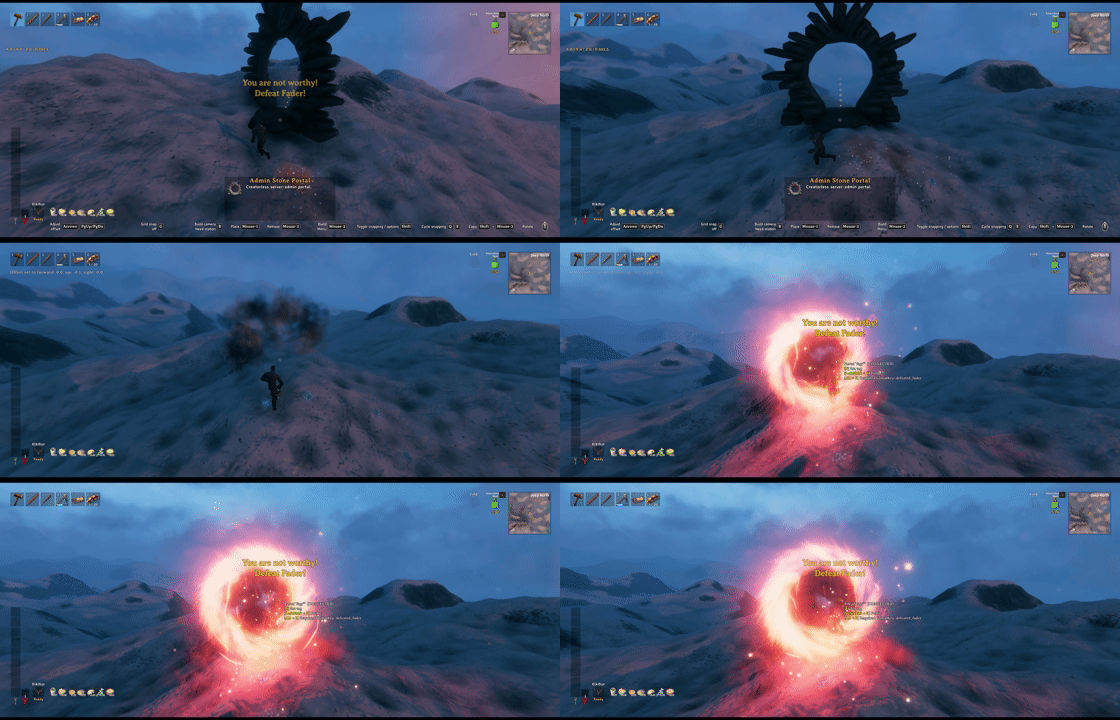
Personal progression for Valheim multiplayer and co-op. Unlock weapons, armor, food, trader items, doors, boss summons and map icons with personal keys. Control raids and creature spawns by player progress. Includes server sync and custom item tiers.You Are Not Worthy
Per-character progression for Valheim.
Showcase
Personal progression
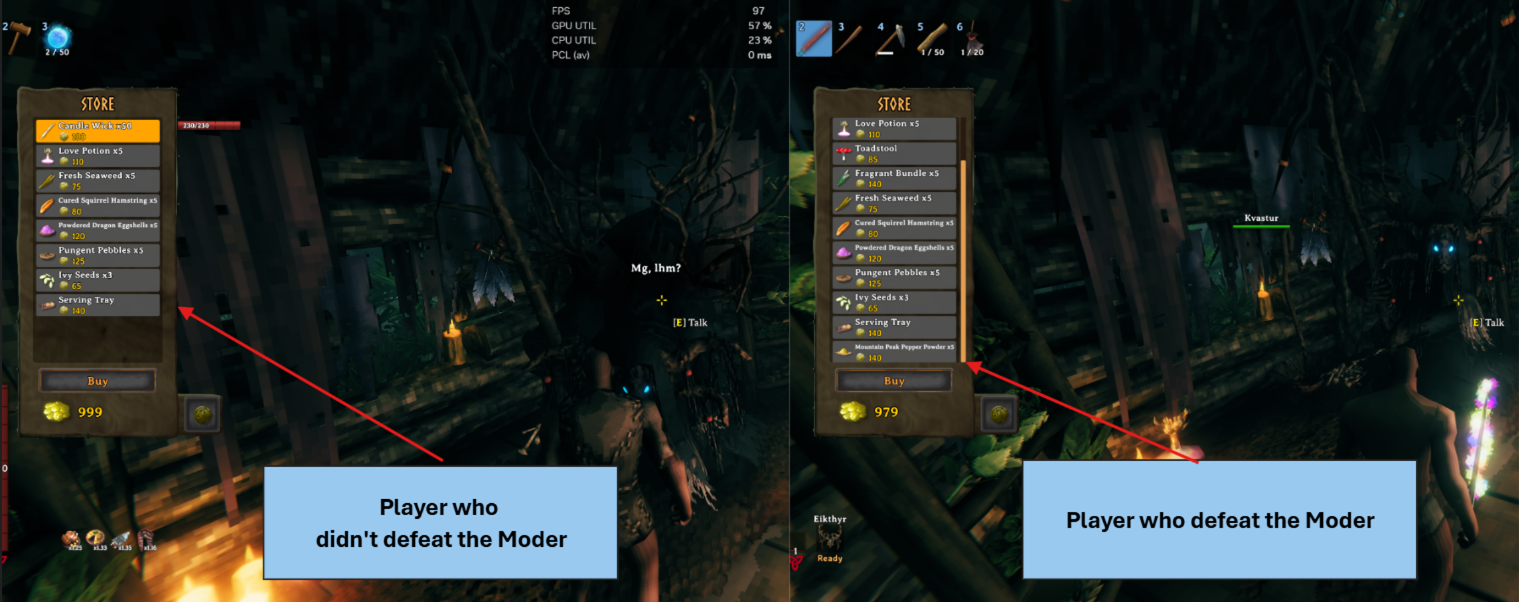
Characters sharing one world can see different trader stock based on their own progression.
Item restrictions
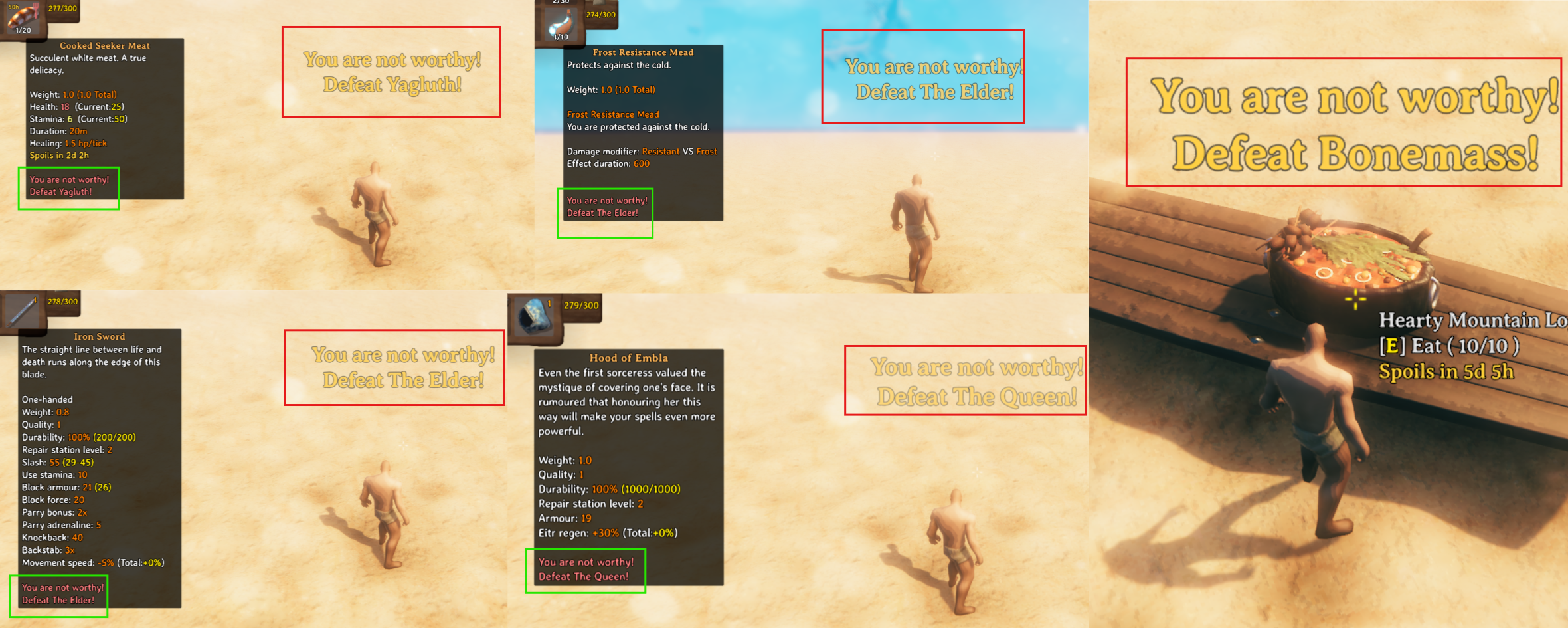
Equipment, consumables, and feasts show their missing requirement and remain unusable until the character earns the required key.
Doors and boss summons
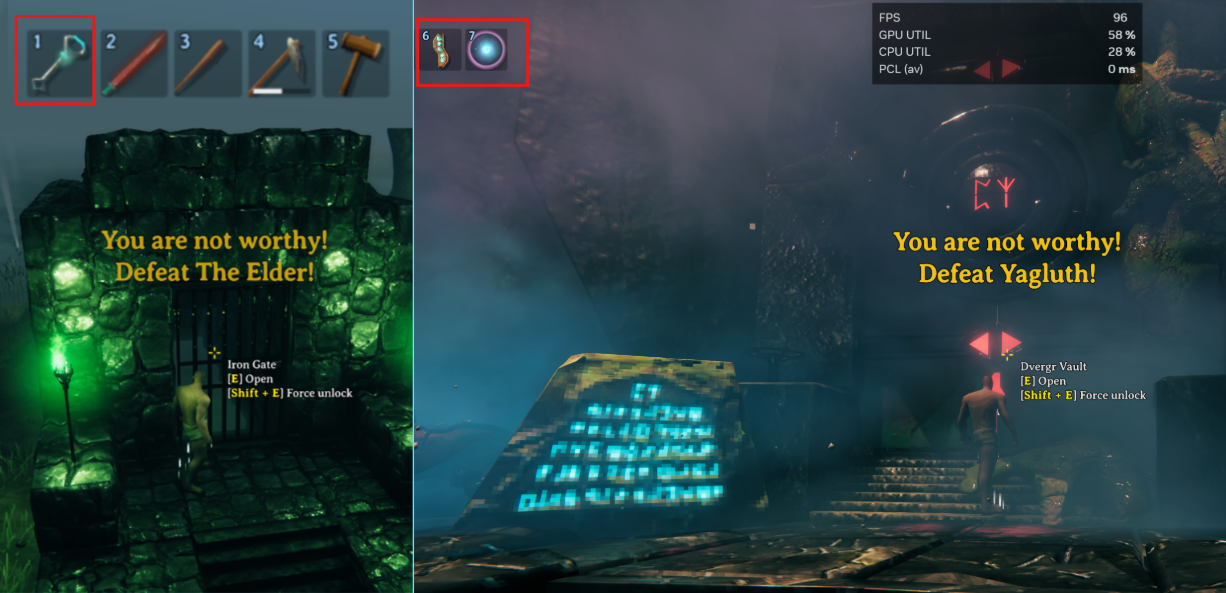
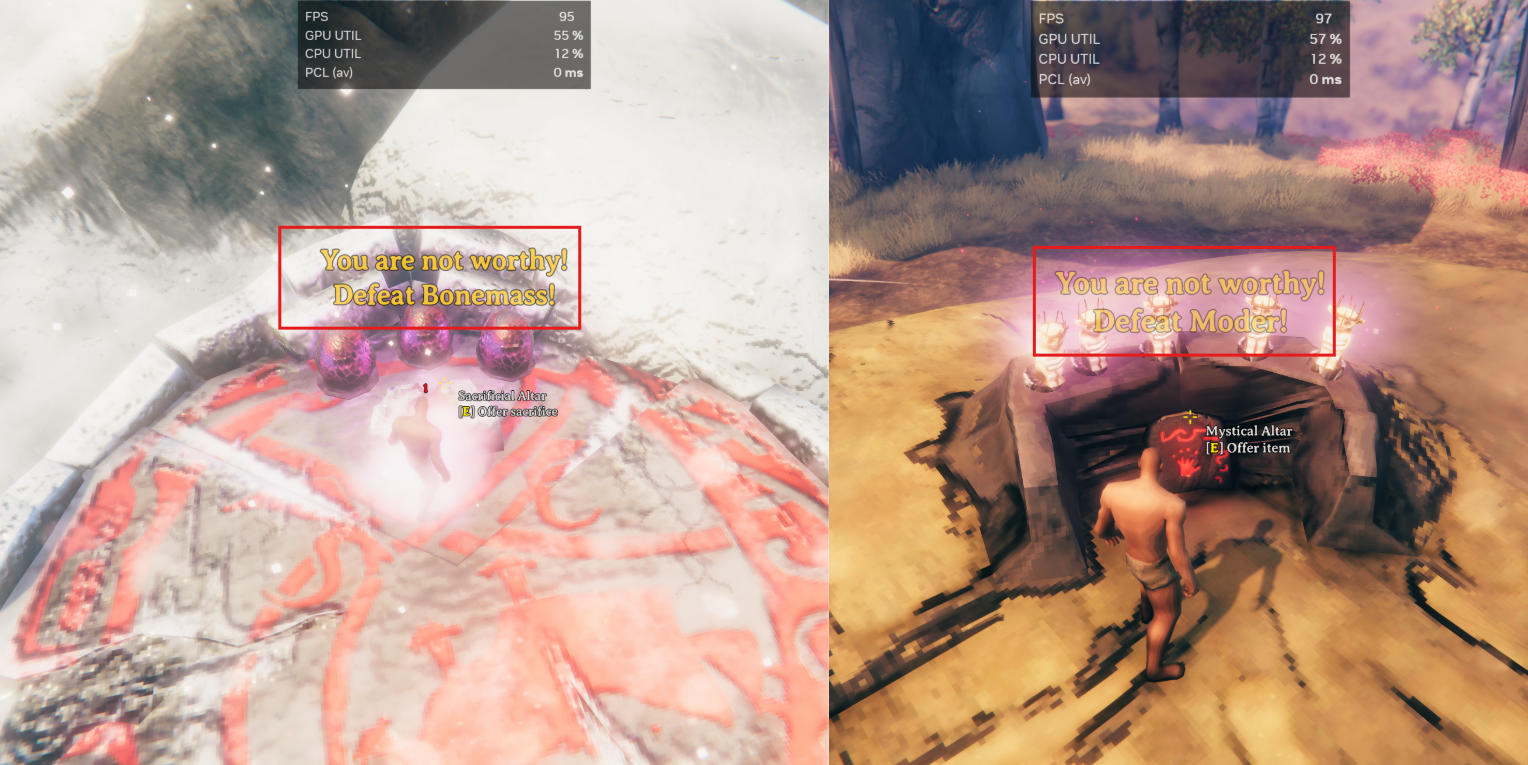
Personal progression also applies when using key items on locked doors or activating boss altars.
Mod integrations
Other mods can reuse YNW's personal-key checks and localized blocked message for their own interactions.
You Are Not Worthy (YNW) personalizes supported value-less, non-reserved
globalkey checks by using Valheim's native character unique keys. Players in
the same world can therefore have different trader stock, raid eligibility,
spawn eligibility, and item-use progression.
Value-bearing keys, reserved modifiers, seasonal keys, and other shared world state keep their Vanilla behavior.
Features
- Personalizes compatible Vanilla and modded global-key progression.
- Grants supported event keys to active players within 64 metres of a death, interaction, or requesting player.
- Adds simple creature-defeat keys through
defeatKeys. - Hides configured dedicated location icons until the character earns their key.
- Gates the final use of tiered items without blocking collection or crafting.
- Respects the server's actual Player based raids setting.
- Synchronizes the server's
progression.ymlandlocations.ymlto clients. - Provides admin commands for connected Steam players.
Configuration
YNW creates two independent configuration files. progression.yml contains
creature-defeat keys and ordered item tiers. Its only reserved root field is
defeatKeys; every other root field is an item tier, ordered from lowest to
highest.
defeatKeys:
  - prefabs: [Serpent]
    key: defeat_serpent

Meadows:
  - Wood
  - Stone

BlackForest:
  requiredKey: defeated_eikthyr
  resources:
    - HardAntler
    - Bronze
    - TrollHide

Swamp:
  requiredKey: defeated_gdking
  resources:
    - Iron
    - Entrails
    - CryptKey

SerpentItems:
  requiredKey: defeat_serpent
  resources:
    - SerpentMeat
locations.yml directly maps each ZoneSystem location prefab name to one
required personal key. There is no wrapper field.
Vendor_BlackForest: defeated_eikthyr
Hildir_camp: defeated_eikthyr
BogWitch_Camp: defeated_gdking
Dolmen01: defeated_eikthyr
- Tier names are labels, not biome checks.
- Creature and resource names are internal prefab/item names.
locations.ymlkeys are exact location prefab names, not localized labels, biome names, or minimap display-icon tokens.- Expand World Data may keep a custom
iconAlwaysoriconPlacedtoken in its own configuration. YNW resolves the originating location prefab and preserves the chosen icon, size, and animation. - Omitted prefabs and pins that cannot be resolved to a
ZoneSystemlocation remain unrestricted. - Use
{}for an emptylocations.yml. A formerlocationIconsblock inprogression.ymlis not migrated. Former display-token entries are not treated as prefab aliases or migrated; recreate their rules with location prefab names. defeatKeysgrants its key around the defeated creature; it does not require the killing blow.- Vanilla and modded defeat global keys normally do not need duplicate
defeatKeysrules. - Items can inherit tiers through recipes, cooking, fermentation, and smelting.
- A sequence-form tier has no
requiredKeyand classifies resources without restricting them.
The two YAML files are validated, hot-reloaded, ServerSynced, and retained as last-known-good state independently. An invalid edit to one does not roll back the other, and a remote client applies the server copies in memory without overwriting its local files.
Item restrictions
When a character lacks an item's resolved requiredKey, YNW can block:
- equipment and ammunition use;
- food, potion, and other consumable use;
- direct boss offerings and final item-stand altar activation;
- key-item use on locked Vanilla doors;
- InventorySlots equipment routes when InventorySlots is installed.
Gathering, pickup, crafting, cooking, fermenting, building, repairing, combat, and biome movement remain unrestricted. Players may prepare an item early, but cannot perform its guarded final use until they earn the key.
Item-restriction bypass requires both server-admin status and Vanilla debug mode. This bypass does not disable global-key, raid, or spawn personalization.
Multiplayer behavior
Personalizable global-key writes are kept out of shared world progression. Supported death and interaction paths grant the same literal as a native character key to active players within 64 metres of the relevant source.
Trader and ConditionalObject checks use the local character. Raid and spawn
patches evaluate their supported key conditions against the relevant character
instead of treating every player as equally progressed. Raid instances, spawn
timers, opened doors, and spawned network objects remain shared world systems.
Vanilla still shares placed unique-location data with every client. YNW filters only configured location prefabs while the minimap builds its runtime pins, so different characters can see different trader-location icons. Custom Expand World Data display tokens remain intact after YNW uses the transported prefab identity for filtering. The raw location data remains shared; unresolved, manual, and Vegvisir-created saved pins are unaffected.
Path of Valheiman compatibility
YNW preserves Path of Valheiman 4.10.1's shared world records: monolith layout, placement, cleanup/reset markers, completion and cooldowns; runestone discoveries; and dungeon completion, including legacy place records and world totals. These keys use the game's world storage and synchronization instead of nearby personal key grants. PoV's character level, skill tree and native personal records remain unchanged; supported boss keys still follow YNW's personal progression.
The exceptions cover pov_monolith_placed_2, its pov_monolith_placed_2_ prefix,
pov_monolith_layout_1_, pov_monolith_reset_1, the three
pov_monolith_start_clearance_1/2/3 keys, and the pov_mono_won_,
pov_mono_cooldown_, pov_rune_, pov_dng_ and pov_poi_ prefixes.
Other pov_ keys are not automatically reserved. No PoV dependency is required.
These shared keys cannot be configured as personal requirements in
progression.yml or locations.yml. The public API remains version 2 and returns
SharedPresent/SharedMissing for them when a query is available.
Existing character records are not deleted or promoted to world records. This
patch does not reconstruct world writes blocked by earlier YNW versions. Back up
an affected world before loading it: if pov_monolith_reset_1 is absent, PoV's
own first-run cleanup can remove existing world monolith completion records.
Mod integration API
YouAreNotWorthyApi.ApiVersion identifies the public API contract. Version 2
preserves QueryLocal(key) for the current character, QueryPeer(peer, key) for
an authenticated character on the authoritative server, and
TryShowLocalMissingRequirement(key) for integrations that have already
established a missing local requirement and want YNW to own the localized
center message and its shared one-second cooldown.
Both query methods return KeyQueryResult, distinguishing personal and shared
keys, present and missing keys, invalid input, and temporarily unavailable
character or snapshot data. Integrations should treat Unavailable as
fail-closed and must not read the internal YNW_PersonalKeys ZDO payload
directly. Calls must run on Unity's main thread, and transient join or respawn
results must not be cached permanently.
TryShowLocalMissingRequirement validates and canonicalizes the key but does
not evaluate whether it is missing. It returns true only when a message is
actually displayed; invalid or unavailable requests and requests suppressed by
the cooldown return false.
Supported value-less, non-reserved keys return a Personal* result. Reserved,
seasonal, and value-bearing world keys retain Vanilla shared state and return a
Shared* result.
Remote personal-key snapshots are owned by the client character. Peer and character validation prevents accidental cross-player queries, but the API is not an anti-cheat substitute for a server-owned progression ledger.
Version 2 adds QueryLocalItemUse(prefabName, out requiredKey) and server-only
QueryPeerItemUse(peer, prefabName, out requiredKey). ItemUseQueryResult has
stable values Invalid=0, Unavailable=1, Allowed=2, MissingRequirement=3.
These read-only, forced item-use checks resolve the actual item through ObjectDB
and the existing tier/material cache without requiring inventory possession.
Missing ObjectDB/cache/item data returns Unavailable; a successfully resolved
item without a requirement returns Allowed. They never grant the local admin
debug bypass. Existing native item restriction behavior is unchanged.
BossRules 1.1.2+ uses these APIs from YouAreNotWorthy 1.0.8+ for optional free Queen/Frozen King inner-altar
summons until personal completion while retaining item progression requirements.
Frozen King requires personal LastBossGate_Open and checks final
defeated_frozenking_p3; the external gate remains paid. Install both updated
mods on clients and the host/server. No new key storage or YAML migration is used.
Admin commands
Server administrators can manage the native personal keys of a connected Steam player's current character:
| Command | Purpose |
|---|---|
ynw:keys players |
List connected players and SteamID64 values |
ynw:keys list <SteamID64> |
List the character's personal keys |
ynw:keys add <SteamID64> <key> |
Add a personal key |
ynw:keys remove <SteamID64> <key> |
Remove a personal key |
ynw:items refresh |
Re-scan and update the authoritative server items.reference.yml |
Personal-key command targets must be online through the Steam backend. Character names, character IDs, crossplay identities, and offline characters are not supported.
ynw:items refresh may be requested by a connected server administrator, but
the scan and file write always run on the authoritative server. It uses the
server's currently applied effective progression.yml and loaded runtime; it
does not read the requesting client's local YAML or write a client reference.
Generated references
After the authoritative world finishes loading, YNW generates these files in the same configuration directory:
| File | Contents |
|---|---|
keys.reference.yml |
Discovered global keys, personal/shared handling, defeat prefabs, and Player based raid keys |
items.reference.yml |
Statically discovered player-facing item-use targets and their final required keys |
items.reference.yml is grouped by best-effort prefab owner and raw Valheim
ItemType. Within each type, keyless entries come first, followed by the order
in which each requiredKey first appears in progression.yml, then prefab name.
Both files are generated reference material. YNW does not read them as configuration or send them through ServerSync, so editing them has no effect.
Development verification
See the verification guide for build commands and the managed regression harness. The harness checks installed game method bodies and item-tier resolution; multiplayer behavior still requires an in-game check.