
This package has been deprecated and may no longer be maintained. We recommend looking for an alternative.

Core Keeper Ultra Wide
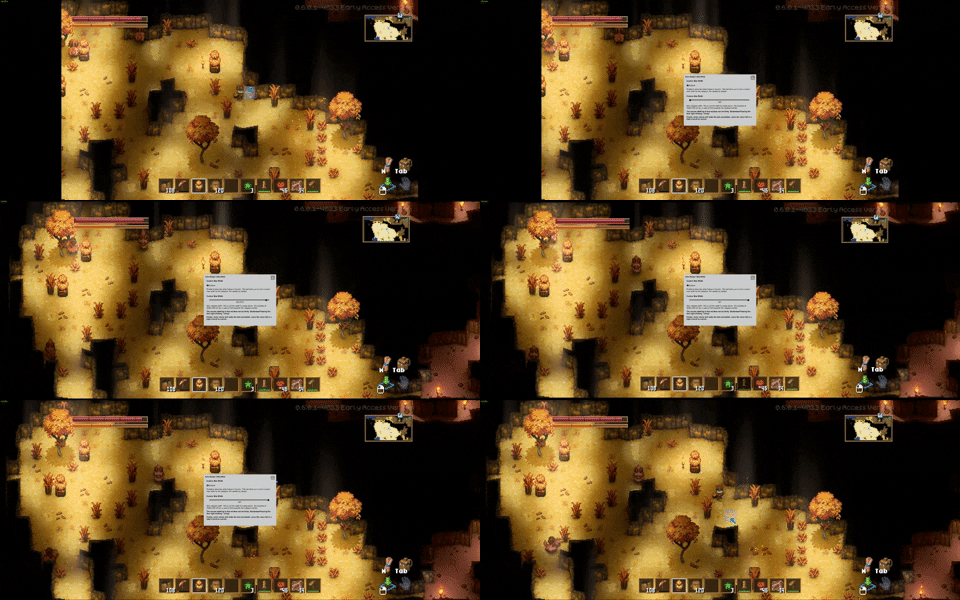
Removes pillar boxing in menus and expands the viewport. Viewport width is customizable to find a balance between width and seeing the world de-spawn around you...CoreKeeper Ultra-wide Fix
Features
- Removes pillar boxing in the menus.
- Expands viewport width. Note you will see world spawn/de-spawning near the edges of the screen. Most likely be worse the wider the aspect ratio.
- The viewport width is adjusted automatically, but a custom width can be set.
- Press F1 to bring up the configuration window in game. Only needed if you want to change the width manually - it defaults to your aspect ratio by default.
(The menu has some quirks grabbing the mouse, works best when paused.)
Notes
- This uses a custom build of BepInEx from here should it need updating in the future.
- The game is also an IL2CPP game, so first start (and after any game updates) will be a little longer while it generates assemblies.
Installation
- Install using r2modman or Thunderstore Mod Manager.
Manual Installation
- Install BepInExPack_Core_Keeper first.
- Extract the contents of the release zip in to the game directory.
(e.g. "steamapps\common\CoreKeeper" for Steam).
Donate
If you enjoy the mod, please consider a donating here or using the Buy Me a Coffee button below. Alternativly, hit that thumbs up button!

Community
Feel free to join me on my own Discord for a look at my other work (Sun Haven, Graveyard Keeper, Roots of Pacha, Potion Permit and a growing list of Ultra-wide mods).
Changelog
0.0.2 - 12/5/2023
- Added simple configuration UI. This can be accessed by pressing F1 in game.
0.0.1 - 12/5/2023
- Initial release.