


MoreHeadBridge
Integrates MoreHead .hhh cosmetics directly into the vanilla R.E.P.O. cosmetics menu and expands it with multi-equip, per-cosmetic color, Mini-Semibot, customization tools, and compatibility features.MoreHead Bridge
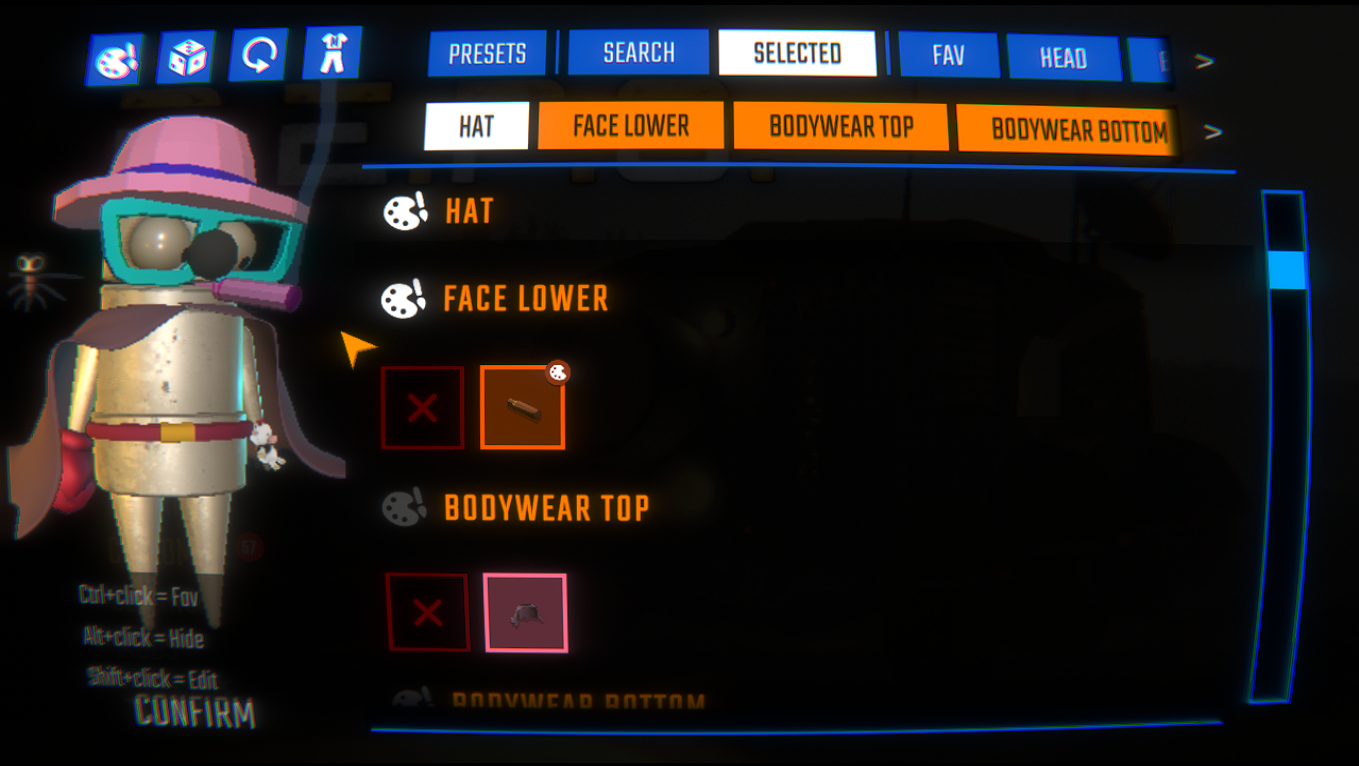
Translates .hhh cosmetics (from MoreHead) into the vanilla R.E.P.O. cosmetics system, so they appear right alongside your vanilla cosmetics — same shop, same menu, same unlock flow.
Highlights
- All your
.hhhcosmetics in the vanilla menu — with rarity tiers, generated icons and unlock tracking. No separate UI to learn. - A Mini-Semibot that follows you — a tiny copy of your avatar, in your outfit, mirroring your face and visible to everyone (see below).
- Your own colors, per cosmetic — paint each item (or each material slot) its own color, with optional Cycle / Rainbow animations, all synced to other players.
- Equip more than one of the same type (two hats, several body pieces, multiple worlds).
- World cosmetics in a dedicated WORLD tab, that orbit and follow you around.
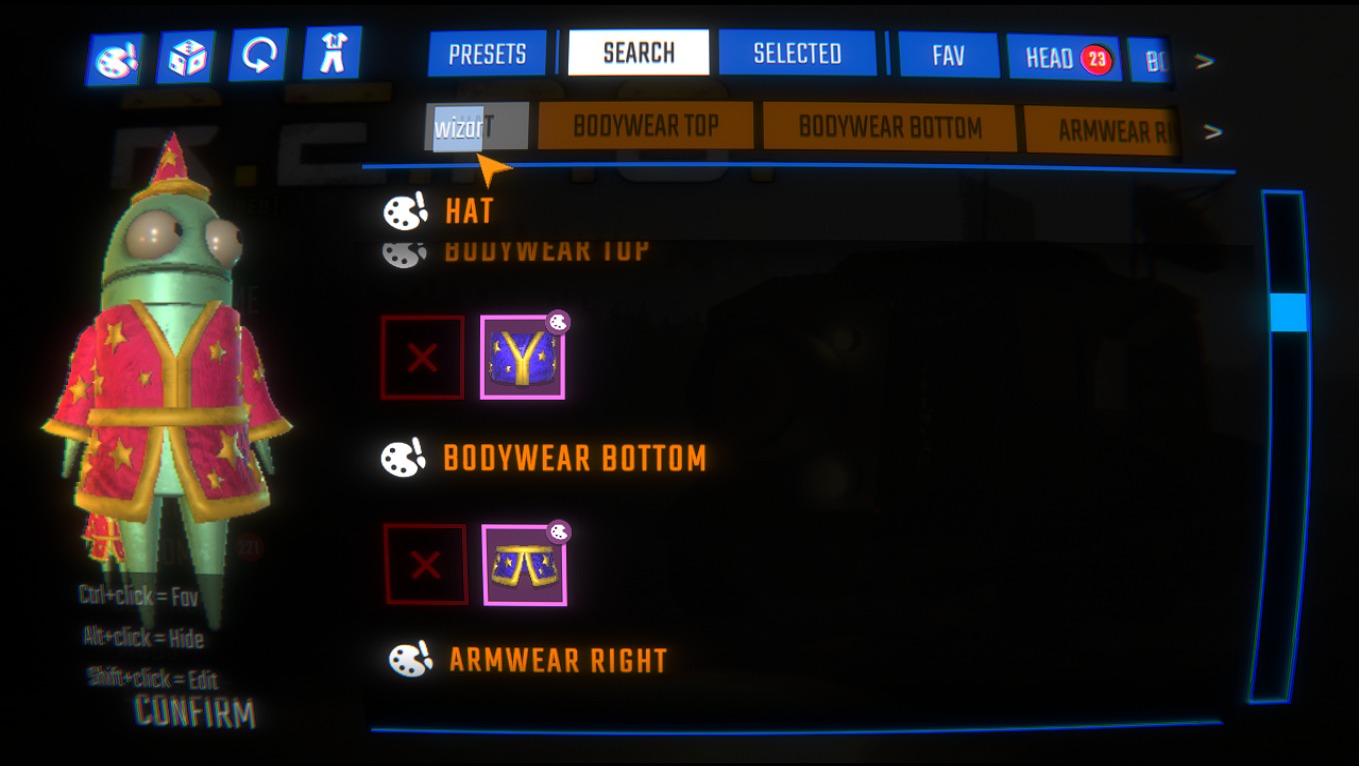
- Favorite and Hide cosmetics, search by name, and a SELECTED tab that shows only what you're wearing.
- A deep Cosmetic Customizer (Shift + click): rarity, category, tinting, jiggle physics, crown, condition flags, position offsets and Death Head behavior — all per cosmetic.
- Plays nice with everything — REPOLib is the only hard dependency; MenuLib, MoreHead, MoreHeadUtilities and BCE are all optional.
Mini-Semibot
Equip the Mini-Semibot (in the WORLD tab) to spawn a cute small copy of your avatar that follows you — dressed in your cosmetics, mirroring your facial expressions, and visible to everyone in the room.
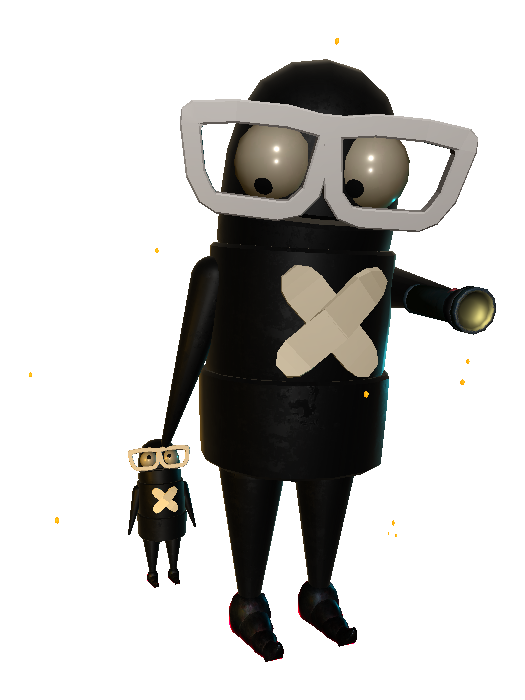
Shift + click it in the menu to open its customizer (requires MenuLib). The options are grouped into sections:
- Placement — Position (Behind, trailing you / Front, walking ahead) and Size (Baby / Child / Teen / Junior).
- Outfit — Same As You (mirrors your live outfit, updating as you change) or Random Preset (a random saved cosmetics preset, re-rolled each time you equip it).
- Gaze — a Menu look-at (At Mouse / Copy Avatar / Still) for how it watches you in menus, and a separate In-Game gaze (Same Target / Copy Head). Idle Glance makes it softly look around when idle so it reads as "alive".
- Movement — Follow Smoothing (Off / Soft / Bouncy) for how it eases after you, Avoid Walls so it squeezes past geometry, climbs stairs and stops at ledges, Leg Speed for how fast its little legs scramble, and State Effects so it flashes when you take damage / heal / upgrade.
- Face & sound — Mouth modes: Never / Random chatter / When I Talk (tracks your live voice) / Mimic Clips (plays the voice lines the Mimic mod recorded — requires that mod), with adjustable Chatter, Voice Volume and Voice Range. Optional Footstep Sounds at its feet.
- Hands — what it carries: Clean Arm, Orb, or Orb + Light with the grabber beam (plus a Beam Color option when CustomGrabColor is installed). It auto-pulls its own Flashlight whenever yours is out.
- When you die — Death Head (slumps at your death-head), Crouch & Wait, or Hide. Hide on Kart tucks it away during the King of the Losers arena (it's cramped in there).
- Extras — show it in the facial-Expression Preview (the 5–9 keys panel), and Recapture Icon to re-photograph its menu icon with your current colors.
When you explode in an arena, the Mini-Semibot explodes too — same blast, in its own outfit colors (purely visual, hurts no one). Its outfit, colors, animated colors and behaviors are synced to other players. Every option above lives in the Shift + click customizer popup; the config file just has EnableMiniSemibot to turn the cosmetic off entirely.
Menu features
Favorites & Hidden
- Ctrl + click any cosmetic to toggle it as a favorite, Alt + click to hide it.
- Dedicated FAV and HIDE tabs appear in the category strip.
- Hidden cosmetics are excluded from other categories and from Randomize.
Tabs
| Tab | Description |
|---|---|
| SEARCH | Live search bar — filters cosmetics by name as you type |
| SELECTED | Shows only your currently equipped cosmetics |
| WORLD | Shows world cosmetics in their own category |
| FAV | Shows only favorited cosmetics |
| HIDE | Shows only hidden cosmetics |
Colors
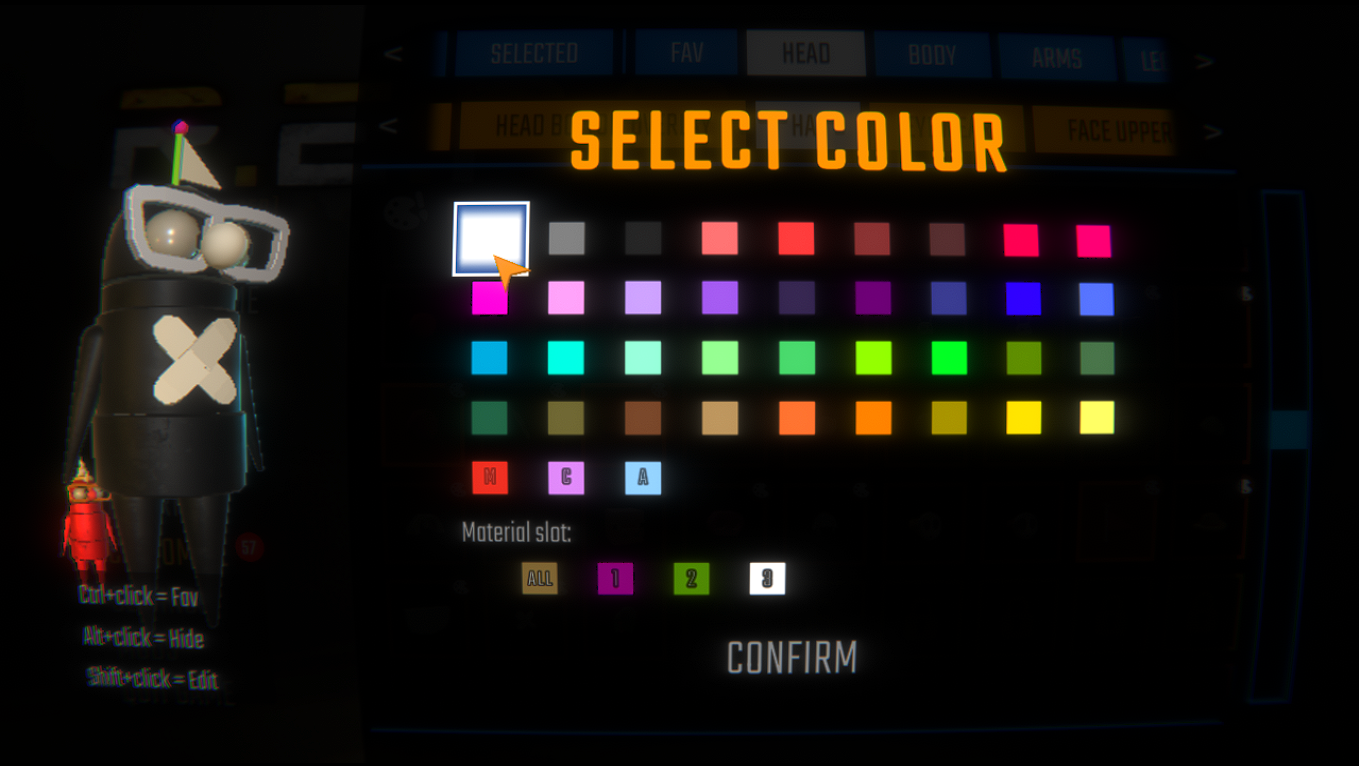
- Open any cosmetic's color picker — bridge, vanilla or modded — to give it its own color, independent of the per-type color.
- For cosmetics with several materials, a slot selector (
ALL · 1 · 2 · …) appears below the palette so you can color each material slot separately. - An Original button restores the author's intended colors; a "C" button (custom RGB) and an "A" button (Cycle / Rainbow animation) appear when enabled in the config.
- Colors and animations are synced to other players.
Quality of life
- Hover any cosmetic to read its name; GroupCosmeticVariants can collapse some variant families (pride flags, color variants) into a single button.
- Tools dropdown: Generate Icons, Clear All Icons, and Sync Customizer (copy another player's per-cosmetic settings).
- Optionally hide the MoreHead button to use only the vanilla UI, or hide MoreHead decorations on avatars entirely.
Cosmetic Customizer — full options (Shift + click)
Set
EnableCosmeticCustomizer = truein the config (default:false). Requires MenuLib.
Shift + click any bridge cosmetic to open a popup with a live preview avatar. Everything here is saved per cosmetic and re-applied on every launch.
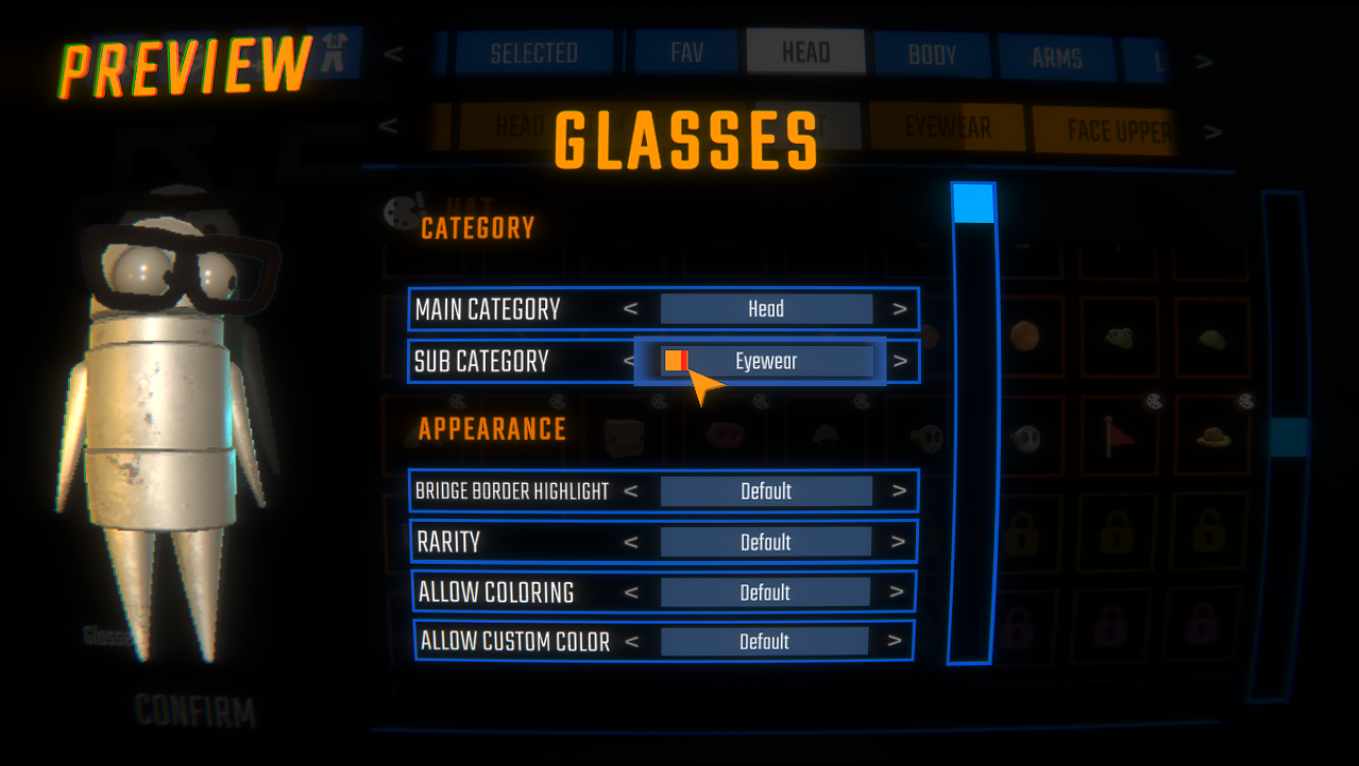
- Appearance — Rarity (Common → UltraRare), Main / Sub Category (Hat, Eyewear, Bodywear Top, World, …), Border Highlight (force the orange bridge / purple modded border on or off), and three coloring toggles: Allow Coloring, Allow Custom Color and Allow Animated Color.
- Fixes — Jiggle Physics (Light / Moderate / Strong sway), Remove Physics, Loop Animation, Equip Animation and Vanilla Position Fixes, each a per-cosmetic override of the global setting.
- Advanced (sub-popups) — Shape Conditions & Hide Conditions (condition triggers relevant to the cosmetic's type), Special Position Fixes (conditional pos/rot/scale offsets), Crown Settings (+ Fix Crown Error), and Death Head (Show-on-death-head toggle + a configurable Impact Pose the hat springs to when it hits the ground).
- Icon — Recapture Icon, Delete Icon, and a per-cosmetic Use Isolated Icon Render toggle.
- Blacklist — Add to Blacklist straight from the popup.
- World cosmetics also get Show To Self (In Game), Follow Smoothing, Avoid Walls and Hide on Kart.
Overrides are saved to BepInEx/config/MoreHeadBridge/CosmeticOverrides.json. You can Export Settings per cosmetic, export/import the whole set (ExportCosmeticCustomizer / ImportCosmeticCustomizer), or copy them from another player via Tools → Sync Customizer.
How icons work
Since .hhh cosmetics don't ship icons, the mod generates one for each via a fallback chain:
- Placeholder — a generic icon so the slot is never blank.
- Texture overlay — if the cosmetic has a texture, it's applied on top of the placeholder as a preview (toggle:
UseTextureAsPlaceholder). - Captured icon — once you hover the cosmetic, the mod snapshots the in-game avatar preview and saves a PNG that replaces the placeholder permanently.
Generate every missing icon at once with Tools → Generate Icons (or GenerateAllIcons). The batch shows progress, can be interrupted (ESC or closing the menu), and resumes where it left off.
Icons are cached outside the vanilla cosmetics cache (which REPOLib wipes every launch):
%userprofile%\AppData\LocalLow\semiwork\REPO\Cache\Icons\CosmeticsModded\MoreHeadBridge_CosmeticsIcons\
Delete that folder, or use DeleteIconCache, to wipe all generated icons.
Upgrading from v1.0.0? The cache used to live at
MoreHeadBridge_Icons\. It migrates automatically on first launch — no action needed.
Slot mapping (MoreHead → Vanilla)
Since the vanilla menu has more specific slots than MoreHead, this mapping is used:
| MoreHead | Vanilla |
|---|---|
| Head | Hat |
| Neck | Face Lower |
| Body | Bodywear Top |
| Hip | Bodywear Bottom |
| Left Arm | Armwear Left |
| Right Arm | Armwear Right |
| Left Leg | Legwear Left |
| Right Leg | Legwear Right |
| World | World (dedicated WORLD category) |
Installation
- Install via Thunderstore / r2modman (dependencies resolve automatically).
- MenuLib is a soft dependency — install it if you want the Cosmetic Customizer / Sync Customizer UI.
- Make sure you have some
.hhhcosmetic files inBepInEx/plugins(e.g. from MoreHead or any cosmetics pack). - Launch the game — bridged cosmetics appear in the vanilla cosmetics menu on first load.
Configuration — every option, by section
Config file: BepInEx/config/Xuaun.MoreHeadBridge.cfg
Section headers below match the
[Section]names in the.cfgexactly.
[General]
| Option | Default | Description |
|---|---|---|
| AutoUnlockBridgeCosmetics | true |
Auto-unlock all bridge cosmetics on every game load. Set to false to require earning them like vanilla cosmetics. |
| AllowMultipleCosmetics | true |
Allow equipping multiple cosmetics of the same type simultaneously (e.g. two hats). |
| EnablePerCosmeticColors | true |
Master switch for the per-cosmetic color system (all cosmetic kinds): per-cosmetic palette colors, custom RGB, animated colors, and the color sync to other players. When false, all cosmetic colors are left to the vanilla per-type palette. Applies live. |
| EnableMiniSemibot | true |
Register the Mini-Semibot world cosmetic (a small avatar copy that follows you). Applies instantly: false unequips it, true registers/restores it. All its other options are set in-game via Shift + click. |
| SpecificFolders | (empty) | Comma-separated subfolder names under BepInEx/plugins to scan for .hhh files. Empty = scan all. Example: Some-MoreHeadPack,Another-Pack. |
Mini-Semibot behaviour (position, death behaviour, outfit, leg speed, mouth, holding, follow smoothing, …) is configured entirely in-game via Shift + click on the cosmetic (requires MenuLib) — there are no config-file options for it beyond
EnableMiniSemibot.
[CosmeticsMenu]
| Option | Default | Description |
|---|---|---|
| EnableMenuEnhancements | true |
Enables the extended cosmetics menu: virtual tabs (SEARCH, SELECTED, FAV, HIDE), Ctrl+click to favorite, Alt+click to hide, live search bar, and name tooltip on hover. Set to false for the unmodified vanilla menu. |
| ShowToolsButton | true |
Show the Tools dropdown in the cosmetics menu (Generate Icons, Clear All Icons, Sync Customizer). |
| GroupCosmeticVariants | false |
Collapse families that differ only by a variant (RepoPride flags, MoreHead color variants) into a single menu button — click it to pick the variant. Requires MenuLib. false shows every variant as its own button. |
| HideMoreHeadButton | false |
Remove the MoreHead button from all menus. Applies instantly when toggled — no restart needed. |
| HideMoreHeadDecorations | false |
Hide the decorations you equipped through the MoreHead menu on player avatars. Owner-authoritative and synced (other players running this mod won't render yours either). Bridge/vanilla cosmetics unaffected. Applies instantly. |
| ExcludeMoreHeadFromPresetIcons | false |
Leave MoreHead-menu decorations out of the saved preset preview image, so a preset thumbnail shows only the cosmetics that preset stores. Local only. Re-save (or clear the cached icon) to refresh a thumbnail. |
| SearchFieldPosition | Top |
Where the search bar appears. Top = above the category strip. Bottom = at the bottom of the Semibot. |
[Blacklist]
| Option | Default | Description |
|---|---|---|
| BlacklistMode | NotLoadIngame |
What the bridge does with blacklisted cosmetics. NotLoadIngame = skip them entirely (saves memory, matches MoreHead). LoadOnHiddenMenu = still register them but start them hidden (HIDE tab). Load-time — applies on next launch. |
| BlacklistOnMoreHead | false |
Also write the bridge's blacklisted cosmetic names into MoreHead's own blacklist (merge-only, never removes your own entries), so MoreHead stops loading those decorations too. Load-time. |
[BridgeAppearance]
| Option | Default | Description |
|---|---|---|
| EnableBridgeTinting | true |
Enables tinting for bridge (.hhh) cosmetics specifically. When false, bridge cosmetics keep their original author colours and ignore section paints — vanilla/modded cosmetics are unaffected (see EnablePerCosmeticColors in [General] for the system-wide switch). Per-cosmetic Allow Coloring takes priority. |
| EnableBridgeCustomColors | false |
Adds a "C" button to the color picker for tintable bridge cosmetics, opening RGB sliders to paint any custom colour (beyond the game palette). Custom colours are synced to other players. |
| EnableWorldFollowSpring | false |
Adds a Follow Smoothing slider to each WORLD cosmetic's Shift + click popup, so it can trail you with a soft lag or bouncy overshoot (Off / Soft / Bouncy) instead of being rigidly glued. Per-cosmetic and local-only (not synced). |
| EnableBridgeColorAnimations | false |
Adds an "A" button to the color picker for animated colors (Cycle / Rainbow), synced to other players. |
| SeeRemoteColorAnimations | false |
Show animated colors that other players set on their cosmetics. When false, remote players' animations are hidden on your screen (they still animate on their own). Only relevant when EnableBridgeColorAnimations is on. |
| HighlightBridgeCosmetics | true |
Show an orange border on bridge cosmetics to distinguish them from vanilla ones. Per-cosmetic overrides take priority. |
| BridgeDefaultRarity | Common |
Rarity tier assigned to bridge cosmetics (controls sort position). Values: Common, Uncommon, Rare, UltraRare. Per-cosmetic overrides take priority. |
World cosmetics are hidden from your own camera by default (other players always see them); use Show To Self (In Game) in each one's Shift + click popup to change that per cosmetic.
[CosmeticCustomizer]
| Option | Default | Description |
|---|---|---|
| EnableCosmeticCustomizer | false |
Enable the Shift + click popup to customize rarity, category, tinting, sway, fixes, crown, shape flags and offsets per cosmetic. Requires MenuLib. |
| UseVanillaPositionFixes | true |
Auto-apply vanilla-style position/scale fixes that adapt bridge cosmetics to non-default body shapes (big/tiny/huge limbs). The aggressive Missing Right Side head fix starts off — opt in per cosmetic via Special Position Fixes → Use. Turn off to keep every bridge cosmetic at its authored size/position. Per-cosmetic override takes priority. |
| ImportCosmeticCustomizer | false |
One-shot trigger. Merge BepInEx/config/MoreHeadBridge/overrides_export.json into your local overrides on next launch. Auto-resets. |
| ExportCosmeticCustomizer | false |
One-shot trigger. Export all per-cosmetic overrides to overrides_export.json on next launch (merges with any existing file). Auto-resets. |
[VanillaCosmetics]
| Option | Default | Description |
|---|---|---|
| EnableVanillaCustomColors | false |
Adds a "C" button to the color picker for vanilla cosmetics that support a custom color channel (Hurtable shader with _AlbedoColor), allowing custom RGB beyond the game's palette. |
[OtherModdedCosmetics]
Options for modded non-bridge cosmetics — items registered by other REPOLib mods, not from
.hhhfiles. MoreHead Bridge can also unlock, highlight, color and customize these.
| Option | Default | Description |
|---|---|---|
| HighlightModdedCosmetics | false |
Show a purple border on non-bridge modded cosmetics to mark them as coming from another mod. Bridge cosmetics are controlled separately by HighlightBridgeCosmetics. Per-cosmetic overrides take priority. |
| AutoUnlockModdedCosmetics | false |
Auto-unlock all non-bridge modded cosmetics on every launch. Tracked in a separate file so ResetModdedUnlocks can undo exactly these without touching earned unlocks. |
| EnableModdedCustomColors | false |
Adds a "C" button to the color picker for modded non-bridge cosmetics that support a custom color channel, allowing custom RGB beyond the game's palette. |
| AllowModdedCosmeticCustomizer | false |
Advanced / opt-in. Also open the Cosmetic Customizer popup for modded non-bridge cosmetics (e.g. to remap their category). Requires EnableCosmeticCustomizer. |
| ResetModdedUnlocks | false |
One-shot trigger. Removes only the modded cosmetics unlocked by AutoUnlockModdedCosmetics; cosmetics earned through gameplay are untouched. Auto-resets. |
[Compatibility]
| Option | Default | Description |
|---|---|---|
| FixCosmeticsMenuPerformance | false |
Enable if you have many cosmetics mods and the vanilla tabs (HEAD/BODY/ARMS/LEGS) stutter or load slowly. |
| RemoveBridgePhysics | true |
Remove Collider/Rigidbody from bridge cosmetic prefabs at load time (prevents the rotation bug in the preview menu). Per-cosmetic override takes priority. |
| LoopBridgeAnimation | true |
Force Animation/Animator clips on bridge cosmetics to loop. Per-cosmetic override takes priority. |
| BridgeEquipAnimationMode | Fixed |
Vanilla equip animation behavior for bridge cosmetics. Fixed keeps a small non-zero spawn scale (prevents world animation collapse), Normal is vanilla, Disabled spawns at final scale. Per-cosmetic override takes priority. |
[BridgeIcons]
| Option | Default | Description |
|---|---|---|
| UseTextureAsPlaceholder | true |
Use the cosmetic's texture as the icon placeholder until a captured icon replaces it. |
| UseIsolatedIconRender | true |
Render bridge icons in isolation (dedicated camera + lights) instead of cropping the live menu-avatar preview — cleaner and independent of pose/loadout. Delete the icon cache after toggling so icons regenerate. |
| AutoCaptureIcons | true |
Reactively capture icons as you hover cosmetics. Saved as PNGs and reused on future visits. |
| GenerateAllIcons | false |
One-shot trigger. Next menu open cycles through all bridge cosmetics without a cached icon and snapshots each one. Auto-resets to false. |
| HideClothesWhileGenerating | true |
During GenerateAllIcons, show only the cosmetic being captured (clean, isolated icons). |
| ResetBodyColorWhileGenerating | true |
During GenerateAllIcons, temporarily reset body color to default for neutral icons (restored afterwards). |
| HideAvatarWhileGenerating | true |
During GenerateAllIcons, hide the on-screen avatar preview while the batch runs (icons are still captured). |
[Reset]
| Option | Default | Description |
|---|---|---|
| ResetBridgeUnlocks | false |
⚠ Destructive one-shot trigger. Removes all bridge cosmetics from your unlocks, outfits, and history on next launch. Auto-resets. |
| ResetCosmeticCustomizer | false |
One-shot trigger. Clears all per-cosmetic overrides and deletes MoreHeadBridge/CosmeticOverrides.json on next launch. Auto-resets. |
| DeleteIconCache | false |
One-shot trigger. Deletes cached bridge icon PNGs on next launch. Use DeleteIconsMatching to filter. Auto-resets. |
| DeleteIconsMatching | (empty) | Optional filter for DeleteIconCache. Comma-separated substrings matched against icon filenames (case-insensitive). Empty = delete all. |
[Debug]
| Option | Default | Description |
|---|---|---|
| ShowBridgeDebugLogs | false |
Don't suppress NullReferenceExceptions for bridge cosmetics (use to diagnose bridge-only issues). |
Compatibility & data safety
- Works alongside other mods. REPOLib is the only hard dependency; MenuLib, MoreHead, MoreHeadUtilities, Mimics and BCE are all soft dependencies — the mod degrades gracefully when any of them is missing, and customizes cosmetics from other REPOLib mods (see the [OtherModdedCosmetics] config section).
- Crash-safe saves. Overrides, per-cosmetic colors and favorites are written atomically (write-temp-then-swap) and flushed on game close, so a crash mid-write can't corrupt the JSON.
- Colorful console (optional). If you have BepInEx Console Extensions (BCE) installed, MoreHead Bridge prints colored messages in the BepInEx console. It's a soft dependency — the mod works perfectly without it.
More R.E.P.O. mods by Xuaun
If you like this one, I make other cosmetic packs and tools for R.E.P.O. — and most of my cosmetic packs even get their own themed border inside MoreHead Bridge:
- XuaunCosmetics — my main random cosmetics pack.
- FortniteSemibot — Semibot Fortnite-themed mesh cosmetics and other items.
- YoshiCarry — Yoshi carrying cosmetics.
- RepoPride — pride-flag overlay cosmetics.
- MonsterCosmetics — R.E.P.O.-based monsters cosmetics.
- RepoTraducaoPTBR — Brazilian Portuguese translation for R.E.P.O.
Credits
- Xuaun — MoreHead Bridge
- Masaicker & YurisCat — MoreHead (original mod inspiration)
- Maygik — MoreHeadUtilities
- Zehs — REPOLib
- nickklmao — MenuLib (Cosmetic Customizer UI)
- innominata — BepInEx Console Extensions (optional mod)