

Carturs HD Blood
Higher resolution ground blood, and a real burst of blood on every hit and kill.Cartur's HD Blood
Higher resolution ground blood, and a burst of blood in the air on hits and kills.
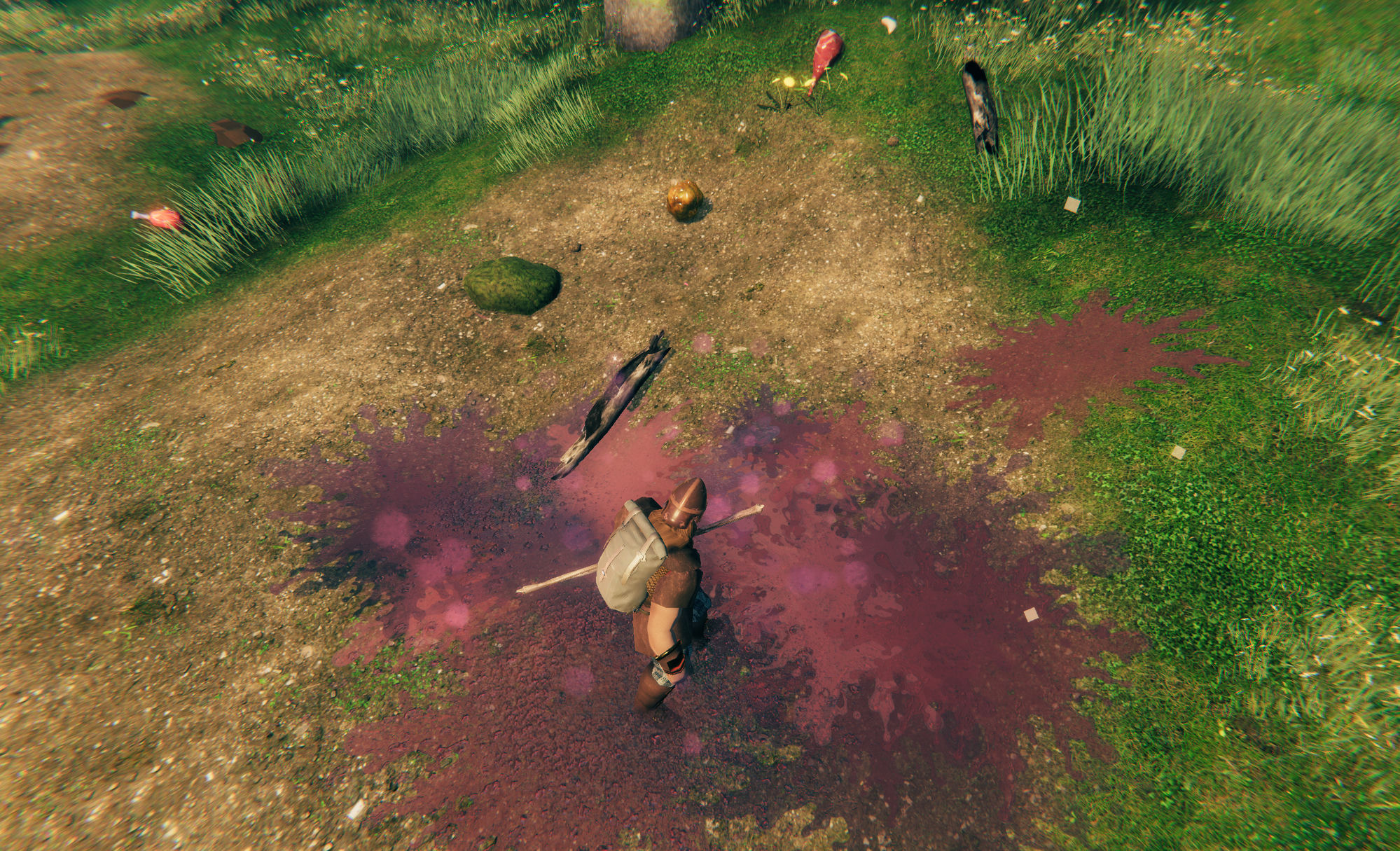
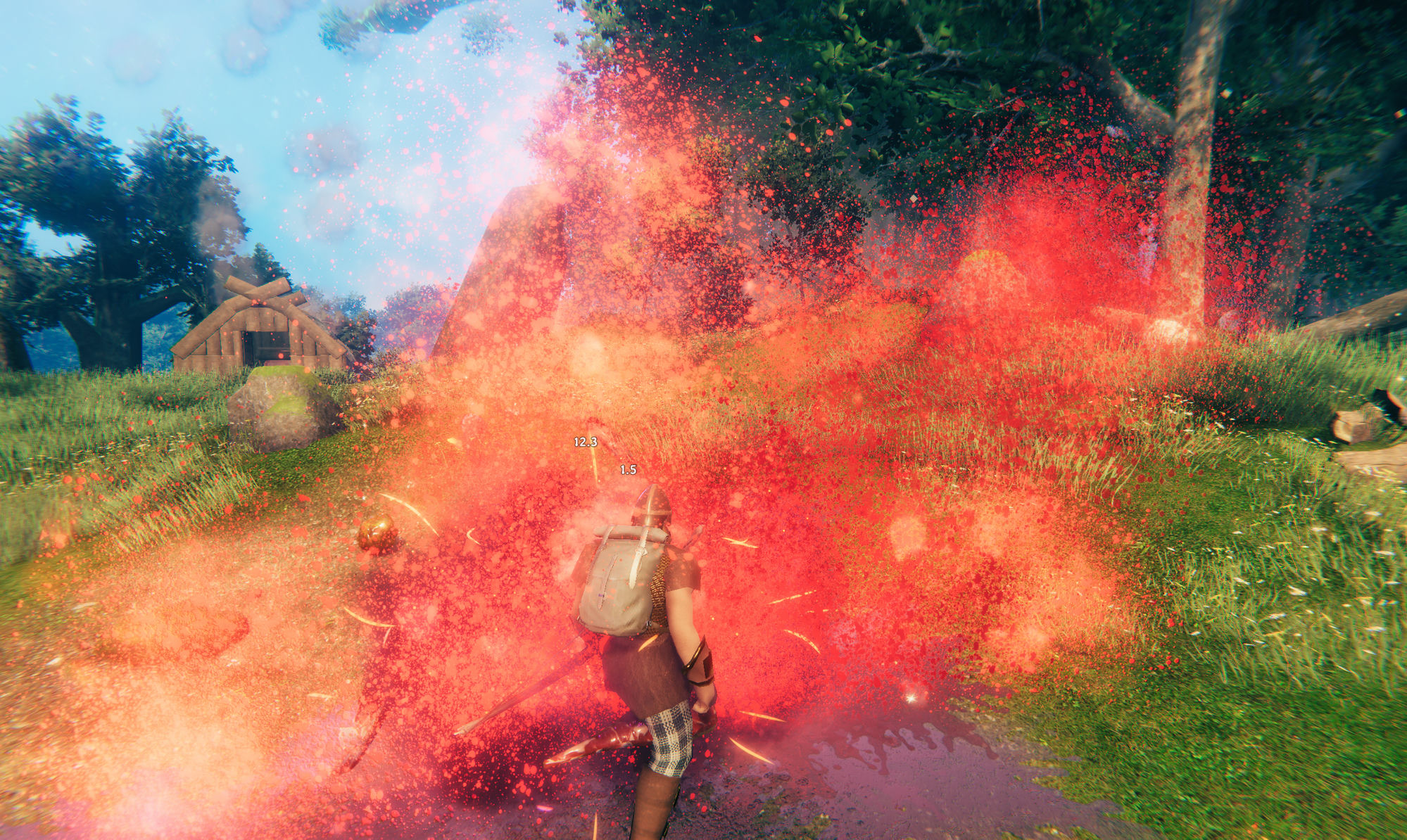
What it does
Vanilla draws its ground blood from a 64x64 texture. This mod replaces it with three textures of 1024 and 512 pixels, each with its own normal map, so light catches the edges of a mark and the blood reads as wet rather than as a flat stain. Small marks use the 512 texture. Larger marks alternate between two different 1024 textures so the same shape does not repeat. Ground marks also darken as they age and fade out over their life instead of vanishing in one frame, and a kill leaves a settled pool under the body, sized to the creature that died.
The second half of the mod is blood in the air. Most creatures throw nothing into the air when you hit them: by the mod's own count of the prefab list, 24 of the game's 28 hit effects and 33 of its 48 death effects have no airborne burst at all. HD Blood copies the burst from the greydwarf death onto those effects as they spawn. The burst on a hit is smaller than the one on a death, and the spray is thrown away from the direction of the blow rather than outward in a ball. Effects that already have their own burst, such as Bonemass, are left alone.
Vanilla only draws blood on a hit that does at least a tenth of the target's max health. At the default level that bar is lowered to a fiftieth, so most real hits on big creatures bleed. A hit you block does not draw blood.
Per-creature colour is kept. Greydwarf blood stays yellow and neck blood stays green, as the game has it. Red blood, like the boar's, is pulled a little toward a darker red, because vanilla's is very bright. The pull is set by BloodTint.
Settings
Config file: BepInEx/config/com.jekkle.valheim.carturhdblood.cfg. Changes apply after a world reload, which means a trip to the main menu and back.
| Setting | Default | What it does |
|---|---|---|
Enabled |
true | Master switch. Off leaves vanilla blood untouched. |
BloodLevel |
Normal | How much blood, everywhere. Low, Normal, High, Extreme or Custom. |
GroundBlood |
1.5 | How much ends up on the ground, 0 to 3. Used only when BloodLevel is Custom. |
HitBlood |
0.25 | Size of the airborne burst on each hit, 0 to 3. Custom only. |
DeathBlood |
1.0 | Size of the airborne burst on each death, 0 to 3. Custom only. |
BloodLevel is the setting to change. Any level except Custom overrides the three settings below it, so set it to Custom first if you want to adjust those by hand. The levels set these values:
| Level | Ground | Hit | Death | Bleeds when a hit does at least |
|---|---|---|---|---|
| Low | 0.15 | 0.1 | 0.25 | 10% of max health (vanilla) |
| Normal | 0.3 | 0.2 | 0.5 | 2% |
| High | 0.6 | 0.4 | 1.0 | 1% |
| Extreme | 1.2 | 0.8 | 2.0 | any damage |
On the Custom scale, GroundBlood 0 is none and 1 is vanilla's amount with only the artwork changed. HitBlood and DeathBlood are a fraction of what a greydwarf death throws, so 1 is a full greydwarf burst. Note that Normal sits below the Custom defaults in the table above; the defaults shown there only matter once you switch to Custom.
The remaining settings are under 2 - Advanced and most people will not need them. They cover droplet size, spread and count, cloud size, pool size, count and lifetime, wetness, ground opacity, fade timing, the spray cone, blood colour and tint, and the list of decal material names.
Compatibility and known issues
Built and tested against Valheim 1.0.7 with BepInEx pack 5.4.2350.
Six methods are patched with Harmony: ZNetScene.Awake, ParticleDecal.Awake, Character.ApplyDamage, Humanoid.BlockAttack, Character.OnDeath and Player.OnDeath. The last four matter if you run other combat mods. They only read what happened (was the hit blocked, which way did it come from, how tall was the creature that died) and then spawn a visual effect. Nothing here changes damage, blocking or death, so a mod that replaces one of those methods outright will stop the blood, not the other way round.
Blood is found by material name, not by prefab name, so it should survive a game update. If blood stops appearing after a patch, the material names are under Advanced and can be corrected there without a new build. A modded creature is picked up if it uses the game's own blood materials. If it does not, add its material name under DecalMaterials in Advanced.
It works alongside texture packs, including HD Valheim Textures. It is client-side and visual: nothing is networked and no save data is touched.
Install
Use a mod manager (r2modman, Thunderstore or Gale) and it pulls in BepInEx for you. To install by hand, drop CarturHDBlood.dll into BepInEx/plugins.
Artwork and design by Cartur.
Free, and always will be. If it improved your game you can tip me on Patreon.
Discord: bug reports, install help, and mod requests. Bug reports get their own thread so nothing is lost in a chat scroll, and requests are voted on.
More from Cartur: Map Pins · Compass and Clock · Safe Stamina · Follow Command · Flooring · UI HUD · Waste Management · Feeding Trough · Combat Text