

Carturs Waste Management
A trash can and sort buttons in the inventory. Drop an item on the can for half of what the bench charged, EpicLoot materials included. Sort tidies the bag or a chest and pulls matching items in from nearby chests; Sort All does the whole base.Cartur's Waste Management
A trash can and sort buttons in the inventory, where the mess is.

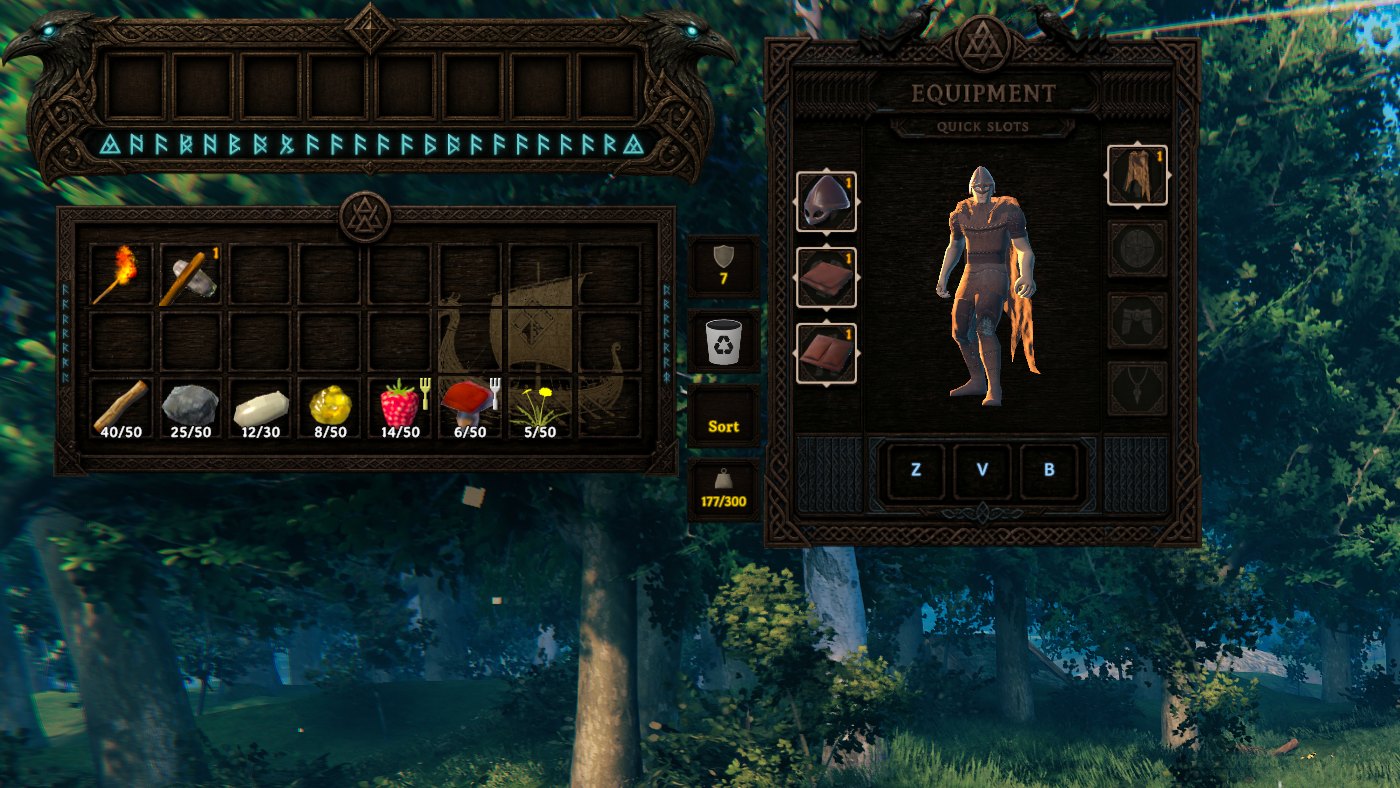
The can
Pick an item up and drop it on the can. It comes apart into what it was made of, and the parts land in your bag. Anything that does not fit in the bag is dropped at your feet.
The refund is the item's own recipe, the same one the bench used to build it, and you get half of it back, rounded up. Scrapping should cost you something, and rounding up means a single unit of an ingredient still returns one rather than nothing. A leftover that doesn't make a whole craft returns nothing.
Every upgrade you paid for is counted, including the earlier steps. A level 3 sword was charged for the craft and then again for each step up, so the refund adds all of that together and a level 3 always gives back more than a level 1.
Anything with no recipe, such as wood, stone, ore or a handful of raspberries, has nothing to give back, so it is simply thrown away. The can destroys things and there is no undo. That is what it is for.
When Epic Loot is installed, it is paid too. An enchanted item was charged materials at the enchanting table, so half of that bill comes back on top of the recipe. Anything else Epic Loot would sacrifice, such as a trophy, a boss drop or an unidentified item, never cost anything to make. Those pay Epic Loot's own sacrifice table instead, unhalved, which is the same numbers its enchanting UI already shows you. Epic Loot is reached by reflection, so nothing happens when it is absent.
The sort buttons
There is one under the can for your own bag, and two above the chest's weight for chests: Sort for the open chest and Sort All for every chest in range. They stand in the same column as the bag's, clear of the chest's slots.
Sorting groups by item type, then by name, and puts the best quality first. It also pours split stacks back together, so half a stack of wood here and half there come out as one pile. Your hotbar row is never touched, and neither are the hidden rows other mods use for equipment and quick slots.
Pulling from nearby chests
A chest's Sort doesn't only tidy what is already in it. It also reaches out to the chests around it and brings in what matches, so a chest of ore and an ore chest next door end up as one chest of ore. How far it looks is GatherRange (20 metres by default), and 0 turns the reaching off. The bag's Sort sorts your bag and nothing else. It never takes from chests.
A chest only collects the kinds of item it already holds. A chest of ores stays a chest of ores and gains the ore from around it, rather than becoming a bin for everything in range.
Only chests players built are touched. Graves and world loot chests are left alone. So are chests you have no permission for, chests inside someone else's ward, chests another player has open, and containers carried by a player. Boats and carts are skipped too, because a hold is not part of your base, and without that rule a moored longship holding a lot of something could win it and pull your stores out onto the water. If the chest you have open is itself a boat or cart hold, Sort All sorts only that one.
Sort All tidies every chest in range and consolidates them. For each kind of thing it finds, one chest wins, the one already holding the most of it and on a tie the nearer, and every other copy is pulled into that chest. So two chests of rubies end up as one chest of rubies. A chest only ever wins a kind of thing it already holds, so a chest of ores still cannot swallow a chest of wood.
What will not fit in the winner is left in the chest it was in. Nothing is thrown away, and a base that could not be finished in one press finishes on the next.
Quick deposit
Press Y and everything in your bag that a nearby chest already holds goes into that chest, without opening it. It works with the inventory open or closed, and does nothing while you are typing in chat, the console or a text box. Your hotbar row, equipped items and the item on your cursor stay put, and so does anything no nearby chest holds. A message says how many items moved.
It reaches as far as GatherRange and skips the same chests Sort does: other players' wards, boats and carts, graves, world chests and chests someone else has open. The nearest chest gets first pick, and what does not fit moves on to the next.
Settings
Config file: BepInEx/config/com.jekkle.valheim.carturwastemanagement.cfg.
| Setting | Default | What it does |
|---|---|---|
ShowTrashCan |
true | Show the can in the player panel. |
ShowBagSort |
true | Show the Sort button for your own bag. |
ShowChestSort |
true | Show Sort for the open chest. |
ShowChestSortAll |
true | Show Sort All above it. |
GatherRange |
20 | How far, in metres, a chest's Sort pulls matching items in from nearby chests, and how far Sort All and Quick deposit reach. 0 turns all three off. |
Hotkeys / QuickDeposit |
Y | The Quick deposit key. |
TrashCanOffset |
0, 0 | Nudge the can, in UI pixels. X right, Y up. |
BagSortOffset |
0, 0 | Nudge the bag Sort button. |
ChestSortOffset |
0, 0 | Nudge both chest buttons, as a pair. |
The button settings are read when the inventory opens, so a change takes effect the next time you open it. GatherRange is read when you click. No restart is needed for any of them.
Compatibility
The chest buttons sit above the chest's weight, in a column other mods build into as well. ChestSortOffset moves the pair out of the way, and ShowChestSort and ShowChestSortAll remove them. It is an offset you set rather than a collision test on purpose. Finding another mod's button means guessing at its rect and re-checking whenever it moves, and a number typed once cannot be wrong.
Cartur's UI moves the can and the bag's Sort button into its inventory side column when both are installed. Epic Loot is optional.
Client-side. No server install is needed, and it doesn't matter whether the people you play with have it.
Install
Needs BepInExPack Valheim. Use a mod manager (r2modman, Thunderstore or Gale) and it installs that for you. To install by hand, drop CarturWasteManagement.dll into BepInEx/plugins.
Free, and always will be. If it improved your game you can tip me on Patreon.
Discord: bug reports, install help, and mod requests. Bug reports get their own thread so nothing is lost in a chat scroll, and requests are voted on.
More from Cartur: HD Blood · Map Pins · Compass and Clock · Safe Stamina · Follow Command · Flooring · UI HUD · Feeding Trough · Combat Text