

PerfectBlock
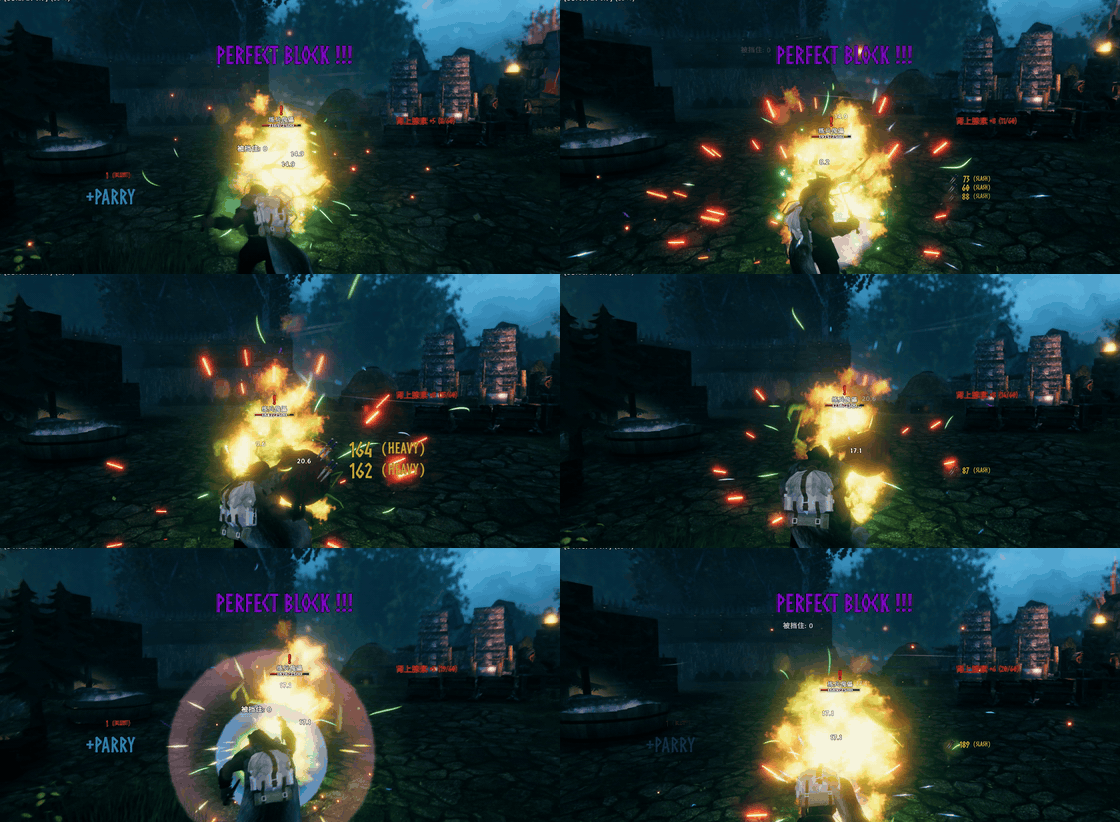
Auto-perfect-block assist inspired by Dark and Darker parries and WoW's Parrot combat text. Learns each creature's timing, blocks just before impact without touching vanilla rules, and adds Parrot-style floating damage numbers and parry flashes.Perfect Block — up to a 90% perfect-block rate
A block assist mod: it watches each enemy's attack, learns the exact moment the hit lands, and presses block for you just before it. Nothing in the damage pipeline is modified — the mod feeds the same block key and lets the game run its own perfect-block rule.
Measured 90.3% perfect blocks across 145 resolved hits (131 perfect / 10 ordinary / 4 missed, default settings); 91% with 0 misses in hold mode (the game's "Toggle Block" accessibility option turned off).
This mod has to learn before it can perfect-block. Each attack of each creature needs its own samples (5 by default, landing-point spread ≤ 5%) before the mod starts pressing for you. A creature you never fought will not be blocked — watching the wind-up is part of the deal.
Best feel: turn OFF the game's "Toggle Block" accessibility option and use hold-to-block. Measured: 0 misses in hold mode, vs ~4% in toggle mode (the toggle path flips on key edges and can turn the raised shield back off).
Why it deliberately does not block while you are swinging
This is a self-imposed handicap, not an unfinished feature. An assist should not eat the player's attacks or every fight would play itself. Cancel Swing On Manual Block therefore only reacts to a block you press; the automatic press never interrupts your swing.
What it does
- Learns
(prefab, animation state) → animation progress at the moment damage fires, stored inBepInEx/config/PerfectBlock/learned.json - Presses block
Lead Ms(70) before the learned landing point and keeps it down forPress Tail Ms(150) after it - Works with both block modes; hold mode is the recommended one
- Optional: manual-block swing cancel, Reliable perfect block (no guard break on a perfect), on-screen
PERFECT BLOCK !!! - Floating combat numbers:
weapon icon 78 (Pierce), red for damage taken (left), yellow for damage dealt (right); position / size / font adjustable
Measured (2026-11-03, v0.3.x, defaults)
| Block mode | Resolved | Perfect | Ordinary | Missed | Perfect rate |
|---|---|---|---|---|---|
| Hold (Toggle Block off) | 45 | 41 | 4 | 0 | 91% |
| Toggle (Toggle Block on) | 100 | 90 | 6 | 4 | 90% |
| Total | 145 | 131 | 10 | 4 | 90.3% |
Install
Requires BepInEx 5.4.x. Drop ChineseCanFly.PerfectBlock.dll and both PerfectBlock.*.yml into BepInEx/plugins/ChineseCanFly-PerfectBlock/, start the game once, then edit BepInEx/config/ChineseCanFly.PerfectBlock.cfg (or use Configuration Manager).
Limitations
- Learning is per prefab + animation state, so a new creature or a new attack starts at zero samples.
- No auto block while you are swinging (by design).
- Toggle-block mode misses ~4% of hits; hold mode does not.
- Landing points come from animation progress, so lag or knockback can shift them; a late press is an ordinary block, never a free hit.
Config
[General]
| Key | Default | Meaning |
|---|---|---|
| Enable Auto Block | true | Master switch. When off the mod only learns and logs |
| Detect Range | 5 | Only watch enemies within this many metres |
| Log Learning | true | One log line per recorded landing point |
| Log Attempts | true | One log line per simulated press (tuning) |
| Force Block Test | false | Diagnostic: hold the block key every frame |
[Learning]
| Key | Default | Meaning |
|---|---|---|
| Lead Ms | 70 | Press this many ms before the learned landing point. Fixed, no adaptation |
| Press Tail Ms | 150 | Keep pressing this long after the landing point |
| Min Samples | 5 | Samples needed before an attack counts as learned |
| Max Spread | 0.05 | Max spread of the landing points; wider = ignored |
[Feedback]
| Key | Default | Meaning |
|---|---|---|
| Reliable Perfect Block | true | Ignore the guard-break rule on a perfect block |
| Cancel Swing On Manual Block | true | Blocking mid-swing cancels the swing (manual presses only) |
| Release Block On Attack | true | Drop the forced block the moment you attack |
| Hold After Perfect (ms) | 500 | Must be 500. Upgraders: change it by hand, 0 makes blocking fail |
| After Perfect Block | Release | Release = let go after the hold; Keep = hold until you attack or tap block |
| Show Perfect Flash | true | PERFECT BLOCK !!! in the middle of the screen |
[Combat]
| Key | Default | Meaning |
|---|---|---|
| Show Combat Text | true | Draw our own damage numbers |
| Show Vanilla Numbers | true | Keep the game's floating numbers |
| Font | Impact | Number font (same as the PERFECT BLOCK flash) |
| Label Font | Microsoft YaHei | Font for the bracketed damage type, must carry Chinese glyphs |
| Base Font Size | 27 | Normal number size |
| Big Hit Scale | 2.4 | Size multiplier for heavy / finisher hits |
| Show Weapon Icon | true | Draw the weapon icon in front of each number |
| Taken / Dealt Position X/Y | 0.2/0.6, 0.7/0.6 | Screen-ratio anchors |
| Test Combat Text | false | Diagnostic: always draw three sample numbers |
完美格挡(成功率高达 90%)
一个辅助模组:观察每只怪物的攻击动作,学出它真正命中的那一刻,然后在命中前替你按下格挡。不修改伤害结算,也不改写格挡判定——按下去的是同一个「格挡键」,剩下的交给游戏自己判。
实测完美格挡率 90.3%(145 次结算:完美 131 / 普通 10 / 漏挡 4,默认参数,训练假人 + 哥布林);其中关闭「切换格挡」的长按模式 91%、0 漏挡。
先说明一点:这个模组对抗打击的完美格挡是需要学习的,并不是一上来就能完美格挡。 每只怪物的每套攻击动作都要单独攒样本(默认 5 次、命中点离散度 ≤ 5%),凑够了才会开始替你按。没打过的怪,它不会挡——先看清招式,是这个模组的一部分。
最佳手感:关闭游戏「辅助功能」里的「切换格挡」,用长按模式。 实测长按模式 0 漏挡,切换模式因为靠按键边沿翻转,约 4% 的几率会把盾关掉(见下面的实测数据)。
设计意图
- 不做代打。 目标是「提升格挡效率」,不是「替你打赢」。完美与否由原版
Humanoid.BlockAttack的 0.25 秒规则判定,我们没有把这个窗口改长,也没有让伤害凭空消失。 - 让学习成为进度。 每种怪、每套招式单独学:命中动画进度、样本数、离散度。样本够了才开始替你挡。
- 帮玩家建立节奏感。 提前量固定 70ms、按压尾巴固定 150ms,刻意不做自适应:你能从屏幕和日志里看出自己该在哪一刻抬手。
为什么挥刀时故意不自动格挡
这是刻意留下的缺口,不是没做完:
- 不抢玩家的主动权。 玩家的攻击是玩家的事;每一刀都被系统接管,人就只是站在旁边看血条。
- 辅助的意义在于「时机」,不在于「覆盖」。 如果连挥刀途中都能自动打断你去完美格挡,它就不再是学习节奏的辅助,而是一个无敌开关。
- 所以
Cancel Swing On Manual Block只作用于你手动按下的格挡。 自动格挡永远不会取消你的挥击,也永远不会在你挥刀时抢按键。
功能
| 功能 | 说明 |
|---|---|
| 学习 | hook 非玩家实体的 OnAttackTrigger,记录 (预制体, 动画状态) → 命中瞬间的动画进度,存 BepInEx/config/PerfectBlock/learned.json |
| 自动格挡 | 命中点前 Lead Ms 按下、命中后按满 Press Tail Ms,敌人中途被打断也会按完尾巴 |
| 两种格挡模式 | 自动识别游戏的「切换格挡」设置;长按模式效果最佳 |
| 手动格挡取消挥刀 | 挥刀途中按格挡 → 立即断招起盾(等价 AttackCancel) |
| Reliable Perfect Block | 只在完美格挡那一下忽略「大伤害破防」规则 |
| 完美提示 | 屏幕中央 PERFECT BLOCK !!!,连续触发向上叠加 |
| 战斗数字 | 武器图标 78 (劈砍),承伤红色在左、输出黄色在右;伤害类型直接用游戏面板的词条,位置/字号/字体可调 |
实测数据
2026-11-03,v0.3.x,默认参数(Lead 70 / Tail 150),对象:训练假人 + 哥布林(Goblin / Goblin Shaman / Goblin Brute Bros)。
| 格挡模式 | 结算次数 | 完美 | 普通格挡 | 漏挡 | 完美率 |
|---|---|---|---|---|---|
| 长按(关闭「切换格挡」) | 45 | 41 | 4 | 0 | 91% |
| 切换(开启「切换格挡」) | 100 | 90 | 6 | 4 | 90% |
| 合计 | 145 | 131 | 10 | 4 | 90.3% |
- 4 次漏挡全部出现在切换模式,且命中时
blockTimer = -1(盾根本没举起来):切换模式靠「按键边沿」翻转,极端时序下会把已经开着的盾再关一次。所以推荐关闭「切换格挡」。 - 长按模式那 4 次普通格挡里有 3 次的
blockTimer在 0.02–0.04s(完美窗口内),说明不是按早了,是当时手里的东西没有招架加成(游戏自己就不给完美)。
安装
- 先装好 BepInEx 5.4.x(Valheim 1.0.x 用 5.4.2360 即可)。
- 把压缩包里的
ChineseCanFly.PerfectBlock.dll和两个PerfectBlock.*.yml放进BepInEx/plugins/ChineseCanFly-PerfectBlock/。 - 启动游戏,配置在
BepInEx/config/ChineseCanFly.PerfectBlock.cfg,也可以装 Configuration Manager 在游戏里调。
配置
[General]
| 键 | 默认 | 说明 |
|---|---|---|
| Enable Auto Block | true | 总开关。关掉时只学习、只写日志 |
| Detect Range | 10 | 只观察这个距离(米)内的敌人 |
| Log Learning | true | 每次学到命中点写一行日志 |
| Log Attempts | true | 每次模拟按压写一行日志,调参用 |
| Force Block Test | false | 诊断:每帧强制按住格挡键 |
| Show Vanilla Numbers | false | 保留游戏自带的浮动数字(会和我们的重叠)。挖矿/砍树也归我们管,同样受这个开关控制 |
| Test All UI | false | 诊断:每 0.8 秒生成一批示例条目,只在世界里生效 |
[Learning]
| 键 | 默认 | 说明 |
|---|---|---|
| Lead Ms | 70 | 命中前多少毫秒按下。固定值,不做自适应 |
| Press Tail Ms | 150 | 命中后继续按多久,兜预测误差 |
| Min Samples | 5 | 同一动作要几次样本才算学会 |
| Max Spread | 0.05 | 命中点离散度上限,太散的动作不采用 |
[Feedback]
| 键 | 默认 | 说明 |
|---|---|---|
| Reliable Perfect Block | true | 完美格挡无视破防规则 |
| Cancel Swing On Manual Block | true | 手动格挡取消挥刀(自动格挡永不触发这条) |
| Release Block On Attack | true | 完美后你一攻击就立刻松盾 |
| Hold After Perfect (ms) | 500 | 完美命中后额外按住多久。必须是 500;从旧版本升级的玩家请手动改(旧 cfg 里可能是 0,会导致挡不住) |
| After Perfect Block | Release | Release = 按住上面那段时间就松;Keep = 一直挡到你攻击或再按格挡 |
| Show Perfect Flash | true | 屏幕中央 PERFECT BLOCK |
| Flash Position X / Y | 0.5 / 0.216 | 闪字锚点(屏幕比例) |
| Flash Font Size | 6 | 字号,按屏幕高度百分比 |
| Flash Duration (s) | 2 | 停留时长 |
| Flash Animation | Punch | Punch / Pop / Slam / Slide / Shake |
| Flash Color | #FFD21A | HTML 十六进制 |
[Combat]
| 键 | 默认 | 说明 |
|---|---|---|
| Show Combat Text | true | 显示我们自己的伤害数字 |
| Font | Norsebold | 数字字体。首位 Norsebold 就是游戏原版字体,强烈推荐;其余 Averia / Noto / prstartk 也都是游戏自带,不用安装 |
| Label Font | Norsebold | 括号里伤害类型的字体。同样推荐 Norsebold;它没有中文字形,中文文案会自动回退到游戏的 Noto |
| English Labels | true | 格挡行与伤害类型用英文(Block / Parry / Slash)。配 Norse 字体时必须打开 |
| Base Font Size | 30 | 普通数字字号 |
| Big Hit Scale | 2.4 | 重击/连段末击的放大倍数 |
| Show Weapon Icon | true | 数字前画武器图标(承伤用攻击者的武器) |
| Taken / Dealt Position X/Y | 0.3/0.6、0.7/0.6 | 屏幕比例锚点,0~1 |
| Animation Style | Static | 15 种 Parrot 风格滚动动画 |
| Scroll Direction | UP;RIGHT | 方向,格式同 Parrot |
| Scroll Size | 1 | 飞行距离倍率(基础 40 像素/单位,是像素不是字号) |
| Line Spacing | 1 | 叠放行距(行槽倍数) |
| Max Lines | 8 | 只对 Static / Static2 生效 |
| Fade Start (%) | 60 | 生命周期到这个百分比开始淡出 |
| Text Duration (s) | 1.2 | 每条数字存活时间 |
| Show Block Text | true | 受伤区显示 Block(12) / Parry(0.5) |
[Buff Panel]
| 键 | 默认 | 说明 |
|---|---|---|
| Show Buff Panel | true | 格挡后列出获得的状态效果(图标、名称、剩余时间、层数)与肾上腺素 |
| Only Buffs From Perfect Block | true | 只列完美格挡瞬间出现的那些 |
| Show Counter Window | true | 反击窗口进度条 + 当前连段段数 |
| Log Perfect Block Buffs | true | 诊断:每次完美格挡把状态效果写进日志 |
| Temp Buff X / Y | 0.624 / 0.4 | 面板锚点(屏幕比例) |
| Buff Scale | 1.5 | 面板缩放 |
| Buff Linger (s) | 1 | 效果结束后图标还留多久 |
| Buff Max Rows | 1 | 最多显示几行 |
已知限制
- 学习按「预制体 + 动画状态」区分:同一只怪的不同招式分别计数,所以会看到
samples慢慢涨到learned。 - 挥刀途中不会自动格挡(见「设计意图」)。
- 切换格挡模式偶发漏挡(约 4%),长按模式没有这个问题。
- 命中点由动画进度推算,网络延迟或怪物被击退时可能偏;偏晚的代价是普通格挡,不会白挨。
日志怎么看
搜索 Perfect Block:
attempt: … press at 57 ms before the learned hit— 这次按压的起点[diag] perfect block #N/ordinary block (blockTimer …)/hit landed while NOT blocking … blockTimer=…— 三种结果[stat] N blocks: perfect=… ordinary=… late=…— 每 10 次结算一行,完美率直接看这行
有问题或建议:https://github.com/tutu8420/PerfectBlock/issues
Feedback UI and buff panel (v1.5)
- PERFECT BLOCK flash: position X/Y, font size (percent of screen height), colour and duration are configurable, with five animations - Pop (the old drop-in), Punch (huge snap-back like a fighting game hit), Slam (falls from above and shakes), Slide (flies in from the right with after-images) and Shake.
- Buff panel: what a perfect block actually gave you - every status effect that appeared with the block is listed with its icon, localised name, remaining time and stack count, plus the adrenaline it added.
- Counter window: a shrinking bar shows how long the forced block stays down - the window in which your swings keep their attack chain - and the current chain stage (e.g. 2/3).
- Diagnostic: Log Perfect Block Buffs writes the effects seen right after a perfect block (with remaining time) to the BepInEx log.
反馈 UI 与 BUFF 面板(v1.5)
- 完美提示:位置 X/Y、字号(屏幕高度百分比)、颜色、停留时长都可调;新增五种动画:Pop(原来的落下)、Punch(巨大弹出回弹)、Slam(从上方砸下并抖动)、Slide(从右侧滑入带残影)、Shake(定住后抖动收敛)。
- BUFF 面板:完美格挡到底给了你什么——紧接着出现的状态效果会逐个列出(图标、本地化名称、剩余时间、层数),并显示肾上腺素增量。
- 反击窗口:进度条显示强制格挡剩余时间(就是连击保持段位的窗口),并显示当前连击段数(如 2/3)。
- 诊断:Log Perfect Block Buffs 会把完美格挡瞬间的状态效果与剩余时间写进 BepInEx 日志。
v1.5.1 changes
Punchis now the default and first animation - the author's pick after testing.- Buff panel split into permanent and temporary columns, each with its own anchor. Temporary = effects that actually have a duration of
Temp Buff Max Durationseconds or less (Bloodrage and friends); everything else (food, gear, levels) is permanent. Effects without a duration no longer show a bogus negative timer. - Adrenaline now always shows after a perfect block, in the temporary column (
+5 (5/100)), regardless ofOnly Buffs From Perfect Block. Hide Vanilla Buff Icons(on by default) hides the game's own status icons - and My Little UI's repositioned copy of them - while the panel is on.- Damage numbers now fly up and to the right on an ease-out curve and fade, WoW scrolling-combat-text style; crits and combo finishers get the same punch scale as the PERFECT BLOCK text (Parrot addon's "Pow" style as reference).
v1.5.1 变更
Punch改为默认动画并排第一——实测效果最好。- BUFF 面板拆成常驻和临时两列,位置各自可调。临时 = 确实有持续时间且不超过
Temp Buff Max Duration秒的效果(血怒这类);其余(食物、装备、等级)算常驻。没有持续时间的效果不再显示负数倒计时。 - 肾上腺素现在必定显示在临时列(
+5 (5/100)),不受Only Buffs From Perfect Block影响。 Hide Vanilla Buff Icons(默认开):面板开启时隐藏游戏自带状态图标,以及 My Little UI 改过位置的那份,避免两套叠着。- 伤害数字改为向右上方缓出滑动并淡出(WoW 滚动战斗文字风格);暴击/连击终结沿用 PERFECT BLOCK 同款 Punch 缩放(参考 Parrot 插件的 Pow 动画)。
v1.6.0 changes
- Damage numbers now come from the game itself: the mod hooks
DamageText.ShowTextand uses the exact value vanilla would have drawn, so the numbers match to the digit. No more computed numbers. - All 15 Parrot animation styles ported 1:1: Straight, Parabola, Semicircle, Pow, Pow2, Static, Static2, Rainbow, Horizontal, Action, Action Sticky, Angled, Angled2, Sprinkler, Sprinkler2, with Parrot's direction scheme (
UP;RIGHT,UP;ALT, ...), plus Scroll Size / Line Spacing / Max Lines / Fade Start / Duration. - Block and parry text (Parrot's avoid events): ordinary block shows
格挡, a perfect block shows招架!on the left (taken) side; own position sliders. Test All UImoved to[General]and now draws every overlay at once.- Permanent buff column removed - the buff panel only shows the temporary buffs a perfect block gave you, plus the adrenaline gain.
v1.6.0 变更
- 伤害数字改为直接取原版的数值:挂
DamageText.ShowText,用游戏自己算好的那个数字,逐位一致,不再自己计算。 - 15 种 Parrot 动画全部移植:Straight / Parabola / Semicircle / Pow / Pow2 / Static / Static2 / Rainbow / Horizontal / Action / Action Sticky / Angled / Angled2 / Sprinkler / Sprinkler2,方向沿用 Parrot 的写法(
UP;RIGHT、UP;ALT等),另有滚动距离、行距、层数、淡出起点、存活时长。 - 格挡/招架提示(抄 Parrot 的 avoid 事件):普通格挡显示
格挡,完美格挡显示招架!,在左侧受伤区,位置可调。 Test All UI移到[General],一次画出所有 UI。- 删除常驻 BUFF 列——BUFF 面板只显示完美格挡给你的临时 BUFF 和肾上腺素增量。
v1.6.1 fixes
- Damage numbers show again:
ApplyDamage(where we know whose hit it is) now only records what to draw, andDamageText.ShowTextcreates it with the game's own value. The old code looked for the vanilla number before the game had produced it. - Vanilla floating numbers are hidden again: my 1.6.0 edit moved the
[HarmonyPatch]attribute offPatchHideVanillaNumbers, so that patch had no target and failed (visible as "Patch failed" in the log). - Block/parry text is now
+格挡/+招架(no exclamation mark), like Parrot. Test All UInow spawns real entries every 0.8 s through the normal pipeline, so changing the animation style or direction is visible immediately.
v1.6.1 修复
- 伤害数字恢复显示:
ApplyDamage(能判断归属的地方)现在只记录“要画什么”,由DamageText.ShowText用原版数值创建文本。旧代码在原版生成数字之前就去取,永远取不到。 - 原版浮动数字重新被隐藏:1.6.0 我插入新补丁类时把
[HarmonyPatch]属性挤掉了,PatchHideVanillaNumbers没有目标方法,日志里就是那条 "Patch failed"。 - 格挡/招架文本改为
+格挡/+招架(去掉感叹号),与 Parrot 一致。 Test All UI改为每 0.8 秒真实生成一批条目,走完整动画管线,改样式/方向立刻可见。
v1.6.2
Show Vanilla Numbersmoved to[General].- Vanilla number hiding is now exact: the only thing suppressed is the damage number that our overlay actually replaced. Heal "+N", craft bonus and "Too Hard" texts are untouched again (the old patch was hiding the wrong overload).
- Mining/chopping damage numbers stay vanilla on purpose: our numbers need a
Characterhit to know whose damage it is, and destructibles do not provide one.
v1.6.2
显示原版数字移到[General]- 原版数字的隐藏改为“只隐藏我们真正替换掉的那一条”。治疗
+N、制作奖励、“太硬了”这些文本不再被误隐藏(旧补丁隐藏的是错误的重载) - 挖矿/砍树的数字保持原版:我们的数字依赖
Character的命中信息判断归属,矿和树没有这个信息
v1.6.3
- Block text now lives in the taken column, formatted
+ 格挡 (0.5)(value taken from the game's blocked number). A perfect block uses the crit size and the crit punch, so it reads as the "reward" version. - The separate block/parry position sliders are gone - the taken anchor drives it.
v1.6.3
- 格挡提示并入受伤区,格式
+ 格挡 (0.5),数值取自游戏自己的格挡数字;完美格挡按暴击处理(更大字号 + Punch)。 - 删除了独立的格挡/招架位置开关,统一用受伤区锚点。
v1.6.4
- Mining, chopping and hitting buildings now draw through our text too:
[weapon icon] +12 (劈砍), with the damage type taken from the hit (chop/pierce/blunt/frost/fire/spirit...). Covered:Destructible,TreeBase,TreeLog,MineRock,MineRock5. - Only the player's own hits are taken over; environmental or other damage keeps the vanilla number.
v1.6.4
- 挖矿、砍树、砸建筑也走我们的字体:
[武器图标] +12 (劈砍),标签取这一击的主伤害类型(劈砍/戳刺/锤击/冰霜/火焰/精神…)。已覆盖Destructible、TreeBase、TreeLog、MineRock、MineRock5。 - 只接管玩家自己造成的伤害,环境伤害仍用原版数字。
v1.6.5
- The damage-type tag is no longer our own translation: it is looked up from the game's own
$inventory_*tokens, so it matches the weapon panel word for word and follows the game language. Simplified Chinese yields 劈砍 / 戳刺 / 锤击 / 切剁 / 镐 / 火焰 / 冰霜 / 闪电 / 蛊毒 / 精神. - Fixed invented terms: Slash is 劈砍 (not Chop), Pierce is 戳刺, Poison is 蛊毒.
- Brackets are now full width with a space in front,
+12 (劈砍), matching the block line+ 格挡 (0.5). - Pickaxe is now considered when picking the majority damage type.
v1.6.5
- 伤害类型标签不再自己翻译,直接查游戏自己的
$inventory_*词条,和武器面板逐字一致,并且跟随游戏语言。简体下是 劈砍 / 戳刺 / 锤击 / 切剁 / 镐 / 火焰 / 冰霜 / 闪电 / 蛊毒 / 精神。 - 修正之前编错的词:Slash 是「劈砍」(之前误当成 Chop),Pierce 是「戳刺」,Poison 是「蛊毒」。
- 括号改全角并在前面留空格:
+12 (劈砍),与格挡行+ 格挡 (0.5)同一套写法。 - 判定主伤害类型时补上了镐(Pickaxe)。
v1.6.6
- Fixed the numbers never showing up: the
PatchVanillaDamageTexthook lost its registration back in 1.6.2, soShow Vanilla Numberswas flipping a switch that no longer did anything and our own text was never created. - Fixed the capture order: this build of the game draws its number from inside
Character.ApplyDamage, while we recorded the pending hit in the postfix. It is now recorded in the prefix and consumed by theDamageText.ShowTextprefix. Test All UIonly runs inside a world now, not in the main menu.- The startup log prints the real version instead of a hard-coded 0.3.3.
- Added
damage text/blocked number/block textdiagnostics (behindLog Attempts).
v1.6.6
- 修复战斗数字完全不显示:
PatchVanillaDamageText在 1.6.2 时连注册一起被删了,所以Show Vanilla Numbers控制的是个不存在的开关,我们自己的数字也从未被创建。 - 修复数值捕捉时机:这一版游戏是在
Character.ApplyDamage内部就把数字画出来的,而我们在 postfix 才记 pending。改为前缀记录、DamageText.ShowText前缀消费。 Test All UI只在进入世界后生效,主菜单不再刷测试文字。- 启动日志显示真实版本号,不再硬编码 0.3.3。
- 新增
damage text/blocked number/block text诊断日志(受Log Attempts控制)。