
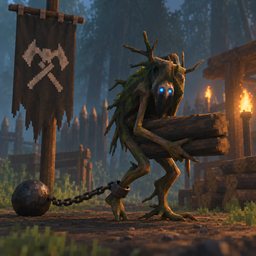
GreydwarfWorkers
Ever wished those pesky Forest Dwellers would stop throwing rocks at you and instead be useful? Now they can. Simply put them to Work! (Now works on those greedy Goblins too!)Greydwarf Workers
Description
This Mod makes Greydwarfes tameable and you can assign them Jobs to do. From Gathering Items from the Ground like Wood, Stone, Coal, etc. Up to refueling Smelters or Light Sources or stuffing Ore into the Smelters.
Tame a Greydwarf → open the F4 menu → select a worker → assign a job → let him work.
Installation instructions
- Install Greydwarf Workers through the Mod Manager of your choice. (Recommended)
- Launch Valheim through your mod manager.
- Enjoy your new workforce!
Manual Installation
Install BepInExPack Valheim and place:
GreydwarfWorkers.dll
into:
BepInEx/plugins/GreydwarfWorkers/
Main features
- Tame Greydwarves (Common, Shaman and Brutes)
- Greydwarves can gather resources
- Workers search their surroundings for suitable resources and deposit them into chests when their Inventory is full
- Configurable worker behaviour
Current Functions:
- F4 opens the UI window. There you can:
- View the Greydwarf's inventory
- View the Greydwarf's jobs.
Inside the Job Window you can order the respective Greydwarf to pursue one of the following Jobs:
- Gather
- Refuel Smelter
- Put Ore into a Smelter
- Refuel Light Sources (Campfires, Hearths, Standing Torches, Braziers, etc.)
- Refuel Charcoal Kilns
- Repair damaged, player-built Structures Or be ordered to drop their current Inventory.
Taming
Greydwarves can be tamed just like Boars at the moment. Even requiring the same taming Food (Berries, Mushrooms, etc.).
Gathering
Greydwarves have an Inventory size of 20 for each normal Resource and 10 for Ingots. If their Inventory is full, they will take the Resources they are currently told to gather to a Chest or similar Container that is:
- in a 30m Radius
- accessible through pathfinding
- has at least 1 of the corresponding Resource in it already (This prevents workers from randomly depositing resources into every available container.)
- is not full yet.
Refuel Smelter
The Greydwarf will start looking for the Smelter nearest to him and then finds out what Fuel it requires. He will then look for the nearest Chest containing that Resource in a ~30m Radius and go fetch it from there, if he doesn't have any in his Inventory at the Moment.
Put Ore into Smelter
The Greydwarf will start looking for the nearest Smelter and then for a chest in a ~30m Radius containing any Ore (Black Metal or earlier). He will then fetch it from the Chest, if he doesn't have any in his Inventory at the Moment and feed it to the Smelter.
Refuel Light Sources
The Greydwarf will look for any Lightsource in a ~30m Radius and will find out what Fuel it requires (Sap, Coal, Wood, Greydwarf Eyes, etc.) and then go look for a nearby Chest that contains the respective Resource, if he doesn't have any in his Inventory at the Moment. He will then deliver it to the Lightsource and refuel it to it's maximum Capacity.
Refuel Charcoal Kilns
The Greydwarf will look for the nearest Charcoal Kiln and respectively for the nearest Chest containing Wood. He will then fetch the Wood from the Chest, if he doesn't have any in his Inventory at the Moment and Deliver it to the Kiln, filling it to it's maximum Capacity.
Repair Structures
The Worker will look for any damaged, player-built Structure in the vicinity and repair it. (No Workbench required, to make it a little more useful than repairing stuff yourself)
Harvest Field
When assigning the Job, stand on the Field you want the Worker to harvest. The Worker will then walk to the Field and begin harvesting the mature crops on it, ignoring any immature Crops. The dropped resources will be collected and when at capacity, will be transported to a nearby chest that already contains that resource. The Worker will then go back to the field and resume the Harvest.
Plant Field
When assigning the Job, stand on the Field you want the Worker to plant. You can select the crop the Worker should plant and accordingly you should provide a nearby chest containing the necessary Seeds. The Worker will retrieve Seeds from said chest, plant them and should his inventory get empty, he will re-stock at the chest if possible. The Workers are meticulous when it comes to planting and will keep neat rows and perfect distances, although they are a bit stupid when it comes to planting "logically", sometimes walking unnecessary distances, but they will do their Job eventually.
On any of the Jobs above, the Greydwarf will then enter a "Waiting State", if he still has Stuff to deliver in his Inventory but the Place he wants to deliver it is still full. Don't Worry, the little Buggers are rather smart and will check around every 15 - 30 Seconds if there is space to insert it. So you can just leave them be at the Station you assigned them if you want.
Should the Greydwarf meet an untimely End, he drops all the Resources currently in it's Inventory.
Tracking
Every tamed Worker gets an Icon on the Map and Minimap shown, so you know where they are. Using the checkmark button in the Main Worker UI, you can toggle the Map Icon of the specific Worker being shown/hidden. Also you can enable/disable every Icon being shown, to prevent having your map cluttered with them.
Requirements
Credits
Made by JooMunchy
Caveat
This Mod is in an early Stage of Developement and I am not that good at coding, so please cut me some slack :D If you encounter any Bugs or Errors, let me know and I will fix it to the best of my Abilities. I am not responsible for any loss of Savegame or Resources occuring by using the Mod.